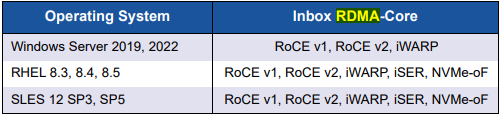
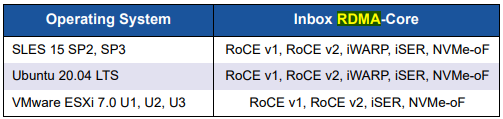
Hello all, long time sufferer first time caller.
After seeing this thread and finding out that ksmbd RDMA does, in fact, work with windows clients, and the likely blocker for my previous issue using with with a connectx-3 card has been solved, I decided to give it a go again. But my setup differs now from when I did use a connectx-3 in my desktop. My server and my desktop are no longer in such proximity that running a QSFP+ DAc is feasible, and punching a hole through the wall to fit a QSFP+ plug is also not feasible, and I assume that terminating my own fiber and creating a QSFP+ cable of my own is also probably not feasible.
I have been running basic 10gbe between my desktop and my server, without RDMA. So I bought a new 10gbe card that purports to have RDMA. As far as I can tell, everything is fine on the samba server - it’s listening on its iwarp adapters, etc. But these values on my windows client are blockers.
PS C:\Windows\system32> Get-SmbMultichannelConnection

Server Name    Selected Client IP      Server IP      Client Interface Index Server Interface Index Client RSS Capable Client RDMA Capable
-----------    -------- ---------      ---------      ---------------------- ---------------------- ------------------ -------------------
192.168.10.168 True     192.168.10.235 192.168.10.168 9                      2                      True               False


PS C:\Windows\system32> Get-NetAdapterRdma

Name                      InterfaceDescription                     Enabled     Operational     PFC        ETS
----                      --------------------                     -------     -----------     ---        ---
vEthernet (WSL Bridge)    Hyper-V Virtual Ethernet Adapter #2      False       False           NA         NA
Ethernet 11               QLogic 2x10GE QL41132HxRJ NIC (NDIS) #2  True        False           True       True
Ethernet 10               QLogic 2x10GE QL41132HxRJ NIC (NDIS)     True        False           True       True


PS C:\Windows\system32> Get-SmbClientNetworkInterface

Interface Index RSS Capable RDMA Capable Speed   IpAddresses                                                                      Friendly Name
--------------- ----------- ------------ -----   -----------                                                                      -------------
9               True        False        10 Gbps {fe80::e79e:a704:43ae:21d6, 192.168.10.235}                                      Ethernet 11
37              True        False        10 Gbps {fe80::4c43:80e0:b2ca:e007, 172.30.144.1}                                        vEthernet (Default Switch)
31              False       False        0  bps  {fe80::5195:3461:de2f:38e4}                                                      Local Area Connection* 2
36              False       False        10 Gbps {}                                                                               vSwitch (Default Switch)-Hyper-V Virtual Switch Extension Filter-0000
29              True        False        1 Gbps  {2600:1700:9540:c8f:9ca8:6513:e471:e6a, fe80::32f3:1a77:6f95:8631, 192.168.1.94} vEthernet (WSL Bridge)
10              False       False        0  bps  {fe80::d46:4b66:6c5c:335d}                                                       Wi-Fi 2
28              False       False        0  bps  {fe80::a55d:8306:32aa:18d2}                                                      Local Area Connection* 1
14              False       False        3 Mbps  {fe80::29c2:47ab:f2d3:ceab}                                                      Bluetooth Network Connection 2


PS C:\Windows\system32> Get-SmbMultichannelConnection

Server Name    Selected Client IP      Server IP      Client Interface Index Server Interface Index Client RSS Capable Client RDMA Capable
-----------    -------- ---------      ---------      ---------------------- ---------------------- ------------------ -------------------
192.168.10.168 True     192.168.10.235 192.168.10.168 9                      2                      True               False


PS C:\Windows\system32>
As far as I can tell, every possible relevant thing that I can control is turned on in a way that should enable RDMA. Yet it remains “Operational: False” and “Client RMDA Capable: False”, despite my efforts.
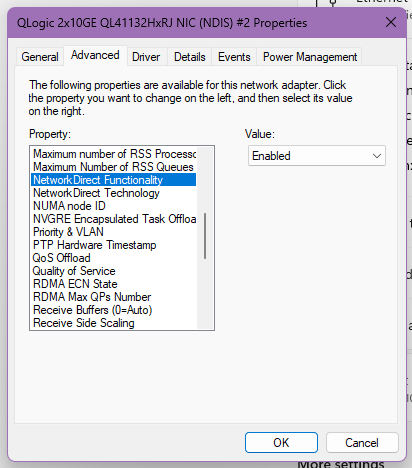
This is a Dell NV5DW, apparently. Full title: Dell NV5DW Qlogic FastLinQ QL41132HFRJ. I’ve combed the documentation and I can’t find anything I haven’t tried. At this point I’m wondering if it’s an OEM lockout sort of thing happening since I’m not using it with a Dell server. I’m on the latest drivers and firmware available from Dell. If anyone has any ideas or magic incantations that might flip whatever switch is off here, that’d be great. Or if anyone can reassure me that making my own fiber cables is affordable and easy, that’d also be great, since I just popped my connectx-3 in and rdma capable etc was all True with zero effort. I’m running Windows 11 Pro for Workstations. Alternatively I run a long, nasty fiber cable that I didn’t make through the inside of the house and deal with the potential damage of said cable in its passage through doors (though a full fat DAC cable can fit through the gaps it needs to pass through) and complaints of other dwellers.