OS: Arch / Windows 11

Motherboard: MS-7C06 (MEG x299 Creation)
BIOS: 7C06v180 (latest)

GPU0 - GTX 1070 (swapped for 1060 for testing) in slots 0 or 1

GPU1 - GTX 2080ti in slot 3
While investigating poor performance in LG, gnif pointed out to me that my linux host gpu was limited to pcie gen1 speeds.
sudo dmesg
...
[    0.483374] pci 0000:65:00.0: 32.000 Gb/s available PCIe bandwidth, limited by 2.5 GT/s PCIe x16 link at 0000:64:00.0 (capable of 126.016 Gb/s with 8.0 GT/s PCIe x16 link)
...
Nvidia-smi was happily reporting the full gen3x16 connection, but nvtop showed that pcie Tx and Rx stayed in the 3-5 GB/s range with two different cards in slot 0.
The difference in performance between the two cards may be explained by a 256-bit (1070) vs 192-bit (1060) bus width.
I booted into windows 11 to confirm it was a linux + nvidia driver error, and libre hardware monitor confirmed the ~4GB/s bandwidth cap for my 1060 in slot 0 with rendering offloaded to my 2080ti.
Right now, I’m out of ideas how this can be anything other than a hardware failure. My house was struck by lightning a year or so ago a few network interfaces were damaged at the time, maybe this was a result of that and I just never realized.
IF that’s the case, I wonder how possible it would be to source a replacement PLX chip. I’ve resurrected NICs in the past by replacing controllers, but a quick google shows that PLX chips are a much larger package so I’d really need to psyche myself up to attempt that one.
If the bios setting is set to auto or gen3, that could effectively be hardware failure. The NIC in your system had been damaged after lightning struck?
I tried changing the BIOS from auto to gen3, there wasn’t a change in performance.
One of the NICs in this computer has failed, though I can’t remember if that happened before or after the lightning strike. Seems likely at this point.
I’ve got the same prob w/ an Asus Z790 ROG Strix Gaming WiFi II board. 3D Mark benchmarks are fine until the PCIe Features test: 3 FPS/ 3GB/s. Took months to finally get this rig together for a friend. Everything works great but only getting x2 in GPU slot. Swapped out everything to no avail. Now I have to rip it out and send to Asus for warranty repair. Tried manually to change to Gen4 even trying x8/x8 and GPU/M.2 bifurcation, at which point the board would not even boot. So it looks, like me, you have a hardware issue. Good luck with that. I think this is the first board that I’ve had to RMA in 20+ years of building. Plus, I’m 76. . .so there’s that - lol! Anything to help ward off dementia!
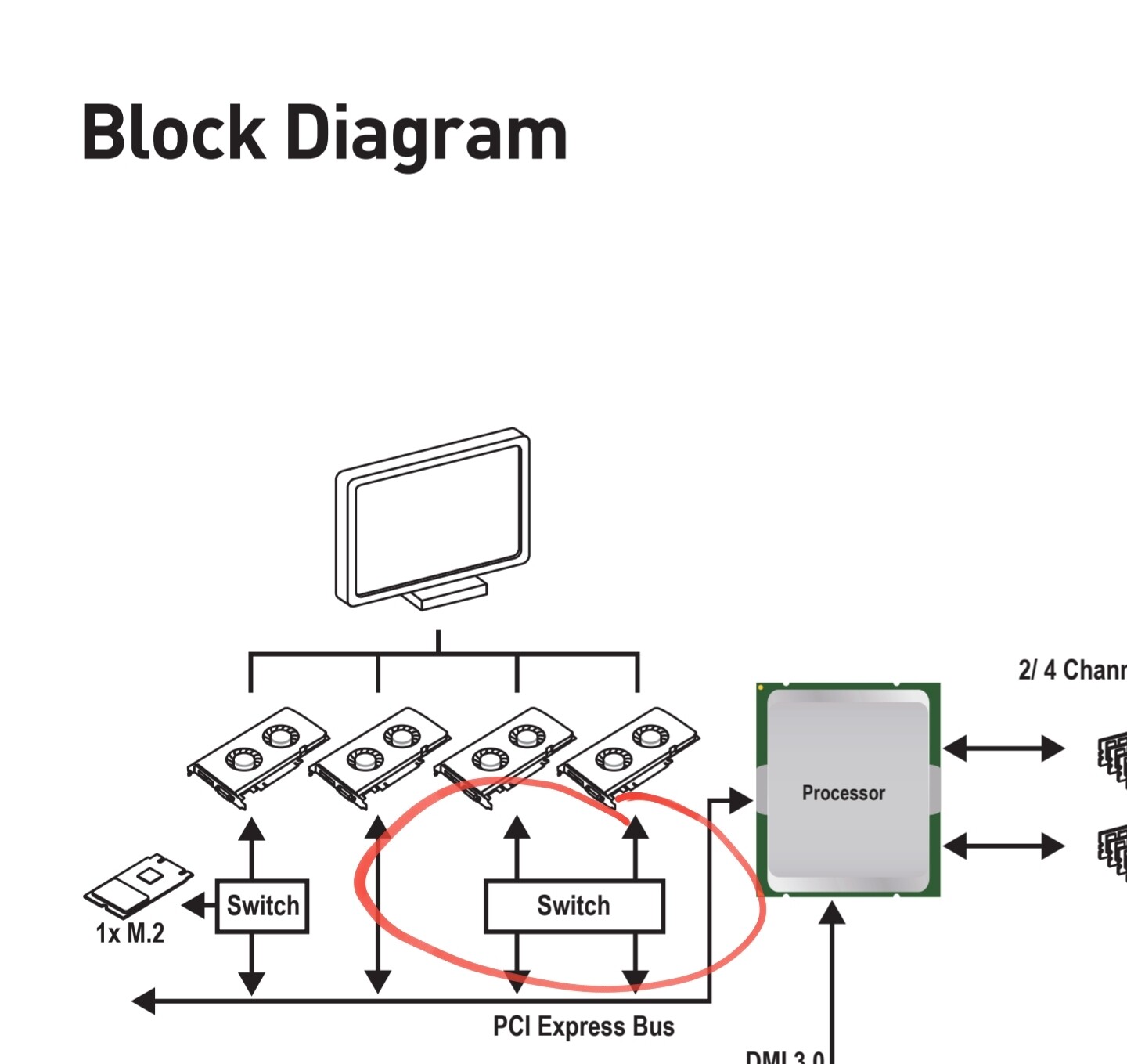
Went through my motherboard manual and found the block diagram, looks like there is in fact a switch in between my CPU and the top two slots. With any luck, that is all that was damaged.
I spent a little more time swapping hardware around, and (windows 11) gpu-z sure does think these cards are at full 3.0 speed under load. The link speed even dynamically changes as the cards go idle.
I think I need to come up with a more scientific way to benchmark pcie bus speeds before I go replacing components.
It occurs to me that with my current testing procedure there is no way for me to know if only one of the slots being tested is at gen1 or both are at gen1. Slot 2 is connected directly to the CPU (on the block diagram at least) so if that slot is limited, I’d need to figure out if the CPU or the motherboard is the source of the problem. . .
I can think of two reasonable options:
Find a pcie device that can communicate data to the CPU in excess of 4 GB/s without too much witchcraft. Maybe I could do something with a 100 GbE nic? quad 10GbE nic?
Just buy a new motherboard and test it within the return window. This feels like a dick move.
Would something as simple as in iperf3 instance saturate the pcie bus?
Any other pcie devices that would more easily serve?
EDIT: 100GbE NICs cost more than a second hand motherboard, Scratch that lol
EDIT2: I’m only thinking about the full X16 bandwidth, but maybe all I really need to test is x1 or x4 to verify gen1 vs gen3. 0.25 GB/s (gen1x1) would (?) saturated by a single 2.5 GbE connection if I can find a cheap PCIe x1 card.
The most affordable options I’ve come up with to test the bandwidth of a single pcie lane are an m.2 adapter or a USB 3 adapter.
A pciex1 USB 3.2 adapter is less than 30 bucks, but then I remembered I already had a pciex1 USB 3.0 card that I used to use to pass webcams to a VM.
If my math is right, USB 3.0’s 5 Gbps is a lot more than the 0.25GBps of a gen1 lane, so I’ll be able to tell if a file transfer is getting throttled. I’ve got an external drive that I know can do 400MBps, so that’s. . . almost twice as fast as gen1 lane speeds.
As I went to install the usb card, I was reminded that I have a 900P installed in this system, which is a pcie gen3x4 card. It’s physically x8, which is why I hadn’t thought of it before.
Ran crystaldiskmark, 2700 MBps sequential read in each of the four slots. That’s a relief.
So why such low transfer speed between (“between”) GPUs? If I do actually have the full 16 GB/s available, 4k120 (7.4GB/s @ 8 bits) should be no problem.
Both GPUs are pegged at 100%, so there must be some configuration problem requiring a lot more to happen besides pulling from kvrfm.
I killed my linux install during troubleshooting (a worthy sacrifice), so that might be a question for another day.
If anyone needs to monitor pcie bandwidth for some reason, nvtop in linux and libre hardware monitor in windows are the tools I used.
The compulsions won out and I revisited this problem this morning.
Reverting to 470.xx drivers and booting into X11 instead of wayland resolved my performance issue.
I’m going to go back to 575 and try X11 there too, but at the moment I suspect this is a wayland/nvidia issue.
EDIT: 575 has the same LG performance issue with X11 and Wayland. 470 X11 has pretty bad looking desktop effects, even things like dragging windows leaves a short ‘trail’. But how that I have working drivers I can figure the rest out.
EDIT2: Installing nvidia-470xx-settings and, separately, deselecting “Allow applications to block compositing” in my system settings cleared things up. I would like to be able to set different scale factors for some of my screens, but I’m going to call this one solved