Transition to Linux full time

Hello everyone,

Its my first post in the forums, please forgive me if I have made a mistake with this topic creation and do let me know so I don’t repeat the same.

I want to make the switch to Linux full time. I have been dual booting Linux and have dabbled around with many linux distibutions. To a point that now I want to make the full switch, sadly knowing what I know about different Linux stuff is making it a hard choice as I can’t seem to nail down which distro I should switch. I do agree that any Linux distro can work for me but still I encounter alot of problems which does get annoying. This is why I am writing this hear to ask help from you guys.

This is my laptop (Asus Tuf Dash F15 2022) specs:

  • Intel Core i7-12650H
  • 16GB DDR5 4800MT/s RAM
  • RTX 3060 Laptop GPU
  • Intel Wifi and Ethernet card/chip

Now currently I have been using Kubuntu 25.10 and it has been good so far, but when I try to play as something as CS2 on it, it doesn’t run properly. I have installed the nvidia drivers on it but don’t know it doesn’t give the good performance. So that is why I want to make the switch once and for all to something which will work.

Some notes:

  1. I have to use a software called Cisco Packet Tracer for university which only has a debian package (tho if there is any work arounds to get it running on other distros I don’t mind doing that at all if it works).
  2. My laptop has a Mux Switch.
  3. I have a preference towards the KDE desktop environment.
  4. I have a multi monitor setup.
  5. I have tried the asus-linux project for my laptop but things don’t seem to run properly even after I use it, could be I am installing it wrong or something.

Lastly, I do know there is ways to have a Windows vm for gaming with a GPU passthrough, I don’t mind doing that at all but the only thing is I haven’t do it properly working but I am sure that is because of my technical error, so if someone here has an easier/fool proof way to do it then I would love to give that a try.

Thanks for all the people who will give time to it and I hope to make the transition Linux full time.

I’m not too clued up on GPU passthrough from a ‘non-OS-level‘ VM, besides using Bottles (a frontend for Wine) and enabling discrete GPUs, which may or may not be what you’re looking for.

As for your CS2 errors though, that could be a Proton error. Proton’s the translation layer steam uses for it’s games if there’s no Linux-native version, there’s multiple and you can use custom ones for each game. Check the properties of CS2 on Steam and in the “compatibility“ section you can “Force the use of a specific Steam Play compatibility tool“. You could switch it to Proton Experimental, Proton Hotfix, or others, and check that it works with your setup.

If none of those Proton versions work, you can use a Proton Glorious Eggroll (ProtonGE), it’s supposed to have some extra fixes, it even says it has some CUDA hotfixes too in the Github. The easiest way to add that Proton version to steam is with the ProtonPlus app, which is just a manager for them all Proton. ProtonGE’s at the very top.

Like mentioned above. dictating a specific proton version in steam can help.
as for the cisco packet tracer, you can install the deb on basically any debian based distro, (or ubuntu based distro, as ubuntu itself is debian based). I myself had to install cisco packet tracer on ubuntu for my uni course work. it was usually fine. but logging in was a bit of a chore the first time. but I have been told that bug has been fixed.

So I had to do a bit of searching on what MUX Switch was in this regards, it appears there is a physical chip inside your asus laptop to physically route the display to either the GPU or iGPU?

From my simple google search (no deep dive) it appears there is the necessary asusctl and supergfxctl in the AUR, which is Arch User Repository. If that is indeed the case, then combined with this that I found:

It appears you could run an Arch distro such as CachyOS if you wanted. That might help your gaming.

Edit: Also found a Fedora one:

So as long as you are willing to do the manual work of compiling source into whatever distro youw ant to run, it seems you can run anything. The Cisco Packet Tracer has source and can be compiled for Arch or Fedora based distros with easy to find tutorials, and the Asus specific stuff has a Fedora specific tutorial and Asus actually recommend using their laptops with Arch based distros. So that gives you a lot of options on what you can run.

Thank you for your reply.

I have seen the asus-linux project, before it used to be very good. But now I don’t know they are making some changes or creating a GUI or something, but because of that rog-control-panel isn’t usable at all.

Further more, I have somehow had monitor issues with things like CachyOS, but it could very well be an error from myself so I think so I will give an Arch based distro a try.

Last time I had used an Arch based distro was for using LARBS from Luke Smith, Distrotube window managers and stuff like that. Never used a proper DE like KDE, Gnome and etc.

I will give it a try tomorrow and update you guys on how it goes.

edit: I wanted to let you know asus-linux is a community project and MUX switch is chip which changes the display thingy so that on battery the gpu power is cut and igpu is displaying everything. While on power, it will give power to gpu and the gpu will display everything. It doesn’t work well on Windows as well in many edge cases as this as I know was the first ever laptop to have it so it was pretty bleeding edge.

Thank you for your reply.

It could be a proton issue because I have never been able to completely understand Proton and its derivitives and Wine. For me Windows would always be the Gaming OS because of my friend group who are majority of Windows users and console users.

But, as we have now matured more into gaming, now we just don’t play Fortnite which only works on Windows, hence I think so I can use Linux for gaming as well with my friends.

Could you provide me some useful links regarding Wine, Proton and other Packages/Technologies as such. I would be happy to take a deep dive in it.

Proton DB would be good for you, I dunno if you’ve heard of it, it’s a good place to check compatibility of Steam games on Linux - with Proton if not native. Checking CS2, it says it has native support for Linux, which is what I’ve heard too. But looking at other people’s working reviews for its compatibility, a lot of users use Proton 10.0-3 - as well as putting “-vulkan” in the launch options, to force the use of the Vulkan backend in the game, instead of possibly using OpenGL through another translation layer.

So try forcing Proton 10.0-3 and adding the “-vulkan“ launch option if it’s still not working for you.

Let me list out a few quick bullet points with key resources for Linux gaming. Don’t worry, I’ll go off the rails pretty soon anyway:

  • ProtonDB is a database of user reports for Steam games, including what tweaks or workarounds were used to run them, and basic info on the user’s system like GPU, kernel version, distro, etc.
  • Are We Anti-Cheat Yet? is a database keeping track of games that use anticheat and whether they work under Linux.
  • ProtonPlus is a great program that can be used to install third-party compatibility tools in Steam. The main compatibility tool you’ll probably want is Proton-GE, but others that may be useful in some cases include Steam Tinker Launch, Boxtron, and Luxtorpeda.
  • Protontricks is an app which makes it really easy to tinker with a Proton prefix if you need to, like installing an extra app in the prefix, modifying its registry, etc. More on prefixes down below.

I’ll collapse each section I discussed to reduce scrolling. I did, in fact, go off the rails and just kind of vomit information at you.

Steam, CS2, linux-native builds

An important thing to note for Steam is that any game which has a Linux-native build will prefer to run that automatically unless you manually force a compatibility tool in that game’s properties. In some cases, such as multiplayer Valve titles like CS2 that do have Linux builds, you don’t generally want to force Proton because Valve’s Anti-Cheat (VAC) is incompatible with it. Something to be aware of.

One way to tell if a game has a Linux-native build is by hitting the little i button in the library view of a game to show the game details, then looking at the line below “Steam Deck Compatibility”. If it mentions Steam Linux Runtime, it’s set to run a Linux version.

Wine / Proton

There aren’t too many fundamental things about Wine/Proton that I think everyone needs to know about, but one of them is the concept of the prefix, a windows-like folder structure that is presented to programs being run through Wine/Proton so it looks to those programs like they’re in a Windows environment.

Steam (and any Wine/Proton runner worth using) makes a unique prefix for each installed game. Generally, if you see a drive_c folder, you’re in a prefix folder, and inside drive_c you’ll find the usual Windows folders like Program Files, users, windows, etc.

Now, where this prefix actually goes depends on the wine/proton runner. Steam puts prefixes in [steamlibrary]/steamapps/compatdata with each prefix getting a folder named after the game’s AppID, while the actual games associated with those prefixes live in [steamlibrary]/steamapps/common and get more sensible folder names.

Programs like Lutris, Faugus Launcher, Heroic Games Launcher, or Bottles will by default install a game or program’s files inside the prefix they create for it. In my opinion, there’s no sense using Wine at the system level outside of runners like those. As long as you understand where the prefix is, how to run something in that prefix, how to configure the prefix, and how to pick what Proton/Wine version to use, you have everything you need, and these apps all make that pretty easy.

Again, for Steam, ProtonPlus is a great tool for all of those tasks. The other runners tend to have those tools built in.

NTFS / exFAT

It may not be relevant to your setup, but it’s worth noting that NTFS and exFAT are not well-supported on Linux. They’re somewhat usable if all you’re doing is storing basic files, but if you try to run anything executable off of them, especially games, you’ll have major problems both with functionality and file system integrity.

Windows VM

This is not really recommended for gaming on Linux. While you do have the necessary two GPUs, the existence of the Mux switch and being on a laptop can complicate setting up GPU passthrough. It’s a lot of effort when you could just dual-boot. Furthermore, any game with anticheat can tell immediately that it’s running in a VM and may ban you just for trying to run it that way.

For any random app that doesn’t need GPU acceleration but also doesn’t quite work in Wine, WinBoat is a very cool Windows emulator I’ve heard about that integrates well with the desktop.

Distro recommendation

You could consider Bazzite if you haven’t tried it yet. It has good documentation, the desktops are KDE and Gnome, and it has a lot of patches built in for Asus hardware, with included scripts for Asus / Nvidia / Mux stuff (ujust enable-supergfxctl and ujust configure-nvidia-optimus, and you can enable a repo to install asusctl and asusctl-rog-gui).

The Bazzite maintainers are in the process of updating it to the 6.19 kernel, and soon the base OS version to Fedora Atomic 44, so if you try it now and things are maybe a little wonky, things should be even better in a month.

Disclaimer: I’ve been on Bazzite for two years and had very little experience with Linux before then, so… I may be biased.

Anyway, hope some of this helps you a bit. Cheers and good luck!
Hey, thank you for your reply.

I am happy to report that I did a clean install of Cachy Linux with KDE and was able to get all of my stuff and requirements working. Especially Cisco Packet Tracer. I also tried CS2 and it works flawlessly. So I am overall really happy, I will only keep the Windows partition rn for just Hyper-V course work in my university and other minor things.

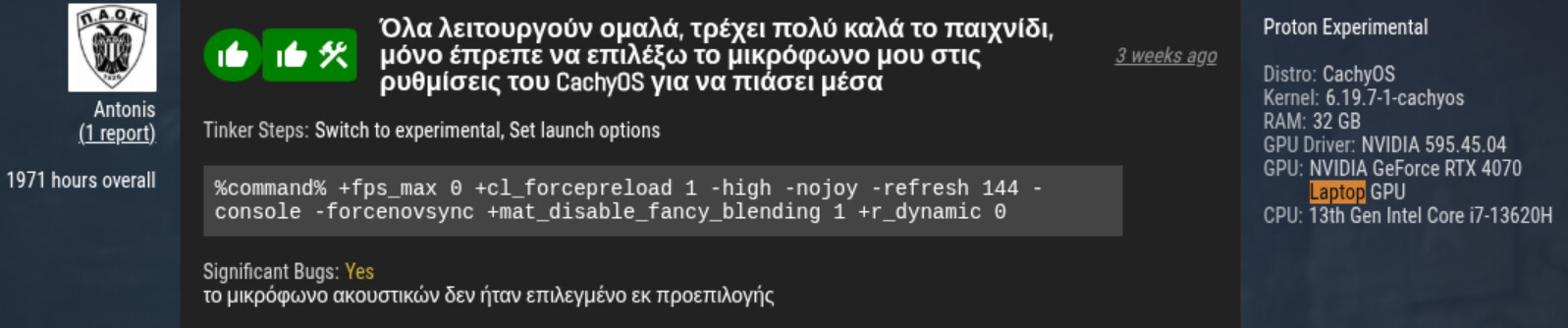
Also I have had a look at ProtonDB before, but I have never seem to understand how to use it, like I can find ratings about games and stuff, but it doesn’t mentioning what flags or what proton version to use and etc explicitly, nonetheless, thanks for the suggestions.

2 Likes

This is perfect, and no not at all, this isn’t going off the rails at all, I have seen worse than this.

Thanks alot for the help and I will try these and let you know how it all went.

When you search up a game to check compatibility, to the right of people’s review of the game, you’ll sometimes see what setup they use, along with their proton version, if they decide to add them to their review.

It may be worth mentioning that the guy above who ran CachyOS with really similar specs to you used Proton Experimental. He also had a mobile Raptor Lake CPU, and a mobile RTX laptop GPU.

Ah okay, that makes sense, thanks alot. I will give it a try on Ghost of Tsushima.

Also, is there a way to pirate games on Linux? I usually do that on Windows and the community is more Windows centric, is there something I can do for Linux? (for educational purposes only)

If I’m remembering right, Qbittorrent, Transmission, and Fragments are all on the CachyOS package repository. You can use them to download files from other computers with .torrent links. FitGirlRepacks, which has a whole host of torrent links for games, only hosts builds for Windows. What I’d do is add the .exe, or whatever you get, to the Steam library. That will make the option to run with proton readily accessible in the game properties.

Fair warning though, to keep the torrent system alive, if you have parts of or the entire file installed, you’ll probably be used as a host for other people. And I’ve heard people get struck with a DMCA request that the publisher sent your ISP. Depends on region and provider.

you can use distrobox for cisco packet tracer. Im actually doing the same thing for my CCNA. I use fedora kinote (kde).

Oh wow, I didn’t know about this. I will for sure give it a try.

Thanks for your time.

Thanks. Yeah I installed all of it, I tried and it works well, protondb was a huge help.

1 Like