Threadripper TRX50 & WRX90 Cooling Stuff: Watercooling, DDR5 RDIMM cooling, etc

With the release of the Threadripper 9000 series this thread has become more relevant again. I’ve created this summary to help you navigate through the pages of replies:

Origins

This thread originally started with a simple question: “What CPU waterblock should I get for my planned Threadripper 7000 build?” At the time, information was scarce, and few users had hands-on experience with watercooling AMD’s latest monster.

What followed was an in-depth discussion that quickly evolved beyond the original question. The thread became a hub for understanding the real-world cooling challenges and solutions for the TRX50 & WRX90 platforms focused around watercooling.

In addition to platform specific discussions, a standout topic emerged around the cooling of DDR5 RDIMM memory modules. These tend to run hot, which is relevant to this day (see Wendel’s video about the subject). @twin_savage and @galvesribeiro experimented with modified off the shelve cooling solutions and in the end created a custom RAM waterblock, which was later modified for air cooling by @martona.

Topics

Discussion about the different available sTR5 blocks.

Start of post

Discussion about RAM cooling

Link to post 10

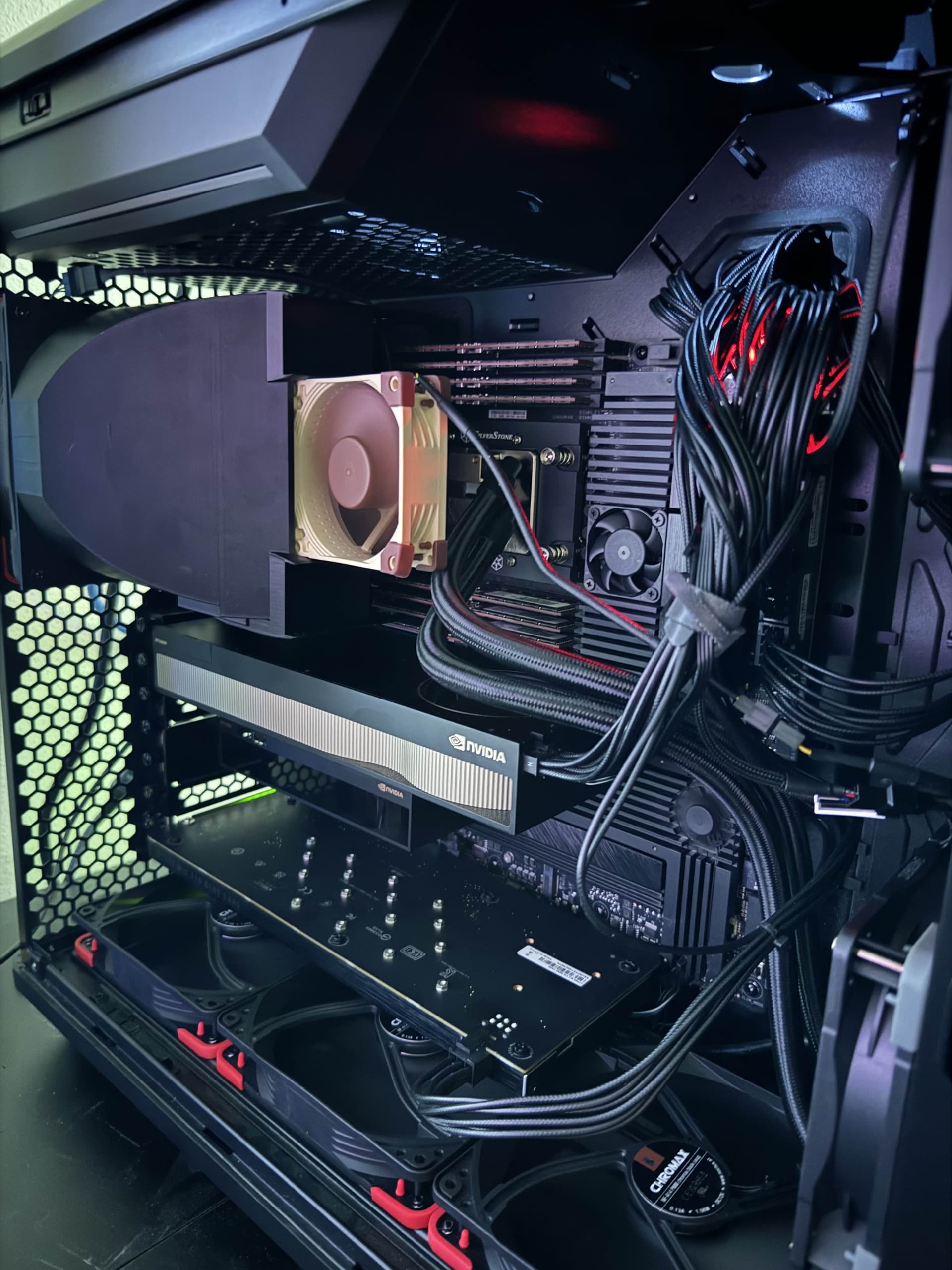
3d printable air shroud (downloadable)

Link to post 14

Discussion about Silverstone’s AIO

Link to post 19

Off the shelve ram cooling (with modifications)

Link to post 22

Custom RAM waterblock (downloadable)

Link to post 39

Custom RAM heatsink (downloadable)

Link to post 44

Discussion about parallel vs series water flow

Link to post 50

Original post

I’m planing my PC upgrade to a Threadripper 7970X or 7975WX. As my current cooling solution won’t work with the sTR5 CPUs I want to go custom loop for the first time. I have tried to compare the available waterblocks that are compatible with sTR5 but there don’t seem to exist any up to date reviews comparing the latest blocks.

I need help deciding between these blocks:

EK-Quantum Magnitude sTRX4

EK-Pro CPU WB sTR

Alphacool Eisblock XPX Pro Aurora - Full Brass Chrome Digital RGB

Alphacool Eisblock XPX Pro 1U

HEATKILLER IV PRO for Threadripper COPPER NICKEL

or maybe you have an even better block you would recomend?
1 Like

I understand that you need help choosing between some blocks. I use the AMD Threadripper 3X block with the EK-Quantum Magnitude sTRX4 - Full Nickel block, one of the best blocks I have ever used. EK informed me that the block’s solid mass and material give it more physical weight than any other block from EK or most competitors. Due to this, it can disperse heat effectively and provide excellent results. I have read many reviews on Alphacool blocks, but the research never seems to add up. I also looked into the Watercool block, but it was not present when I tested. I am partial to the EK brand, so I do not want to sound biased, but out of the blocks you listed, I would say that EK-Quantum Magnitude sTRX4 - Full Nickel is the best option available.

1 Like

The only other block I went back and forth about was the Combino Block. Check it and confirm if they are making a block for your current block.

Anyone have more insight on waterblocks for Threadripper?
These were the only real review I could find but it is on pretty old gen CPUs:

That Heatkiller looks great, especially for the price. The new EK sounds good too, but the price is far higher.

Hello!

I’m on the same boat as you. My new build is with Threadripper Pro 7995WX.

Those blocks on the OP are for sTR4. Those new TR are sTR5/SP6. Are you sure they will fit? Was looking into the EK ones but none seems to be compatible.

Can you clarify if they will work?

Thanks!

I went with the Heatkiller due to how low the price was and it has been performing extremely well:

The description says TR4 and TR5, so they should be compatible between the sockets… Ill have to check again what my temps were, it has been a few months now so I dont remember, but I do remember they were very good for my all core 5.6GHz overclock.

1 Like

Oh! I haven’t noticed the details. The EK blocks are also supported. Cool. I guess will go with it then.

Thanks!

Ill be that guy this time, if you give up on the custom loop idea XE360-TR5 is an amazing cooler. I have it on my box and with PBO turned on under full load I never see anything higher than 60c and thats with a quiet fan profile set.

I have that AIO as well. It works well indeed.

The problem is not that. The CPU is under control. The problem is that I have to have a junky pair of 3 small Noctua fans on top of the DDR5 modules otherwise they go to 90C with any load I throw on it and starts to throttle and I also need the GPUs to be cooled while at the same time I want low noise. That is why I’m going to custom loop.

Have all GPUs + CPU + RAM on a single loop is what I’m aiming here.

@galvesribeiro I don’t know anything about water cooling, but since you are going to the trouble to customize a water cooling system, it doesn’t make sense to have one loop for all your GPUs, CPU, and RAM. It makes more sense to have individual loops for each item you want to cool with water.

1 Like

I’m sorry but where you got this idea from? I’m not customizing anything. It is a loop built from scratch, like any loop which is not a single AIO.

I have for this build 3 radiators. One between each set of components. So there is no point on make them isolated if we can have heat exchanged 3 times on the same circuit lowering the overall coolant temperature significant.

Can you elaborate more on why should it be separated?

@galvesribeiro, I thought you were using only one radiator; you are right since you are using three radiators. What I said in my post doesn’t make sense.

https://forum.level1techs.com/uploads/short-url/kjbreaDN3DCddIff7EPF5tMW3cH.stl

I am familiar with the pain of hot ram. This is sort of what my setup looks like today although I got rid of the 80mm noctua fan recently after switching the fan behind the printed shroud from a pull to a push (I flipped the fan around). Now my ram sits at a comfy 40c instead of 80c

3 Likes

I’ve settled on the Optimus PC Cooling Signature V3 CPU Block - Threadripper block since I have been extremely happy with the original Absolute Threadripper block I got back in 2019 for my two Epyc workstations.

Your Threadripper 7000 cpus are based on the socket SP3 which is compatible with all the previous mentioned cpu blocks. Socket SP3/SP6/sTR5 are socket compatible for the cooler fixings.
Signature V3 CPU Block - Threadripper

Main point for Threadripper/Epyc cpus is full coverage coldplate for the IHS. Should be looking at temps between 40-60° all-core with custom loop cooling.

1 Like

Threadripper 7000 use a sTR5 socket fwiw

Same socket cooler attachment points as SP3/sTR4. Point is any of the previous Threadripper blocks fit just fine.

This is what I got. I’ve found a 3d model to hold those 3 fan on top of each 4 RAM modules so ordered a print to it. Also my current GPUs are RTX 4000 Ada using their stock coolers. I plan on replace them both with RTX 6000 Ada.

Since I’ll water cooler them, and the replace the CPU AIO with its block, I’ll leverage the same loop to cool the memory blocks.

I think I’ll use this for the Memory: https://www.ekwb.com/shop/ek-quantum-momentum2-quad-ram-module-set-d-rgb

Not sure yet the CPU and GPU blocks, will probably use EK’s as well.

2 Likes

I’m not entirely sure they are the same. This AIO for example from Silverstone is supposed to work only on Epyc. I had to buy a custom adapter to be able to use it on TR Pro.

1 Like

Why? Was there a problem actually using the Epyc mounting bracket with the TR Pro?

Or did Silverstone just want to capture more revenue off you?

AFAIK, the Silverstone block is all the same for the Epyc Zen 3, Zen 4 and Zen 5 cpus. All that is changed is the mounting mechanism that is interchangeable on the block itself just by unscrewing the adapter and changing to another.

The SP3, TR4, sTRX4, sWRX8 and SP6. (Socket sTRX4 - Wikipedia) all have the same socket mounting screw dimensions as referenced here. LGA 4094

Socket SP6 was created as a smaller variant of socket SP5 with fewer pins and less memory support, reducing the footprint from 72×75.4 mm to 58.5×75.4 mm, identical to that of SP3.

All that Silverstone does with their different AIO sku’s is package the different mounting mechanism. Their SP5 sku uses the same cooler mechanism but with the much larger bracket dimensions for the larger SP5 socket. It is even the same cooler for the Intel 4677 socket. Just again a different mounting bracket for their XE360-4677/Xe360 AIO.

XE360-TR5

XE360-4677

You can see the coldplate and radiator/fans are identical in the product images. All that changes is the mounting bracket.

3 Likes

Sorry, I didn’t said the block was different. It is the same block. Silverstone, by the time I bought the CPU and the AIO (May 15th 2024), didn’t had the AIO with the TRP bracket. Then, I have bought this adapter bracket so I can remove the SP5 one which come with the AIO and use this SP6 one instead.

For my full build saga you can look this other thread where I started with a TR 7980X TRX50 and ended up with TR Pro 7995WX WRX90E build where (according to other people here) I got the fastest storage performance ever got on HEDT.

Now with the build, well, built, my only complains are the noise of the fans (the machine is tucked in a closed in my bedroom with other networking gear - no rack or dedicated space) and the memory temperature.

So I plan to solve both problems with a proper custom loop just like I did with a mini-ITX SFF game machine (AM5 7950X3D + RTX 4090 + 96Gb DDR5 with dual radiator) which is on my living room and is dead silent running games at 4K full load.

2 Likes