So I’ve upgraded to a threadripper machine today. I have the following specs:
Threadripper 9960x
ASUS Pro WS TRX50-Sage WiFi
Silverstone SST-XE360-TR5
So the machine works fine but I have a couple of questions regarding temperatures.
The machine idles at around 42C after having been in use for a while. However I am a little worried about the temps under load. Whenever I start an all core workload, the temperature shoots up to 95C basically immediately and then stays there until the workload is complete.
Also, since the silverstone AIO does not have a liquid temperature sensor, I have to run the fans based off the CPU temperature. This means that the fans are basically blasting at full speed whenever the CPU is under load. I assume there is no better way to handle that.
I just wanted to know if the temps are some kind of an issue and if I might have configured something incorrectly.
Well the pressure is in the range that is mentioned in the cooler’s manual, but I can try loosening it a little. I used the torx screw driver that came with the CPU. Maybe a mistake?
Yes I have removed the plastic underneath, it’s impossible to install the cooler with it on.
The thermal paste used was the one that came preinstalled on the cooler. It was nicely applied, so why use a different one.
They are blasting at full speed when the CPU runs above 70C, I tweaked the curve among the wind up and wind down delay, so it won’t sound like a jet every time there is a slight peak.
I’ll loosen the cooler a tiny bit and see if the temps come down.
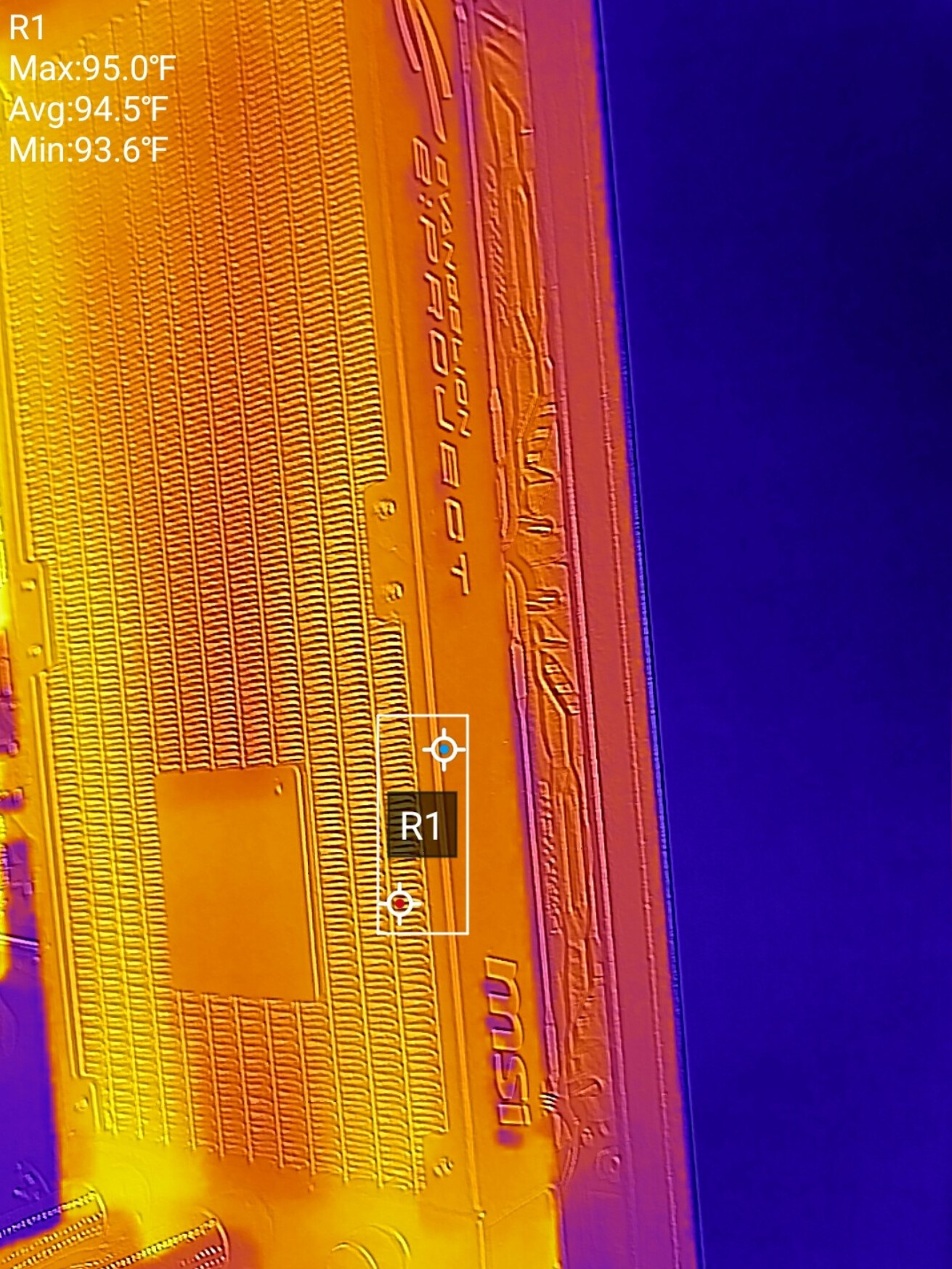
If you’ve got a smartphone with a camera that can do lwir, you can look for channel clogs or a weak pump with it.
Striations in temperature like these under a steady state load would be a give away of the problem:
One of the things I’ve noticed is that there is a discrepancy between the temperature reported in linux and the one that seems to be displayed on the motherboard’s debug display. The one on the motherboard’s display never exceeds 84 degrees and also is lower when under low load.
Do you reckon that could be an issue? Just incorrect temperature reporting in linux?
AMD motherboards report “two” different temperatues for their cpus. The highest temperature is the “package” temperature and what AMD and the motherboard makers use to control the cpu cooling. The other temp is the “cpu” temp which is the actual average temp of the cpu cores in each die.
With your TR cpu you should have individual temps for each die in the package. Your 9960X has 4 cpu dies and the IO die. In Linux, the OS should have loaded automatically the k10temp driver which will report tccd1- tccd4 temps and the tctl temp. The tctl temp (control) is the package temp and what controls the fan speed. If you have installed the lm-sensors driver you can get your temps for all the exposed sensors in the terminal with the sensors command.
The package temp is always 10° higher than any cpu die temp. AMD’s reasoning is that it provides better cooling control to ramp fan speed ahead of any need for more cooling when the cpus go under higher loads. This extra cooling gives the cpu some extra thermal headroom to help allow the maximum boost clocks under the thermal and power limits.
For example this is what my 9950X with two dies reports from the sensors command.
As you can see the Tctl temp is 10° higher than any individual die temp. Tccd1 is the “good” die and Tccd2 is the “mediocre” die in the 9950X cpu. The Tctl temp is an artificial temp used to control cooling requests. The actual die temps are the individual reported Tccd(x) temps.
That is why you saw two temps for your 9960X, the 95° temp is the package temp, and the 84° temp is the actual temp of one of the dies.
Long shot but reset the BIOS to factory settings and check if that helps. Maybe some parameters learned for the previous CPU are still in place. Might be the BIOS is holding on to those even without AI overclocking enabled.
It’s a new build, the board never had a CPU in it. I also updated the BIOs to the latest available version. I mean Tctl at idle sits at around 35C now. I loosened the cooler pressure a tiny bit, which seems to have worked pretty decently.
Tctl still goes up to 95C when I do a synthetic all core stress test. I’ll do some real world tests and see how it behaves under more realistic all core workloads.
I run Linux on my workstation, but yeah you could say that the temperatures I’ve observed was mostly under synthetic stress tests.
I’ll compile some large projects and see how that behaves. Again I don’t think there is much wrong with the cooler, my systems idles between 35-38C depending on the ambient temperature.
So after playing around a little, the high temps seem to have dropped significantly after I’ve switched to a push-pull config on the rad and added an additional intake fan at the front.
Doing so made the temps drop by over 10 degrees in some instances.
My system idles at between 30 and 32c and under heavy load it doesn’t go above 86c.
I guess I could further improve this by replacing the silverstone fans outright with a matching set of fans. But For now it’s much better.
You need to be using a fairly recent kernel for the TR ID’s to be recognized by the k10temp driver. You need to be using > 6.6 kernel to get temps for Zen 5 1AH models. AI says that you should be using > 6.11 kernel for best support for thermal and powe management on Zen 5 9000 models.
It looks like your motherboard doesn’t expose the ZEN_CCD_TEMP_VALID flag in the hardware to read the tdie temps. All you get is Tctl as you found. You will have to wait for the 7.0 kernel for the asus-ec-sensors driver to pick up the temps from your cpu. But that driver only is showing cpu and package temps right now. It does show you your VRM temps and and thermal sensor input that has a 10K thermistor plugged into it which is handy for monitoring water temps if using that cooling.
This the output from that asus-ec-sensors driver on the 9950X
asusec-isa-0000
Adapter: ISA adapter
CPU: +70.0°C
CPU Package: +81.0°C
Motherboard: +34.0°C
T_Sensor: +35.0°C
VRM: +53.0°C
That community supported driver has excellent support for Asus motherboards EC sensors. It gets new models added weekly which are mainlined rapidly into hw-next. https://github.com/zeule/asus-ec-sensors
It supports like over 30 models or something. I never counted how many exactly, you check yourself at the link and see your board is supported.
I run BOINC distributed computing loads 24/7 on my fleet of hosts. So not synthetic loads but actual working scientific loads. The temps are always going to push toward the 95° C. thermal target that Zen 4 and Zen 5 are designed to target. So nothing wrong with your temps. The cpu is working as it should. My 9950X hosts pull a constant 240W or so and the Epycs pull their designed thermal load of 240W. I use custom loop cooling to keep the temps reasonable.
Yes I did some research myself and from what it seems the 7.0 kernel should add a couple more temperature sensors for the TRX50 boards. I guess using a more niche plat form brings some quirks with it.
Either way, right now I’m on the 6.18.9 kernel, so I’ll just have to wait for it. But as I’ve said, I managed to fix my temps for the most part, my CPU package temp never exceeds 85C on all core workloads.
I also replaced all of the fans in my system with Phanteks T30’s. 6x 120mm ones on the rad and
4x 140mm ones as chassis fans. The temps are significantly lower, as I am able to push significantly more air through the system now. It’s a night and day difference.