The Ceiling vs. The Floor of QLC NAND: Why is the gap so massive? (Intel 144L vs. Micron 176L OEM)

(Gemini Translated)
Driven by pure curiosity today, I decided to dig deep into the firmware and NAND details of all the SSDs running in my rig using flash ID tools.

For years, I genuinely believed that my Micron 2400 was the only QLC drive in my system, while the other cheap SATA drives were TLC. Well, today’s reality check blew my mind: Almost my entire system has been running on QLC NAND this whole time without me knowing.

But here is the kicker: One of these bottom-tier, dirt-cheap budget drives actually shares almost identical NAND specs with the premium OEM Micron 2400, yet its underlying health, engineering margins, and factory over-provisioning are significantly superior and way more robust.

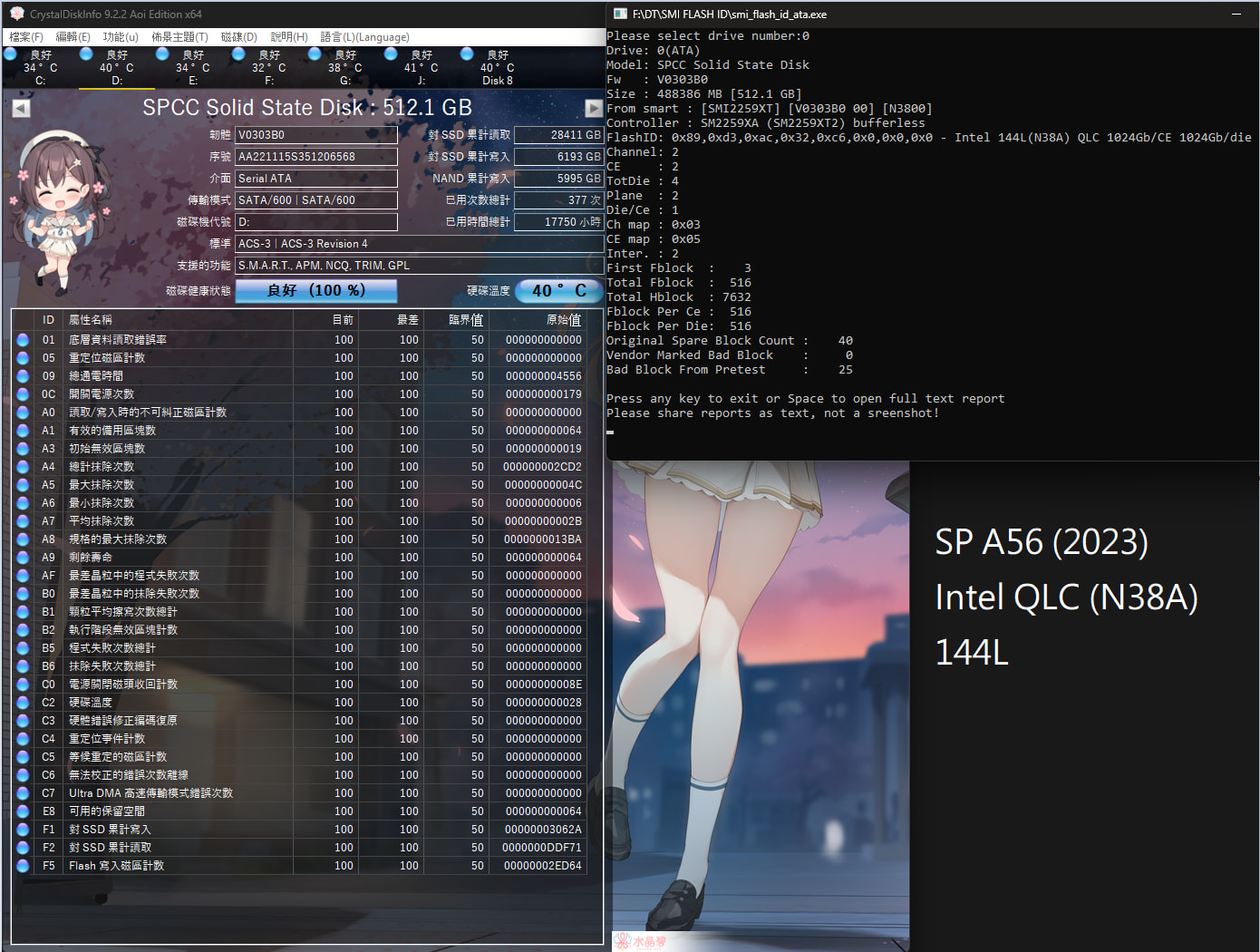
Drive 1: Silicon Power A56 (Intel 144L QLC). Over 17,000 hours, 100% Health, 0 Runtime Bad Blocks. The ultimate victory of Intel’s Floating Gate architecture under daily power-cycle abuse!
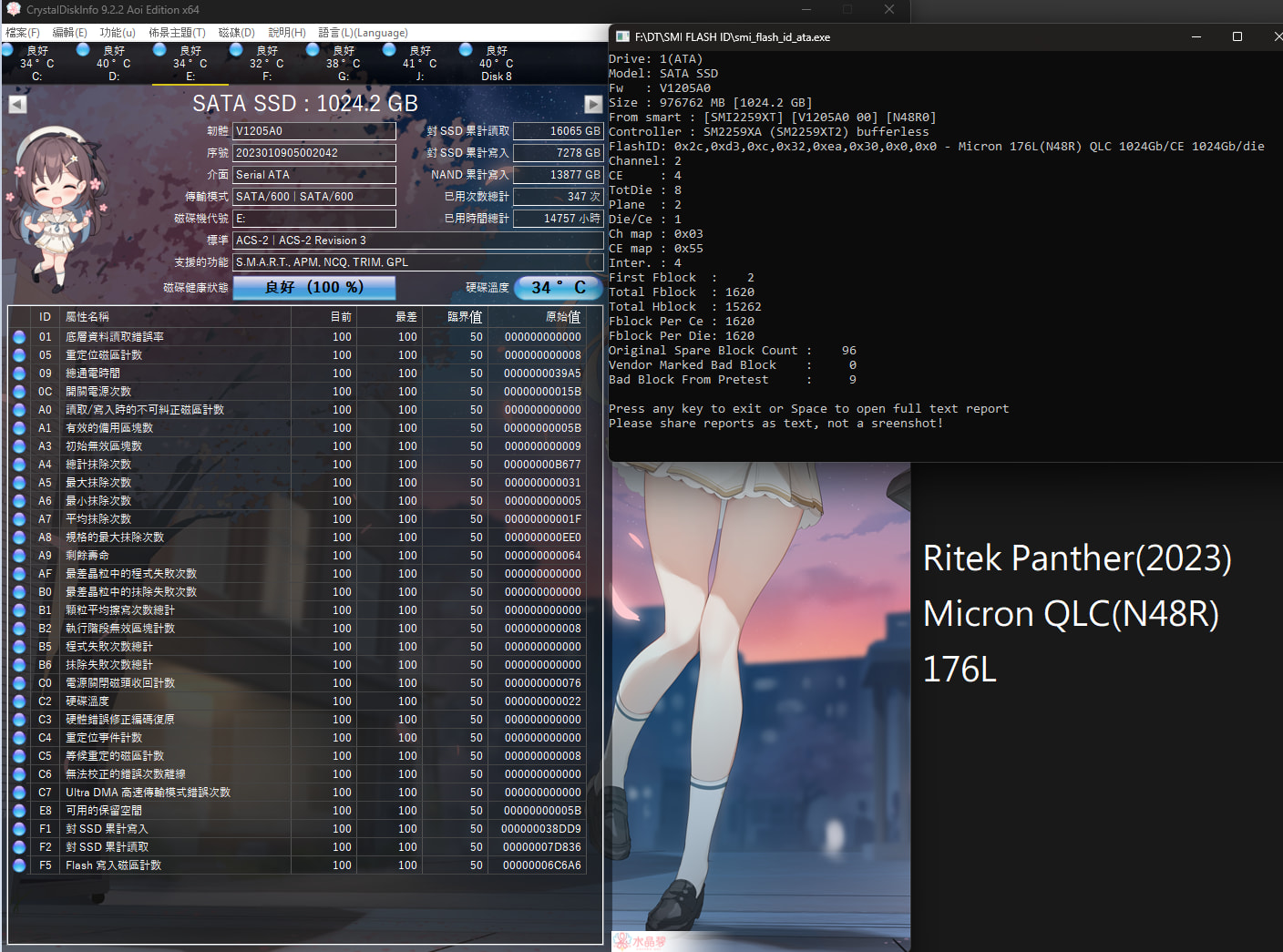
Drive 2: Ritek Panther 1TB (Micron 176L QLC). Cheap white-label drive, but surprisingly left with 87 available spare blocks!
Drive 3: Micron 2400 512GB (Micron 176L QLC). The “Premium” OEM drive born in debt. 39 Pretest Bad Blocks with only 20 Original Spare Blocks. Health degraded to 92% in less than 10k hours.

My Personal Takeaway:

To be honest, I never expected the quality and engineering philosophy between different QLC configurations to be this massive.

It is fascinating yet puzzling to see how a premium OEM drive can be so conservative with its engineering margins—giving me strong vibes of the old Intel days where you paid a premium but got heavily cornered specifications. Meanwhile, those dirt-cheap, white-label budget drives are out here over-provisioning like charity, laughing all the way to 17,000+ flawless hours.

What do you guys think? Is Micron’s strict over-provisioning limit on the 2400 a common practice for modern OEM client drives, or did I simply get an incredibly unique silicon lottery roll?
1 Like

They’re making 500GB QLC drives now!? I mean it makes sense financially, but wow.

1 Like

Well, in the Asian market, selling 512GB (or even lower) QLC drives is actually pretty common. On top of that, TLC drives are heavily marketed as “premium” here, and we have to pay a massive price premium just to get TLC.

To be fair, Micron is relatively honest about labeling their NAND. Most budget brands in Asia right now just slap a vague “3D NAND” label on the box. Whether you get TLC or QLC is a complete lottery. You won’t know what you actually bought until you run flash ID tools like I did, or if you bother to harass their customer service.

2 Likes

Just thinking: Even with 10kh (1+year) and 0x42 unsafe shutdowns, that failure rate seems quite high.

Also, the read/write numbers seem odd: 5.4 TB read vs 9.2 TB written. Are you using this as a cache drive? Still, that’s about 0.05DWPD, I’d say it’s more than fine.

1 Like

To clarify a bit on the history of this Micron 2400—I got it as a “pulled drive” from a brand-new laptop. The original seller swapped it out immediately, so it had less than 100GB of total host reads/writes when I first plugged it in.

I can’t be 100% sure what the exact baseline bad block values were on Day 1 since I didn’t run the flash ID tool back then. However, after using it purely as a Windows boot drive (with separate drives handling games and downloads), it reached this terrifying level of degradation with just 9.2 TB written.

The daily usage experience was noticeably sluggish and stuttery, which completely aligns with these hardware stats. Seeing a major brand’s OEM QLC drive struggle this hard under such a light, routine OS workload is honestly pretty alarming. This is exactly why it represents the “floor” in my comparison!

Oh, and I wouldn’t touch QLC NAND with 1 chip only, even If I’m budget constrained. For 500GB, a used sata ssd seems much more reasonable.

Unless you need that M.2 2230/2242, even then I’d go with TLC.

1 Like

Well that makes sense. Is RMA an option? If you can claim warranty, maybe just abuse it and kill it before reaching TBW.

Though with how samsung replied to louis rossmann, I’d be skeptical in this economy if they’ll honor it.

3 Likes

Totally agree. Single-chip QLC is a complete trap.

To be honest, I’ve moved on and started looking into enterprise-grade stuff like the Intel S3000/S4000 series, P4000/P5000 series (with eMLC/eTLC NAND), and even their 3D XPoint (Optane) product lines. I’ve actually recommended and set up quite a few S3000/S4000 drives for people I know, and they are rock solid.

The thing is, the enterprise surplus stock out there is massive—practically endless. But because of recent market demand fluctuations, a lot of sellers have started asking for some pretty ridiculous prices lately.

1 Like

To be honest, claiming warranty (RMA) over here is a gamble and heavily depends on the situation.

Back in the DDR3/DDR4 days, things were looser—brands like Micron, Transcend, or Kingston would often let you swap RAM even if the warranty sticker was accidentally torn off.

But for SSDs like this, especially OEM pulls, the warranty usually ties strictly to the original machine it came from. In our local market, it ultimately comes down to a deliberate choice: do you want it cheap, or do you want it stable?

Hunting through the second-hand market, scoring budget deals, and gambling on hardware health is just a routine part of the tech culture here in Asia.

Yeah, I got lucky to get a micron 9200 right before the price hike. It’s hot like sh*t even with added heatsink, but the bulk capacity more than makes for it. I just hope it doesn’t break…

If hunting for surplus, I found SAS SSDs on ebay to be still reasonable, at least $/TB wise.

But yeah, living in Japan we don’t have consumer laws to force mfc.s to honor their warranty when they should logically, either.
Even for something that should’ve been a recall, like the display of my 2nd hand pixel 8, they’re allowed to say “voluntary replacement”.

1 Like

Man, I actually seriously considered going down the SAS rabbit hole a few years back!

Living in Taiwan is pretty unique for hardware hunting—we are stuck right in the middle of everything. I can source stuff from Western platforms like eBay or Amazon, or I can look Westward toward China/Hong Kong platforms like Taobao, Shopee, or Pinduoduo. The hardware circulating in these two different supply chains is night and day, which makes hunting so much fun.

And yeah, SAS is an entirely different beast. I still remember drooling over Toshiba’s enterprise aesthetics and the sheer, brutal performance of the Seagate Nytro series. Getting into SAS doesn’t just require the drive itself; you need the AICs, the proper HBA cards, and the right cooling environment to tame them. It’s a very cool setup you got there, brother!

I’ll never buy a QLC drive… Unless, of course, at some point, I can’t find TLC drives any more (it already became close to impossible to get MLC drives these days).

Not only their NAND cells wear out after only a few hundreds (at best) erase cycles, but they loose your data when left offline for some time (for example, you could get bad surprises on return when you go traveling for a few months), i.e. when the controller cannot refresh the stored data on a regular basis.

QLC = sh*t. Don’t buy it or only if your purpose is temporary storage of a massive amount of unimportant/transient data: definitely not a consumer usage.

1 Like

I have to admit I never tried SAS, let alone SAS SSDs. But I remember Wendell did a video on it, so it should be fine?
The one and only time I touched it was when I was using weird stuff (think aws snowball but with sas), and the mental gymnastics needed from SATA or NVMe were quite unpleasant.
I wouldn’t mess with SAS SSDs unless the price difference was so big like we have now.

As for the HBAs, I recall seeing their price quite reasonable. But that was pre-price hike, and I don’t know how it looks today.

And yes, the market is interesting if you have access to both! I’ve got some sketchy MCIO board+cable that somehow work fine with PCIE4.0 from taobao, and I still don’t know why I got a new one so cheap.

Re: @mandelbrot’s “loose data when left offline” - be ware for enterprise gear on that aspect too.
I recall the JEDEC mandated data integrity upon non-powered storage is different for enterprise vs. home. The enterprise ones were quite scary.

1 Like

You’re spot on. TLC is still the baseline for now, and thankfully, large-capacity used eMLC/MLC drives haven’t reached completely extortionate prices yet.

Back then, Intel and other NAND manufacturers naively believed the market would just blindly swallow the QLC transition. But reality hit them hard, and that colossal miscalculation was arguably a major domino that led to Intel selling off their legendary storage foundation to SK Hynix.

But to me, the truly terrifying part isn’t the physical limitations of QLC—it’s the shift in consumer psychology. As time moves on, collective memory gets wiped. A new generation of buyers will grow up thinking, “Who cares if it’s QLC? A PC is just a appliance you toss out after a few years anyway.” When built-in obsolescence becomes the accepted norm, that’s when we’ve truly lost the plot.

As for current QLC? It’s a complete headache. Dealing with Charge-Trap engineering and data retention leakages is a constant nightmare for manufacturers. Yet, credit where it’s due: in very specific, write-once-read-many write scenarios (like cold storage or massive archive arrays), its density advantage does get amplified immensely. But it was never meant to be a general consumer boot drive.

2 Likes

17000 hours is nothing for SSDs. What counts is the total amount of written data (write amplification included).

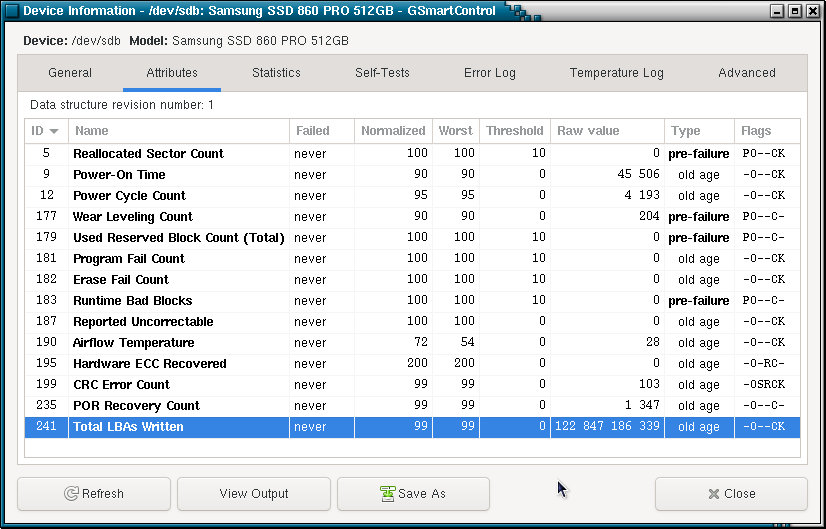
Here’s one of my Samsung 860 Pro (used in a RAID5 of three such drives), a MLC drive with 45500 hours of power-on time:

Yes, that’s 45TB written (4kB LBA), and zero reallocated sector, 100% reserved blocks available.

1 Like

To be honest, the whole Taobao/Shopee ecosystem is fascinating. A lot of these dirt-cheap components are the result of ultra-low labor costs or factories squeezing out surplus production margins (sometimes walking into shady legal gray areas). I still remember a friend of mine getting into the SAS/HBA rabbit hole; he just bought a bunch of cheap SAS-to-SATA adapters, cables, and M.2 AICs from those platforms, crossed his fingers, plugged them in, and everything miraculously worked on the first try! In our region, taking that kind of “hardware gamble” is just half the fun.

Also, thank you so much for bringing up the JEDEC standard, that is a gold-tier reminder! A lot of people blindly hoard used enterprise drives thinking they are the ultimate solution for offline cold storage, completely forgetting that the enterprise spec only mandates about 3 weeks of data retention at 40°C without power, compared to the 1 year for consumer drives.

1 Like

Yup, even 1year is scary for cold storage. For me, cold=HDD only, bcs I don’t trust myself plugging in!

1 Like

Man, those were the days when everyone was passionately recommending the 860 PRO.

Looking at the current 980 PRO / 990 PRO era, even with all that blazing Gen4/Gen5 speed, we barely see products with that kind of legendary, unyielding durability anymore. Modern consumer drives just don’t feel like they’re built to last like that tank.

Blockquote
Re: @mandelbrot’s “loose data when left offline” - be ware for enterprise gear on that aspect too.
I recall the JEDEC mandated data integrity upon non-powered storage is different for enterprise vs. home. The enterprise ones were quite scary.

I’d never buy second hand enterprise drives either, not for my valuable data anyway.

And being “paranoid”, not only do I use a (Linux md) RAID5 of three MLC SSDs for my valuable data, but I also backup the latter on two different hard drives (used for this sole purpose and sleeping 99% of the time, i.e. outside of the backup process) in two different PCs (one is in my main PC and the other in my Linux firewall/mini-server).

1 Like

Respect! That is a textbook definition of a rock-solid 3-2-1 backup strategy. Running a Linux md-RAID5 with pure MLCs combined with dual-machine offline HDD backups—your valuable data is probably safer than secrets in a government bunker! :joy:

And I totally get your stance on second-hand enterprise gear. It’s definitely a gamble. I don’t use them for my absolute critical data either; for me, hunting these surplus drives is more like an enthusiast’s hobby to see how far old-school engineering can go.

Speaking of which, you actually inspired me to pull the official Solidigm/Intel Storage Tool to check the inner SMART stats of that server-pulled P3700 (HET-MLC) I mentioned. Just wanted to share this hardware artifact with you:

The raw NAND bytes written is at a staggering 4,731 TB (4.73 PB), meaning a WAF of roughly 2.92 against the 1.62 PB host writes. The cells survived 4,529 average erase cycles, yet the program/erase fail counts are still a solid 0.

1 Like