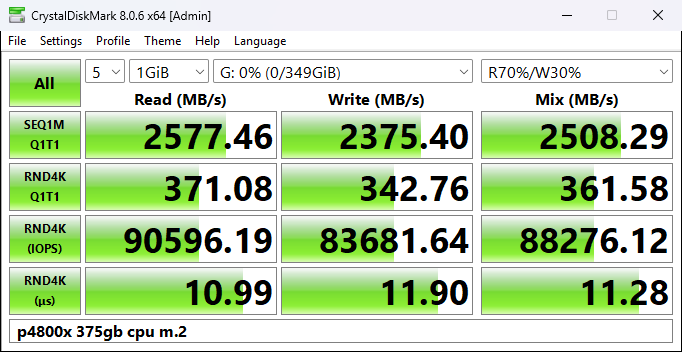
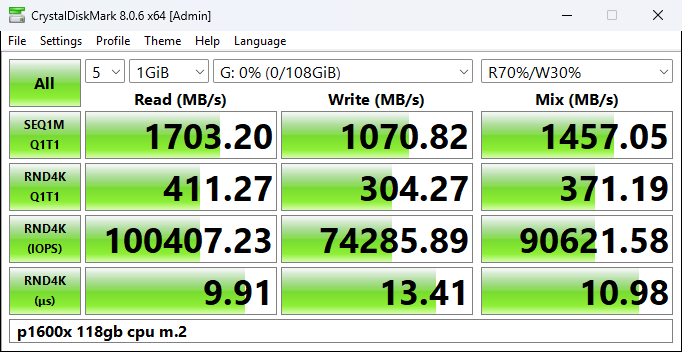
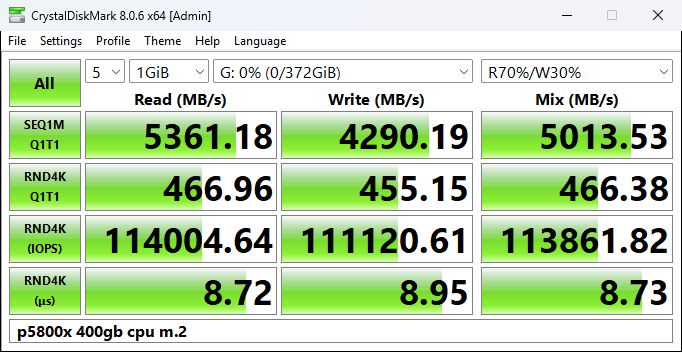
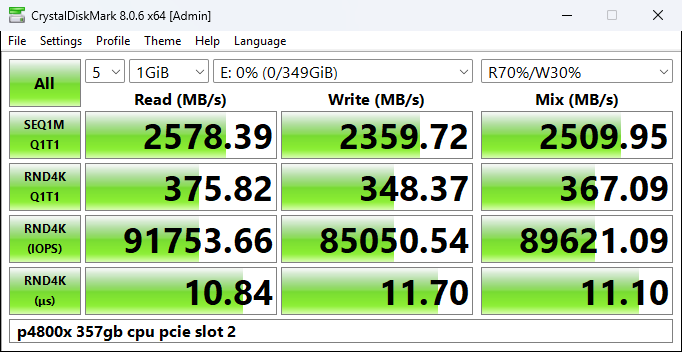
I’ve always been curious about the speeds of optane drives since learning about them.
Different systems having different settings and configurations that wildly vary the performance of these drives. Makes trying to compare them quite difficult. How would they perform if they were connected to the same system? That’s what I wanted to find out.
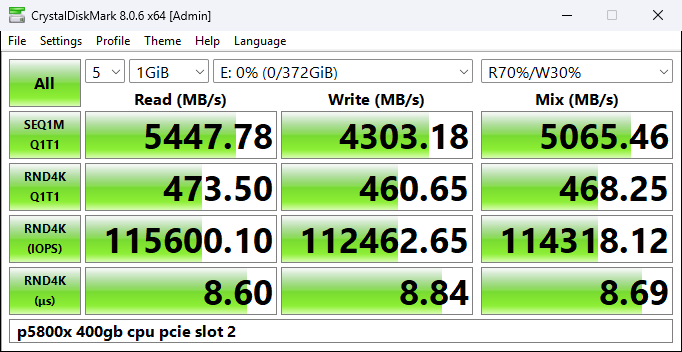
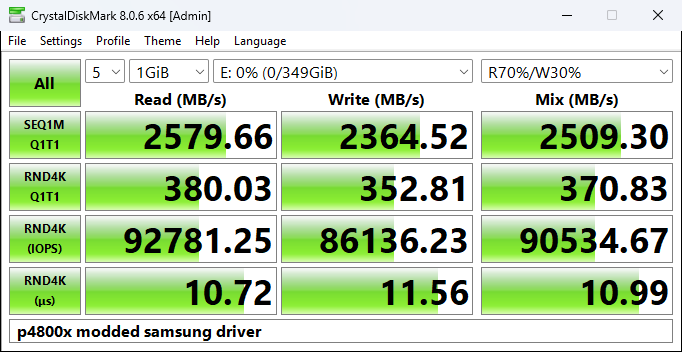
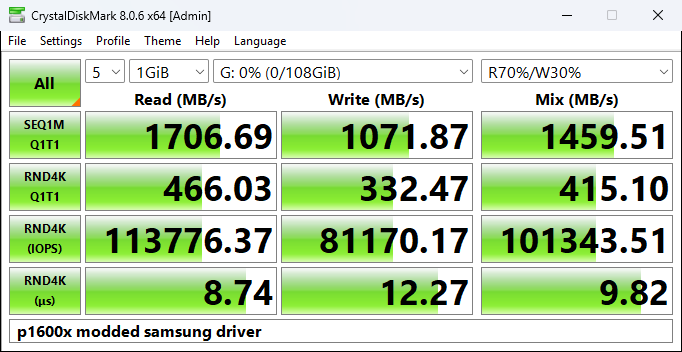
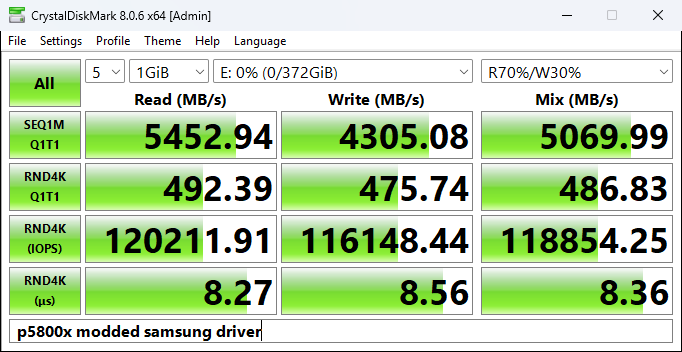
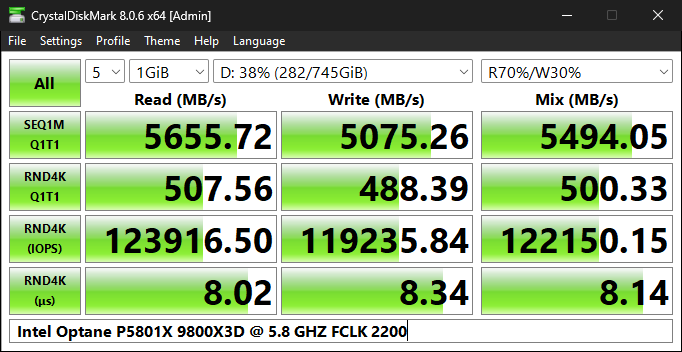
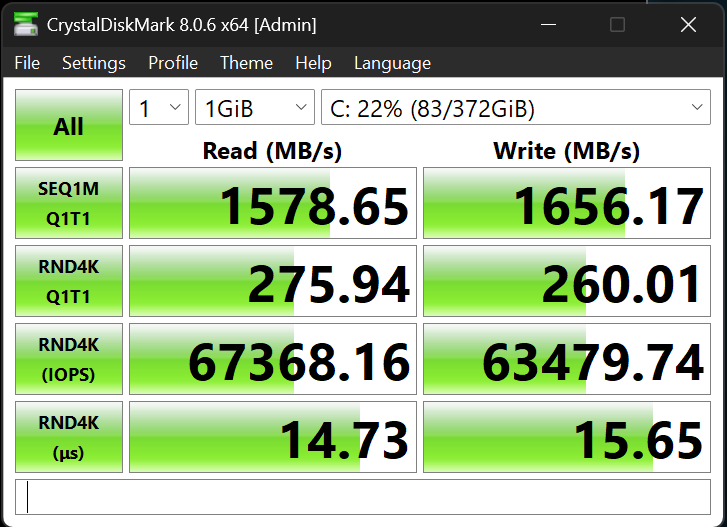
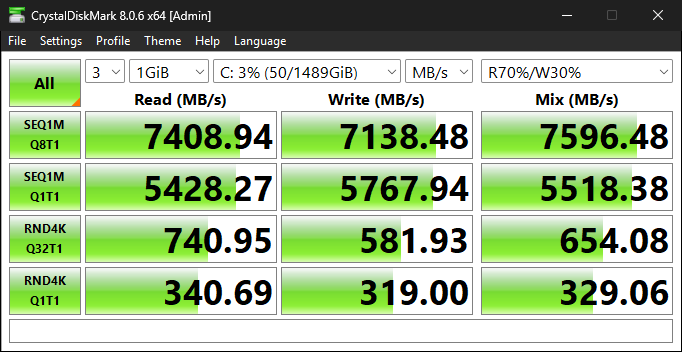
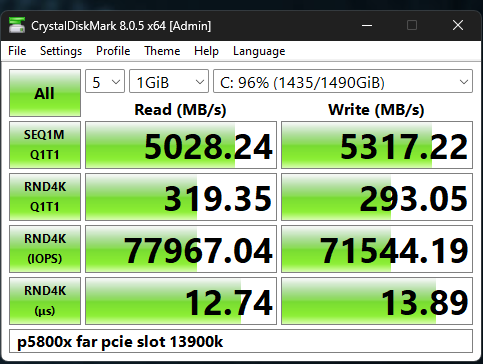
Test is CrystalDiskMark using the real world performance + mix profile. Fresh installation of windows 11 with ASPM, C states, IOMMU disabled.
First test, all three drives running off the m.2 cpu slot.
The p4800x and p5800x used a 75cm u.2 to slimsas cable and NGK slimsas to m.2.
The p1600x is native m.2.
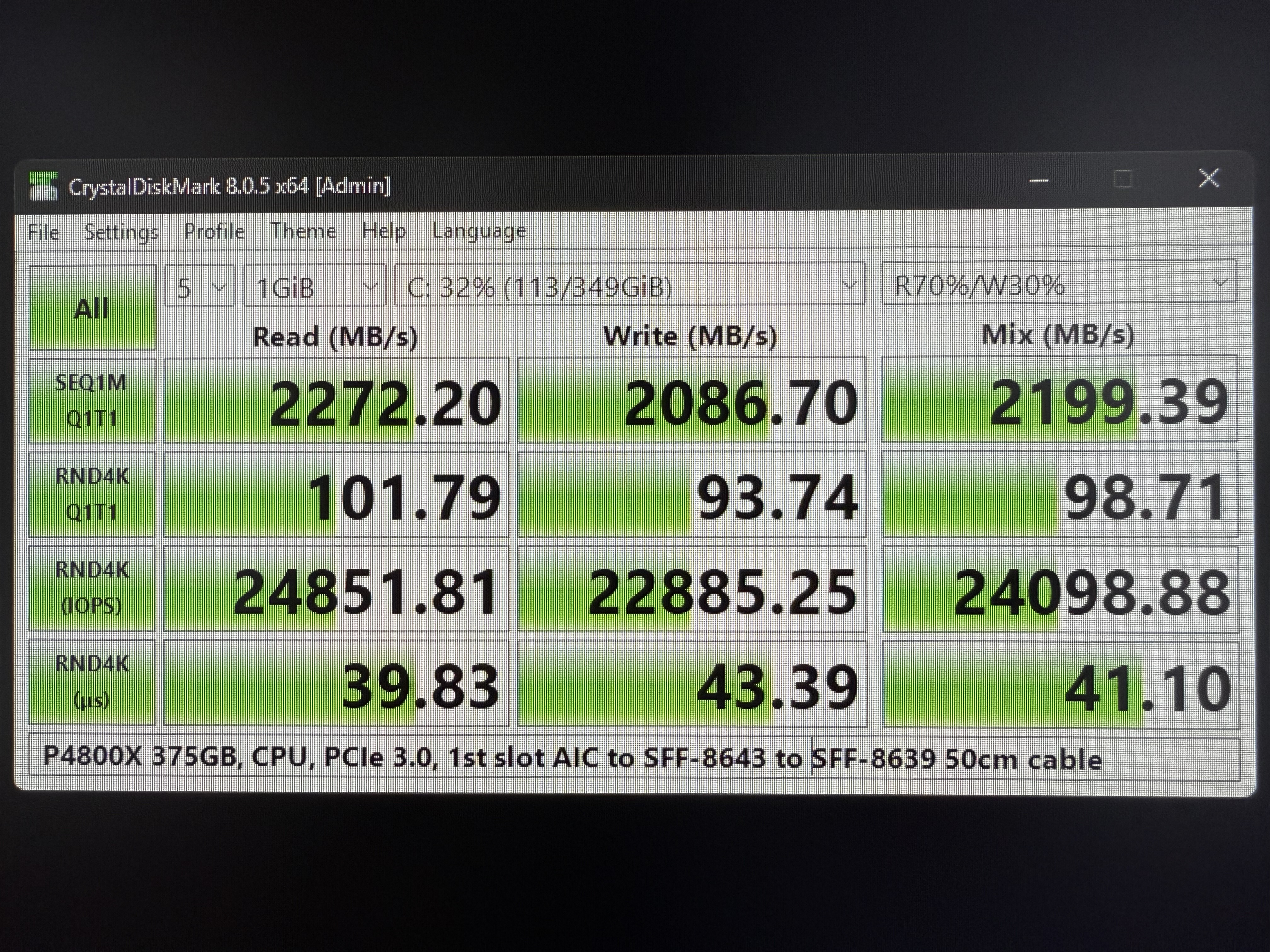
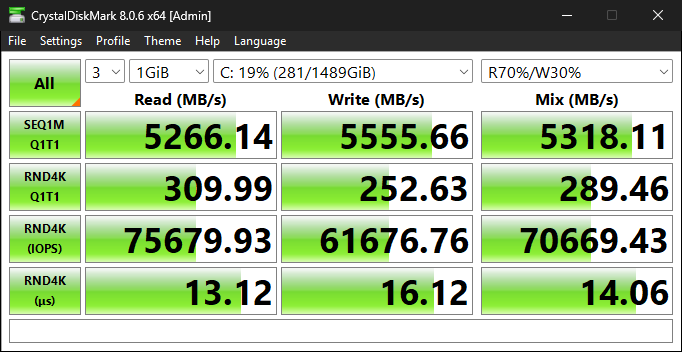
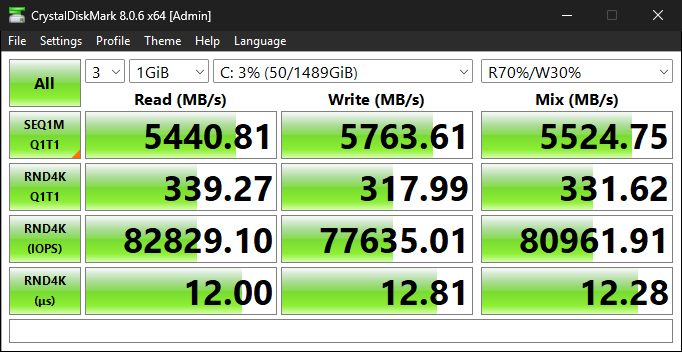
This next test is the p4800x and p5800x moved from the m.2 slot to the second pcie slot to see the difference vs the results prior.
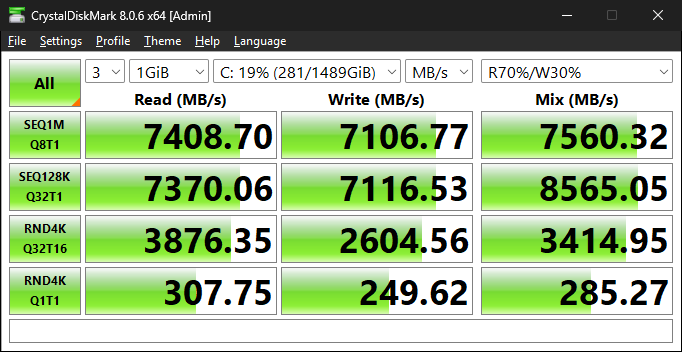
This is with community Samsung drivers loaded instead of the default windows driver. It seems to help a decent amount.
They are all great drives in the end. Each one has its benefits and trade offs.
Hope this helps anyone looking at these drives.
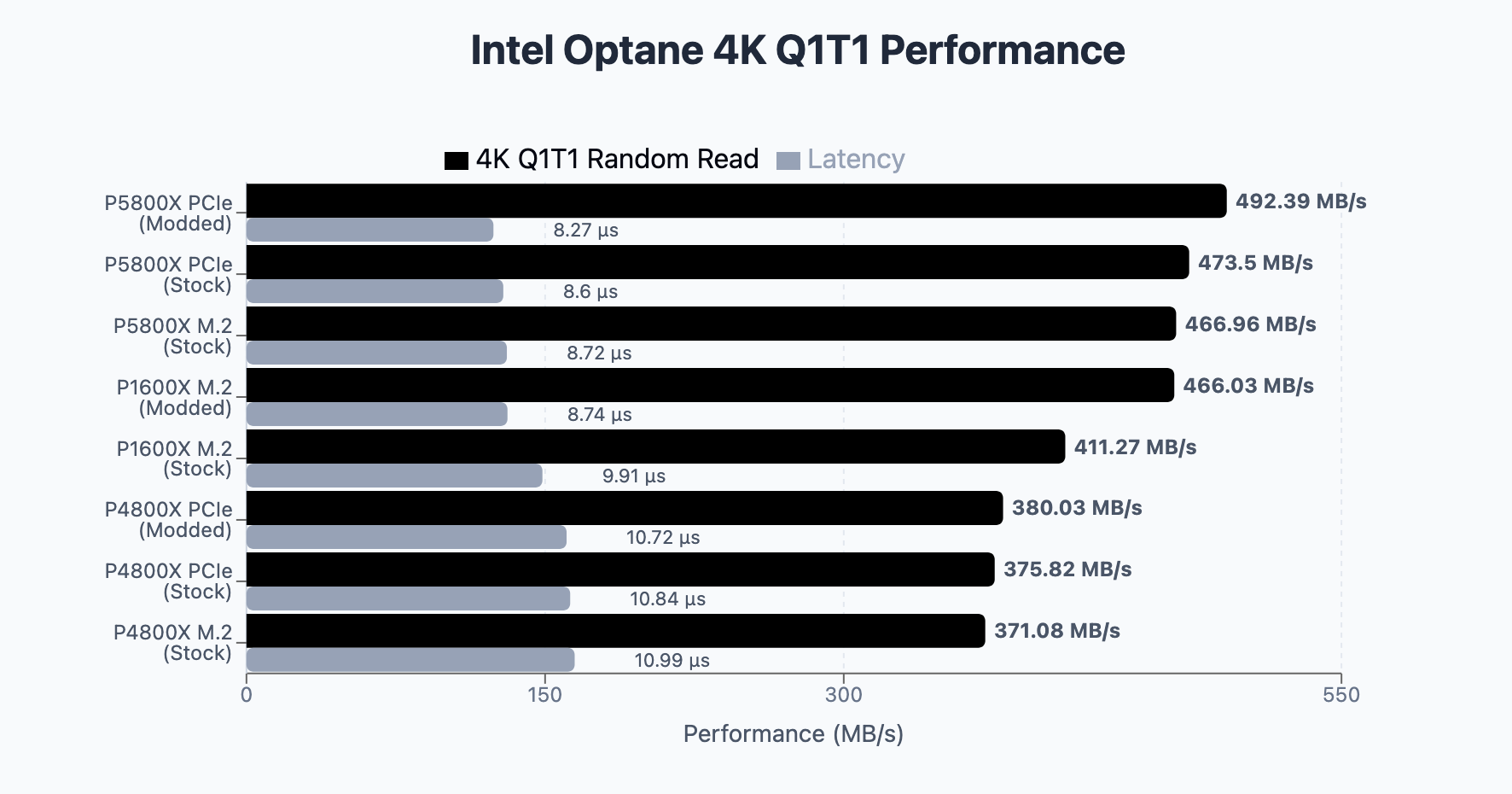
Edit: Here is the information consolidated into a chart regarding random read and latency.
As an aside, with the video above, while interesting and shows some advantages of an enterprise controller, the Intel DC P3700 is not Optane (3D XPoint) as he refers to multiple times…
correct me if i am wrong but lower capacity drives dont saturate the pcie lanes as much compared to higher capacity ones right ? talking more abt the sequentials than random
Yeah it seems to love clockspeed. Just know when you put that optane drive on something newer later on down the line, your storage speeds will increase as well. Think of it as a bonus when upgrading.
Here is a 400gb 5800 vs a 800gb 5801 in CDM. Sequentials were higher on the larger capacity drive.
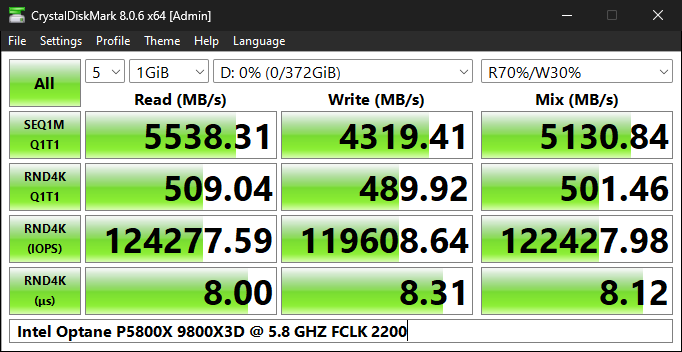
PC is a 9800X3D processor on a Asus X870E Hero motherboard. The single thread clocks get to 5.7-5.8ghz using external clock generator (eclk). The second PCIe slot is cpu as well.
What are the community Samsung drivers you speak of? I would like to give this a shot as I have Optane of the yang and want to get the most out of them.
Could you share how you connect your P5801X to your mobo – and what adapter(s?) you’re using? I’d like to build a system, almost certainly AM5, that can squeeze performance out of the P5801X’s that that I just bought.
I’m using UMCCOY UMC-E pcie 5.0 x4 adapter that came with the drive in the first pcie slot (pcie 4 x16) and have disconnected all of my other M.2 drives and moved my GPU to the bottom pcie slot. I haven’t tried any bios tweaks yet.
I have 4x 1.5Tb 905p in raid 0 via LVM on Fedora Workstation. Each drive is going direct to CPU. AM5 system with 7800x3d, 64Gb RAM, 7900xtx, Gigabyte Elite AX x870 Mobo.
I’ve had some time to think about it. I’ve resolved my issue and restored performance back to what I was seeing before.
I had to use an Ubuntu (as of this writing, 25.04) and install Intel’s MAS CLI tools. I then had to issue a sanitize by block command (NVME format wouldn’t do anything, nor did the normal Delete argument).
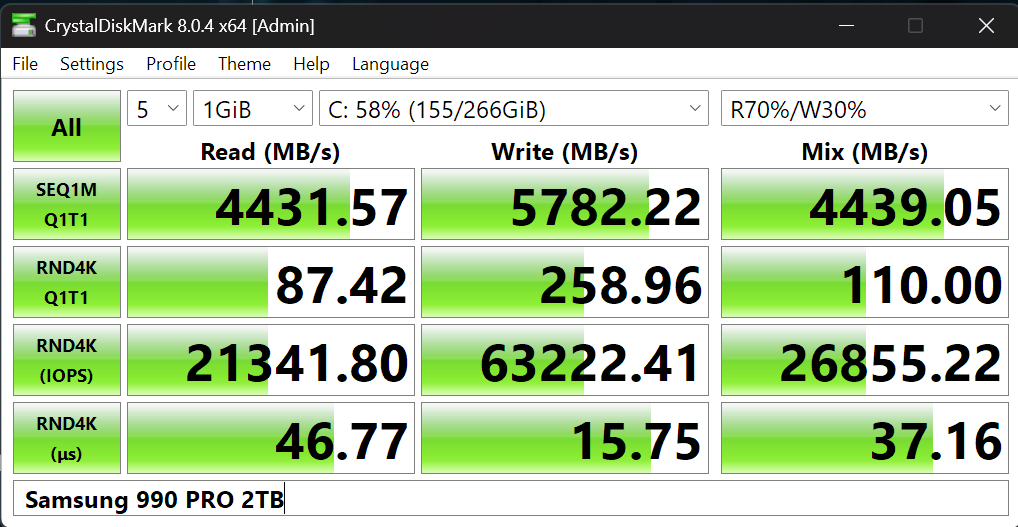
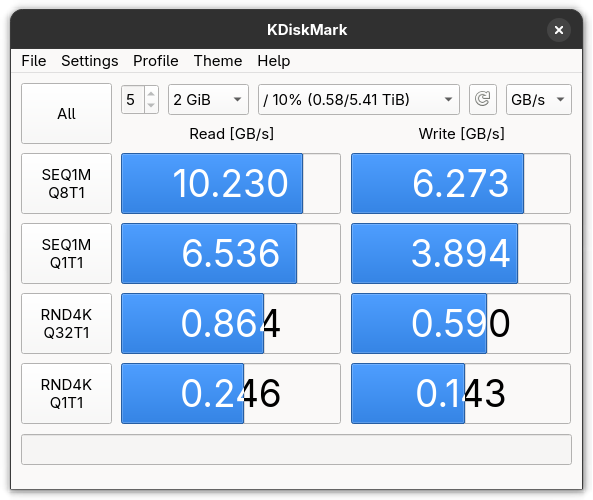
With this, I am getting the following results, back to what it once was when I freshly received the drive:
I have two P1600Xs in my office PCs, one is paired with an i7-8700 & 32GB-2666 and the other only has a 9th gen Pentium Gold & 16GB-2400T or something like that.
Unfortunately they are both packed away right now, but I use them as OS drives until I can secure an i9-9900/K/T and try to run both drives in RAID on the 9th gen system.
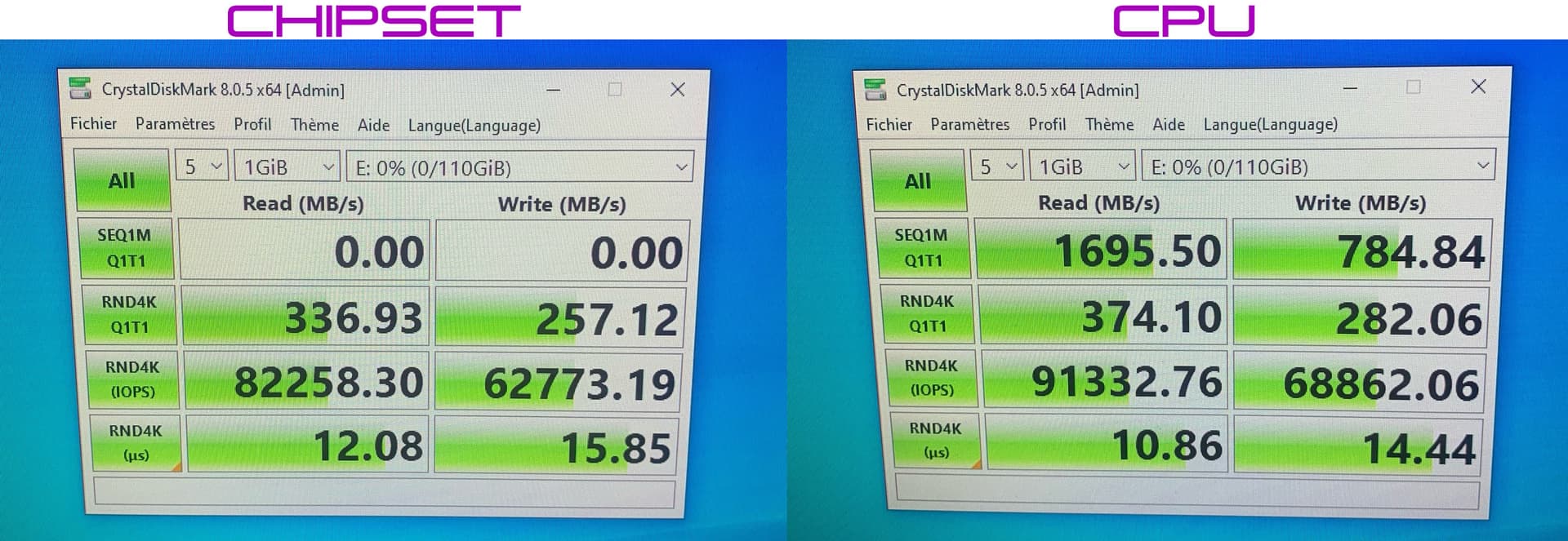
It is important to connect the SSD to the correct slot, the one that is directly managed by the CPU and not the PCH.
I tested the latency of each M.2 and PCIe port with an Intel Optane P4801X SSD.
Latency for all M.2 and PCIe ports managed by the Chipset is 12.1µs.
Latency for all M.2 and PCIe ports managed by the CPU is 10.9µs.
It is therefore necessary to avoid cables, and if possible avoid using the Chipset ports to gain speed. Today, manufacturers are making graphics cards with 8 PCIe lines instead of 16 PCIe lines, and this is therefore interesting for CPUs that only manage 20 PCIe lines. See the new NVIDIA RTX A400 and NVIDIA RTX A1000 card.
Note: the only way to test the latency of each port on your motherboard is to use an Intel Optane SSD, because the performance does not change unlike a NAND SSD.
Hi there. I got ahold of a zero hour 3.2TB P5800X recently. After a few OS cloning attempts, I got it up and running. Performance is slightly less than compared to a 1.6TB P5800X that I had for 9 months.
Actually both drives seem to be slower than the ~340MB/s random 4K that I once had.
I want to now properly block sanitize the 3.2TB.
But I what the exact command was in IntelMAS CLI.
I did run the following: “intelmas start -intelssd 1 -sanitize block”, it did sanitize the drive. Took about 30 minutes in total.
But I’m not sure if it was just a regular sanitize or a block sanitize (block is what is probably needed to restore speeds).
Could you please advise what the command is for block sanitize?
All the resources I’ve found on Google including Intel’s official documents for IntelMAS CLI have haven’t been helpful. In fact, Intel’s own guides are not well written and comes off as very confusing.