Hey all,
This is my first time posting on a forum and i’m pretty stuck.
I have a Dell Poweredge T430 i’ve been using for Truenas stuff and it’s been great. My latest venture was installing an Asrock Intel Arc A310 Low Profile into one of the PCIe slots. Keep in mind, i am very new to all of this.
Before installing the A310, my PCIe configuration was just 2 H330s that were flashed with IT firmware installed in the 2 x16 slots connected directly to CPU1 (i don’t have a CPU2 installed). to make room for the A310, i moved my HBA with the boot drive into the x4 slot1, and put the A310 into the x16 slot.
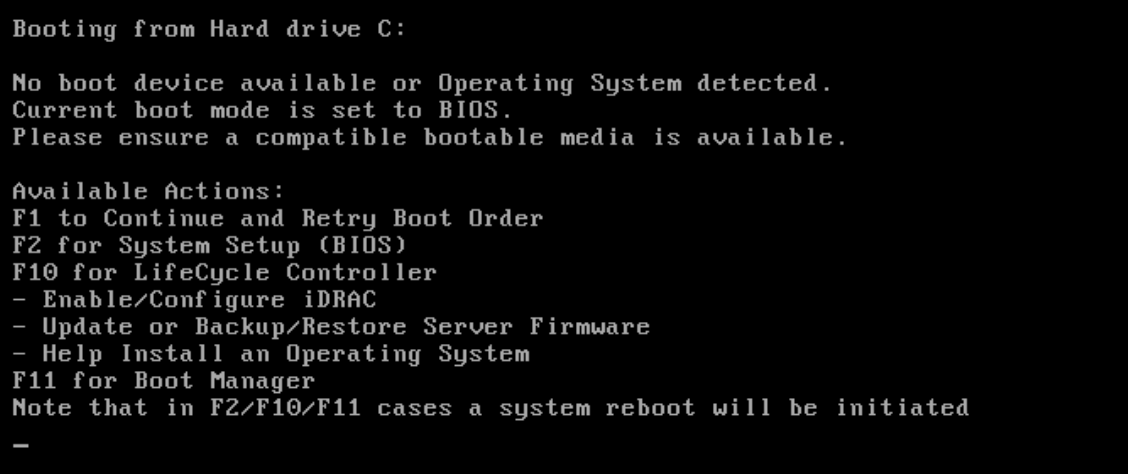
Now when i boot, all of my drives are recognized, but my boot device isn’t available.
I think i see the problem, which is that the Controller in x4 slot1 is not showing up as an option in the boot order, even though i can see it and its drives within device settings in BIOS.
Here are pictures for context:
-
PCIe slots (yellow are HBAs and Blue is the GPU as of this post)
-
The error i’m receiving

I had taken 5 screenshots but am only allowed to post 2 since im a new user here. Hopefully the 2 help.
I’m looking for a few things here:
- get a better understanding of PCIe lanes (confused on CPU vs PCH)
- see if this can be fixed without moving the cards
- if 2 can’t be done, will swapping the 2 HBAs solve this?
- if there are any recommendations to solve my problems differently, or build differently, i am open to the feedback. This is just a way i went about it but if there are better ways please let me know.
Again since i’m new, not sure if i should be posting full specs. I can do that if needed.
I appreciate anyone who stops to read 