Strix Halo LLM inference notes

I’ve been tuning a Strix Halo box as my long-context local LLM tier and figured the setup might be useful to others running similar gear, or anyone weighing whether to pick one up.

Headline: Qwen3.6-35B-A3B UD-Q8_K_XL through llama.cpp, serving around 25 tok/s with a live observed context of 153,562 tokens. The screencast shows the run sitting under 100W. This is real-world usage, as it’s the current daily-driver chat/high-reasoning tier for my homelab.

Full writeup, screencast embedded, plus an interactive loading/quantization artifact:

Full post:   https://kmarble.dev/posts/strix-halo-llm-inference-show-and-tell/
Screencast:  https://assets.kmarble.dev/artifacts/strix-halo-llm-inference-loading/strix-halo-llm-inference-screencast-2026-04-26.webm
Interactive: https://kmarble.dev/artifacts/strix-halo-llm-inference-loading/
Download:    https://assets.kmarble.dev/downloads/strix-halo-llm-inference-loading-2026-04-26.zip

Hardware/software:

Host:        artemis
Machine:     Minisforum MS-S1 MAX
APU:         AMD Ryzen AI Max+ 395 w/ Radeon 8060S
RAM:         128GB LPDDR5X unified, 124 GiB visible
OS:          CachyOS, Linux 7.0.0-1-cachyos
Backend:     Vulkan RADV
Mesa:        26.0.5-arch2.2
llama.cpp:   b8890, 8bccdbbff
llama-swap:  v205, 66639e83f7be4f1354817e45321f50bdb8e3227d

Live llama.cpp metrics at capture:

n_tokens_max                 153562
prompt_tokens_seconds        322.685
predicted_tokens_seconds     24.0673
requests_processing          0
requests_deferred            0

Current model launch, shortened:

llama-server
  -ngl 999
  -fa on
  --no-mmap
  -t 16 -tb 32
  -m Qwen3.6-35B-A3B-UD-Q8_K_XL.gguf
  -c 524288
  -np 3
  --kv-unified
  --cache-type-k q8_0
  --cache-type-v q8_0
  -b 4096
  -ub 4096
  --cache-ram 16384
  --cache-idle-slots
  --slot-prompt-similarity 0.8
  --mlock
  --reasoning on
  --reasoning-budget 65536

The RADV APU heap fix is important:

<driconf>
  <device driver="radv">
    <application name="Default">
      <option name="radv_enable_unified_heap_on_apu" value="true"/>
    </application>
  </device>
</driconf>

Strix Halo will obviously never beat something like a 5090, but it doesn’t have to. It’s the complete envelope: large unified memory, low enough power, no separate VRAM ceiling, and enough generation speed for an interactive local chat/agent loop.

This sits behind llama-swap as an OpenAI-compatible endpoint. My main homelab host, voyager, has a 7900 XTX and runs a smaller Qwen3.6-27B cron tier. artemis is the high-context chat/reasoning box.

The main lesson so far: long context isn’t just a model-card number. You need the model architecture, quant, KV cache settings, backend, memory behavior, and service layer to line up. In this case, Qwen3.6-35B-A3B plus Strix Halo unified memory plus llama.cpp/Vulkan/RADV is a genuinely useful local inference target.

If you’re running similar gear, I’d love to hear what tok/s and context numbers you’re hitting, or any tweaks that pushed yours further. UD-Q3_K_XL is on my list for the next round of testing if anyone’s already been there. Happy to dig into any of the launch flags above if something looks off, too.
5 Likes

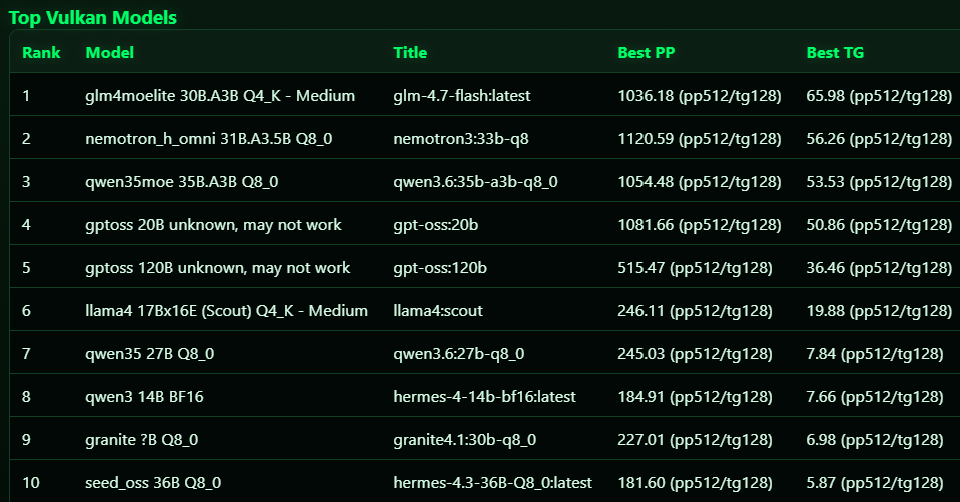
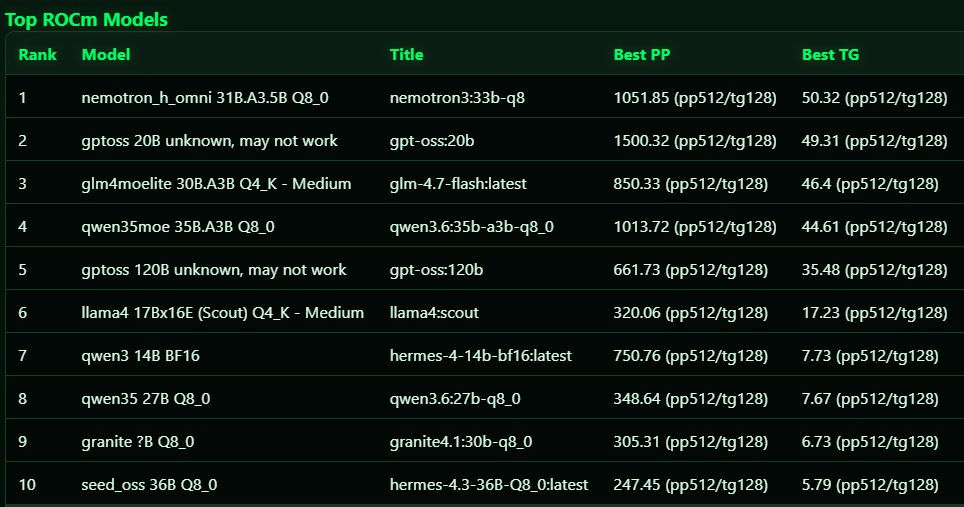
I agree. using llama-bench, i tested some of the latest models and these were the numbers I got on my Framework strix halo setup:

Model Title Backend PP test PP tok/s TG test TG tok/s
glm4moelite 30B.A3B Q4_K - Medium glm-4.7-flash:latest ROCm pp512 850.33 tg128 46.4
glm4moelite 30B.A3B Q4_K - Medium glm-4.7-flash:latest Vulkan pp512 1036.18 tg128 65.98
gptoss 120B unknown, may not work gpt-oss:120b ROCm pp512 661.73 tg128 35.48
gptoss 120B unknown, may not work gpt-oss:120b Vulkan pp512 515.47 tg128 36.46
gptoss 20B unknown, may not work gpt-oss:20b ROCm pp512 1494.59 tg128 49.29
gptoss 20B unknown, may not work gpt-oss:20b Vulkan pp512 1075.19 tg128 50.86
gptoss 20B unknown, may not work gpt-oss:20b ROCm pp512 1500.32 tg128 49.31
gptoss 20B unknown, may not work gpt-oss:20b Vulkan pp512 1081.66 tg128 50.86
llama 70B Q4_K - Medium hermes4:70b ROCm pp512 121.87 tg128 4.6
llama 70B Q4_K - Medium hermes4:70b Vulkan pp512 76.52 tg128 5.26
llama4 17Bx16E (Scout) Q4_K - Medium llama4:scout ROCm pp512 320.06 tg128 17.23
llama4 17Bx16E (Scout) Q4_K - Medium llama4:scout Vulkan pp512 246.11 tg128 19.88
qwen3 14B BF16 hermes-4-14b-bf16:latest ROCm pp512 107.43 tg128 3.12
qwen3 14B BF16 hermes-4-14b-bf16:latest Vulkan pp512 129.24 tg128 7.27
qwen3 14B BF16 hermes-4-14b-bf16:latest ROCm pp512 750.76 tg128 7.73
qwen3 14B BF16 hermes-4-14b-bf16:latest Vulkan pp512 184.91 tg128 7.66
qwen35 27B Q8_0 qwen27b-q8-100k:latest ROCm pp512 343.34 tg128 7.66
qwen35 27B Q8_0 qwen27b-q8-100k:latest Vulkan pp512 242.34 tg128 7.84
qwen35 27B Q8_0 qwen27b-q8-100k:latest ROCm pp512 348.64 tg128 7.67
qwen35 27B Q8_0 qwen27b-q8-100k:latest Vulkan pp512 245.03 tg128 7.8
qwen35moe 35B.A3B Q8_0 qwen3.6:35b-a3b-q8_0 ROCm pp512 1013.72 tg128 44.58
qwen35moe 35B.A3B Q8_0 qwen3.6:35b-a3b-q8_0 Vulkan pp512 1047.41 tg128 53.48
qwen35moe 35B.A3B Q8_0 qwen3.6:35b-a3b-q8_0 ROCm pp512 979.68 tg128 44.61
qwen35moe 35B.A3B Q8_0 qwen3.6:35b-a3b-q8_0 Vulkan pp512 1049.17 tg128 53.33
seed_oss 36B F16 hermes-4.3-36b-bf16:latest Vulkan pp512 133.94 tg128 3
seed_oss 36B F16 hermes-4.3-36b-bf16:latest Vulkan pp512 141.51 tg128 3.01
seed_oss 36B F16 hermes-4.3-36b-bf16:latest Vulkan pp512 127.12 tg128 3.01
seed_oss 36B F16 hermes-4.3-36b-bf16:latest Vulkan pp512 145.14 tg128 3.02
seed_oss 36B F16 hermes-4.3-36b-bf16:latest Vulkan pp512 149.1 tg128 3.02

Host OS: Fedora 44. In some cases, ROCm performed better, but in the end, i opted for qwen3.6:35b-a3b-q8_0 on Vulkan RADV

4 Likes

Quick follow-up since this setup has changed quite a bit since the first post.

The big change: I’ve swapped the node roles. voyager is now the foreground Hermes session box, and artemis is the parallel worker / auxiliary inference box.

Current live setup:

  • voyager: Ryzen 9900X, 192GB RAM, 7900 XTX

    • Main Hermes session model: Qwen3.6-27B-Q4_K_M
    • llama.cpp Vulkan build
    • -c 157286, -np 1
    • q4 KV
    • -b 8192 -ub 4096
    • reasoning on, budget 65536
    • prompt cache / checkpoint / slot-save flags enabled
  • artemis: Strix Halo / Ryzen AI Max+ 395, 128GB unified memory

    • Parallel/delegation model: Qwen3.6-35B-A3B-UD-Q8_K_XL
    • q4 KV
    • -c 262144 -np 4 --kv-unified
    • all four slots get the full 262k context window via unified KV, instead of splitting the context 4 ways
    • -b 4096 -ub 512
    • reasoning on, budget 65536
    • mmproj loaded, so this lane is vision-capable too

Hermes is using both machines in the same live agent session now. The parent session runs on Voyager’s 27B model, and delegate-task/subagent work goes over to Artemis. Hermes is configured for up to 4 concurrent child agents, and those child agents inherit the normal terminal/file/web toolsets.

So instead of treating the Strix Halo box as “the one big chat model,” I’m using it more like a high-memory parallel reasoning pool behind the foreground agent. The 27B model on the 7900 XTX is responsive enough for the main loop, while Artemis can absorb auxiliary work: delegated agents, session search, compression, web extraction, background review, title generation, etc.

I also still have some on-demand Artemis lanes around for testing:

  • Qwen3.5-122B-A10B at 262k context
  • Mistral Medium 3.5 128B at 262k context, which fits but is more of a slow deep-work/toolless lane
  • Nemotron 3 Nano Omni 30B-A3B
  • Qwen3-Next-80B-A3B-Thinking

Main lesson from the last couple weeks: for agent use, raw “can I fit the biggest model?” is not the whole question. The service topology matters just as much. A smaller/faster foreground model plus a high-memory multi-slot worker node has been more useful than forcing every interaction through the biggest model I can load.

2 Likes

Nice update! Another thing to think about is accuracy. Sometimes with other models, I’ve run into issues with accuracy especially when it comes to design, whether it’s simple PDF generation or front end UI modeling. I could not get anything decent out of Nemotron even though from a testing standpoint the numbers look great. Here are the latest updates:

Another thing that matters a lot are the personality files for my hermes agent. All the soul.md, agent.md, etc matters. I improved context by setting up a local Hindsight instance which helps. How are you delegating work between the agents? Did you set up a custom MCP?

Oh and another thing I learned is that BF16 models just don’t work at all because the drivers are not meant to handle full context. So now I’m just shooting for q8 models.

Yeah agreed, raw numbers let me know if it’s even within the realm of feasibility. To prove accuracy I run things through some simple needle-haystack tests at full context depth to see if it can handle that use case. It’s crude and not fully accurate, but it’s a good gut check before sinking time into it myself. I need to set up some sort of dedicated, personal benchmark set to compare things between for consistency. Likewise with quants, q8 is where I start at usually for sizing considerations, then only go down if needed. I’ve found q4 kv quant pretty good for daily use as well, but full bf16 kv cache is indeed better.

With regards to Hermes setup, I have a really personal soul.md setup, and agent.md is much more operational. I have a my own memory provider plugin I had claude set up when i first started exploring Hermes, and it works, but i’m afraid i’ve hit sunk cost fallacy on it and something like mem0 or hindsight would be better. For agent work delegation, I’ve just proved it out through the Delegate Task tool in straightforward single-session work, but it is able to spawn 3 or so parallel delegated agents at once. Next I want to explore the kanban plugin a bit more, since they’ve done some extensive work dogfooding multi-agent orchestration in hermes

1 Like

Interesting, are you doing that with llama.cpp’s --cpu-mask/–cpu-mask-batch and -t/-tb, or a custom loader/backend? Also what context size and backend were you seeing stalls on?

With the MTP merge into mainline llama.cpp I wanted to try out some other optimizations i could think of. Ended up tested backends, mtp, and bumping to ROCm nightlies.

What’s changed:

  • ROCm 7.13 works on gfx1151 (7.2.2 could see the GPU but couldn’t compile shaders)
  • MTP merged to llama.cpp main yesterday (May 16)
  • I ran 3 models x 2 backends x 3 prompt lengths + a full-context decode test

The headline: ROCm drops 64% at full context, but MTP recovers most of it. Vulkan barely drops.

Full writeup with all tables: Strix Halo at Full Context — Why Your Decode Drops 64% and What Actually Fixes It · kmarble.dev

But the quick version:
35B MoE at full context (76k prompt tokens, 5k output):

  • ROCm non-MTP: 16.6 tok/s (was 46.2 empty)
  • ROCm MTP: 37.5 tok/s (was 63.7 empty)
  • Vulkan non-MTP: 28.9 tok/s (was 32.7 empty)
  • Vulkan MTP: 34.3 tok/s (was 46.8 empty)

122B MoE:

  • Vulkan non-MTP: 23.7 tok/s (only 12% drop)
  • ROCm MTP: 19.2 tok/s (38% drop)
  • Vulkan MTP: 21.9 tok/s (6% drop)

27B dense (avoid it): 6-9 tok/s at full context regardless of backend.

Insights:

  1. ROCm was 2.3x Vulkan at empty context (46 vs 32 tok/s), but at full context the gap narrows to 1.3x (37.5 vs 28.9)
  2. Vulkan is way more stable at full context - only 12% drop vs ROCm’s 64%
  3. MTP on 122B Vulkan actually helps slightly (-6% vs non-MTP) while MTP on 122B ROCm drops 38%
  4. The dense 27B is unusable - 5x slower than 35B MoE because it processes 27B active params per token vs 3B

Setup: ROCm 7.13 with therock-gfx1151 codegen path from kyuz0’s toolbox. Vulkan 1.3 RADV. llama.cpp b9188. All live llama-swap proxy tests, not synthetic llama-bench runs.

BF16 models don’t work at full context on Strix Halo. Q8 for 35B, Q4 for 122B.

For my setup, ROCm MTP on 35B MoE stays the production choice: 37.5 tok/s at full context, under 100W, 262k context available. But if you care more about quality than speed, 122B on Vulkan at 23-24 tok/s is competitive.

3 Likes