i think i dont quite understand yet how the EFI stuff works. is the data you’re talking about stored on the EFI partition or the actual system/BIOS (or both)?
I thought if i reinstall an OS from scratch, i create a new EFI partition and thus all associated data (“path to the OS”) is reset, so there shouldn’t be a problem with partition that right? unless it’s stored on the system so it “survives” the reinstall
Also, how do the “efivarfs” filesystem and the /boot/efi partition relate to each other in this context?
$ df -h
$ df -h
Filesystem      Size  Used Avail Use% Mounted on
tmpfs           687M  1,6M  685M   1% /run
efivarfs        128K   88K   36K  72% /sys/firmware/efi/efivars
/dev/sda2       183G  7,9G  166G   5% /
tmpfs           3,4G     0  3,4G   0% /dev/shm
tmpfs           5,0M   12K  5,0M   1% /run/lock
/dev/sda1       380M  6,2M  374M   2% /boot/efi
/dev/sda3       183G  6,5M  173G   1% /home
tmpfs           687M  184K  686M   1% /run/user/29999
$ efivar --list
$ efivar --list
605dab50-e046-4300-abb6-3dd810dd8b23-MokListTrustedRT
605dab50-e046-4300-abb6-3dd810dd8b23-SbatLevelRT
605dab50-e046-4300-abb6-3dd810dd8b23-MokListXRT
605dab50-e046-4300-abb6-3dd810dd8b23-MokListRT
a2fc5188-a5f6-4fa3-87b2-f4367ba8264d-HpContextExecutionPhase
ec87d643-eba4-4bb5-a1e5-3f3e36b20da9-ProcessorSpeed
ec87d643-eba4-4bb5-a1e5-3f3e36b20da9-ProcessorType
ec87d643-eba4-4bb5-a1e5-3f3e36b20da9-MemorySize
ec87d643-eba4-4bb5-a1e5-3f3e36b20da9-SysInfoBornonDate
ec87d643-eba4-4bb5-a1e5-3f3e36b20da9-BiosDate
ec87d643-eba4-4bb5-a1e5-3f3e36b20da9-SystemBiosVer
ec87d643-eba4-4bb5-a1e5-3f3e36b20da9-SystemBoardID
8be4df61-93ca-11d2-aa0d-00e098032b8c-BootCurrent
8be4df61-93ca-11d2-aa0d-00e098032b8c-OsIndicationsSupported
63a58801-3ee7-4c09-81a7-42142dd7d8ee-HPSignFlag
5e1affe6-e52f-4c15-960a-8f87405004b6-SysDiagsBiosData
14090d43-63e6-4aa6-8269-df5b8b8c4ce4-SysDiagsBiosData2010
e090f249-2355-48fc-9bee-9b1ef9b16eb1-SysDiagsBiosData2010
4b3082a3-80c6-4d7e-9cd0-583917265df1-Type3Handle
4b3082a3-80c6-4d7e-9cd0-583917265df1-Type2Handle
4b3082a3-80c6-4d7e-9cd0-583917265df1-Type1Handle
4b3082a3-80c6-4d7e-9cd0-583917265df1-Type0Handle
8be4df61-93ca-11d2-aa0d-00e098032b8c-LangCodes
8be4df61-93ca-11d2-aa0d-00e098032b8c-PlatformLangCodes
8be4df61-93ca-11d2-aa0d-00e098032b8c-ErrOutDev
8be4df61-93ca-11d2-aa0d-00e098032b8c-BootOptionSupport
8be4df61-93ca-11d2-aa0d-00e098032b8c-ConInDev
8be4df61-93ca-11d2-aa0d-00e098032b8c-ConOutDev
79941ecd-ed36-49d0-8124-e4c31ac75cd4-AmdAcpiVar
01368881-c4ad-4b1d-b631-d57a8ec8db6b-SB_USB_POINT
0a602c5b-05a0-40c4-9181-edcd891d0013-GNVS_PTR
01368881-c4ad-4b1d-b631-d57a8ec8db6b-FPDT_Variable
4bafc2b4-02dc-4104-b236-d6f1b98d9e84-S3SS
8be4df61-93ca-11d2-aa0d-00e098032b8c-SetupMode
8be4df61-93ca-11d2-aa0d-00e098032b8c-SecureBoot
8be4df61-93ca-11d2-aa0d-00e098032b8c-SignatureSupport
01368881-c4ad-4b1d-b631-d57a8ec8db6b-RSCInfoAddresss
8be4df61-93ca-11d2-aa0d-00e098032b8c-BootOrder
8be4df61-93ca-11d2-aa0d-00e098032b8c-Boot0000
8be4df61-93ca-11d2-aa0d-00e098032b8c-Boot0005
ba57e015-65b3-4c3c-b274-659192f699e3-BugCheckCode
ba57e015-65b3-4c3c-b274-659192f699e3-BugCheckParameter1
ba57e015-65b3-4c3c-b274-659192f699e3-BugCheckProgress
77fa9abd-0359-4d32-bd60-28f4e78f784b-Kernel_RvkSiStatus
8be4df61-93ca-11d2-aa0d-00e098032b8c-Timeout
d719b2cb-3d3a-4596-a3bc-dad00e67656f-dbx
ec87d643-eba4-4bb5-a1e5-3f3e36b20da9-Setup
707c9176-a4c1-4e27-851d-1c37b7ca73c8-DiagsInfo
81c76078-bfde-4368-9790-570914c01a65-SetUpdateCountVar
707c9176-a4c1-4e27-851d-1c37b7ca73c8-HpPassphraseStructureVariable
8be4df61-93ca-11d2-aa0d-00e098032b8c-OsIndications
8be4df61-93ca-11d2-aa0d-00e098032b8c-Boot0004
8be4df61-93ca-11d2-aa0d-00e098032b8c-Boot0003
8be4df61-93ca-11d2-aa0d-00e098032b8c-Boot0002
8be4df61-93ca-11d2-aa0d-00e098032b8c-Boot0001
eaec226f-c9a3-477a-a826-ddc716cdc0e3-UnlockIDCopy
77fa9abd-0359-4d32-bd60-28f4e78f784b-Kernel_EntRevokeSiStatus
77fa9abd-0359-4d32-bd60-28f4e78f784b-Kernel_ATPSiStatus
77fa9abd-0359-4d32-bd60-28f4e78f784b-Kernel_WinSiStatus
77fa9abd-0359-4d32-bd60-28f4e78f784b-Kernel_SkuSiStatus
77fa9abd-0359-4d32-bd60-28f4e78f784b-Kernel_SiStatus
77fa9abd-0359-4d32-bd60-28f4e78f784b-CurrentPolicy
63a58801-3ee7-4c09-81a7-42142dd7d8ee-BornOnDate
63a58801-3ee7-4c09-81a7-42142dd7d8ee-HPKeyExisted
8be4df61-93ca-11d2-aa0d-00e098032b8c-PK
8be4df61-93ca-11d2-aa0d-00e098032b8c-KEK
d719b2cb-3d3a-4596-a3bc-dad00e67656f-db
b540a530-6978-4da7-91cb-7207d764d262-FastBootOption
e20939be-32d4-41be-a150-897f85d49829-MemoryOverwriteRequestControl
8be4df61-93ca-11d2-aa0d-00e098032b8c-Lang
45cf35f6-0d6e-4d04-856a-0370a5b16f53-DefaultBootOrder
8be4df61-93ca-11d2-aa0d-00e098032b8c-ErrOut
8be4df61-93ca-11d2-aa0d-00e098032b8c-ConIn
8be4df61-93ca-11d2-aa0d-00e098032b8c-ConOut
4b3082a3-80c6-4d7e-9cd0-583917265df1-WriteOnceStatus
63a58801-3ee7-4c09-81a7-42142dd7d8ee-FirstBootLan
ec87d643-eba4-4bb5-a1e5-3f3e36b20da9-PowerOnTime
ec87d643-eba4-4bb5-a1e5-3f3e36b20da9-UsbSupport
c811fa38-42c8-4579-a9bb-60e94eddfb34-AMITSESetup
8be4df61-93ca-11d2-aa0d-00e098032b8c-PlatformLang
98872116-cda0-4ef0-8ea9-29341288f913-HpBiosFlag
63a58801-3ee7-4c09-81a7-42142dd7d8ee-HpRestoreSecurityDefault
01368881-c4ad-4b1d-b631-d57a8ec8db6b-MonotonicCounter
d1405d16-7afc-4695-bb12-41459d3695a2-NetworkStackVar
63a58801-3ee7-4c09-81a7-42142dd7d8ee-ManufacturingMode
707c9176-a4c1-4e27-851d-1c37b7ca73c8-ucal
e08126e5-b93c-4f5e-8e81-6dfcf34ff88e-FirmwareUpdateCountVar
f0b9a350-9ba2-4627-954e-5e8ef91c1a34-HpCleanNvram4ReadBack
5b1b6fcc-a701-4c01-a3eb-8236be8f4058-OwnershipTag
b088f8c5-d551-4908-98b9-d3d8b90a05ac-SystemIds
72cb10a8-b2e3-407f-98fa-1b25c58af28b-HPSYSID
4b3082a3-80c6-4d7e-9cd0-583917265df1-DmiVar0200020700
4b3082a3-80c6-4d7e-9cd0-583917265df1-DmiVar0200020500
4b3082a3-80c6-4d7e-9cd0-583917265df1-DmiVar0200020600
4b3082a3-80c6-4d7e-9cd0-583917265df1-DmiVar0300030400
4b3082a3-80c6-4d7e-9cd0-583917265df1-DmiVar0200020400
4b3082a3-80c6-4d7e-9cd0-583917265df1-DmiVar0100010400
4b3082a3-80c6-4d7e-9cd0-583917265df1-DmiVar0100011a00
4b3082a3-80c6-4d7e-9cd0-583917265df1-DmiVar0000000500
4b3082a3-80c6-4d7e-9cd0-583917265df1-DmiVar0b00071f00
4b3082a3-80c6-4d7e-9cd0-583917265df1-DmiVar0b00071e00
4b3082a3-80c6-4d7e-9cd0-583917265df1-DmiVar0b00071d00
4b3082a3-80c6-4d7e-9cd0-583917265df1-DmiVar0b00071c00
4b3082a3-80c6-4d7e-9cd0-583917265df1-DmiVar0b00071b00
4b3082a3-80c6-4d7e-9cd0-583917265df1-DmiVar0b00071a00
4b3082a3-80c6-4d7e-9cd0-583917265df1-DmiVar0b00071900
4b3082a3-80c6-4d7e-9cd0-583917265df1-DmiVar0b00071800
4b3082a3-80c6-4d7e-9cd0-583917265df1-DmiVar0b00071700
4b3082a3-80c6-4d7e-9cd0-583917265df1-DmiVar0b00071600
4b3082a3-80c6-4d7e-9cd0-583917265df1-DmiVar0b00071500
4b3082a3-80c6-4d7e-9cd0-583917265df1-DmiVar0b00071400
4b3082a3-80c6-4d7e-9cd0-583917265df1-DmiVar0b00071300
4b3082a3-80c6-4d7e-9cd0-583917265df1-DmiVar0b00071200
4b3082a3-80c6-4d7e-9cd0-583917265df1-DmiVar0b00071100
4b3082a3-80c6-4d7e-9cd0-583917265df1-DmiVar0b00071000
4b3082a3-80c6-4d7e-9cd0-583917265df1-DmiVar0b00070f00
4b3082a3-80c6-4d7e-9cd0-583917265df1-DmiVar0b00070e00
4b3082a3-80c6-4d7e-9cd0-583917265df1-DmiVar0b00070d00
4b3082a3-80c6-4d7e-9cd0-583917265df1-DmiVar0b00070c00
4b3082a3-80c6-4d7e-9cd0-583917265df1-DmiVar0b00070b00
4b3082a3-80c6-4d7e-9cd0-583917265df1-DmiVar0b00070a00
4b3082a3-80c6-4d7e-9cd0-583917265df1-DmiVar0b00070900
4b3082a3-80c6-4d7e-9cd0-583917265df1-DmiVar0b00070800
4b3082a3-80c6-4d7e-9cd0-583917265df1-DmiVar0b00070700
4b3082a3-80c6-4d7e-9cd0-583917265df1-DmiVar0b00070600
4b3082a3-80c6-4d7e-9cd0-583917265df1-DmiVar0b00070500
4b3082a3-80c6-4d7e-9cd0-583917265df1-DmiVar0b00070400
4b3082a3-80c6-4d7e-9cd0-583917265df1-DmiVar0b00070300
4b3082a3-80c6-4d7e-9cd0-583917265df1-DmiVar0b00070200
4b3082a3-80c6-4d7e-9cd0-583917265df1-DmiVar0b00070100
4b3082a3-80c6-4d7e-9cd0-583917265df1-DmiVar0b00070000
4b3082a3-80c6-4d7e-9cd0-583917265df1-DmiVar0100011900
4b3082a3-80c6-4d7e-9cd0-583917265df1-DmiVar0300030800
4b3082a3-80c6-4d7e-9cd0-583917265df1-DmiVar0200020800
4b3082a3-80c6-4d7e-9cd0-583917265df1-DmiVar0100010700
4b3082a3-80c6-4d7e-9cd0-583917265df1-DmiVar0100010500
4b3082a3-80c6-4d7e-9cd0-583917265df1-DmiVar0100010800
4b3082a3-80c6-4d7e-9cd0-583917265df1-DmiArray
4599d26f-1a11-49b8-b91f-858745cff824-StdDefaults
In any case, i didn’t try this
yet, since the efivarfs is not full (see above) and the linked example said i could brick something so i’m rather careful there.
I’ll look into that later, need to setup a second system to test.
Chkdsk was some of the first things i tried with the faulty windows installation, but it didn’t help. “destructive” only applies to the data/installation, not the hardware, right? ^^’
I’m pretty sure i connected it properly since i have changed many times between HDD and SSD. I now also reconnected the cable on the mainboard side (didn’t try that so far), but no effect.
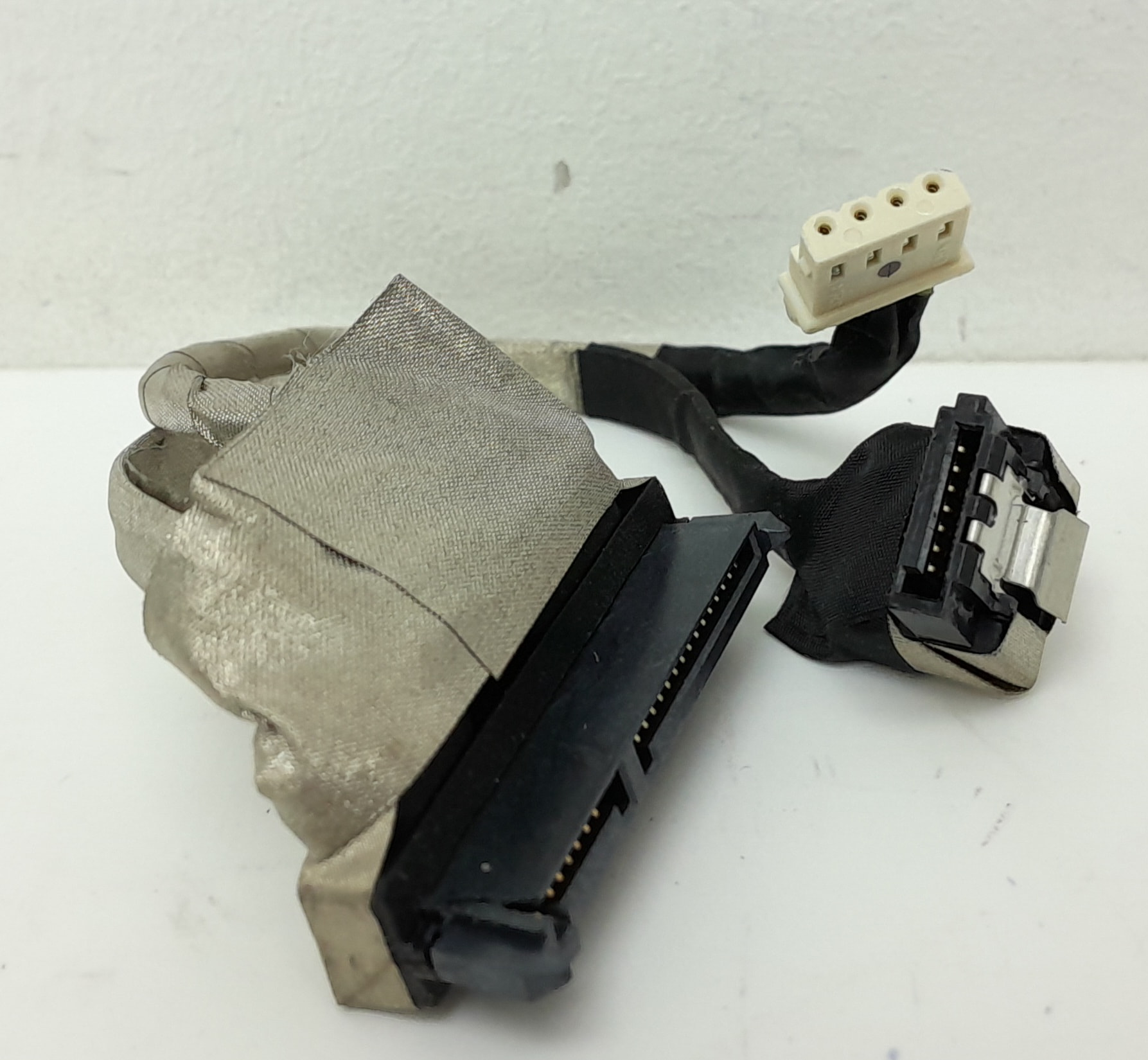
The original SATA cable (DD0N91HD001) has 2 seperate connectors for power and data on the mainboard side but one combined one on the hard drive side. so to try another SATA cable i’d also need a different power cable (physically can’t plug the new SATA along the combined data/power). And the power cable on the mainboard side is some small 4 pin connector (similar to a fan header) which i don’t have a second one of.
SATA cable
Image taken from https://www.store.refurbit.co.uk/product/hp-24-e034na-aio-dd0n91hd001-laptop-hard-drive-cable/
I could bypass that problem by powering the SSD from an external PSU. But i don’t know if it’s safe to do such thing.