I need to store terabytes and terabytes of sample libraries, sound effects, and other sound files. These need to load fast, and smoothly. I have up to this point, thought I would solve my problem by using 16tb of nvme using 2tb sticks at raid 0 x 4 stuffed into 2 asus pcie cards. Speed is fast, but very inconsistent, and sometimes there is big hang time before the transfer , or file listing , or any interaction with the drive takes place. makes it feel slow, and sketchy. Big transfers / reads can die off in speed pretty quickly. very disappointed.
Trying to research this I am slowly coming to the conclusion that this is about iOps and the fact that its pseudo consumer level storage. My research as led me so far to Gen4 Kioxia u.3 solutions or the micron equivalent. A couple of pcie cards to replace the nvme sticks which will then connect two 7.8tb u.3 drives. Is this a real solution? Is there a way to test where bottlenecks are in storage in terms of responsiveness?
Will this be lightening fast for loading the files to RAM, and access and searching the files on these drives? Also, is it likely or possible that the software is actually the bottleneck? Is it a free space issue? Do I have to just assume I will leave X% of the drive empty?
Lack of free space will lead to fragmentation, which leads to bad performance. Extreme fragmentation can also be a problem on SSDs - though unlikely this is your issue.
What software are you using to read the files? How are you storing them, all in one big directory, or many directories with a few files each?
Having 8x nvme’s connected via two “asus pcie cards” means that you’re using at least a workstation setup. Do you mind sharing? What nvme model(s) are you using?
I assume you’re referring to the asus cards that require bifurcation support from the motherboard and don’t come with redrivers.
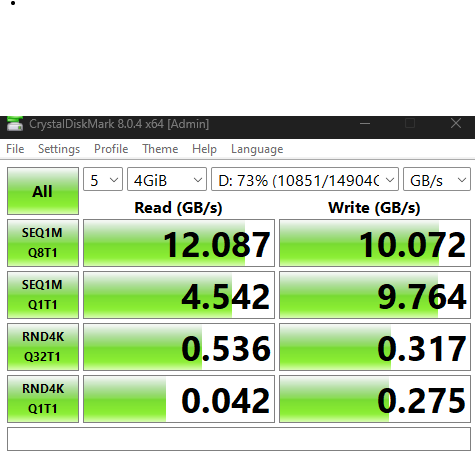
Your screenshot shows a diskmark run across all drives. How did you set that up (mobo raid|software raid|…)?
Getting simultaneous sequential read/write speeds of 12GB/s and 10GB/s is not shabby and is what I would expect out of your setup. The single threaded performance (SEQ1M Q1T1) is also reasonable depending on the model of your nvme drives.
The random 4k performance is very low and possibly a reflection of read amplification due to the raid configuration.
I would first look into better understanding the workload you build this setup for. I.e. how much of your workload depends on the first line in your test vs. the bottom lines. I assume a mix.
“sample libraries, sound effects, and other sound files” can mean a few hundred large files or millions or tiny files (which one is it?). Also, I assume the responsiveness of your workload depends on loading a (varying) subset of all these files (how large is this subset typically?).
“sometimes there is big hang time before the transfer , or file listing , or any interaction with the drive takes place”. Did you try running this workload off of a single nvme? If yes, how did that compare?
A modern single nvme should have about 100x-1000x the RND4k performance compared to your raid setup and I would expect a noticeable improvement running off of a single nvme.
Yes, these are good drives, but I would wait before purchasing any of these expensive enterprise drives. They may be a solution, but I don’t think they are in your case. They even may introduce new and unexpected issues into your setup.
Thanks Jode,
they are off the shelf mix of samsung 980, micron, 2tb sticks ordered off amazon. nothing special as I was not knowing I needed to be deliberate with choice. yes, the cards are bifurcated, although I dont recall doing the setup 4x4 on each slot, but I must of since the drives all show up. I did the raid 0 striping just on windows partition manager, not the motherboard level. not sure it supports it when on pcie cards anyway.
its millions of small files.
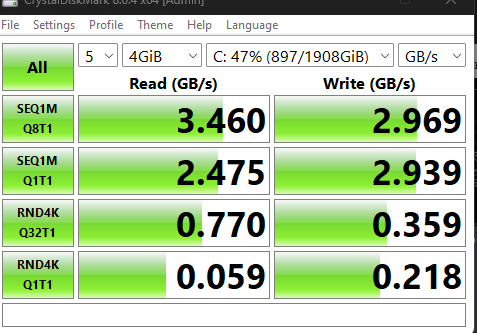
What you said prompted me to do my OS drive. which is also some off the shelf nvme in a motherboard slot. seq1m performance is what I would expect. Is the performance of this part of the problem? Keep in mind, that I would characterize my speeds as good, but with the hesitations, and pauses, and slow downs , overall performance feels bad.
The RND4k performance of your “C” drive, while in line with your RAID cluster, is very low and indicates either the use of a very cheap consumer drive or serious issue on the OS (file system) level.
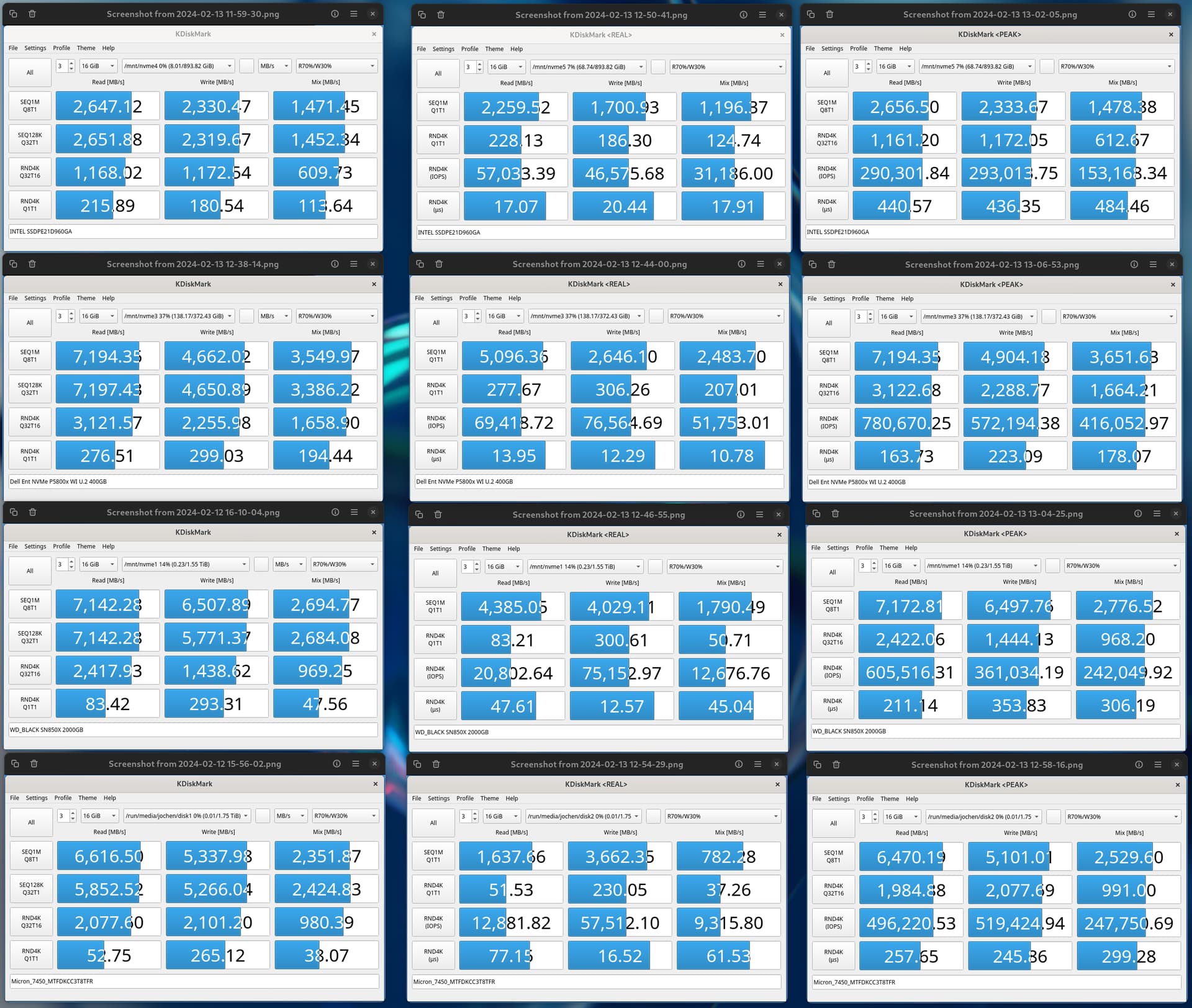
Take a look at performance numbers of different nvme technologies.
You find a top of the line consumer drive in form of WD SN850X, an enterprise class Micron 7450, and two generations of Intel Optane (905 and P5800X).
Identically named results are generally comparable to yours, however there are some caveats. These tests were performed on Linux using the fastest file system option available (XFS). Other file systems such as NTFS and btrfs have nice features that make them very suitable to host operating systems, but don’t offer comparable levels of performance.
Also, see that there are not only way more test scenarios, but that the drives differ a lot in how they perform across these test scenarios.
If you look at the RND4k Q1T1 performance across the drives you will see that the enterprise class Micron drive has the lowest read performance of the bunch. This is why I don’t think buying enterprise class nvme drives will solve your issue.
My hypothesis is that you experience stutters when the drive is asked to load a bunch of tiny files (close to the RND4k tests).
I assume that the load will not result in a high queue depth, but rather have a queue depth close to 1. You can verify this by looking at the disk performance section in Windows task manager.
Modern nvme storage technology is capable of offering RND4k Q1T1 performance that is in the order of 1000x faster than what you currently experience. If/when you find out how to unlock that speed I think your performance issues are largely be a thing of the past.
Unfortunately, I am not exactly sure what your next steps ought to be. I have given up on Windows for anything but gentle browsing a while ago and I am simply lacking the experience.
Unfortunately this can be hard to optimise for. Are they in many smaller directories, or one big directory? Having lots of files in one directory can cause speed issues, especially when software attempts to list the directory.
I would say software is likely the bottleneck rather than hardware. Even the worst SSDs shouldn’t have poor enough performance to noticeably hang loading a small file randomly.
RAID0 could actually make performance worse in this case, since it needs to potentially wake multiple sleeping drives in sequence, and the more drives in raid 0, the more drives need to be woken. Depending on how the RAID is handled, this could also be an issue. In this case, not using RAID would be the better solution imo, rather than enterprise drives that just never sleep.
But, waking from sleep should be a matter of a couple ms, so it shouldn’t cause a hang like that either.
I would actually try to condense the problem space by looking at either dual 8TB NVMe or even go for 32TB enterprise drives in a RAID1 or RAID0 setup. The more parts you have the more complex your setup is going to be, sooo…
Something like the Micron 9400 Pro with a U3 interface could fit the bill here:
Do remember that you will want SSDs with a DRAM drive and TLC NAND.
Since you wish to use RAID and NVMe drives, Have you considered using Get FreeBSD | The FreeBSD Project FreeBSD 14.0-Release with ZFS zettabyte file system?
For a quick test use Live Media version booting up Download GhostBSD | GhostBSD from a single USB Flash drive and copy its contents to 4GB Dram memory. See if you get the same transfer speed of your small files when using ZFS and RAID NVMEs? This is an idea you can cheaply test and see if it works for you.
*update. I am about to migrate the OS to a gen4 m.2 and measure again as the fundamental problem on my OS drive may be the cause of the overall slow “feel” and hang times on things.
Then, I ordered a u.3 8tb drive and a pcie card interface as a second test to see if the I/Ops and enterprise level designs provide any improvement beyond what the OS drive change made.
I’d like to see a system that can get into the ~59GB/s read—218GB/s write RND4K Q1T1 range. Even the xinnor stuff I’ve seen doesn’t even get close to that.
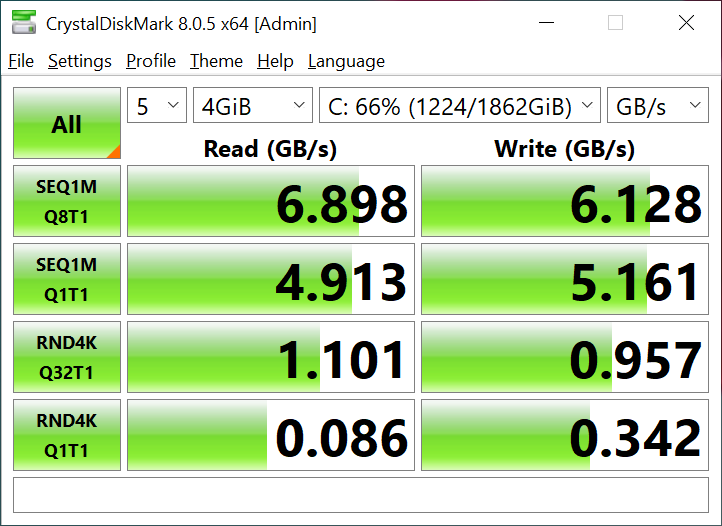
I’ve got a SN850X and am only getting about 50% higher than the OP single drive Q1T1 speed:
The benchmarks you’ve run might not be indicative of the actual file access speed you experience. If the files have been sitting on this type of SSD for a while, >6-12 months, they will be much slower to access than if they were freshly written to the drive.
I suppose migrating to a gen4 m.2 will make the data fresh though.
… You are aware PCIe 5.0 only support ~63 GBps Read and Write? And that is in theory, in practice it’s more like 30-35 GBps?
A DDR5 RAMDisk MIGHT solve your issue here, but anything relying on PCIe is not going to cut it. You’d need PCIe 7.0 speeds in that case, possibly 8.0 speeds.
Now that I think about it, there might have been a misunderstanding between the GB/s the CrystalDiskMark was showing and the MB/s that KDiskMark was showing.
I think that might have been where the 1000x speed increase potential of NVMe came from.
Even with PCIe 7.0/8.0 and a monster controller, I’m not sure NAND flash would be up for those speeds at queue depth 1. but this has me wondering how fast a ramdisk would be @ Q1T1 on something like the new threadripper pro or maybe W790; with 8 memory channels you’d think it would be pretty fast.