I think you may very well be right! That could explain why different drives experience a different “bottom out” speed. More importantly, I think that plays into the VASTLY different TBW endurance specs that drives provide. The higher the TBW, perhaps the less concerned the controller will be with maintaining data access speed (to minimize background write operations for corrections).
That said, from experience it REALLY does seem that some drives just plain don’t exhibit this degradation in read speed behavior at all. My theory is that it comes down to the electronics components used internally on the drives (capacitors, inductors, etc) vary between models/brands and in some cases hamper the NAND’s ability to preserve a good stable charge.
If it was programmed in firmware, it would have a refresh algorithm kick in before data corruption happens, probably, one would hope.
If maintaining performance isn’t the priority, making sure that data isn’t lost is the only bar to clear. Given the stupid-high TBW of some consumer drives that seem to perform very poorly long-term, and do have a tendency to eat bits sometimes, though, it wouldn’t surprise me if some of these drives are intentionally pushing the limits of delaying the rewrites.
It could also be a factor of programming voltage, ie the drive may be programming already partially degraded bits because it can’t sustain optimal voltage for the required programming time for the NAND cell due to the cheap power system in the drive/controller, so it compensates for it by assuming that there’s a degree of leakage from the start.
But, that’s assuming that all this performance loss is due to leakage and nothing else, and I don’t think SSDs are quite that simple.
Has anyone done this kind of benchmark on SD cards? They should be using the same NAND flash, and there’s much less room for a complex controller interface in-card.
I watch Security Now (Twit.tv) and Steve and his spin rite has been showing performance improvements by rewriting every block on a drive. This help fix issues and speed up the drive at the cost of wear levelling the flash. The rewrite will be new cells via internal SSD balancing.
using a consumer trash SSD with 64l TLC and no active wear leveling, I’m seeing corruption on older data in the form of btrfs csum errors. Specifically, currently, only data that was first written to the drive a very long time ago.
It’s a cheap, trashy siliconmotion dramless SATA SSD, so either the data is degrading to the point of erroring and the drive does not care, or writing new data to the drive is causing corruption in older pages. This might actually be a problem for consumer-grade SSDs, especially budget-oriented bulk-capacity type SSDs.
The number of errors is slowly climbing, but I’ve been using it as a temp drive for downloads, so not sure how much is just data retention, and how much is the controller borking old data while wear leveling for new data.
Oh, and given that the drive had no recoverable errors when performing a scrub… it has no error correction at all.
Don’t buy cheap siliconmotion consumer SATA SSDs, they will eat data.
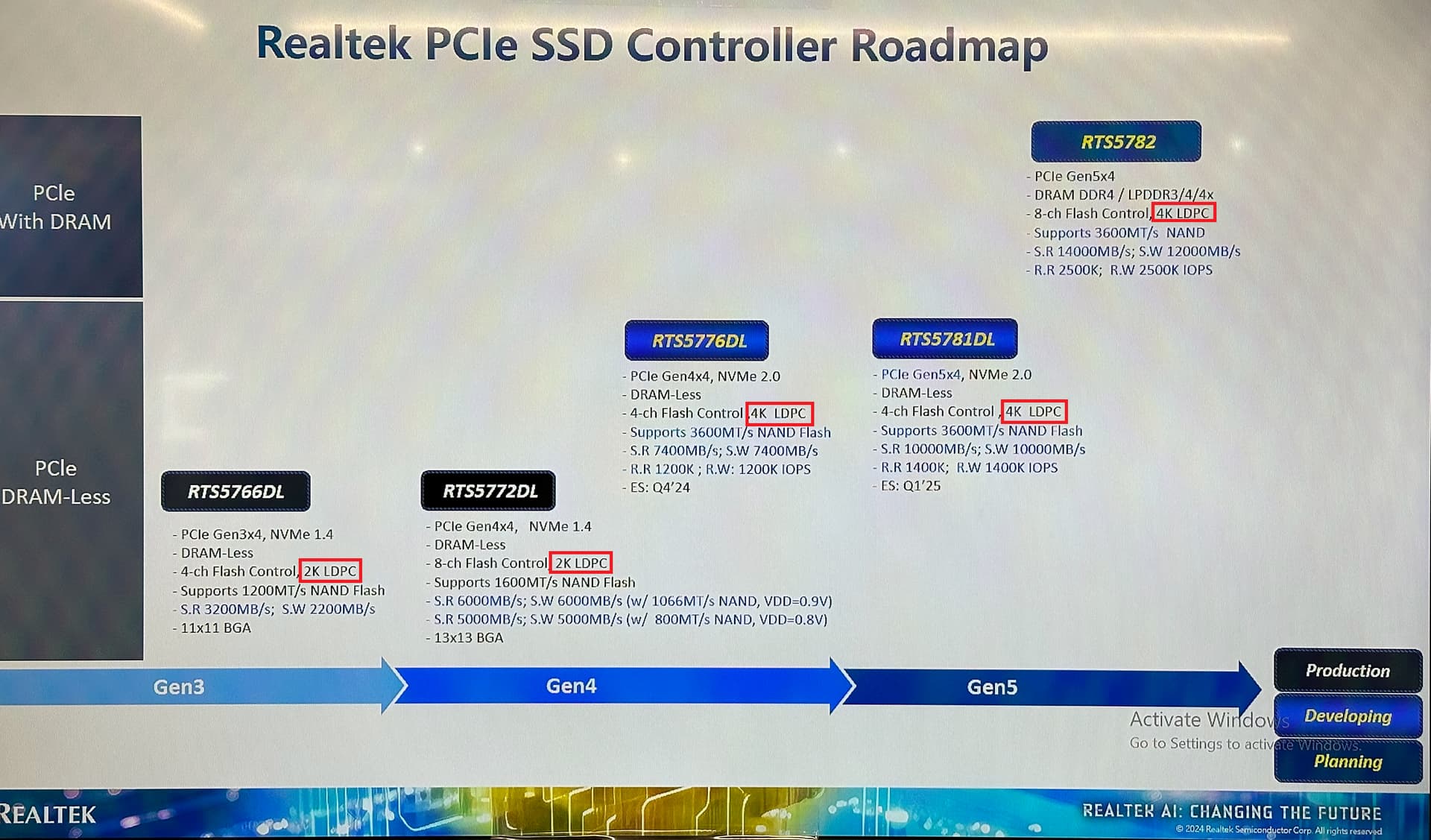
I recently came across a slide showing what kind of ECC some SSDs implement and I was surprised to see that even the most high end realtek controller can only match AF HDDs… I had assumed that SSDs had better ECC than HDDs but apparently that is not the case.
I hadn’t noticed how long this thread had gotten in only five months. Are there recommended SSD series, manufacturers, or controllers which do The Right Thing™?
I understand that the rule of thumb is go go with enterprise SSDs, but sometimes there aren’t any which provide the desired mix of capacity and/or performance characteristics.
Use cases:
Always plugged in
As a target for writing backups and then cold storage for as many weeks as a back-up cycle
yeah this thread is getting huge, a lot of experimentation in it.
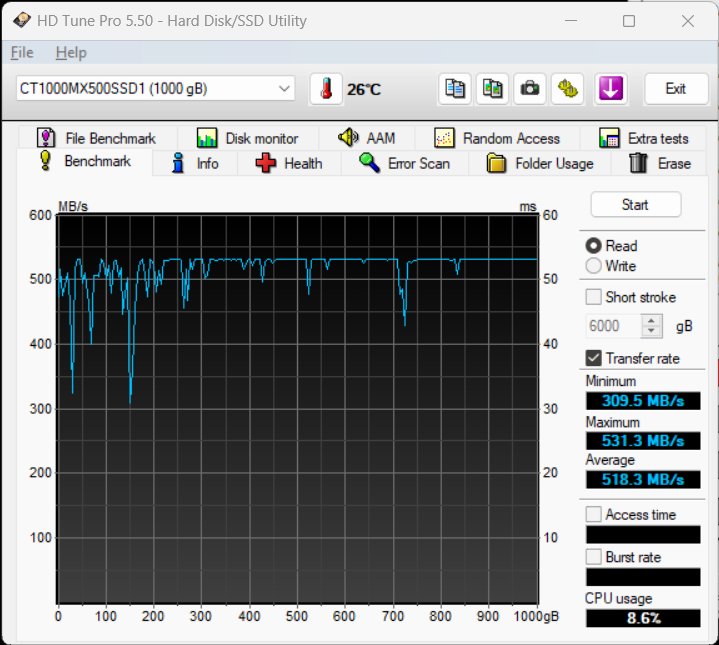
Judging from all the testing so far, the Crucial MX500 was the only consumer-grade SSD that was found to not experience severe read speed decay after data was at rest for extended periods of time.
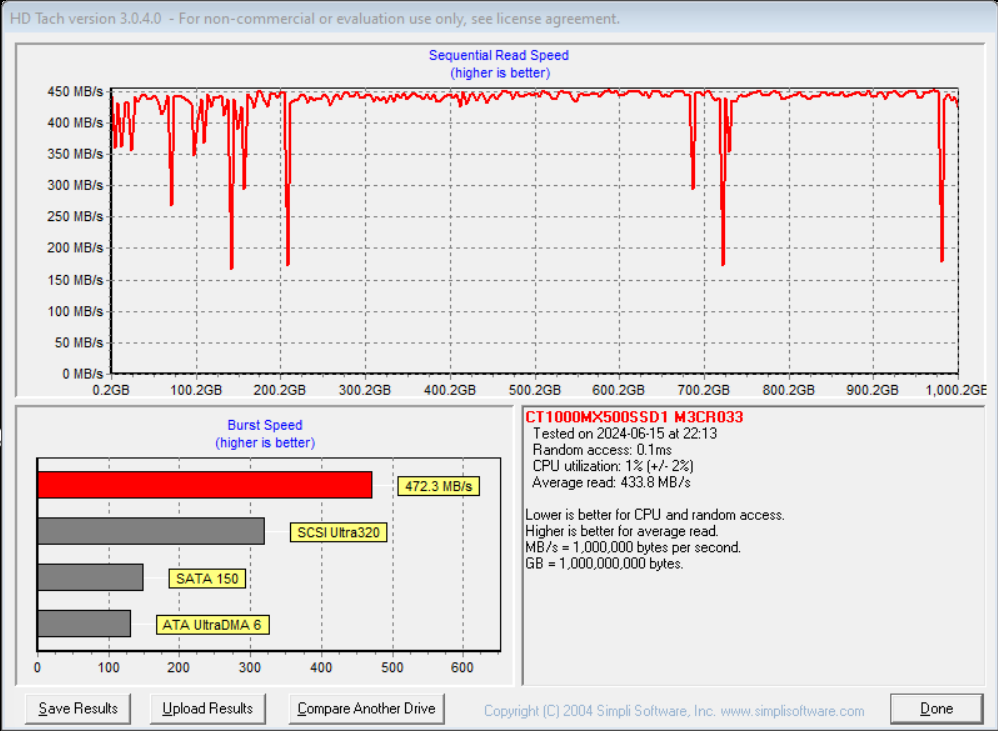
This is what my Crucial MX500 looks like now. To be honest, it’s not very full, most of the data on it moves in and out. But there is about 140GB that’s been sitting there for almost as long as the drive has been running, a little over 1.5 years. And even at about the 1 year mark I never saw much of a degradation. To me this looks like just a few files are being read a more slowly, certainly nothing like my TeamGroup CX2 which drops to 50Mb/s or less in 2 months…
As an EE, you are correct that cell voltage needs to be refreshed (as does magnetism for spinning rust).
(in theory) The easiest method to guarantee so is to perform an “Extended SMART Test” where each sector’s current value is read into RAM on the drive, another value then written to that sector, that value then read and compared to expected result, then the original value written back.
This is in theory how the Extended SMART Test should be implemented, but drive firmware is often a black box. After doing so, a scrub performed by the filesystem (ZFS or ReFS) should be performed to validate data integrity.
Every sector has now been fully refreshed and be good to go.
Short of that, a bit for bit copy between the original data drive to another drive, writing random data to the original data drive (so as to skip firmware optimizations omitting rewrites of same data) and a bit for bit copy back to the original drive followed again by a filesystem scrub to verify original data integrity is the best bet.
I don’t think people here are concerned with data integrity as much as data read speed, the fact that some drives, after sitting for 2+ months, can have stored data become readable at 10% of the advertised speed. In a year it can be down to 1-5% (2-10MB/s).
Cell value is the very definition of data integrity.
If your cell value =/= written value, then you have lost the integrity.
With time the cells lose the voltage differential due to capacitive discharge.
This is not regularly refreshed as silicon’s ability to retain electrons degrades each time the barrier is permiated (with a write more than a read).
Your slow reads are a result of hardware logic branching (this includes caching issue).
If cell voltage differential is large (the difference between the acceptable true and false voltages per cell)
Then
confidence = 1
read at default speed (no mode change for controller)
Else
change read mode (voltage differential sensitivity) to higher sensitivity for this cell
Then revert and loop for next cell trying to be read.
This hardware changeover to a higher sensitivity would slow read speed drastically with each change adding a loop per cell read.
As cell voltage differential drops from electron loss (bit rot) reads become slower and slower as the controller attempts to salvage data. Eventually a cell is marked incapable of meeting the voltage differential threshold and labeled bad. Correctable errors are cells within lower thresholds that after rewriting fall within bounds.
OP was asking how to fix this at the software level, and the firmware SMART Extended is the simplest assuming it is implemented correctly. Read, rewrite with different data that bypasses drive optimizations and rewrite original data is the most assured way.
Now we have explained why.
Let me know if you have any further questions.
I don’t think any extended SSD smart test behaves that way, though. Pretty sure it’s just short(controller only test) and long(read only media test), and I suspect some drives likely ignore a lot of things to return a “working fine here” result.
For a harddrive, it might work that way, but I was always under the impression that a surface test was just a read+compare checksum test, since old data on a HDD isn’t erased, so every block of data has a valid data block and checksum for that block.
The ATA standard requires each Byte in a logical sector be read, summed, and the two’s compliment be stored in the last byte of the sector during normal operation. During an ATA SMART Extended Test, this logic is performed with the sum being compared to the stored value in the last byte of the sector.
If these two values do not match, then you have a failure. Logic states the data integrity has been lost.
Unable to repost the ATA-5 Standard, but ATA-3 is freely available.
From 7.48.6.12 Data structure checksum:
The data structure checksum is the two’s complement of the sum of the first 511 bytes in the data structure. Each byte shall be added with unsigned arithmetic and overflow shall be ignored. The sum of all 512 bytes shall be zero when the checksum is correct. The checksum is placed in byte 511.
By design, an SSD MUST rewrite the charge read from a cell.
When the cell is accessed, the charge is depleted and the capacitance measured.
This empties the cell that was accessed returning it to baseline charge.
If the cell is not rewritten, the result is a 0 after every access.
Thereby, a properly implemented SMART Extended Test will always result in the voltage of each cell being restored to optimal in an SSD.
This is not the case. There is a reason that “read refresh” algorithms are implemented in most all “advanced” SSDs, but many microSD cards and other less advanced flash media don’t implement the algorithm and get by okay.
The read refresh algorithm will have a counter on how many times a particular page has been read and after a sufficient number of reads (could be a relatively large number, in the thousands) will then rewrite the page as to not suffer read disturb errors.
I can imagine that being true by the race to the bottom regarding price by certain manufacturers, but by current electrical law that would mean after a determined amount of reads, the cell’s charge would drop below the minimum threshold and render the data unreadable.
Yes, a gate could in theory hold a charge indefinitely and rely solely on the field effect but electron leakage will invariably pull this to delta naught.
In any sane design, the gate will have the highest energy state with parasitic losses to both drain and source.
In that case, leaving the drive unplugged would be better than having it plugged in since the electrons on the source side will expel more electrons to drain.
THIS is very interesting, and at least for me it might explain why two of my drives (identical model) degrade so rapidly while on 24/7. It seems to confirm one of my initial theories, that one of the difference-makers between models, in regards to maintaining data read speeds over time, is the power components on board of the drive.
Can your understanding of this explain why drives tend to plateau at a certain rock-bottom speed for all their data, instead of the data becoming unreadable? That speed obviously is different per model.
This is the working principle of DRAM, where there is an actual capacitor being drained (or charged, depending on state) via a line-driver sense-amplifier.
Floating-Gate cells as used in SSDs are more transistor-like in their working principle, just with the gate being electrically (mostly) isolated.
In theory, you are absolutely correct. Unfortunately, every time the field effect occurs, some of the gate electrons are lost to the drain. As mentioned above, there are designs (very cheap) that do not replenish the gate voltage with each subsequent read.
As the gate charge depletes, the threshold voltage is still achieved but at a lower point so the drain receives a lower percentage of the source voltage.
This difference leads to the branched hardware logic loop. This does not account for the slower hardware logic that occurs at lower voltages. Since fewer electrons are flowing at once, gates take longer to actuate. In silicon, this is typically field effect. You can simulate a similar effect with a relay and variable power supply. Lower voltages can turn on relay, but slower than higher voltages. Although this relies on magnetism, the principle is similar.
Most drives will replenish this gate voltage regularly, but at the bare minimum to meet threshold with a certain confidence. The reason being, as electrons flow through silicon, the surface barrier is degraded. You can use a lower quality substrate while maintaining industry standard read write endurance IF you lower the stresses during normal operation.
Enterprise drives use entirely different silicon compounds with tighter QC and all around different designs to maintain their performance during the entire life cycle. These drives operate at higher TDP due to the higher charge states.
Before people go overclocking SSD’s, realize that this is all by design. Consumer drives with constant write cycles die rapidly.