my brother just screwed his laptop charger, apparently there’s two cables inside so I’ll just splice them together with two butt splices and some electrical tape.
I guess the outer one is neutral inner is hot without any ground wiring correct?
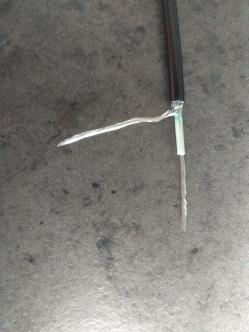
my brother just screwed his laptop charger, apparently there’s two cables inside so I’ll just splice them together with two butt splices and some electrical tape.
I guess the outer one is neutral inner is hot without any ground wiring correct?
looks like the 19v end,
Inner is (+), outer is (-) by rule of thumb.
And lighter colored cable is always (+) by rule of thumb witch corresponds with the above.
Look at your charger.
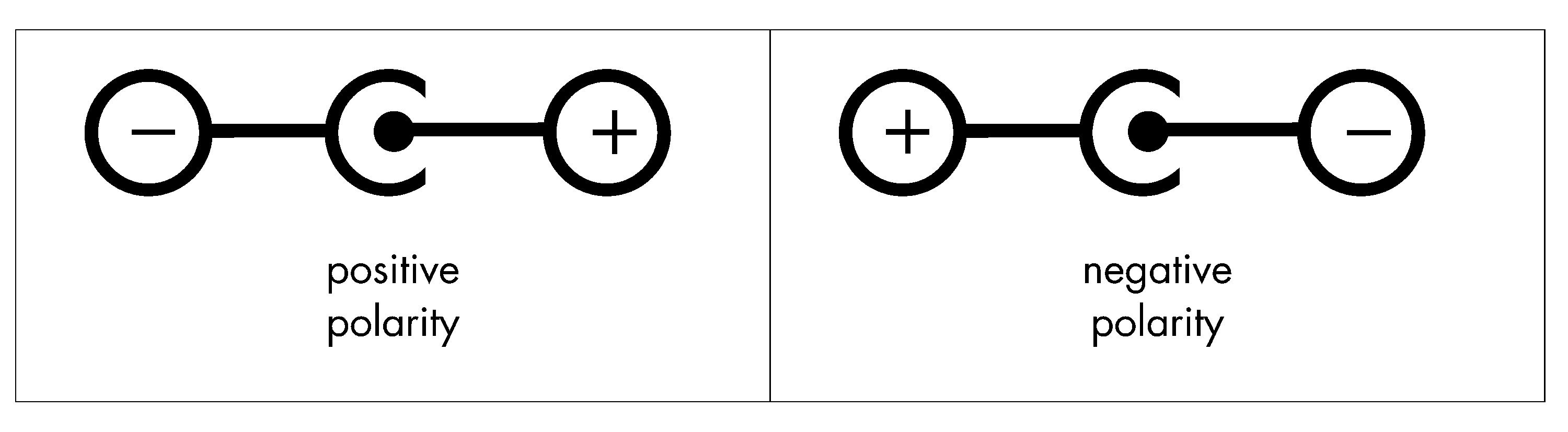
The right example deserves the title of this topic…
Gave you a thread OP. 
Depends on the brand… But sometimes there is a tiny 3rd wire
Like @Fawkes said, look at the charger. Normaly there is one of the symbols showing what part of the plug is what.
Then you just need a multimeter to check wich part of the plug wire is what.
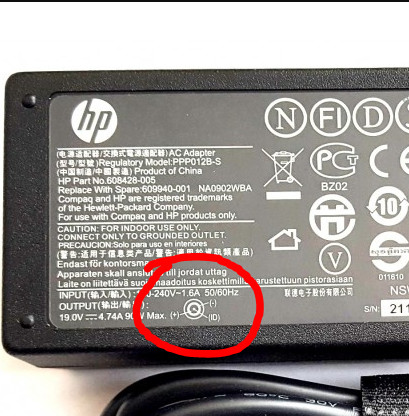
Then the symbol looks a bit different, but reads the same.
@nx2l mentioned something important. Sometimes there is a “voltage sense” wire going back to the powerbrick.
actually its a signal wire that is the manufacturers way of checking that you are trying to use it in the correct laptop… or they wont enable the main voltage output.
I’ve personally seen center negative, but mainly on either audio equipment, 15+ Y/old computers, or asshole engineers making obscure products.
Definitely not common. EEVBlog made a video about center negative a few years ago.
Oh, that is new.
I have seen it as a “voltage sense” like it is done on some 24-pins where the PSU checks if the correct voltages arrive at the mainboard, but never as a signal.