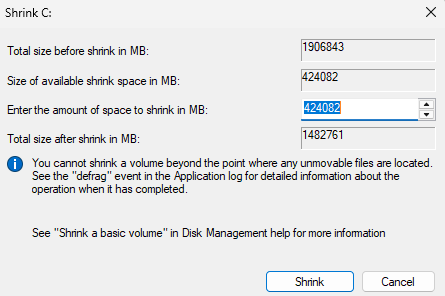
I want to copy my Windows installtion from a 1.8 TB drive to a smaller 447 GB drive because I barely use it. The Windows installation on the larger drive takes up 324 GB. My original plan was to shrink the data partition down to under 447 GB and use Clonezilla to clone it but Windows Disk Management will only let me shrink it down by 424 GB. I have system restore, hibernation, fast startup and page file all disabled and I’ve used Disk Cleanup. I’ve also tried to shrink it with GParted on my Linux install but it just gives me an error.
Are there any other ways to do this? I really want to avoid having to install Windows and spend a long time manually copying files and setting everything up again.
Solution: I came across a program called DiskGenius and after creating and loading into a bootable USB created in the program, it was successfully able to clone the drive without me having to shrink it beforehand.
I think you should be able to make a system image and then restore that to the smaller drive.
The system image would be just the data, not a block-level copy.
Heck, you could even clone the drive - using something like disk2vhd, and even that should end up smaller than 2TB. And even further, you could compactify it.
I sometimes use Clonezilla but it can be clunky. I would recommend Foxclone which you can boot from USB, then you can use Gparted to shrink the partition and the clone utility to copy it, there are pretty good docs on the site and I’m pretty sure I’ve used what I just said to move Windows to smaller drive before.