I’m just curious if someone has already found a solution for this.
If you don’t know already, I work in the construction industry and often have to take videos to show construction defects or to help me draw up existing houses.
For a long time I’ve just used the 1080p option on my phone, when I use the 4k option, the video plays perfectly well on the phone. When I watch the video with VLC, it stutters really badly.
Have you tried to convert the file to another format (no idea what format it outputs) and/or using another player like the one built in to the browser? There is a Firefox extension Video Download Helper I use which can convert audio and video files to many different formats. Since I already use it, I don’t have to go hunting for other software to convert file formats and it works fine for my limited purposes.
I don’t understand the love of VLC. If a file is ever going to have a problem playing, it’s always with VLC. If it didn’t come installed by default in so many distributions I would never use it again. Perhaps the LAN part is more useful but I’ve never needed it, and all basic functions seem to be worse than the player built in to Firefox. I really can’t count how many times a file was set to open in VLC by default, failed, and I use literally anything else and it works fine. I’m glad to have this reminder. I never uninstalled VLC from my last OS install and it has bitten me a few times, so I’m uninstalling it right now.
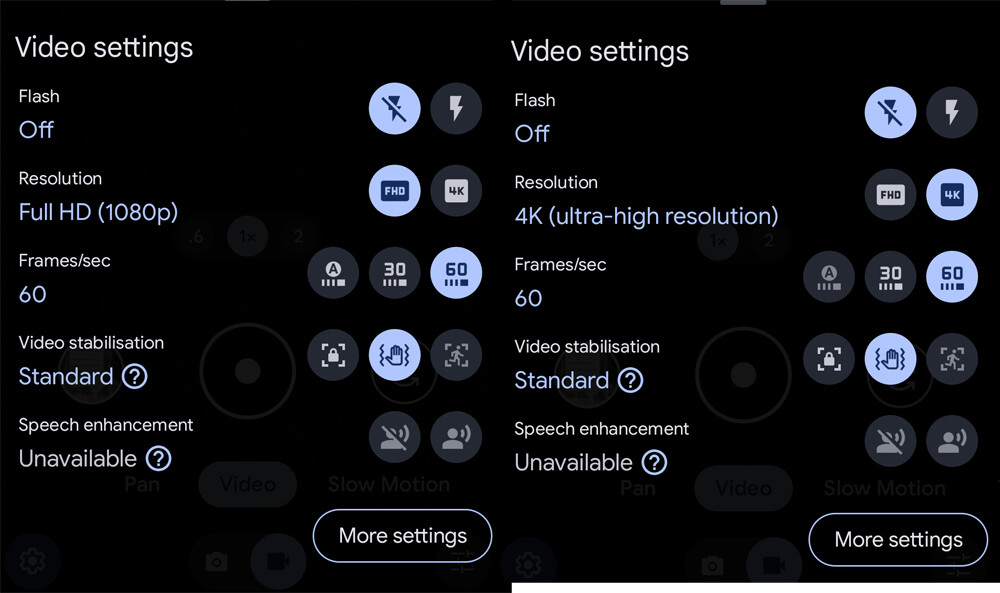
I notice you have it set to record at 4K 60FPS. If nothing else works, perhaps try 30FPS and see if that makes a difference.
What format, codec and encoding profile is used by recording device?
What kind of hardware is your PC and what kind of decoding does it support?
is HW decoding available for target codec at all? If not , performance issues are to be expected.
if it is available, is it used? Verify by monitoring cpu usage and gpu decoding block usage
Codec packs and player are mostly irrelevant these days, if player uses ffmpeg library at base, then it can play anything your machine can play wit hnative offloading (VLC, MPV.io)
Preliminary:
If up to date VLC has issues playing the video, you hardware likely does not have matching hardware offloading capability.
Unless you phone uses non-standart or too modern encoding for 4k ( like AV1) and you cant change it to something else manually, you are fucked. Upgrade or perish.
All answer above must be answered by OP:
hardware specs
cpu/igpi or dgpu for hw offloading block capabilities
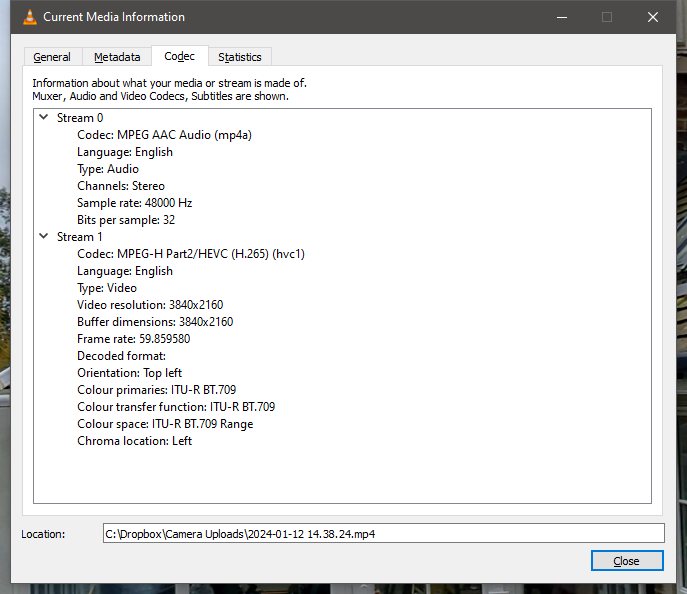
list encoding specs of phone recording (VLC ctrl+j, codec info)
Thanks for the suggesting, I’ve just tried and while it plays normal videos (1080) without issue, it struggles worse than all others when I try 4k. I’ll certainly have a look into that Video Download Helper extension, thanks you.
Merely in my use case, I only used VLC (and continued doing so) because many years ago I had an issue with the built in apps, tried VLC, and it worked. I have no love for it, it is just a tool for me. I have no love for my electric drill, impact, recip, and so on, just want a tool to do a job!
Good call, I’ll certainly try that. Though it’s a shame that 1080p at 60 seemed to be OK.
If I find a solution with this, I’ll certainly update you via this post
Thanks for commenting
I’m using a 4C/8T CPU and a RTX Quadro 4000. It’s normally good for almost anything that I chuck at it (it is well overdue replacement though!).
I have played 4K movies on the same machine, with no issue (that I can recall at least!)
Thank you for everything you’ve written, I have fully read I’m not near the machine now (film night with other half), but I’ll answer all of this as best as able asap
look in bios and make sure you have above 4g encoding enabled.
in vlc goto tools/ advanced/ stream filters and see if you need to increase the buffer sizes.
try doubling the buffer size and then if needed the seek threshold… (as far as i know they should match values)
then down to output modules and see if you have hardware acceleration set for dx11-9 and so on.
vlc should handle h265 fine.
EDIT: Disregard following, mistook device specifications .Regardless of that, it supports UVC feature level of 6.3 (ref. wiki), which includes H.265 decoding up to 4k and up to 10b color space.
working dGPU (radeon) is capable of offloading at least some HEVC streams (haven’t found details on limits) .
working iGPU has intel quick sync feature level v6, which is capable of decoding some HEVC streams (ref. wiki)
problematic dGPU (quadro rtx 4000) is based on TU104 chip, i.e unfused 2070-2080 consumer card. It has VPAU featureset J, which is pretty recent and supports almost everything HEVC wise.
Since both gpus have support HEVC offloading, its likely that there is capability mismatch in play here → offloading is supported for certain combination of resolution AND bit depth AND chroma subsampling.
More details are needed here from codec info.
Quick reference how complex it can be from puget systems:
You’d think so wouldn’t you. Drivers are update and it seems more up to date that those available from NVidia? CORRECTION: I HAVE VERSION 536.67 AND THE CURRENT APPEARS TO BE 537.99.
I’m afraid the Quadro is the problem machine, the radeon referred to is my laptop that appears to have no issues with play back…even on battery saving mode while on battery!
I’ve searched the motherboard manual and can’t see anything that refers to encoding, so I think you’re right. The board just isn’t modern enough. Upgrade time!
TLDR: If device support <?codec> encode/decode acceleration does not mean it support it for all settings and feature levels. Details like colourspace, framerate and resolution define the line between working offload and none at all.
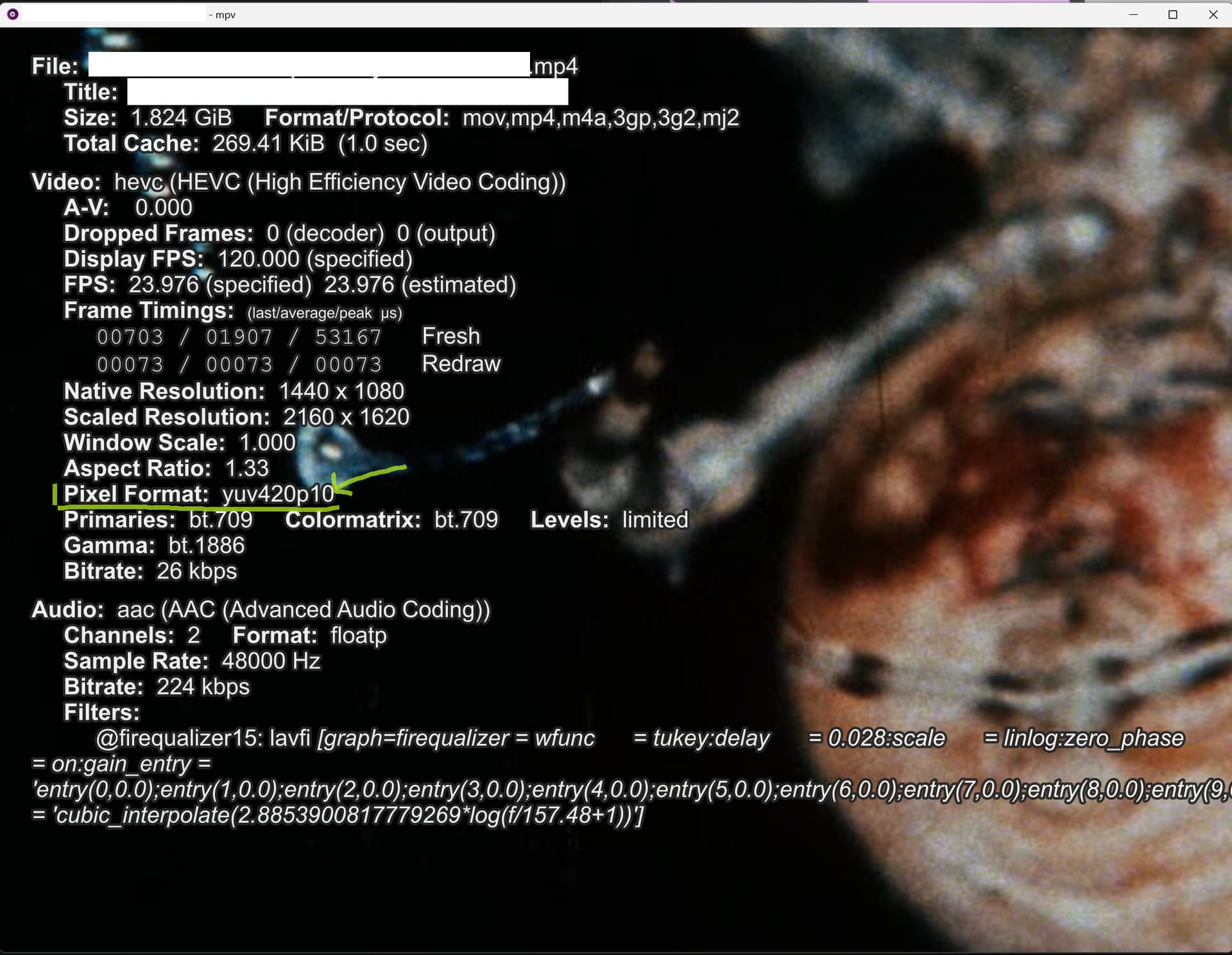
Ah, VLC does not seem to expose relevant details. We need something like this (this is mpv windows build with info menu invoked by pressing i during playback):
That yuv colourspace and bit dept is what we need to know and compare to gpu decoding support.
yuv420@8bit and @10bit is the minimum supported decoding, anything above like yuv422@* and full yuv444@* is optional.
If your phone encodes HEVC in yuv422 or yuv444, then there is likely no decoding acceleration present on your pc or wrong gpu is used by default.
Other than that, I would refresh gpu drivers and look if there isnt known relevant bug.
It doesn’t look like it’s overloaded, but the stuttery video could still be caused by a lack of hardware decoding or something.
I would install the latest codec package and see how Media Player Classic Home Cinema handles the file. Not that it necessarily has to be a solution to the problem, but it would give you a point of reference whether you are chasing your tail with vlc.
If you can open it on a laptop without any problems, it may be an incorrect configuration on the desktop or an option not enabled… As above, I would check the codecs and another player.
Vlc, from what I remember, has a lot of its own built-in codes and who knows…