Hi everyone, I’ve been a fan of Level1 for a while but I’ve never really used the forum before. Please let me know if this is the wrong place for this post. Reddit/r/techsupport seems a bit too surface level for this issue. And compared to deeper things we read about and do around here, this issue may seem rudimentary or surface level, but I came here specifically because I want to dive deep on this and would like some help from smarter minds than my own, because I’m a bit stumped here. I do have about 4 years of L1 (maybe 2?) helpdesk style end user support and I’m comfortable with Linux and CLI and such.
So, I work at a small shop of 5 of us as a general laborer and I’ve also ended up being the IT guy since I have experience. We have a Dell Inspiron 27 7710 All-in-One PC for the admin person, running Win11 (25H2 IIRC). It has an NVMe SSD, a 12th gen i7, 16GB of DDR4 RAM. It is slower than it seems to have any excuse to be, IMHO. It lags when typing sometimes, everything takes 3-5 seconds to register clicks, it sits at a black screen for a whole like 2min after boot before the login screen shows up, etc. It’s atrocious to use for long periods.
I’ve done most driver updates, I’ve checked and removed startup tasks, I removed McAfee, I’ve looked at CPU usage (nothing of note is taking up a huge chunk when I sort by CPU usage in Task Manager, even when it’s over 50%). Memory usage is usually a bit high, even at startup (again, nothing of note taking a huge chunk that I’ve noticed when it’s idle, but she does use Quickbooks and has lots of Edge tabs and it often gets to 80-90% RAM), but not enough in my opinion to cause this level of lag.
I do not have a full disk image backup of this PC so I have NOT done a BIOS update yet, it’s about 2 years out of date there. Is it really that important to a lag issue? I wasn’t around when this was purchased but I presume that it wasn’t always this slow.
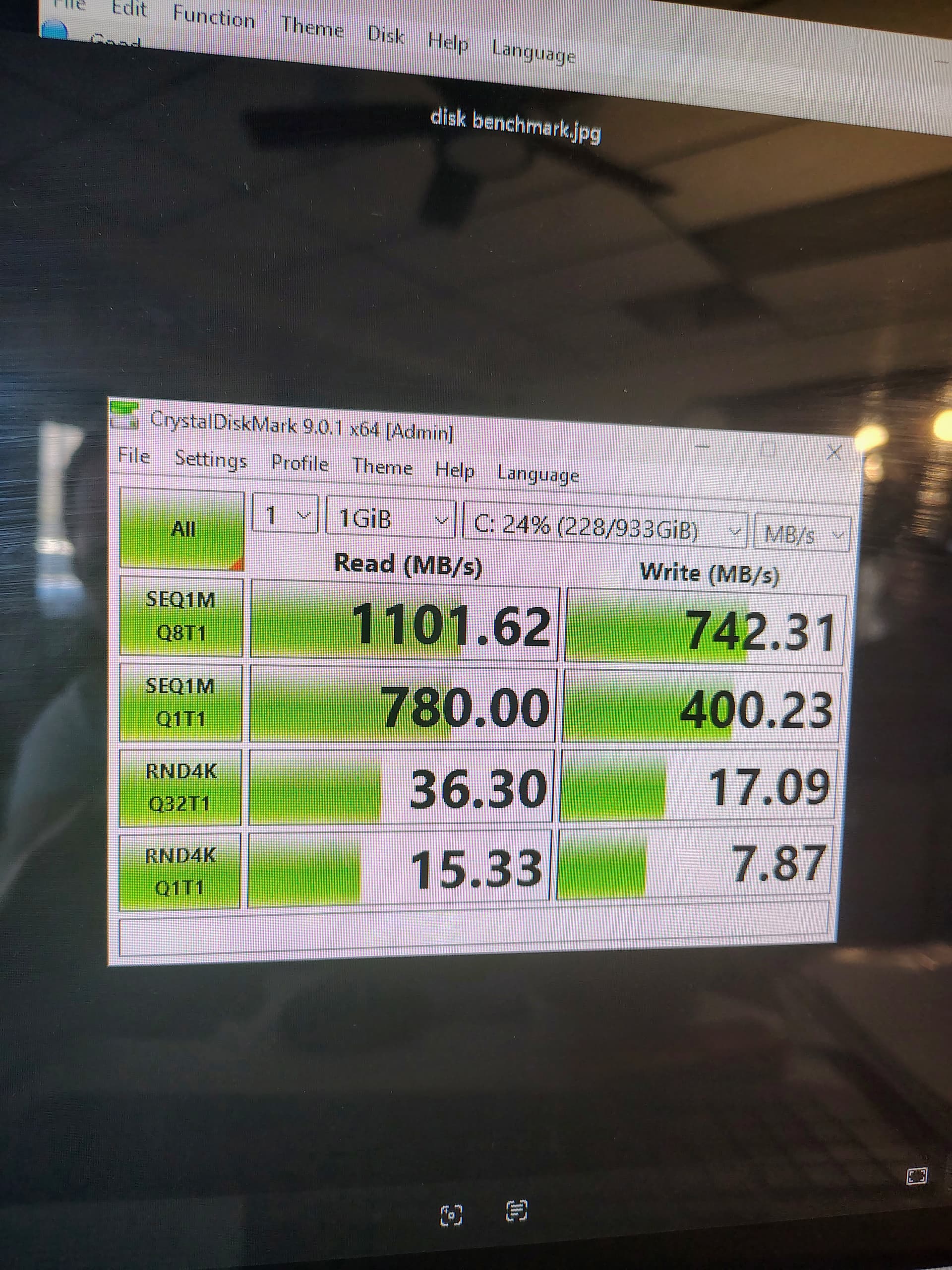
My first theory was that it was swapping to disk too much, and that the SSD was having issues. So I looked at the SMART stats and ran a quick benchmark. SMART shows everything as good as far as I know, but I’m only familiar with old HDD stats, not new ones on SSDs. I’ve attached an image of what I found. Does it seem ok?
The benchmark showed quite slow to me random reads/writes, but I was told by someone on Reddit that this was not abnormal and that the sustained tests look good, so this doesn’t seem like a failing SSD. So I’m off that theory.
Next, I decided to dig into the fact that this is basically laptop hardware in a desktop format, so I figured there could be power efficiency type issues going on. I eventually found a Reddit thread where people were having issues with GPU drivers causing this type of lag. This PC has a combination of discrete Nvidia and onboard Intel graphics. I verified that both of those drivers are up to date. I went to Nvidia Control Panel and specified to use the discrete graphics (to take load off the CPU) and also said Max Performance instead of Max Efficiency for the power profile setting, restarted, basically no change in the issue.
Next thing I did is look at the power plans, and the only one that existed was Balanced. I created a new custom one and specified the following
-Turn off hard drive: Never
-Sleep never
-PCI Express - Link State Power Management: Off (default was something else about efficiency)
-I left the min and max CPU availability at 5% and 100% because I wasn’t quite sure what would happen if I changed those, my brief research suggested that the 5% was a good default recommended by OEMs
This didn’t really fix it either. (My test is see how long the Start menu takes to open, how long a new fresh File Explorer window takes to open and load, and how much lag if anything there is when I type in the MS Edge address bar)
Next, I looked at system temps. CPU package was sitting at 40-50C at idle, which to me seems okay, but someone on I think Tom’s Hardware under some else’s issue didn’t think that was so good. Is it okay? I was using HWinfo64 and it did specify that the thermal throttling indicators were “No”.
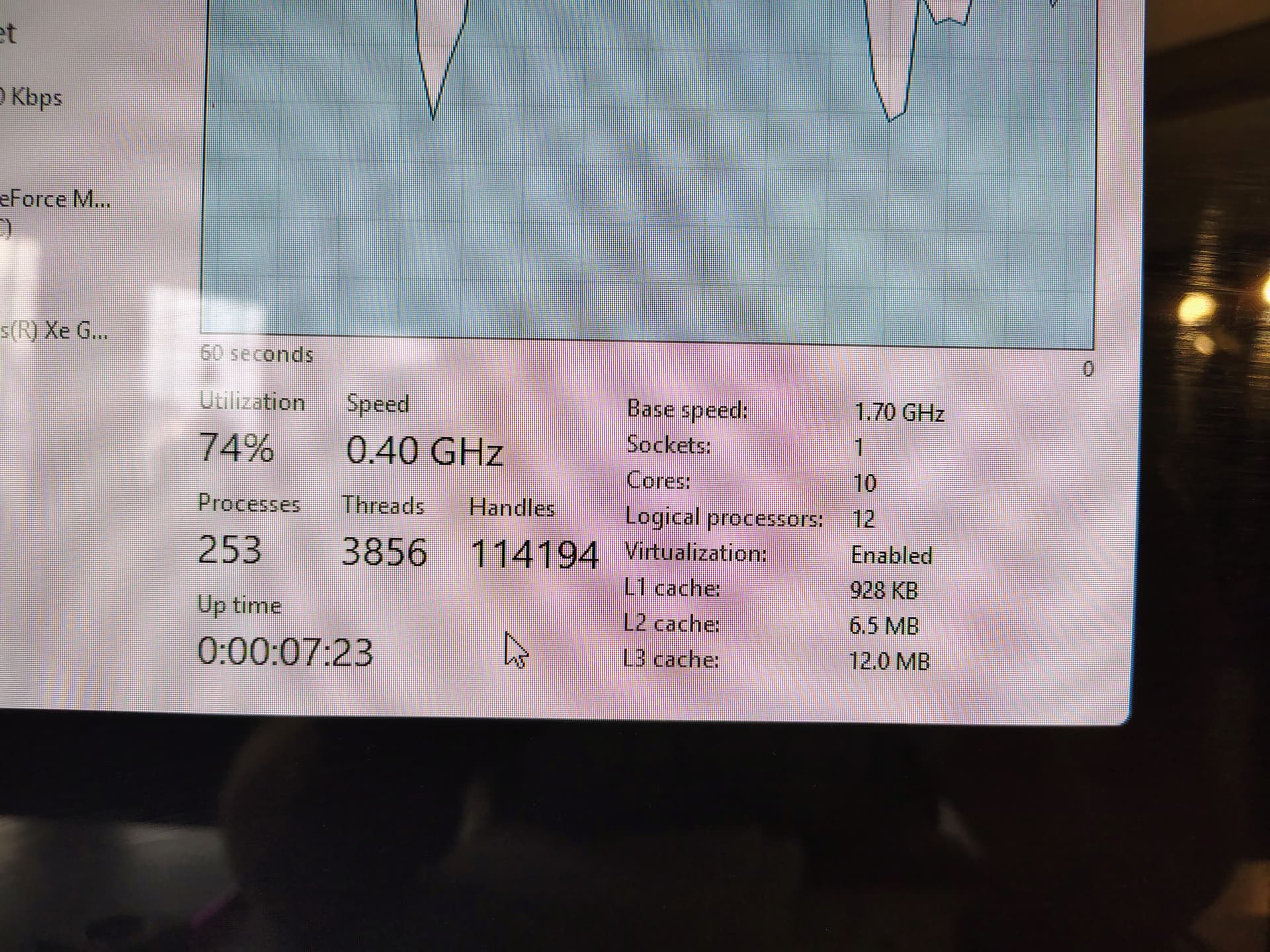
However, I noticed, at least after I made my new power profile, that the CPU was running at 0.4ghz in Task Manager. No matter what I was doing, that didn’t increase. Interesting. I could have sworn I’ve looked there plenty of times and would have noticed this previously if that was it, but I don’t know. Maybe I missed it. Maybe those power settings changes started causing overheating, but temps still looked the same in HWinfo64 and I felt all around the PC and it wasn’t even warm to the touch anywhere on the front or back, neither was the power brick.
Also, at the same time, I noticed that the “base speed” in Windows was 1.70GHz, but in the UEFI menu, it ranges from 0.4 to 4.70GHz. And in UEFI it was running at 4.05, not seemingly throttled.
Someone suggested that the 0.4ghz issue could be the power brick, that they had a Lenovo laptop with that issue and there was a data wire or something that broke in their genuine OEM power adapter and a new one fixed this 0.4ghz issue. I decided to look in the Dell UEFI/BIOS where before on laptops I’ve seen the charger wattage reported, but I didn’t find it this time, so I don’t know. I’m also used to Dell laptops giving a POST warning beep that the charger wattage is below what it should be when I’m using the wrong one, and that didn’t happen here.
Someone else suggested to try ThrottleStop and see what that does and lists out. Is that a good known piece of software to download on a work PC? They said it could be an issue of the system reporting “BD PROCHOT”. Someone also suggested this flag could be due to a dead fan, whether any fan spin was actually needed, that fan failure could be triggering some sensor to force a thermal throttle regardless of temps. Thing is, I’m not sure that this PC has a fan at all, I didn’t see any fan control stuff either. And it being an AIO makes it a bit more difficult for me to open up for surgery. I will if I have to, but that’s a last resort.
So my next steps are to figure out space where I can take an image of a 1TB SSD without having to purchase anything so I can do a BIOS update, and see what ThrottleStop says. And if someone can suggest a more surefire way to test the 130W power brick, maybe replace that if it comes up bad?
Thanks for all your time. I’m really getting stumped (and honestly, fascinated) on this one. If this were a corporate PC backed up in all the usual ways I would have tried a nuke/pave/rebuild a while ago already, but that is truly a last resort here. As is purchasing any hardware/accessories, I don’t want to suggest that until I’m definitely sure that it’s needed, vs trial and error.




 I love having a Dell optimized program to figure out all the drivers to prevent any mistakes. (It told me that Command Update was now deprecated and I had to use SupportAssist.)

 But I totally understand being cautious.