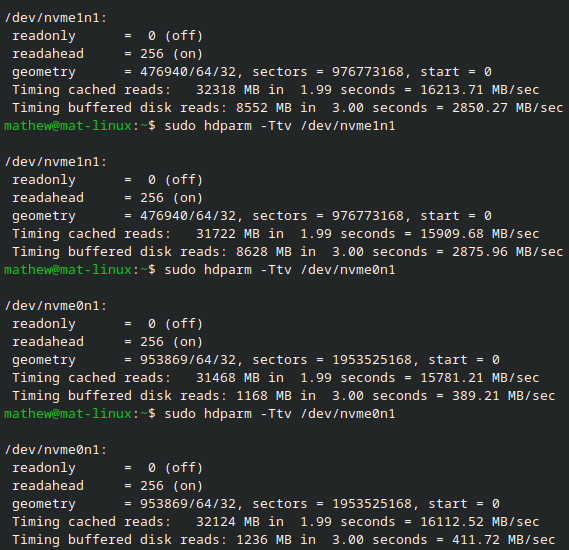
I have 2 Nvme ssd’s they are both PCIe 3.0 x4 one is a Crucial P3 1 TB and the other is a Samsung 970 EVO Plus 500 GB the Crucial drive is reading way slower then the Samsung, they should be roughly the same.
I am running Fedora 42 and Kernel 6.16.3 I have checked the link speed of the drive and they are both running at 8GT/s, Width x4.
I am new here and I am still learning Linux so if missed something or did something wrong please let me know.
I have attached my speed results below and if anyone can help me find what the issue is that will be much appreciated.
I have a Crucial P3 4TB and it’s pathetically slow. I picked it up cheap as somewhere to store weekly system backups. Backups took forever to write.
I finally got sick of it and swapped with a Samsung PM893A (a SATA SSD). Copying the large files from the Crucial P3 to the Samsung, reading from the Crucial P3 drive was the limiting factor (wouldn’t read beyond about 250MB/s and was at 100% utilization whereas the Samsung was sitting around waiting for more data to write). My experience mirrored others over on another forum who saw severe read speed degradation over time, which was theorised to be due to aged blocks. I ruled out all possibilities with PCIe slot speed/lanes, and it would occasionally read a bit faster, but 250MB/s was the typical average throughout the whole copy.
Writes are even worse - flatlined at sub-100MB/s speeds once the cache gets exhausted.
I expected slow writes, due to it being QLC, but the read speed is strange. I don’t see it with other QLC drives I use for media storage.
I haven’t worked with P3 (one P3 Plus, yes, but not its 3x4 predecessor) but it’s my understanding the P3’s prone to reads slowing down on older data and as it fills. Not sure what Crucial did with the firmware to make reads sensitive to the amount of space used but it’s pretty obvious they didn’t care if the P3 line reliably exceeded SATA SSD performance.
OP would have to clarify if either condition applies but ~400 MB/s is actually not bad compared to the ~100 MB/s reads I’ve encountered people posting about.
So there should not be any issues with my hardware that is good to know but I unfortunately got a slow drive.
The drive is about 2 years old, is 52% full and has written 28 TB and read 25 TB.
I only noticed the slow reads recently when moving some large files should I put in a warranty claim as the drive is not reading the advertised speeds ?, I would expect my Samsung drive to be slowing down as it is 8 years old and about 85% full yet it reads faster than the Crucial.
Is Crucial not a good brand any more ?, what brands would you recommend that have good Linux compatibility and that don’t require windows software to update firmware.
I don’t think you have chance to succeed in warranty claim, drive is unfortunately functioning as expected.
Maybe if you live in country with very strong consumer protection and are both lucky and extremely persistent, you might succeed just to make you go away.
Performance of samsung drive is immaterial, its entirely different product and of different performance class.
Crucial makes good products still, but as any vendor they do sell cut cost variants like P3. Those are shit everywhere, just varying level of shit performance.
TLDR always check the following:
TLC or QLC flash ? Always prefer TLC. If not specified, assume QLC and avoid.
Is SSD controller dramless? Prefer fully featured one with dram, or at least HMB functionality
If you want to test the performance of a SSD, you should use kdiskmark instead.
Then you can compare the numbers against reviews to get a better idea if it’s performing correctly.
Some of these cheaper QLC drives don’t have good NAND refresh logic so sometimes it can restore some if not all performance by reading and writing all the sectors. That forces a refresh.
badblocks can do this if you are feeling adventerous