Silverstone FLP01 Retro Thick Pizzabox Proxmox Node: 5.25" Bay 2.5" U.2/SAS Options/Recommendations for Home Server?

Hello,

This probably won’t be my only post on this hypothetical build, but tl;dr, I’d like to build a Proxmox node in a Silverstone FLP01 retro desktop box: FLP01.
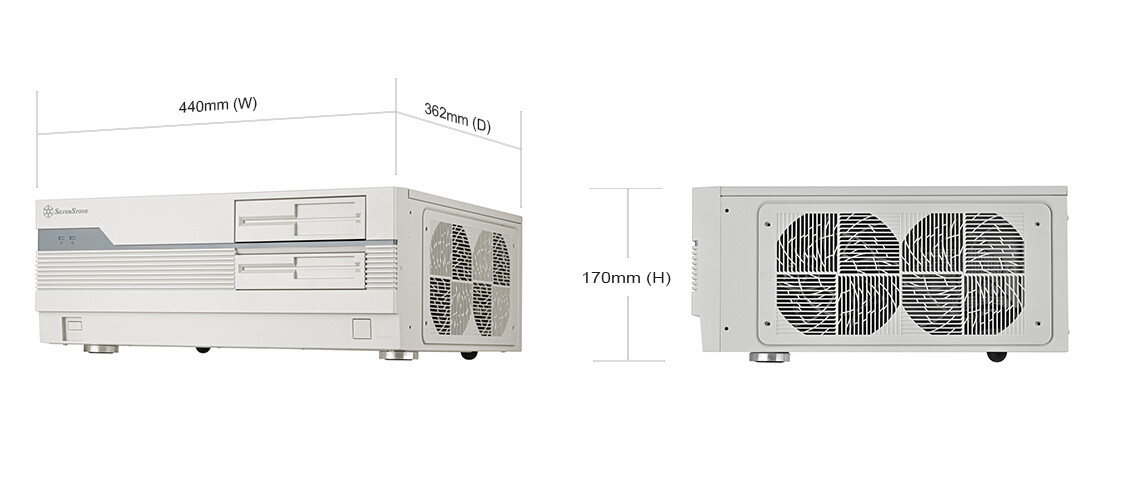
I’d like a non-rack desktop Proxmox build, and I’m old enough that the aesthetic of this one really appeals to me. This will be for a home server build with 10 Gbps networking; preferring solid-stage storage is more about lack of noise and low power than maximum speed.

Before I get too much further into spec’ing out a build, I’m looking at storage options for SAS/SATA SSDs/U.2 for the external 5.25" bay. (The top fake floppy disk flips down to let you access the 5.25" device you slot there … I’d probably remove the flip-down door for airflow.)

I’m looking at 5.25" bay enclosure options from IcyDock, and I’m a bit overwhelmed with my options: Removable 2.5" Drive Enclosures | ToughArmor Series | ICY DOCK

For solid state 2.5" storage for Proxmox, I’ve previously spec’d used enterprise SAS/SATA SSDs in the 1.6 TB+ range (depending on eBay pricing) and picked enclosures to match. IcyDock has a lot of those, but I feel pretty solid in my understanding of SAS/SATA HBAs at this point to choose.

But at this point in 2025, is it worth it to start looking at used enterprise U.2 storage? If so, which IcyDocks should I be looking at? That is, has used pricing come down enough that I can get a better/similar deal on price/storage capacity if I go with U.2 2.5" disks? If so, does anyone have advice on choosing an appropriate IcyDock and compatible HBA?

I’m interested in either a 4 or 6 bay unit, but again, the options are overwhelming.

I don’t have a motherboard or CPU or anything else picked out at this point. I’m really focused on trying to figure out how much 2.5" SSD storage I can reasonably fit in this case before going further.

EDITS: Friday, June 27, 2025
I want to keep track of some useful info here, as well.
Reference Build: Project Sparrow

1 Like

Ey! FLP01 mentioned!

Word of caution:
The case is closer to HTPC than anything else, meaning surprisingly compact case, so plan accordingly.
In my case, I kinda overdid it on the CPU-cooler so I now have quite good temps, but I need to come up with a DIY-solution for mounting the ODD.

If you don’t do like I did, that wont be a problem, then you are just left with the hurdle of “how to mount 2.5” devices"?


I would argue 8x 2.5 SATA:

There are nice 4-to-1 pigtail cables to plug 4 SATA-devices each into an appropriate controller, job done.

As proud owner of exactly 1 enterprise SSD: Strong depends

Yes they are fast all day every day (know your workload!), yes they are “cool and enterprisy”.
However: 150€ add-in card with re-drivers, 45€ cables, 300€ 5.25" cage. And they are not “cool” but “hot stuff” (20W under not-idle conditions).
I modded the enclosure with Arctic fans.

2 Likes

Ey! FLP01 mentioned!

Thanks for sharing your build and the advice. :slight_smile:

Thanks!

I’ve had great luck with used enterprise SATA SSDs (Intel and HGST, mostly–avoid the HP OEMs because they do not behave in non-HP systems). Sounds like I’m still better off sticking with SATA. I’m not ready to shell out that much for U.2 setup for home use.

Even then, an 8 bay 5.25" enclosure isn’t the cheapest thing ever. I’ll have to think a bit more on whether I really want to pay extra for the components to build in the meme box. :slight_smile:

In my case, I kinda overdid it on the CPU-cooler so I now have quite good temps, but I need to come up with a DIY-solution for mounting the ODD.

I was going to sell something/save up and get a low profile Noctua. In my speicfic office setup, having most of the airflow be from the sides might actually work better.

I might skip the ODD entirely, especially if I’m using a ToughArmor enclosure. I have an external BlueRay R/W drive in my closet that I haven’t used in 5 years. It’s not exactly something I’m missing in my workflow, and I could always attach the external if I needed to.

I need to start pricing things out to see if this is actually going to be worth it.

PS: I’m strongly considering this motherboard/integrated CPU combo for $400. Amazon.com

ATX CPU Motherboard Combo - Intel Core i7-14650HX with DDR4 RAM, PCIe 4.0- High-Performance Motherboard with Integrated CPU

1 Like

Yeah, that is how I did it too. Side-Intake directly into the CPU cooler.

1 Like

I think I was editing my reply when you replied. Not sure if you saw my idea for a totally legit MB/CPU. :stuck_out_tongue:

Yeah, saw that.
Ehm… no idea about that, or boards like it. Mobile chips in a home-use NAS have the advantage of not burning through electricity.

My “production”-NAS is based on an Odroid H4+, which has different sorts of limitations making it unsuitable for your purposes here.

With prices per TB converging on both SATA and NVMe and SATA being EoL, getting used drives, be it SAS or SATA, is probably the go-to. NVMe needs PCIe lanes or fancy expensive PCIe switches, expensive backplanes and expensive cables. SATA ports and cables are dirt cheap.

The cost in going NVMe is really on the stuff to actually run them, not the price/TB or drive. But I haven’t seen new models for SATA in the recent years, so that’s what we got. NVMe with U.2 is certainly future-proof as there are 32TB+ drives around and U.2 form factor is still always the biggest option for new models from all vendors. And why I went U.2 myself.

And U.2 run hot…there is certainly the power draw and noise factor, which isn’t the case for SATA SSDs. I got some Noctua 40mm for my U.2 backplane, but 3000-3500rpm certainly isn’t as silent as a backplane full of SATA SSDs, because they don’t generate 10W+ of heat each.

This topic was automatically closed 273 days after the last reply. New replies are no longer allowed.