SFP28 PCIe 4.0 x8 NIC on PCIe 4.0 x4 electrical

HI All,
I’ve done some searching on this forum, the web in general, intel’s support forums, etc. and I do not see a definitive answer to this.

Q: Will a SFP28 25gb PCIe 4.0 x8 NIC run on a PCIe 4.0 x4 (Electrical) slot?

EDIT: TL;DR for those googling the topic. Results so far over several device brands of NICs wired for x8 lane connectivity, shows ~10gbe functionality, with older(PCIe 3.0) devices a little under 10gbe and newer(PCIe 4.0) more consistently getting 10gbe, but I haven't tested ALL nics, so your results may vary

The simple answer I know is ‘yes’, but in the worst case, at a slower speed. But the real question is, will it run at 25gb speeds? On one port, or on both ports?

PCIe 4.0 x4 should have enough bandwidth for 2x25gb SFP28 ports, but I do not see any cards that are physically(or electrically) only 4.0x4.

I also understand this could depend on the specific card/controller/driver etc, so I have specifically been eyeing the Intel E810 based cards as a relatively economical solution to buy new, but if anyone has first hand knowledge of 4.0x4 working on any other NIC at full 25gb speeds, I’d love to hear about it.

Some other details. My client device that I am trying to set this up on is:
Z790 board w/14900k, and obviously only has a 4.0x4 slot, through the chipset, free.

Homelab box is x299 based running a Intel XXV710-DA2 beautifully through a USW-EnterpriseXG 24 at full speed.

1 Like

I run Mellanox Connect-X 4 Lx cards in all my servers and workstations. They are older but cheap. They are PCIe 3.0 x8 dual SFP28 cards. Workstations with large GPUs are stuck running them in x4 slots, but even at 3.0 x4, they can still manage a full 25gbit. I use both ports on these cards for the redundancy, but even though the theoretical is 50gbit, the pcie bandwidth of the x4 slot limits it to 32gbit total. This is still plenty for most of what I do.

Mellanox Connect-x 6 and Intel E810 should be able to do it. But you will most likely be limited to a single port speed or a reduced speed on both ports. However your CPU might also limit your speeds as well past 25Gb.

1 Like

Hmm… so I do have a Connect-X 4 Lx card that I installed, but it ran at 10gb speeds max. It was recognized as 25gb by the USW-EnterpriseXG 24 but performance never passed 10gb in multiple tests. Maybe it’s a driver/Win11 issue.

Well, I ordered the E810, and will update if it works. Ideally one 25gb port is perfectly fine by me, since this is a client I don’t care to have a redundant connection.

10Gb is suspicious because that is SFP+ speed instead of SFP28 speed. Are you sure it negotiated at 25Gb? If your cable/switch (or other host if P2P) were only capable of 10Gb that could happen.

Theoretical max of 3.0x4 is 32Gb, for 4.0x4 it’s 64Gb. So 3.0x4 is marginal (there is some overhead), whereas 4.0x4 should be very comfortable and fine for 2 ports simultaneously maxing out.

I guess most cards are designed with 8 lanes so that they still can work full speed on PCIe 3.0 systems. And the cards are usually large enough to facilitate it. It’s also mechanically a bit nicer to fit in most slots.

E810 would be an improvement anyway since Connect-X 4 is getting old (my Connect-X 3 is only barely working anymore even on linux – the firmware and admin tools dropped support last year on fedora, and the official drivers dropped support for newer kernels a long time ago (some features are not available on the mainline driver)).

I would buy an E830 instead, as it is brand new and actually cheaper street price most of the time than E810 is.

Whether something supports being plugged in to a lower connection slot depends on the chipset, most support it but some do not. Typically much older devices do not.

Sure, but you can get used E810-XXVDA2 cards for $115 on eBay.

1 Like

Is this raw LLM output? Sample size of 1, but in all my years ordering things on eBay I have never received anything that was not exactly as expected in the listing. As a rule, I do not purchase anything used that I am not fully prepared to service or repair if necessary.

1 Like

4x lanes of Gen4 will give you at most ~63 Gbit of bandwidth.

There is some overhead, but there is probably enough bandwidth available for two 25Gbit ports to operate at the same time.

How well it works is going to depend on implementation.

I have had decent luck running more recent Intel NIC’s at below their max PCIe bandwidth. They seem to figure out that they have less bandwidth available to them and distribute it well.

I have had less luck with older adapters. Years ago I bought a set of ~2008 era 10gig INtel 82698EB NIC’s. The cards were 8x Gen2 cards and they worked splendidly when all 8 lanes were connected at Gen2 speeds. Years later I tried to repurpose them in a 4x slot, and it did not go well. In theory they should have had more than enough bandwidth for a 10Gig port at ~16gbit, but they seemed really confused at not having all 8 lanes available to them.

From memory, one of the directions (downstream or upstream, can’t remember which) worked perfectly at near full speed, whereas the other direction only functioned intermittently and when it did, was very slow.

So I guess my take is, it depends.

I think most modern NIC’s are like the more modern Intel NIC’s I have tested, in that they just seem to figure it out, and use the bandwidth they have available to them effectively, but I haven’t tested all modern NIC’s, so there is always the risk that some of them shit a brick like my old 8259EB’s did.

I also noticed you were discussing a chipset slot.

Be aware that all bets are off with chipset slots.

They utilize heavily congested shared bandwidth bandwidth upstream using integrated PCIe switches of some sort.

My experience with AMD chipsets is that they have generally worked pretty well as long as you don’t overload them. Recent consumer models have 4x Gen 4 lanes that connect the chipset to the CPU, and as long as you don’t try to push too hard (and keep in mind that these lanes are shared, so you don’t load integrated devices on the motherboard too hard) the experience can be quite decent. There will always be a latency penalty when it comes to chipset lanes, but for something like a NIC, the latency over the network will be orders of magnitude greater, so the difference won’t be perceptible.

I have had less of a good experience with the last few generations of Intel chips when it comes to chipset lanes. Instead of connecting to the CPU using PCIe lanes, they use a special purpose “DMI” link that while based on PCIe doesn’t appear to work as well (at least not in my testing).

I don’t fully understand the distinction, but my high level understanding is that AMD uses standard PCIe (Gen4 x4) to connect the chipset, and has some form of PCIe switch (like a PLX device) integrated into the Chipset to connect all of the on board devices, and provide chipset lanes. Intel’s DMI links are essentially PCIe lanes, but they have done something proprietary to them to encapsulate and route all sorts of stuff, like legacy interrupts and other things) and I don’t think they use a straight up PCIe switch equivalent like AMD does. The result can be that the performance is pretty bad in many applications.

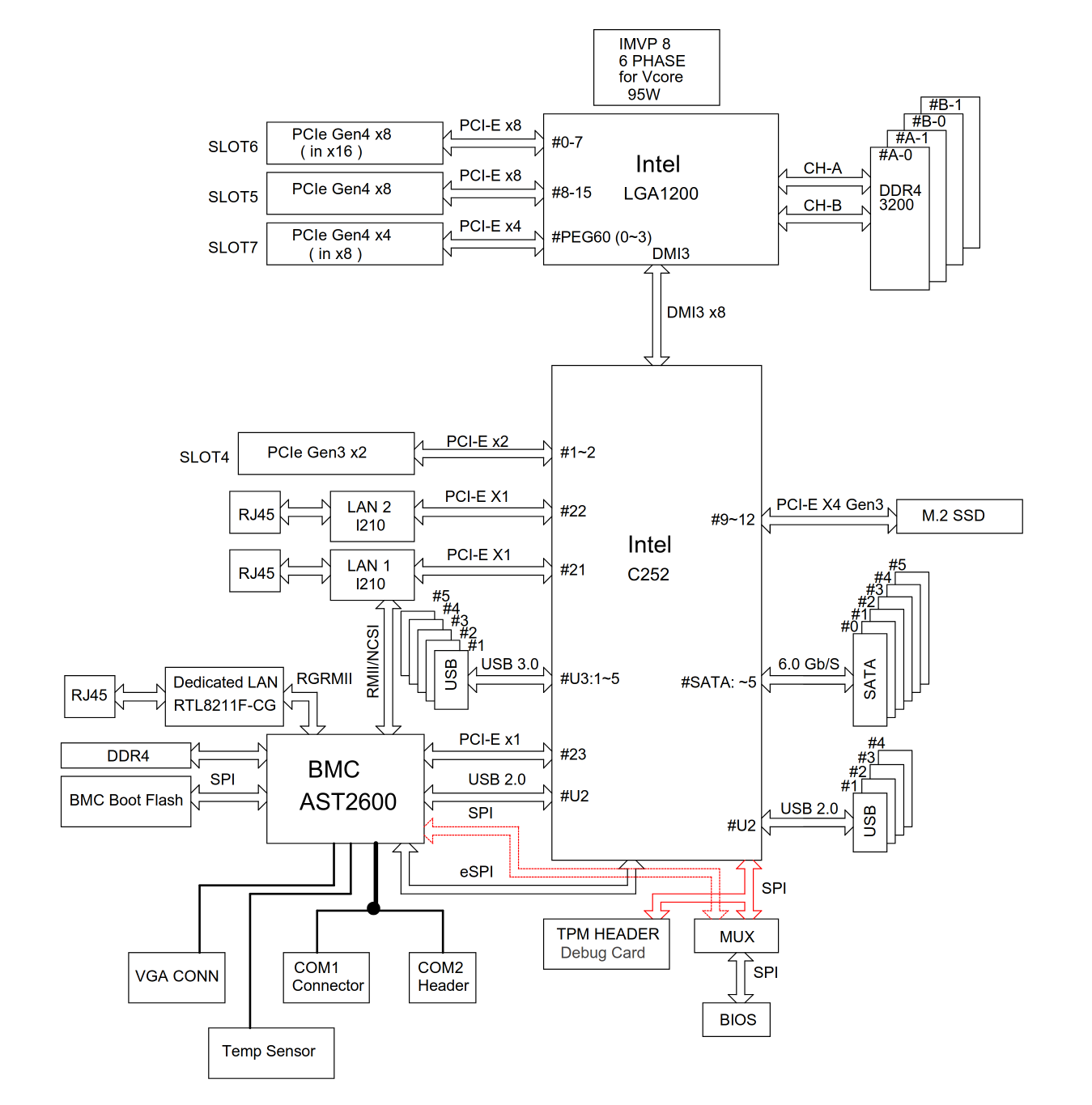
The chipset connected PCIe lanes on my Xeon E 2314 (Rocket Lake) on my SuperMicro X12STL-F motherboard (C252 chipset) are absolutely horrible bordering on unusable.

Now granted, these are 8 lanes of DMI Gen3, vs I think 8 lanes of DMI Gen4 on the x790, so the Z790 should probably be slightly better, but still just be aware that chipset lanes can be rather unimpressive performance wise.

I don’t know why Intel’s DMI setup has worked worse for me than AMD"s PCIe setup. ON paper DMI has quite a decent amount of bandwidth, and on my SuperMicro X12STL-F I am using very little of it (only on board device I am using is a single Gigabit ethernet port) but the difference has been quite huge in my application. I originally tried running a mirrored pair of Optane drives on this board, one on th eprimary M.2 port that connects to the chipset, and one on a secondary slot that connects through the CPU, and performance was absolutely awful until I switched them both to proper CPU lanes using risers.

Here is the diagram for this board:

So when one of the Optanes was in the M.2 slot off the chipset, and one was in SLOT7 connected to the CPU, the performance was awful. These weren’t even high end Optanes. We are talking 2x Gen3 each. In this configuration I got like a quarter of the expected performance.

But when I moved the Optane drive from the chipset m.2 slot to a second riser in SLOT5, they operated as expected at full speed.

IN this test, almost nothing else on the chipset was loaded up except maybe the BMC.

So just keep in mind that using chipset slots can be unpredictable, and can cause lower performance than expected, especially on Intel implementations over DMI.
1 Like

Thanks for the detailed post @mattlach !

That’s all great info. I suspect I am not using enough chipset based peripherals to justify poor NIC performance even for SFP28. Just typical external peripherals, 2 SATA drives that typically sit idle, and an NVMe gen 4.0x4 drive that does get used a fair amount, but typically not at the same time as the NIC … but to be fair, I do think the tests I originally ran with the gen 3.0x4 connect-X4 NIC used this NVMe through the chipset, which likely effected my original results.

Strangely though, the results of the gen3.0x4 NIC on the gen4.0x4 NVMe, both through the chipset, gave me somewhere in the neighborhood of 600-700 MBps speeds. ~20GB file, and NVMe does have DRAM cache. This seems pretty slow given that gen4 DMIx8 is a 16GB connection. I can only assume the overhead of reading and writing through the chipset at the same time is pretty bad, or the older SFP28 card is just not great at managing a reduced electrical connection.

Well, I’ll update with the E810 results, and this time I intend to do transfer tests through a chipset NVMe and a CPU attached NVMe.

So I have somewhat interesting results.

The E810 NIC did perform better, but only in the sense that it was more consistently getting 10gbe speeds. On both SSDs connected directly to the CPU and SSDs connected through the chipset. Both showed the same result. I also ensured the x4 electrical slot I am using does not get reduced lanes under any circumstance like an SSD being intalled anywhere: https://www.msi.com/Motherboard/MEG-Z790-ACE/Specification

To ensure the connect-X4 in my TrueNAS box was in fact capable of faster than 10gbe, I ran simultaneous large file transfers between my NAS and 3 client devices:

E810 on Z790 running over PCIe4.0x4 => 1 GBps consistent
first i226-V client => 270+ MBps consistent
second i226-V client => 270+ MBps consistent

*All above client devices were copying to NVMe gen3x4 (or greater) SSDs connected directly to CPU lanes.

So with 3 clients I am able to get ~20+ Gbps speed over a single port on the connect-X4 NAS NIC.

But the E810 is still capping out at 10gb speeds on a PCIe4.0x4 interface. This is better than the connect-X4 at PCIe3.0x4 which was bouncing around between 600 and 700 MBps.

I also tried all the same testing, in isolation, on each of the 2 ports on the E810 card with the same results.

I am going to keep the E810 in my client machine for a while and play around with it to see if there is anything I can do to get the available bandwidth to increase, but if nothing works long term I may revert back to a 10gbe over copper device for convenience.

If I find out anything that changes the above results significantly, I will update again.

1 Like

I use ancient connect-x4 nics and exceed 25gbit on a pcie 3.0x4 connection.

For giggles, set 9k jumbo frames on both ends of the connection and see if that improves anything.

I’ll run a 9k MTU test for fun, but if that is required, it sounds like a blocker in general. Given the NAS is used by a lot of devices I’d think, and assume from past experience, that all clients would need to be set to 9k MTU as well for stability and compatibility. Which isn’t super practical across laptops, phones, TVs etc. But I am curious to see what happens. I’ll update again after testing this.

If this works though … it’s just another good reason to migrate off of bare metal TrueNAS to bare metal Proxmox with a TrueNAS VM and multiple dedicated NICs.

1 Like

I am also interested in this, as I am looking into building an inexpensive AM5 home server, and using one of the 4x4 slots is needed to avoid shelling out on a top-end mobo.
Did you try with 2 10gb links on the 810, just to test it?
Have you considered trying with an E830XXV-DA2?