I’m not sure if any kind of old school RAID array is really worth it these days in a workstation or PC. In something like a Synology NAS where you’ve got to work within the confines of an(otherwise pretty good) system I can see how it might make sense, but with drives like the P5800X and filesystems like ZFS around I’m not seeing a use case for it if you’ve got one if those available.
Isn’t AMD raid a software raid ?
I would reccommend you to separte your boot disk from your data disk. RAID 0 offers no redundancy. A hiccup in your electricity during write could brick your raid.
RAID0 should be used for temporary data that you may need to analyze. After the process is done, you may compress the data and dump it somewhere or erase it entirely. Games is a good candidate for it as you can redownload it anytime.
Imagine during your intensive read/write and RAID0 fails, you just need to, perhaps, reformat the drive and re-transfer the data. Then life goes on. But if your boot drive is sitting on the raid too. It’d be a pain.
Saving booting time from a good Nvme to RAID0 Nvme, perhaps save you just one or two blinks.
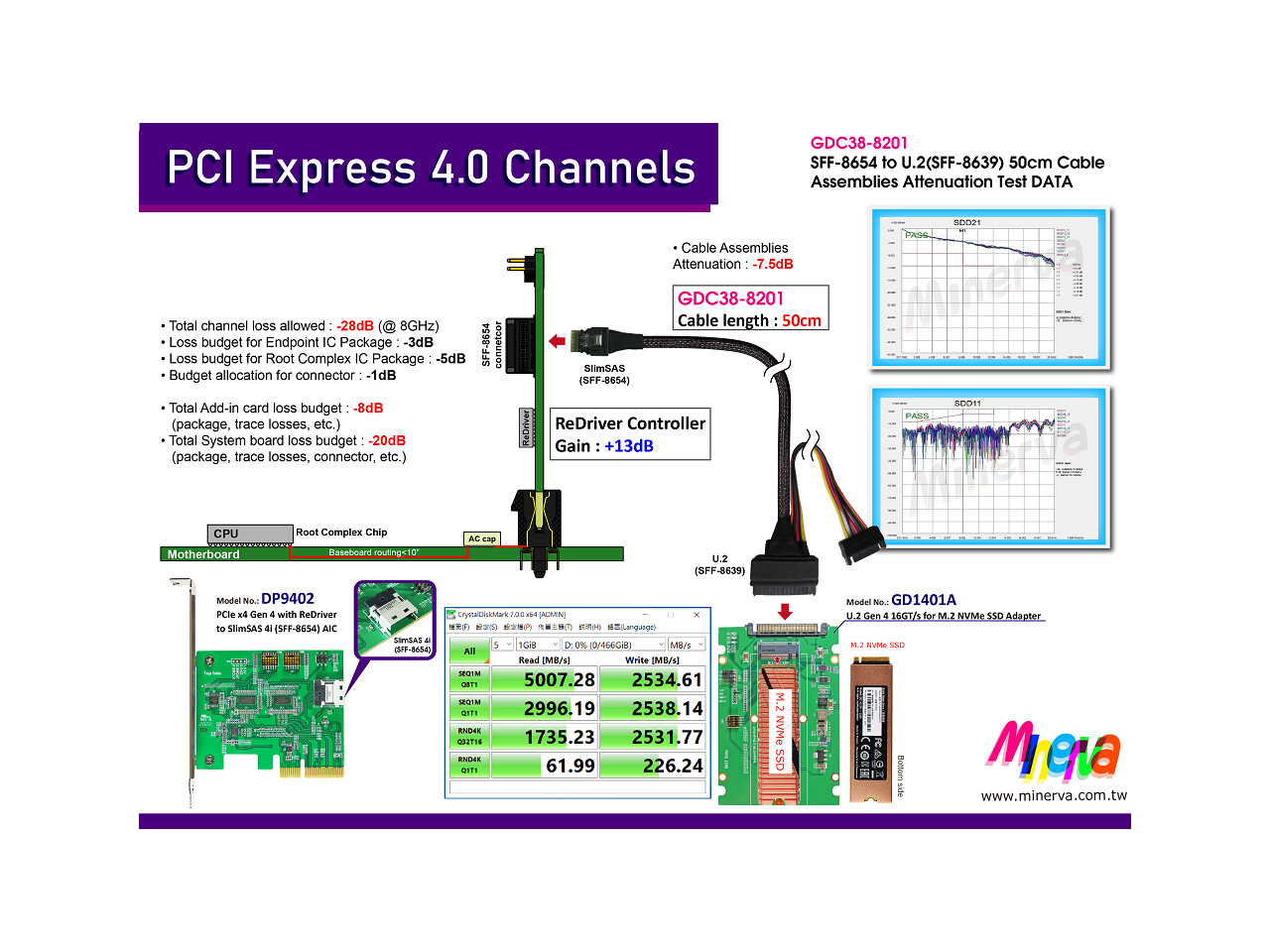
Are not the redrivers on the card/motherboard/behind the interface (e.g. behind the SFF-8654 4i or 8i), and not on the cable?
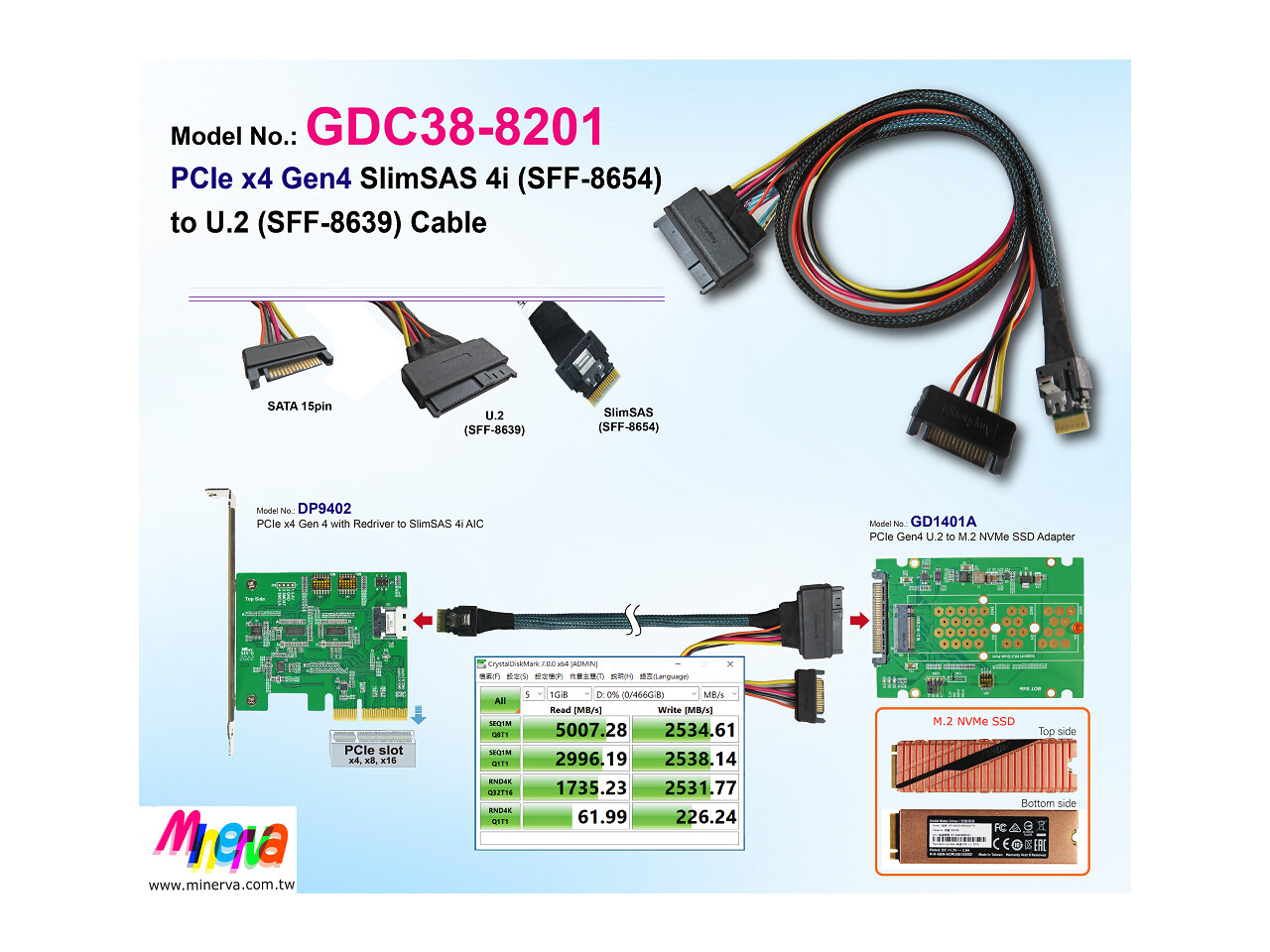
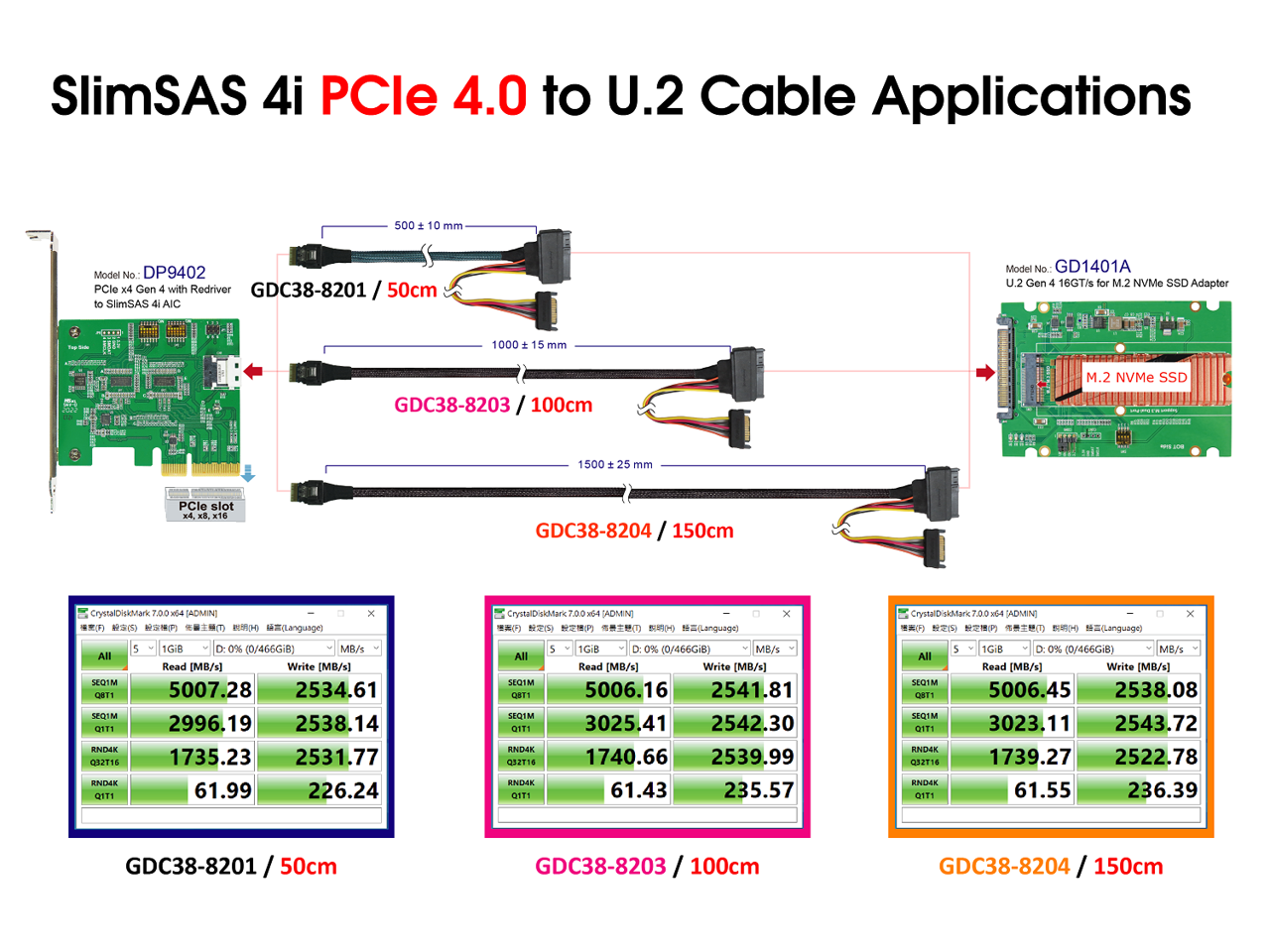
There are a number of these SFF-8654 to SFF-8639 cables that specify they are PCIe Gen4 rated, and in various length, like 50cm, 100cm, 150cm.
In the products’ accompanying diagrams, it specificially refers to PCIe 4/Gen 4, etc., and shows the redriver on the circuitry upstream of the SFF-8654 connector and attached cable:
Likewise, if Gigabyte advertise their WRX80-SU8-IPMI motherboard as having:
“2 x slimSAS (PCIe gen4 x4 or 4x SATAIII) + 1 x slimSAS (PCIe gen4 x4) connectors”
… aren’t they saying that the WRX80-SU8-IPMI has redriver/whatever sort of crazy equipped PCIe 4 SFF-8654 connectors that can be connected to a PCIe 4 rated cable to a PCIe 4 rated device for PCI4 rated connectivity?
Converserly, when SuperMicro touts its H12SSL-i motherboard as having “2 PCI-E 4.0 x4” NVMe slots but only describes its SlimSAS connectors as “2 NVMe via single SlimSAS x8” (with no mention of PCIe 4), are the odds good that the SlimSAS connectors on the H12SSL-i don’t have the PCIe 4 crazy included, and are just PCIe 3?
I mean surely, blowing a full x16 slot for an x4 card is sub-optimal? There also seem to be PCIe Gen4 x16 adapters hosting 2 PCIe 4.0 SlimSAS (SFF-8654) 8i connectors which would actually use the whole amount of available bandwidth. Are these things not real in some way?
Maybe not a workstation, but if you’re using a ‘sworkstation’ with 16/32/64 cores to run whole infrastructures worth of computing in your CPU, then server fast storage might be a good match.
If you look closely at the card you posted you see yet more redrivers even beyond what the motherboard has.
The cable contraption has to be responsible for maintaining the signal integrity. This is much easier and way cheaper with a PCB than a cable contraption currently.
Pcie4 rated is good. But as a practical matter it’s bad advice, currently, to suggest it’s easy to get a good result using a cabling solution vs PCB for pcie aic. It’s not and it’s much more expensive.
Every backplane I’ve seen in servers for pcie4 had redrivers right at the backplane as well as the cables. And they tend to be copper foil shielded.
I’ve ordered some of these types of things from Ali express and been disappointed.
I have some 8x to 2x x4 pcb cards and those work great. The 4 slot variants need redrivers on the card to work properly. As the far two cards are too far away for on mobo redrivers
@redocbew I do think it helps. If we are talking a home-lab level workstation. A second hand raid card costs 30 - 100 bucks. A good NAS matching 12G SAS level would cost almost a thousand, excluding disk.
If you buy a large case, you would fit 8X3.5" disk easily and you gain a built-in NAS for just the cost of the disk plus a 100 bucks. This easily give your 1-2 GB/s, on par with intermediate Nvme, but at the scale of a hundred Terabyte.
Dont forget the two 10G ethernet cards that one must buy for the NAS and the workstation.
Of course, I agree that having RAID0 for your intermediate data is necessary.
Use slot 2 then if you don’t want to give up a x16 on your MOBO. Simple.
I’ll say this @jeverett - if you go hunting for weird-ass cables you’ll find yourself down an endless rabbit hole of problems. Just stick to what’s supported and you’ll be golden IMHO. These boards are pretty spectacular as-is; oh wait, there’s a Unicorn… 
And, yet, the Gigabyte WRX80-SU8-IPMI motherboard has 3 “SlimSAS” connectors on it that claim to be “PCIe gen4 x4”:
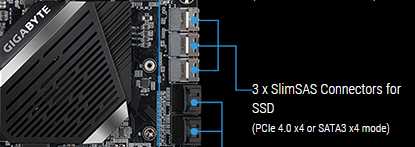
What connects into those ports to make good on that claim? Is there some sort of PCB component with just the right form factor to plugin those 3 ports and then expand into a terrace with mounts for 2.5" U2/U3, or maybe EDSFF E1 or E3 drives – or is it somehow done through cables? (Or, is that specification on the motherboard essentially just a false promise that can’t be used? And, likewise are all the various vendors claiming to sell PCIe 4 spec cables, either SlimSAS/SFF-8654 or EDSFF/SFF-TA-1009, just non-functional scams?)
If you get a chance, can you point to any of these examples?
I’ve seen some older examples, like videos of the EDSFF SuperMicro SSG-1029P-NEL32R, but they don’t show the guts inside the server and how the ruler SSD bays attach inside. Likewise, when I look at the component motherboards, I can see there are (what the manual calls) “PCIe 3.0 x32 slots with Tray Cable Connector Interface support”:
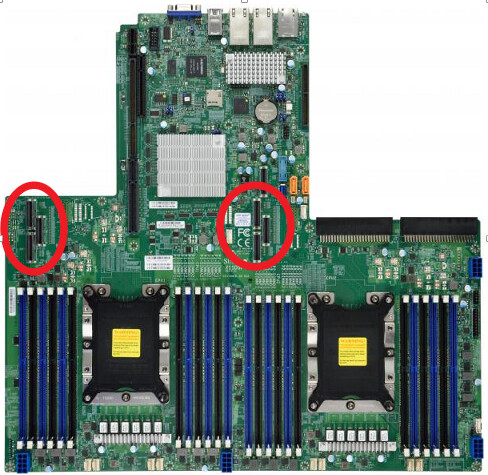
… but there’s no explanation or illustration of how those connectors hook up to the EDSFF bays at the front of the case. The best the manuals say are things like:
NVMe Slots (PCI-E 3.0 x32) There are two PCI-E 3.0 x32 slots with Tray Cable Connector Interface connections on the motherboard.
– p. 58, https://www.supermicro.com/manuals/superserver/1U/MNL-2209.pdf
or
NVMe Slots (PCIe 3.0 x32) There are two PCIe 3.0 x32 slots with Tray Cable Connector Interface support on the motherboard. These slots offer 32 NVMe connections which support 36 M.3 (32 NVMe M.3 + 4 SATA M.2) connections, or GPU devices.
– p. 56, https://www.supermicro.com/manuals/motherboard/C620/MNL-2132.pdf
Fast forwarding to the present, pictures of the new generation of PCIe 4.0 E1 storage devices (e.g. the Intel P5801X, or the Kioxia XD6), all look like the devices use a standard connection interface (SFF-TA-1009?). So, how do these plug into motherboards – cables/PCB risers/etc.? And what would be the best examples of this tech so far?
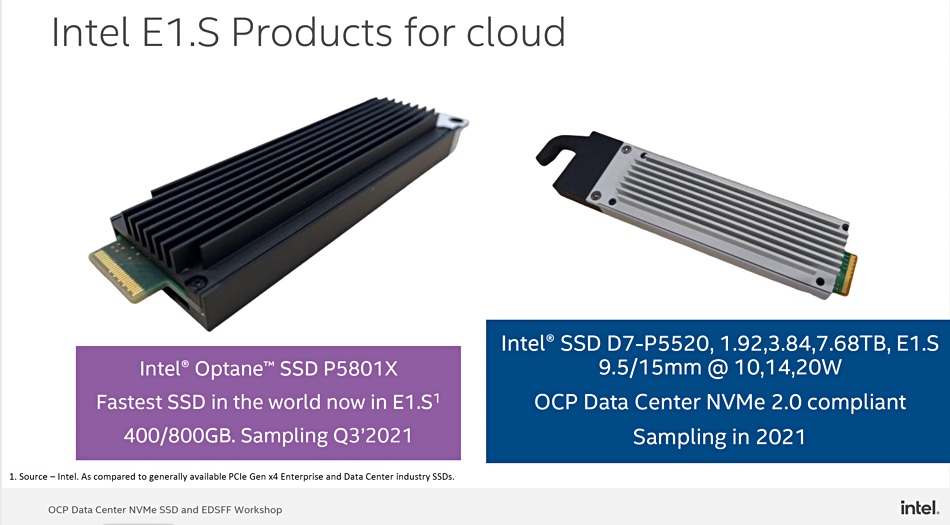
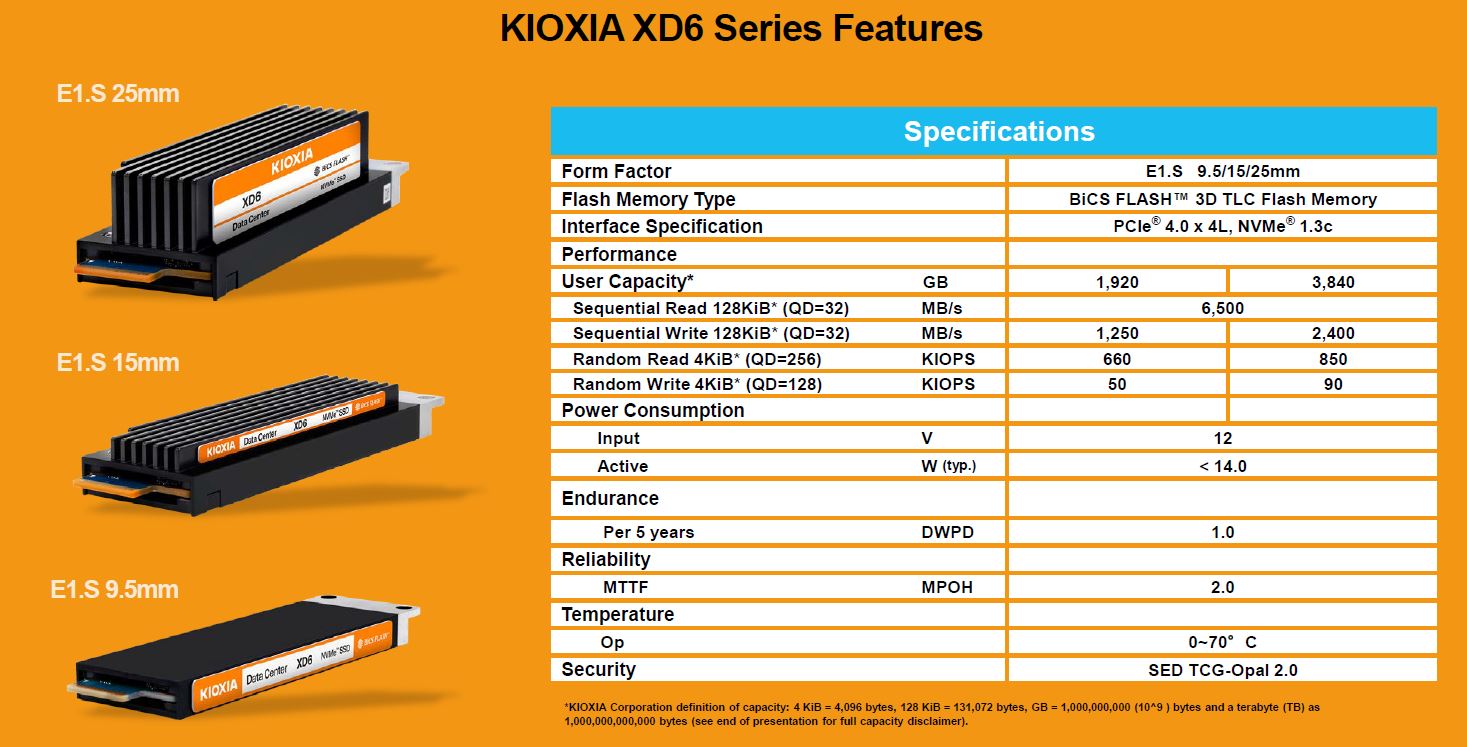
These are all industry standards:
https://www.snia.org/technology-communities/sff/specifications
No can do. Slot 2 is already taken by the Thunderbolt 3 AIC:
“You also have to pick which slot your add-in card is. I recommend the x8 slot for reasons i’m not going to get into here but especially if you’re doing cross-platform stuff like with Linux and Windows and you want thunderbolt to work, you definitely want the x8 slot.”

If you use impossibly short cables, I’m sure it’ll work at pcie4. The thing to look for is if at the end of the cables you see Yet More Redrivers. Some of the actual PCie4 adapters that work have little dip switches on a card that plugs in here before going to the cable that let you configure the gain. Yes, that level of insanity.
For these server boards the chassis/backplane has the redirvers on that side, too. It’s not like in the pic where it’s just a passive u.2 connection… that’ll be prone to errors.
“Eventually” what you are saying will work its just that nothing is Actually Available ™ right now that’s full pcie4 spec and with a low enough loss the motherboard redrivers would actually work. It’ll be a few years before I trust it.
Redrivers on the drive backplane from the slim sas/etc connectors etc make sense.
There’s one or two companies prototyping Right Now a PCIe4 U.2 hotswap bay thingie for 5.25. Guess what? redrivers at the bay side to help make it all work.
So me, essentially:
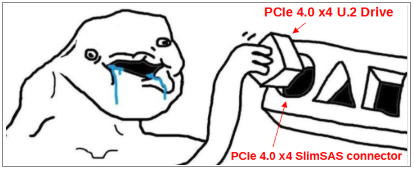
I just don’t get it – you can get up to 10 foot QSFP-DD Passive DAC cables that can do 400Gbps/50GBps, but somehow a PCIe 4.0 x4 (7.877 GByte/s) SlimSAS-to-U.2 cable is beyond our reach?
Really, these cables don’t need to be very long. My WRX80-SU8-IPMI is in a Lian Li o11 Dynamic – I could probably create a drive bay space for 3 2.5" SSDs within 6 inches of the corner of the motherboard with the SlimSAS connectors. Likewise, even in a Fractal Design type case, with the drive bay locations nearing the front edge, the cable would need to be, what, 12 or 16 inches tops?
It’s just shocking to me that PCIe 4.0 x4 speed enterprise drives are in production now, but the solution to connecting them is to buy some StarTech PCIe-to-U.2 adapter card and jam the SSD into the PCIe card bay area.
But, back to the original thread topic…
… but, in the recent motherboard RAID video, it actually said:
“…we used NVMe as well as SATA SSDs…. tested a simple NVMe RAID 0 and a simple RAID 1 with 2 NVMes. The two NVMes worked decently well with AMD soft RAID….”
– Adventures in Motherboard Raid (it's bad) - YouTube
So, wasn’t that video mostly a caution about the state of SATA RAID, not one about using motherboard RAID with two 1TB 980 Pro NVMe drives?
IF AMD motherboard NVME RAID works “decently well”, couldn’t a NVMe RAID boot drive be a reasonable solution – and then on top of that, you could perhaps add on to that an Optane P5800X for Level 2 cache with PrimoCache? (to get low latency access on cached files, and RAID 0 NVMe level throughput on non-cached files.)
Likewise, I’m also curious about current opinions about AMD StoreMI. It’s been 3 years since this video on AMD StoreMI – StoreMI: Why Tiered Storage is better than cache on x470/Zen+ and Threadripper - YouTube – and a few things have changed, like:
- There is a new, recently updated (7/6/2021), version of AMD StoreMI, with support for WRX80 Threadripper Pro processors.
- Enmotus FuzeDrive Software is no longer available for individual purchase – so I guess the old “upgrade for additional features” is gone.
- It seems like StoreMI eliminated the drive size limit (“AMD StoreMI now supports HDD/SSD combos of any capacity”) – so maybe, there are other options, formerly requiring upgrade, which are now standard.
Anyway, given these choices, what would be preferred – cached storage (with PrimoCache) or tiered storage (with AMD StoreMI)? Does the new version of StoreMI hold up like it did 3 years ago? Does either PrimoCache or StoreMI have a better algorithm/performance when it comes to moving data around drives? If performance is equivalent, is tiered storage (with a “source of truth” copy of a file, rather than a cached “intermediary” version) preferable? Or is maybe PrimoCache more flexible?
It looks like StoreMI won’t tier a motherboard RAID device:
“AMD StoreMI only supports systems configured in AHCI storage mode. StoreMI does not yet support installation on a system configured in RAID mode.”
– https://www.amd.com/en/support/kb/faq/amd-storemi-faq
So, I guess if PrimoCache can cache a RAID volume, that’s one advantage. But, if a computer just had one NVMe and one Optane P5800X, which would be the optimal solution – cached or tiered storage?
Why buy Optane P5800X when you can buy way faster memory for much less?
Optimal for what? What’s the use case?
The same use case as 3 years ago, when someone wrote, “Tiered Storage is better than cache”. But, since software has undoubtable evolved or devolved over time, perhaps updating the recommendation.
From the PrimoCache docs:
Level-1 cache is composed of physical memory while level-2 typically resides on a solid-state drive or flash drive. The purpose of level-2 cache is to increase the read speed of traditional mechanical hard disks.
Unlike level-1 cache which cannot keep cache contents on reboot, level-2 cache is able to retain its cache contents across computer reboots because of the persistent nature of storage devices. Thus, PrimoCache can quickly provide needed data from level-2 cache and avoid fetching often-accessed data again from slow disks each time computer boots up. This will greatly improve the overall performance, reducing boot-up time and speeding up applications.
– Level-2 Cache
Also, it seems like if you have a huge Level 1 cache, and you computer wants to hibernate, it has to either flush or save to disk/restore at wakeup all that memory space,
It seems like there are some setting in PrimoCache related to saving Level 1 cache across boots, but these will involve persisting them on a drive and then restoring it – both of which would take some amount of time.
Looking at some of the caching complexities, I guess I can see the elegance of tiered storage instead, assuming the StoreMI software is still a viable solution.
This topic was automatically closed 273 days after the last reply. New replies are no longer allowed.