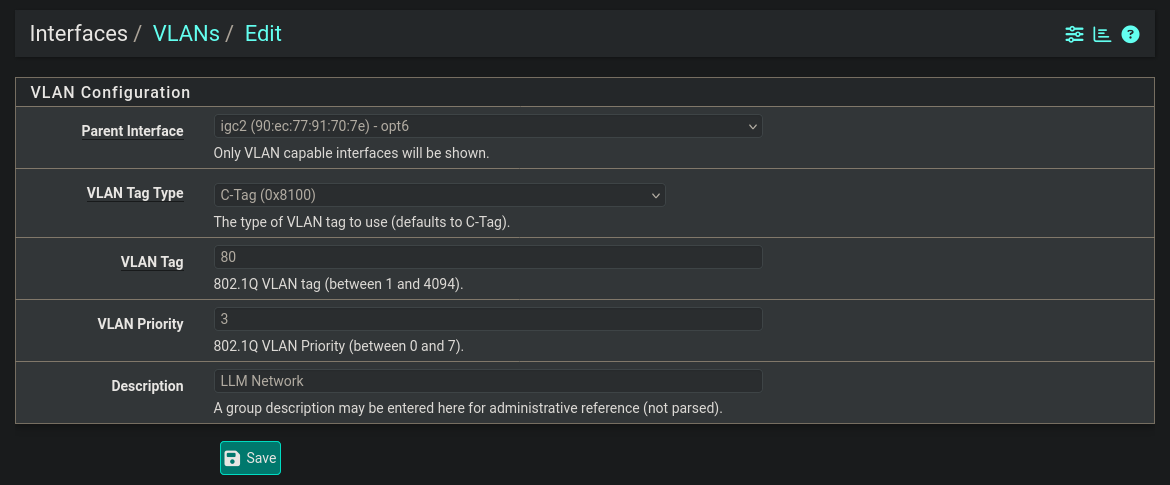
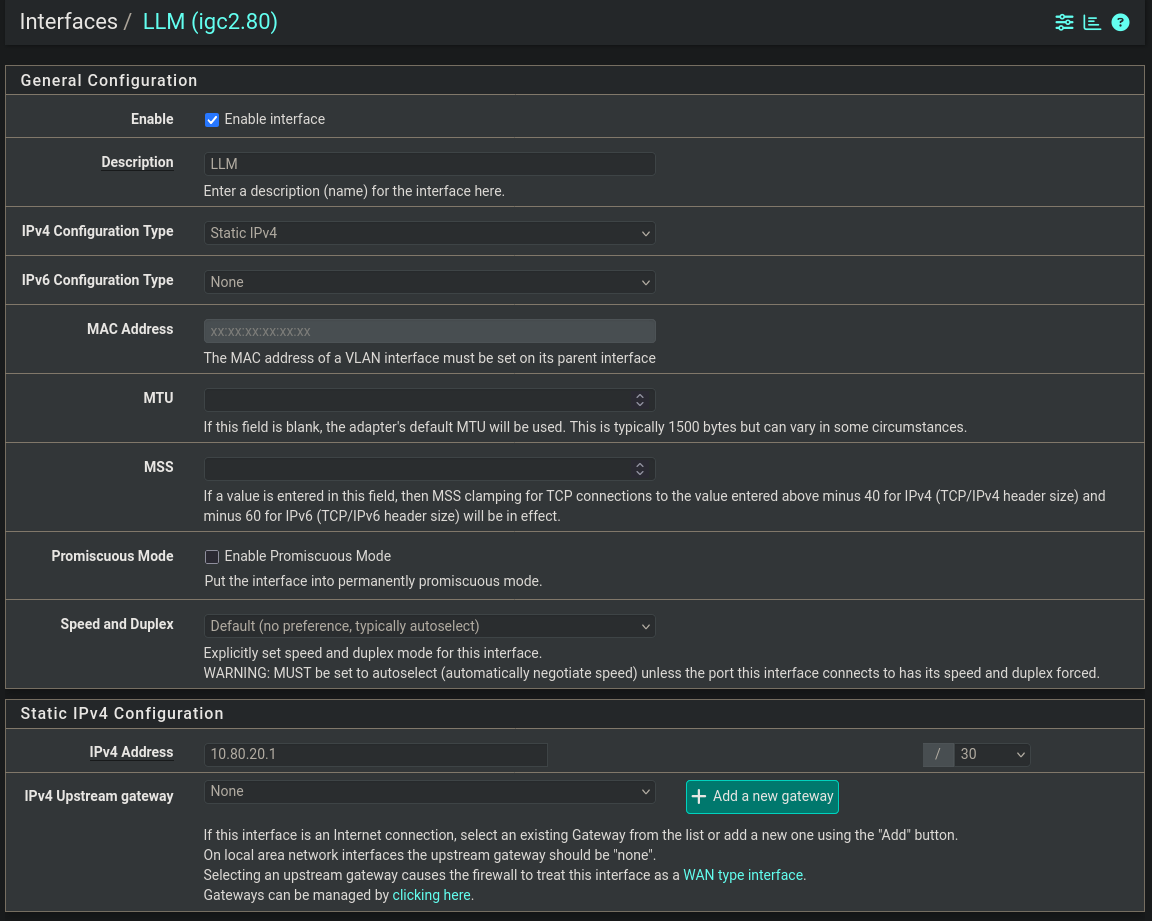
So, on Linux, how can I use a VLAN trunk (I think that’s the right terminology) to provide networking to a libvirt VM? I’ve been trying to set this up for hours to no avail, trying different methods, articles, etc. I’ve set up a VLAN in pfSense that I intend to use for this VM as well, but I’ve only ever followed this process when I intend to use switch ports with UniFi switches to filter traffic. Doing it on Linux is a process I’ve never followed before:
1 Like
Is this for a hardware network (network card facing a switch) or all virtual?
I suppose it’s all virtual. The Linux machine is connected directly to my pfSense box.
Pfsense side looks fine (though VLAN priority can be left to 0, don’t need to change that) assuming that igc2 (opt6) is plugged into a VLAN capable switch with VLAN 80 defined or plugged directly into the server.
What does the server config look like?
I deleted all the configs, but I created the VLAN tagged interface again to show what I’ve gotten:
connection.id:                          vlan80
connection.uuid:                        12d2ea66-2cdd-4530-ae48-b8948d51c13c
connection.stable-id:                   --
connection.type:                        vlan
connection.interface-name:              vlan80
connection.autoconnect:                 yes
connection.autoconnect-priority:        0
connection.autoconnect-retries:         -1 (default)
connection.multi-connect:               0 (default)
connection.auth-retries:                -1
connection.timestamp:                   1779136546
connection.permissions:                 --
connection.zone:                        --
connection.controller:                  --
connection.master:                      --
connection.slave-type:                  --
connection.port-type:                   --
connection.autoconnect-slaves:          -1 (default)
connection.autoconnect-ports:           -1 (default)
connection.down-on-poweroff:            -1 (default)
connection.secondaries:                 --
connection.gateway-ping-timeout:        0
connection.ip-ping-timeout:             0
connection.ip-ping-addresses:           --
connection.ip-ping-addresses-require-all:-1 (default)
connection.metered:                     unknown
connection.lldp:                        default
connection.mdns:                        -1 (default)
connection.llmnr:                       -1 (default)
connection.dns-over-tls:                -1 (default)
connection.mptcp-flags:                 0x0 (default)
connection.wait-device-timeout:         -1
connection.wait-activation-delay:       -1
802-3-ethernet.port:                    --
802-3-ethernet.speed:                   0
802-3-ethernet.duplex:                  --
802-3-ethernet.auto-negotiate:          no
802-3-ethernet.mac-address:             --
802-3-ethernet.cloned-mac-address:      --
802-3-ethernet.generate-mac-address-mask:--
802-3-ethernet.mac-address-denylist:    --
802-3-ethernet.mtu:                     auto
802-3-ethernet.s390-subchannels:        --
802-3-ethernet.s390-nettype:            --
802-3-ethernet.s390-options:            --
802-3-ethernet.wake-on-lan:             default
802-3-ethernet.wake-on-lan-password:    --
802-3-ethernet.accept-all-mac-addresses:-1 (default)
ipv4.method:                            disabled
ipv4.dns:                               --
ipv4.dns-search:                        --
ipv4.dns-options:                       --
ipv4.dns-priority:                      0
ipv4.addresses:                         --
ipv4.gateway:                           --
ipv4.routes:                            --
ipv4.route-metric:                      -1
ipv4.route-table:                       0 (unspec)
ipv4.routing-rules:                     --
ipv4.replace-local-rule:                -1 (default)
ipv4.dhcp-send-release:                 -1 (default)
ipv4.routed-dns:                        -1 (default)
ipv4.ignore-auto-routes:                no
ipv4.ignore-auto-dns:                   no
ipv4.dhcp-client-id:                    --
ipv4.dhcp-iaid:                         --
ipv4.dhcp-dscp:                         --
ipv4.dhcp-timeout:                      0 (default)
ipv4.dhcp-send-hostname-deprecated:     yes
ipv4.dhcp-send-hostname:                -1 (default)
ipv4.forwarding:                        -1 (default)
ipv4.dhcp-hostname:                     --
ipv4.dhcp-fqdn:                         --
ipv4.dhcp-hostname-flags:               0x0 (none)
ipv4.never-default:                     no
ipv4.may-fail:                          yes
ipv4.required-timeout:                  -1 (default)
ipv4.dad-timeout:                       -1 (default)
ipv4.dhcp-vendor-class-identifier:      --
ipv4.dhcp-ipv6-only-preferred:          -1 (default)
ipv4.link-local:                        0 (default)
ipv4.dhcp-reject-servers:               --
ipv4.auto-route-ext-gw:                 -1 (default)
ipv4.shared-dhcp-range:                 --
ipv4.shared-dhcp-lease-time:            0 (default)
ipv6.method:                            disabled
ipv6.dns:                               --
ipv6.dns-search:                        --
ipv6.dns-options:                       --
ipv6.dns-priority:                      0
ipv6.addresses:                         --
ipv6.gateway:                           --
ipv6.routes:                            --
ipv6.route-metric:                      -1
ipv6.route-table:                       0 (unspec)
ipv6.routing-rules:                     --
ipv6.replace-local-rule:                -1 (default)
ipv6.dhcp-send-release:                 -1 (default)
ipv6.routed-dns:                        -1 (default)
ipv6.ignore-auto-routes:                no
ipv6.ignore-auto-dns:                   no
ipv6.never-default:                     no
ipv6.may-fail:                          yes
ipv6.required-timeout:                  -1 (default)
ipv6.ip6-privacy:                       -1 (default)
ipv6.temp-valid-lifetime:               0 (default)
ipv6.temp-preferred-lifetime:           0 (default)
ipv6.addr-gen-mode:                     default
ipv6.ra-timeout:                        0 (default)
ipv6.mtu:                               auto
ipv6.dhcp-pd-hint:                      --
ipv6.dhcp-duid:                         --
ipv6.dhcp-iaid:                         --
ipv6.dhcp-timeout:                      0 (default)
ipv6.dhcp-send-hostname-deprecated:     yes
ipv6.dhcp-send-hostname:                -1 (default)
ipv6.dhcp-hostname:                     --
ipv6.dhcp-hostname-flags:               0x0 (none)
ipv6.auto-route-ext-gw:                 -1 (default)
ipv6.token:                             --
vlan.parent:                            enp7s0
vlan.id:                                80
vlan.flags:                             1 (REORDER_HEADERS)
vlan.protocol:                          --
vlan.ingress-priority-map:              --
vlan.egress-priority-map:               --
proxy.method:                           none
proxy.browser-only:                     no
proxy.pac-url:                          --
proxy.pac-script:                       --
GENERAL.NAME:                           vlan80
GENERAL.UUID:                           12d2ea66-2cdd-4530-ae48-b8948d51c13c
GENERAL.DEVICES:                        vlan80
GENERAL.IP-IFACE:                       vlan80
GENERAL.STATE:                          activated
GENERAL.DEFAULT:                        no
GENERAL.DEFAULT6:                       no
GENERAL.SPEC-OBJECT:                    --
GENERAL.VPN:                            no
GENERAL.DBUS-PATH:                      /org/freedesktop/NetworkManager/ActiveConnection/23
GENERAL.CON-PATH:                       /org/freedesktop/NetworkManager/Settings/22
GENERAL.ZONE:                           --
GENERAL.MASTER-PATH:                    --
IP4.GATEWAY:                            --
IP6.GATEWAY:                            --
After that, I’d create a macvlan with nmcli connection add type macvlan con-name macvtap8s0 ifname macvtap8s0 mode bridge dev vlan80. Then I’d add that to my virtual machine with virt-manager (connecting over SSH). I can edit the XML a little, but I generally rely on the GUI tool.
P.S. I went ahead and recreated the macvlan/macvtap device:
connection.id:                          macvtap8s0
connection.uuid:                        39d75f93-254f-4621-b1e9-6adefb00425f
connection.stable-id:                   --
connection.type:                        macvlan
connection.interface-name:              macvtap8s0
connection.autoconnect:                 yes
connection.autoconnect-priority:        0
connection.autoconnect-retries:         -1 (default)
connection.multi-connect:               0 (default)
connection.auth-retries:                -1
connection.timestamp:                   1779137055
connection.permissions:                 --
connection.zone:                        --
connection.controller:                  --
connection.master:                      --
connection.slave-type:                  --
connection.port-type:                   --
connection.autoconnect-slaves:          -1 (default)
connection.autoconnect-ports:           -1 (default)
connection.down-on-poweroff:            -1 (default)
connection.secondaries:                 --
connection.gateway-ping-timeout:        0
connection.ip-ping-timeout:             0
connection.ip-ping-addresses:           --
connection.ip-ping-addresses-require-all:-1 (default)
connection.metered:                     unknown
connection.lldp:                        default
connection.mdns:                        -1 (default)
connection.llmnr:                       -1 (default)
connection.dns-over-tls:                -1 (default)
connection.mptcp-flags:                 0x0 (default)
connection.wait-device-timeout:         -1
connection.wait-activation-delay:       -1
ipv4.method:                            disabled
ipv4.dns:                               --
ipv4.dns-search:                        --
ipv4.dns-options:                       --
ipv4.dns-priority:                      0
ipv4.addresses:                         --
ipv4.gateway:                           --
ipv4.routes:                            --
ipv4.route-metric:                      -1
ipv4.route-table:                       0 (unspec)
ipv4.routing-rules:                     --
ipv4.replace-local-rule:                -1 (default)
ipv4.dhcp-send-release:                 -1 (default)
ipv4.routed-dns:                        -1 (default)
ipv4.ignore-auto-routes:                no
ipv4.ignore-auto-dns:                   no
ipv4.dhcp-client-id:                    --
ipv4.dhcp-iaid:                         --
ipv4.dhcp-dscp:                         --
ipv4.dhcp-timeout:                      0 (default)
ipv4.dhcp-send-hostname-deprecated:     yes
ipv4.dhcp-send-hostname:                -1 (default)
ipv4.forwarding:                        -1 (default)
ipv4.dhcp-hostname:                     --
ipv4.dhcp-fqdn:                         --
ipv4.dhcp-hostname-flags:               0x0 (none)
ipv4.never-default:                     no
ipv4.may-fail:                          yes
ipv4.required-timeout:                  -1 (default)
ipv4.dad-timeout:                       -1 (default)
ipv4.dhcp-vendor-class-identifier:      --
ipv4.dhcp-ipv6-only-preferred:          -1 (default)
ipv4.link-local:                        0 (default)
ipv4.dhcp-reject-servers:               --
ipv4.auto-route-ext-gw:                 -1 (default)
ipv4.shared-dhcp-range:                 --
ipv4.shared-dhcp-lease-time:            0 (default)
ipv6.method:                            disabled
ipv6.dns:                               --
ipv6.dns-search:                        --
ipv6.dns-options:                       --
ipv6.dns-priority:                      0
ipv6.addresses:                         --
ipv6.gateway:                           --
ipv6.routes:                            --
ipv6.route-metric:                      -1
ipv6.route-table:                       0 (unspec)
ipv6.routing-rules:                     --
ipv6.replace-local-rule:                -1 (default)
ipv6.dhcp-send-release:                 -1 (default)
ipv6.routed-dns:                        -1 (default)
ipv6.ignore-auto-routes:                no
ipv6.ignore-auto-dns:                   no
ipv6.never-default:                     no
ipv6.may-fail:                          yes
ipv6.required-timeout:                  -1 (default)
ipv6.ip6-privacy:                       -1 (default)
ipv6.temp-valid-lifetime:               0 (default)
ipv6.temp-preferred-lifetime:           0 (default)
ipv6.addr-gen-mode:                     default
ipv6.ra-timeout:                        0 (default)
ipv6.mtu:                               auto
ipv6.dhcp-pd-hint:                      --
ipv6.dhcp-duid:                         --
ipv6.dhcp-iaid:                         --
ipv6.dhcp-timeout:                      0 (default)
ipv6.dhcp-send-hostname-deprecated:     yes
ipv6.dhcp-send-hostname:                -1 (default)
ipv6.dhcp-hostname:                     --
ipv6.dhcp-hostname-flags:               0x0 (none)
ipv6.auto-route-ext-gw:                 -1 (default)
ipv6.token:                             --
macvlan.parent:                         vlan80
macvlan.mode:                           2 (bridge)
macvlan.promiscuous:                    yes
macvlan.tap:                            no
proxy.method:                           none
proxy.browser-only:                     no
proxy.pac-url:                          --
proxy.pac-script:                       --
GENERAL.NAME:                           macvtap8s0
GENERAL.UUID:                           39d75f93-254f-4621-b1e9-6adefb00425f
GENERAL.DEVICES:                        macvtap8s0
GENERAL.IP-IFACE:                       macvtap8s0
GENERAL.STATE:                          activated
GENERAL.DEFAULT:                        no
GENERAL.DEFAULT6:                       no
GENERAL.SPEC-OBJECT:                    --
GENERAL.VPN:                            no
GENERAL.DBUS-PATH:                      /org/freedesktop/NetworkManager/ActiveConnection/25
GENERAL.CON-PATH:                       /org/freedesktop/NetworkManager/Settings/23
GENERAL.ZONE:                           --
GENERAL.MASTER-PATH:                    --
IP4.GATEWAY:                            --
IP6.GATEWAY:                            --
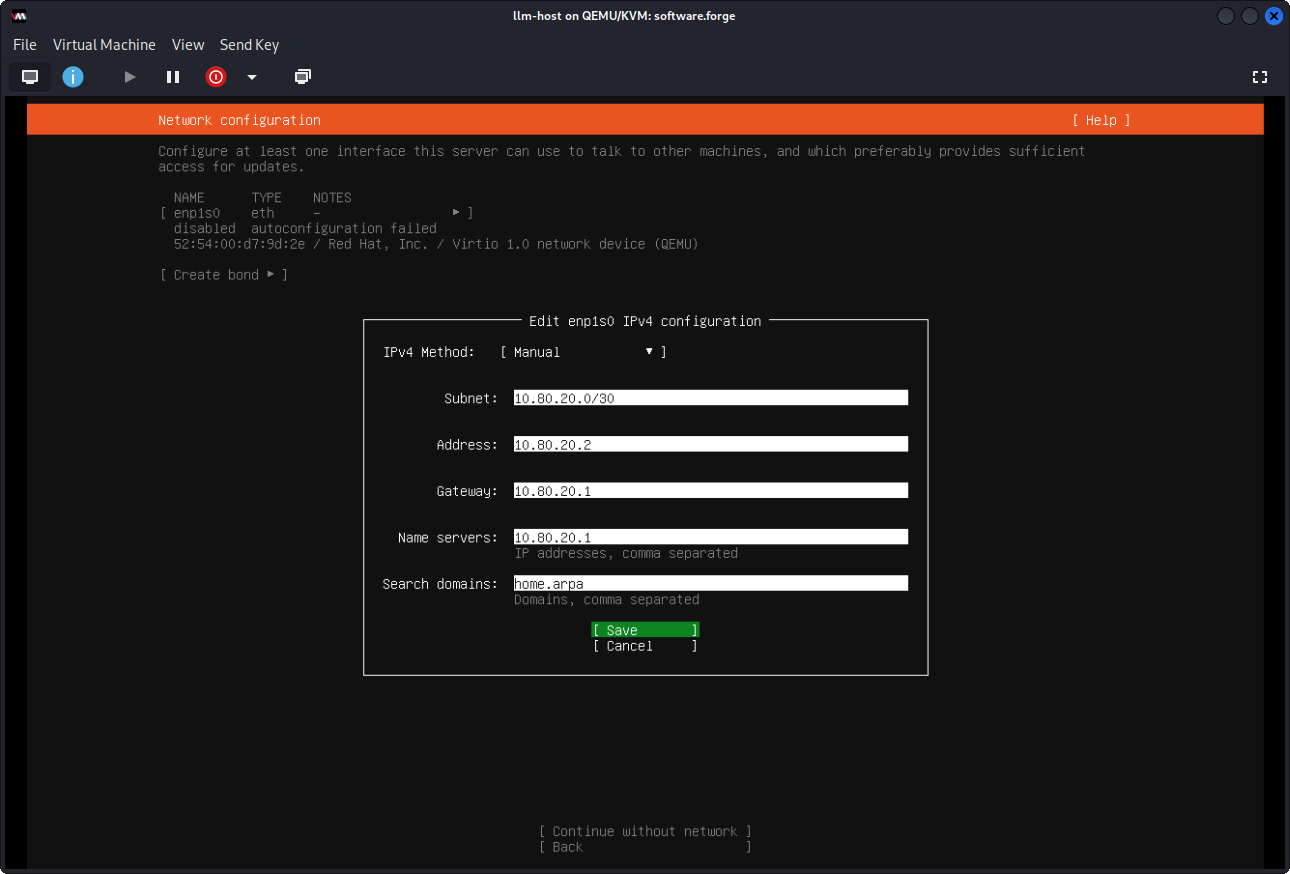
I wonder if I’m supposed to like NAT it through or something. At one point, I’d tried defining like a new network with XML and virsh net-define llm-net.xml
<network>
    <name>llm-network</name>
    <forward mode="bridge">
        <interface dev="vlan80"/>
    </forward>
</network>
Ofc, the vm interface that I’m adding with my current method is that I select Macvtap device… for the Network source: dropdown, and enter macvtap8s0 in the Device name: field.