I’m writing to get some opinions on running a 4x48GB (192GB total) RAM kit at 6000MHz. I’ve been told a few times that RAM can become unstable when the processor goes idle.
At the moment, I don’t have enough experience to say whether that’s true or not in my case.
If you’re wondering why I’m rocking that much RAM—well, unfortunately, I actually need it for work. I’m a game developer, and when working on large maps, I often end up using over 100GB of RAM. In the Unreal Engine editor, every asset is loaded and never unloaded, which means RAM usage can climb quite a bit. Combine that with the fact that I develop using Rider (a Java-based IDE), and memory usage gets heavy pretty fast. I’m really trying to hit the RAM sweet spot of 6000MHz. I am gmae dev that work in Linux more exactly Arch Distro.
Currently, my hardware setup is a 9950X3D on an X870E chipset. My motherboard (MSI MEG Godlike) is a 10-layer with a T-Topology design, so I figure it was built to support pushing 4-DIMM configurations to higher speeds. I’m using a G.Skill Trident Z5 DDR5-6400 CL32-39-39-102 kit, which uses an XMP profile rather than EXPO. Still, I’m getting pretty good results with it. Currently, I haven’t enabled a PBO setup yet, but I’m thinking of trying it soon if things remain stable in the next week. Here’s a quick baseline benchmark I did of my setup on Geekbench: Micro-Star International Co., Ltd. MS-7E48 - Geekbench
Previously, I was running a 7950X on an X670E chipset with a Daisy Chain motherboard (ROG CROSSHAIR X670E EXTREME), and I could never get more than 5600MHz with 4x16GB or 4800MHz with 4x48GB. That made my heart sad, so I decided to upgrade.
Is anyone else running this kind of setup as their daily driver?
Search around the forum, there are several similar threads already, like this.
Bottomline - no one will give you definite answer whether it will or not work on your board, ram modules, bios version, etc… too much variance. Try and see, if you feel adventurous
Consider a more expensive ECC memory, especially if this is for something critical, like work?
Otherwise do you need something more than validation from a memtest?
Also consider dialing down the speed to whatever JDEC specification is the closest to your RAM. Its nice to have fast RAM but unless you intend to validate the use case of fast RAM to gamers (which fair enough, some should have these fast enough RAM) a slower RAM MT/s should provide better stability and sanity for your workflow.
I have two DDR5-6400 CL32-39-39-102 kits with an 9950x and Asus x670e creator and I don’t get it above 5600MT.
Since I had the same result with a 650e Creator, I suspected that my CPU is the limiting component.
As you’ve already noticed, +67% 2DPC 2R overclocks are difficult. So probably not happening unless you’re willing to spend a good bit of money and time trying to win the silicon lottery and retuning in response to AGESA updates. Arrow Lake with CUDIMMs is also expensive but should be less time consuming, though depending on workload 285K may be a downgrade.
The 6000 thing’s mostly hype for AM5. On memory intensive stuff I bench like ~1% faster than 5600 with 2x48 CL30. Also, while there’s very little data what there is hints the X870 overclocking marketing might reflect tuning for 1DPC 1R at the expense of 2DPC 2R. If so, changing boards would be a downgrade for this purpose. I’ve booted 4x48 5200 on X670E but 4800 was the highest stable I could find in the time I had for that build.
CAMM2’s JEDEC’s resolution to DDR5’s 2DPC limitations. So the the reliable and currently available AMD upgrade path is 12x16GB DDR5-6400 from EPYC 9355 or similar. Near-ish term, Shimada Peak’s likely to happen before CAMM2.
Here’s my update after 22 hours of nonstop use: everything went really well. I did some development, played a few games, left the PC idle for a few hours, then “woke” it up without any issues, played a bit more afterward, listened to the F1 Grand Prix… and stability remained solid throughout.
These kits are really tempting, it’s the stuff of dreams… but hey, I just upgraded my PC. Who knows, maybe for the next CPU generation!
And
I realize now that my previous message might not have been very clear. Right now, I’m running a 4 x 48 GB kit at 6000 MHz with 40-40-40-96 timings. My question was mainly about a rumor I heard: is it true that some 4 x 2Rank kits become unstable when the CPU goes idle? And also to hear feedback from other people who use this kind of kit on a daily basis.
To be honest, I hadn’t really considered ECC RAM, partly due to a bias I never really took the time to verify. I always had the impression that ECC kits weren’t designed to reach high speeds. That said, it’s true that over the past couple of years, I’ve started seeing server RAM kits with higher frequencies than regular unbuffered modules.
To clarify: yes, I ran a 4h MemTest and it passed of without any issues.
Now that you mention it, I realize my BIOS isn’t up to date and on top of that, a new version for my motherboard just came out yesterday with AGESA PI-1.2.0.3a Patch A released that look to be a Optimizing Compatibility Of Single & Dual Rank Memory On X870 & B850 Motherboards.
I have never heard of this, maybe it’s confusion with CO undervolt? I that case it’s true: since the voltage curve gets lowered for all frequencies the cpu may become unstable at idle or when transitioning out of idle.
I would rather be worried about temperatures. 48GB dims get hot.
AM5 2DPC 2R configs are usually difficult to stabilize past 4400-4800. To expand on what @quilt just said, sometimes tinkering with SoC voltages can nudge up the stable clock. But voltage changes increase the risk of the processor not being able to make load transitions. Typical stress test methods for memory overclock validation have poor coverage there as load is usually pretty continuous, even with core cycling tools.
Personally I stop lifting MCLK when I hit the limits of processor voltage defaults. If a crash costs a day’s runtime and a memory tune offers +1% perf then, even with the build running 24x7, you don’t hit breakeven until the crash rate’s below 1 in 100 days. Realistically, our builds need to be far enough from the edge of stability to be below one failure per year.
Yeah. I usually see ~5 W/DIMM and ~40 °C SPD ΔT under memory intensive workloads at 5600 1.25 V with tightened tRFCs, mild tREFI lengthening, airflow case configs, and stock heatspreaders. Probably ok up to around 35° ambient, maybe a little warmer without GPU passthrough heating.
Haven’t measured as I haven’t needed to push voltage for timings but V²f suggests ~55 °C ΔT for 6000 1.4 without DIMM downflow. That’d hit the tRFC2 breakpoint and 3.9 μs tREFI limit at 85 °C from 30 °C ambient. Also haven’t come across data on combining downflow with setback CPU air (Royal Knight 120, Fuma 3).
With a 9950X3D I’d use an AIO (or custom loop), though, unless eco modeing.
I’ll try to track down my sources, and yeah, it might be related to a CO undervolt. Honestly, I can’t remember if I read it somewhere or heard it in a video. But if you have no idea about it either, it’s probably just me overthinking for nothing.
As for the temperature, that’s a really good point. One I should definitely keep in mind more often. With the RAM running at 1.35V, it can heat up pretty easily. When I touch it, it doesn’t feel hot and maybe even cool. But realistically, I can only test one side or the top of the heat spreader.
For CPU cooling, I’m using an AIO, the Arctic Liquid Freezer II with a 420 mm radiator, along with Kryonaut Extreme thermal paste. What I like about the Liquid Freezer II is that it has a small built-in fan that helps cool the VRMs and in my case, I figure it’s probably helping to keep at least one RAM stick cool too.
More seriously, on the airflow side, I’ve got a total of seven 140 mm (3) intake (4) exhaut fans and four 120 mm all intake fans. All the ventilation is set up with fan for static pressure, tuned to run slowly to keep the PC quiet. Overall, temperatures stay low.
In linux, if you have a relatively recent kernel, sensors shows the memory temperatures (look for spd).
The best way I found to test for temperature-related memory instability is running ‘stressapptest’ at the same time as running some GPU load (e.g. unigine heaven or so).
Oh, thanks for the info! I just checked, and it looks like support starts with Linux kernel 6.14. Right now, I’m still on 6.13.7. I don’t compile my own kernel. I use the default one provided with Arch. But I guess if it requires a specific module that hasn’t been included yet, I might have to compile it myself if Arch doesn’t support it yet.
For now, the only thing I’m using is my finger… not exactly precise, let’s be honest . I can feel a bit of heat, nothing burning, but I’m still a little concerned about the sticks in the middle. I had a RAM fan with my old DDR4 Corsair Dominator kit. Maybe I could try installing it, even though I have no idea if it would work with DDR5
Oh thanks, I didn’t know about that app: https://aur.archlinux.org/packages/stressapptest.
Do you have any tool recommendations for a GPU stress test, something like a “fur test” on Linux?
I guess I could always write one heavy GPU workloads myself if nothing really effective exists
I use unigine heaven, you can leave the benchmark running in a loop in another window. I guess scripting an LLM or so would work too? For this purpose it would just be to get the ‘worst case’ of case temperatures any way.
With T-Topology on the MSI MEG Godlike, you should have a better shot at stable 6000MHz, but 4x48GB is still pushing limits. Have you tried tweaking voltages (SOC, VDDIO, and MEMVDDQ) or manually adjusting timings? Also, how’s stability under heavy Unreal Engine loads?
7950x, x670e ProArt with 4x32GB Kingston KF556C40BBK2-64 (two separate kits)
I was stuck on the original 0805 bios, anything newer was giving me either much lower ram speed also stuttering in Windows resulting in failing LatencyMon test and audio popping. Also freezing in BIOS with newer versions.
I easily booted 2200 fclk 2400MCLK(4800) CL32 1.1V after moving to the 2904 BIOS.
I left everything default except 4800 memory, 2200fclk, CL32, and my personal termination settings which are
Proc odt: 48
ProcCaDs: 30
ProcDqDs: 34.3
DramDqDs: 34
Everything else auto and it quickly booted and was stable enough to daily until I started memory stress testing.
It did fail after 3 hours of TM5 with 2100FCLK but I was seeing if the failure was due to 2200fclk but I think I might just need more voltage or tweaks elsewhere - so it will probably end up stable with 2200 as my guess this wasn’t causing the error on TM5.
Currently I’m a 2 hour drive away from that machine for this week, and my pikvm isn’t able to reboot it so I probably need to reset bios to default to get it to post as I tried to boot it at 2233fclk.
Can’t easily get screenshots from it as it won’t post right now. I used to get this issue on previous BIOS also where memory overclocking required clearing cms to recover from so this isn’t new to 2904!
I think this is the first BIOS version where I am now happy with how the machine runs with 4 dimms. I was from time to time taking two out for workloads where I didn’t need more than 64GB ram.
I actually want to bump my original thread about 4x32GB on AM5 because everyone should try again with this most recent release to see if now stable 4800 is incredibly easy for everyone…
i have a proart x670e with two sticks of crucial pro ddr (1x48 5600 “kit”) and just installed 2904 so am eager to bump capacity to 192gb…
right now only viable option here (india) for me is crucial pro again but two kits of 2x48 at 5600, will be getting them tomorrow and will see how it goes.
im more interested in maxing capacity - dont mind losing speed… hoping it somehow runs at reasonable speed stable.
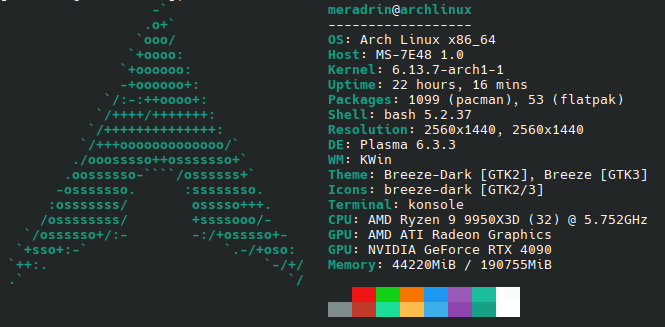


 . I can feel a bit of heat, nothing burning, but I’m still a little concerned about the sticks in the middle. I had a RAM fan with my old DDR4 Corsair Dominator kit. Maybe I could try installing it, even though I have no idea if it would work with DDR5