Hi all,
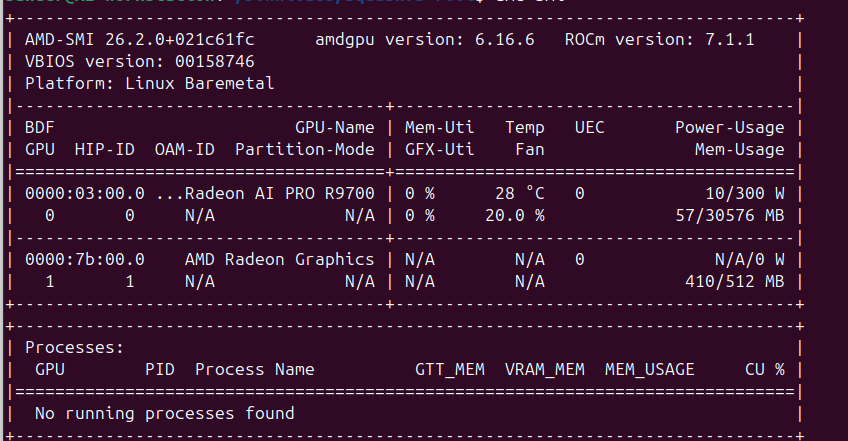
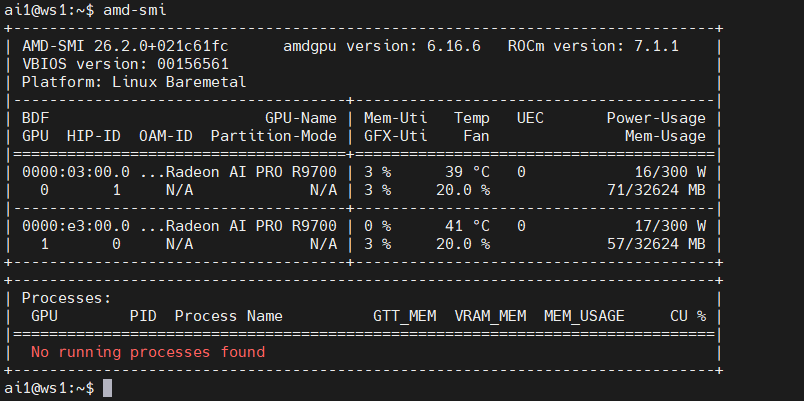
i got my first radeon r9700 today. installed it and ran lmstudio but i noticed that lm studio said only VRAM 29GB available. so i ran amd-smi and here is the screenshot. only 30576MB is detected. below that i placed the screenshot of the github repo wendell links in his install video. and there it says 32624MB available. i am very confused right now… is it something i am doing wrong or does this card just not have 32GB ?
1 Like
Ah, yes… This is unfortunately, exactly and precisely correct. This is due to marketing bookkeeping:
The way computers count: 1 GB = 2³⁰ = 2¹⁰ * 2¹⁰ * 2¹⁰ = (2¹⁰)³ = 1024³ bytes
The way everyone else, especially marketing, count: 1 GB = 10⁹ = (10³)³ = 1000³
As we obviously can see, 1000³ < 1024³
So, you have 30 576 MB. If we count this according to how computers calculate MB and kB, to achieve 32 GB of memory you should have 32 * 2³⁰ or 34,359,738,368 bytes.
But, what you are seeing here, is:
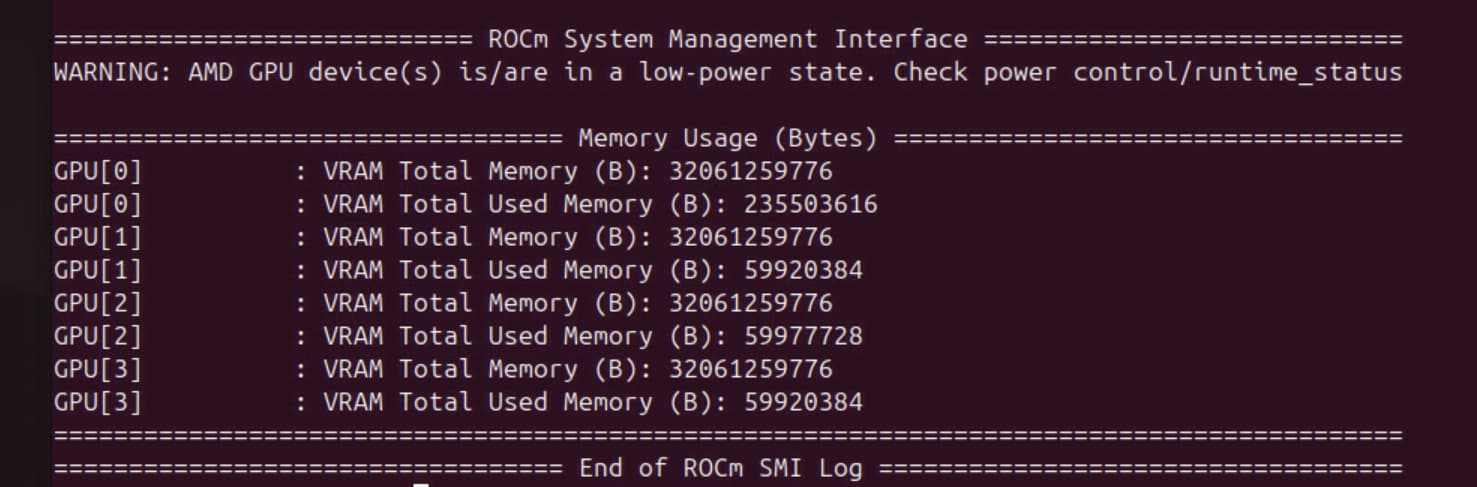
30,576 MB = 31,309,824 kB = 32,061,259,776 bytes.
32 061 259 776 bytes are, unfortunately, barely above 32 * 1000³ bytes. It is, therefore, 32 GB.
This was less of a problem when you bought a 1000 MB vs 1024 MB hard drive. Nowadays, the discrepancy is quite large (2GB at least, with TB it’s even larger), and there is also no real reason to use the old way to count bytes anymore. So we really should standardize everything on 32 GB = 32 * 1000³ bytes to protect consumers, but no one really care enough to make this a reality.
Wendells hardware manufacturer still use the old way to count bytes.
4 Likes
yeah see i was tought in school that a Mb is 1024 bits . i find it very strange and actually misleading that this is advertised as 32Gb. im in the market for another card, so ill make sure to get that one from a different manufacturer. curious to see what that will do.
in the end the plan is to have 4 of them. but in my case it would say 120Gb instead of 128Gb and i have to say that seems a big difference.
*edit not 2014 but 1024 bits.
That’s absolutely bizarre; I’ve never once seen RAM measured in “GB” instead of “GiB.” RAM always uses the base-2 sizes rather than the base-10 sizes.
Thanks for bringing this to the community’s attention. I would strongly recommend you return the card and bring this up with Sapphire’s support.
Make a fuss about it everywhere you can. This is not how DRAM sizes are measured.
3 Likes
i am very curious to see the smi output for other brands of cards. and also for example if lm studio shows different results. for example seed-oss-36B in Q6 is said as " not fitting" in my gpu, but i know that it does fit in a 32Gb 5090
1 Like
I very much doubt Sapphire makes the memory chips, and I have a hard time believing the chips they use are not calculated in a power of 2. Something seems off to me. Then again, I have no data to support that. I do have the ASROCK version of the card so I can check at some point and get back to you if I remember.
1 Like
The Google answer…
n ROCm, a reported VRAM of 30,576 MB (approximately 29.86 GB) on what is physically a 32 GB card (32,768 MB) is normal and expected.
The “missing” memory (about 2,192 MB) is not a calculation error but represents physical VRAM that ROCm cannot use for compute tasks for several reasons:
- The “Visible” Memory vs. Total Memory
ROCm reports only the memory it can actively address for compute kernels. Even on professional or data center cards, a portion of the VRAM is strictly reserved for internal GPU firmware, hardware management, and frame buffers for the display (if any monitor is connected).
- Driver and Page Table Overhead
A significant amount of VRAM is consumed by the Page Tables and the Amdgpu kernel driver. These structures are required to map memory addresses for the GPU’s translation lookaside buffer (TLB). Larger VRAM cards require larger page tables; for a 32 GB card, this overhead can easily exceed 1–2 GB.
- BAR (Base Address Register) Limitations
While modern systems use Resizable BAR (Smart Access Memory) to allow the CPU to see all VRAM at once, ROCm still reserves a small portion of memory for its own internal auditing and synchronization between the host and the device.
- GPU-Internal Reserved Space
AMD GPUs often reserve a fixed amount of memory at the hardware level for “VRAM Reserved” space. This is used by the GPU’s internal management microcontrollers for features like power management and hardware-level error correction (ECC).
Summary of the Math
- Physical 32 GB: 32,768 MB
- Reported Usable: 30,576 MB
- Difference: ~2,192 MB (roughly 6.7% of total)
This ~2 GB discrepancy is standard for 32 GB AMD cards in a ROCm environment, representing the total overhead of the kernel driver and hardware reservations. You can verify this by running rocm-smi --showmeminfo vram to see the breakdown of total vs. available VRAM.
if this is the case, it does not explain why the screenshot of that other r9700 does show a higher amount?
I’ll try to check the Asrock card today. You do have a different vbios than Wendell’s. I have no idea if that is related, though.
1 Like
2 Likes
no chance, there had been lawsuits decades ago and in the end it’s legal to use the ten-base system which results in false (bigger) numbers as they are if you’re using the base-2 system.
I see the same amount of VRAM as you see.
try this to see if ecc is enabled (anything non-zero means yes). I get -1 which means ECC is enabled. I don’t want to turn it off to verify that there will be 32GiB reported.
cat /sys/module/amdgpu/parameters/ras_enable

The
Radeon AI Pro R9700
is an enthusiast workstation card launched in late 2025 based on the RDNA 4 architecture. While it is marketed as a 32 GB card, seeing 29.98 GB (approximately 30,700 MiB) of available VRAM in Linux is expected behavior for this specific model.
The “missing” ~2 GB is primarily due to ECC (Error Correction Code) overhead, which is a core feature of the AI Pro series to ensure stability for long-running AI training and inference.
Why you see 29.98 GB
- ECC Reservation: Professional AMD GPUs typically reserve about 6.25% to 7% of total physical VRAM for ECC metadata (storing checksums for every block of data).
- 32 GB × 93.75% = 30.0 GB .
- VRAM vs. GiB Reporting: Drivers often report in binary Gibibytes (GiB) while marketing is in decimal Gigabytes (GB). 32,000,000,000 bytes is roughly 29.8 GiB .
- Driver Overhead: The
amdgpudriver reserves a small portion of memory for “Page Tables” and internal framebuffers used by the GPU management system (like the MES - Micro Engine Scheduler).
How to Verify and Reclaim the Memory
If you need that extra 2 GB for a specific large model (like a 32B parameter LLM), you can disable ECC to regain the full capacity:
- Check current ECC status:
bash
cat /sys/module/amdgpu/parameters/ras_enable
Use code with caution.
If it returns 1 or -1, ECC is active.
2. Disable ECC (to reclaim memory):
You can disable ECC by adding a kernel boot parameter. This is a common practice for AI researchers who prefer memory capacity over absolute data integrity.
- Edit your GRUB configuration (usually
/etc/default/grub). - Add
amdgpu.ras_enable=0to theGRUB_CMDLINE_LINUX_DEFAULTline. - Update GRUB (
sudo update-grub) and reboot.
After rebooting, your available VRAM should increase to nearly the full 32 GB (reported as ~31.8 GB due to minor firmware overhead).
4 Likes
@wendell Did you have ECC disabled when you were testing? See the original post for context.
1 Like
i ran dmesg | grep -i ecc. and that confirmed that ECC is enabled.
i modified my grub file and after two reboots indeed i have amd-msi reporting 32646MB . so i can confirm this is due to memory reservations for ECC. thanks a lot all for your help!
5 Likes
You’re welcome
1 Like
It’s very encouraging to see that the conclusion wasn’t manufacturers are now shortchanging us with base-10 RAM sizes 
2 Likes
lets not give them any ideas 
2 Likes
This topic was automatically closed 273 days after the last reply. New replies are no longer allowed.