Hi,
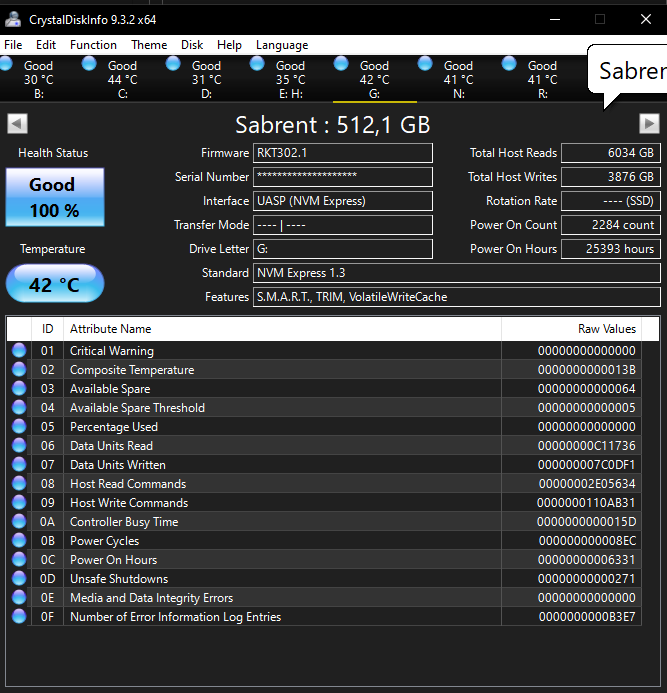
TLDR: I’ve just build my first NAS & am transferring files to it; everything’s working great apart from 1 NVME SSD (Sabrent Rocket 512GB)
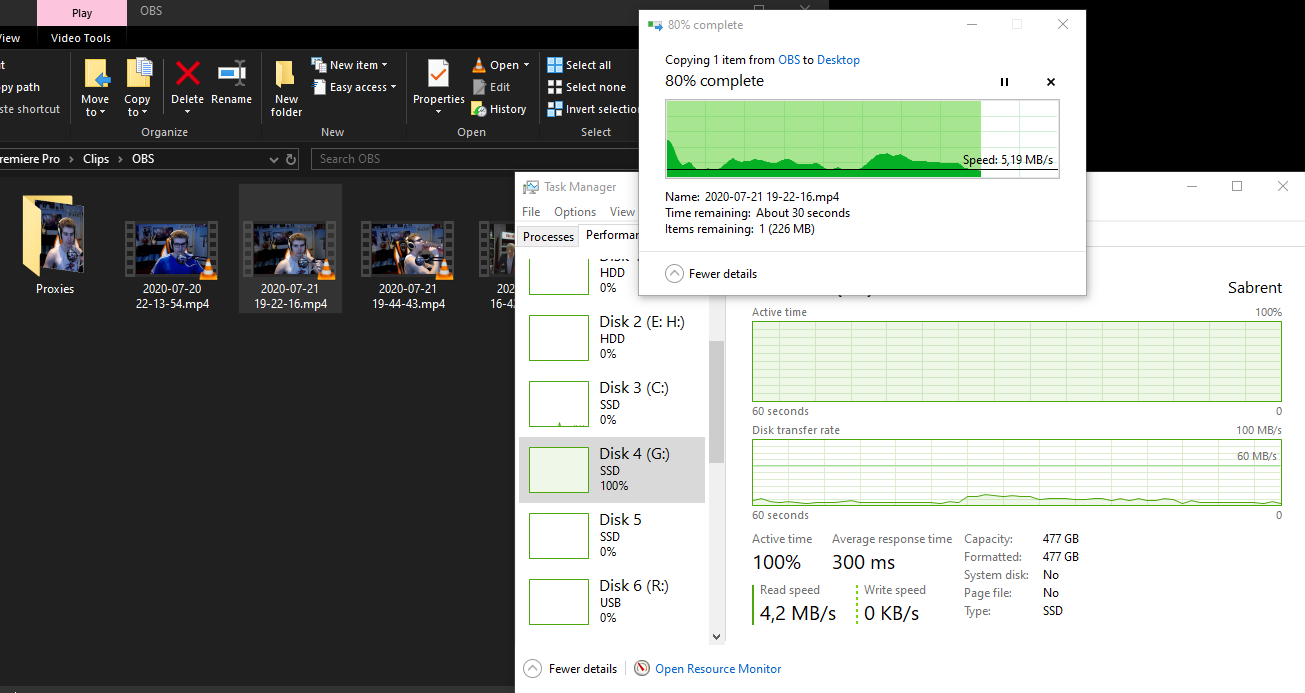
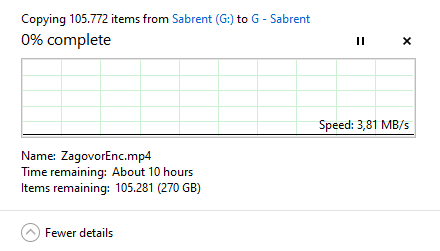
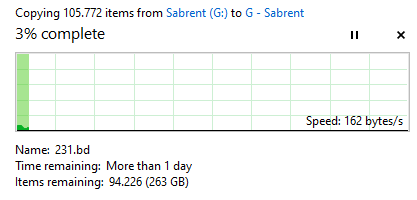
The read speeds are incredibly bad (And the files are mainly just 0.5 - 2GB .mp4’s). The weird thing as well is that CrystalDiskMark speed test shows proper numbers. (Transferring to other local SSD’s/HDD’s is also affected)
I’ve also removed the NVME from my m.2 to an external USB enclosure & the issue is exactly the same…
If anyone has any idea whats happening I’d love to hear it:) Also the firmware is the most recent version.
How did you use this drive, as fast removable storage with long periods of inactivity (i.e disconnected in drawer somewhere?).
When did you write and last access files you are trying to read?
That might explain extreme perf loss when reading stored data from it.
Easy way to verify would be to offload data, wipe drive clean, reload the data and then test again. If performance return to normal, you shouldn’t use this drive for cold offline storage.
This was connected to my 2nd m.2 slot for a few years now (before that it was hooked up via PCIE to m.2 adapter to a different system)
It was used for general purpose things semi regularly (OBS recording; storing various data that was needed while programming etc.)
The current files are relatively old (about 2-4 years); as far as I’m aware SSD’s should be refreshing their NAND voltages for data so it shouldn’t be the case, but I was also thinking about that as nothing else really makes sense.
Update: I just tried writing a 1,5GB ISO to it & it was as fast as it should be. Reading it back was also fine & there should only be 512MB of RAM on this drive… so it seems that yes, the issue seems to be because the data is old, which is pretty scary. I’ve got tons of other SSD’s with way older data & such & never had such issues.
Yup, there’s a whole thread for it. It’s difficult to draw conclusions, so probably best to assume a drive won’t refresh until a couple years’ data shows otherwise.
What node sizes and cell levels are they on? Not sure which Rocket here but looks like probably TLC and 12 nm NAND.
CRAZY!! I’ve literally never heard about this; I did know such behavior could possibly be the case with some of the “cheapo” level stuff… but I had no idea this could happen on a higher quality drive.
I have tons of old Samsung SSD’s & some “cheapo” stuff as well, with way older data & never had issues until this drive now:P Luckily now I know.
It’s the original blue one (SB-ROCKET-512); it’s TLC with DRAM & a Phison controller, but not sure about specifics.
What’s also interesting is I have another 500GB Corsair MP510 (or something like that) - that drive I bough about a year before this one & specs wise at the time I remember it literally just looked the same (same controller, dram, nand etc.) just rebranded as Corsair… But that drive had no issues transferring files today…
I’d say that makes sense as the SSD wouldn’t want to constantly read/rewrite for super optimal performance as it would wear itself out… But the Sabrent:
I did write them a message before posting on the forum (but their support doesn’t work weekends it seems)
I’ll see what they’ll say, but I have heard bad things about their support.
But yes, quite crazy that what was considered a “premium” drive dropped down to this, I have cheapo Intenso SSD’s that I put into cheap USB enclosures years ago & they still work fine enough. I was gonna use this with an old Corsair NVME in mirrored mode on my new NAS for VM’s & stuff… but now…
Well, a lot of reviewers did speak of them pretty highly (like on LTT); and these were DRAM enabled drives with good TBW NAND & phison controllers, so I’d say as premium as you can get without being a Samsung/hynix/Micron/Intel/Kioxia/WD that can manufacture the whole drive.
If you look over in the other thread there’s an SN850 (non-X) that’s hardly running faster. Hopefully the SN850X is better behaved. Absence of evidence is not evidence of absence but there’s maybe hints certain drives and some manufacturers might be more proactive than others. In lieu of industry standards more data seems needed.
Yeah, not sure NAS and consumer flash go together all that well for many use cases. My rule with 321 type approaches is at least one copy must be on a hard drive.
Pricing I can get on Rockets is consistently ~50% higher than SN850X, 990 Pro, or P41 Platinum, which certainly puts them in premium pricing for consumer drives. The 4 Pluses do give +25% endurance over those three but Fury Renegade does that at ~25% higher.
Solid choice if you dont want to overspend and yet avoid no-name crap trap often traps price consicous, yet technically unaware builders.
Behavior like this has been handled since Samsung 960 EVO incident by most ssd controller automatically, unless there is firmware issue or product is cost-cut down so much its absence is intentional (i.e we dont care about quality vendors).
This is indeed the drive. Other than this issue, the drive has been excellent all these years, but this almost doesn’t seem real. Who knows, maybe there actually is an issue with this drive.
It’s probably safe to assume all consumer SSDs exhibit this severe slow down behavior after enough time passes; there are a few notable exceptions but it seems to consistently show up in almost all the non-enterprise SSDs.
This is a guess on my part, but I think the reason consumer SSDs don’t implement a time-based flash refresh algorithm is because it was weighed that less warrantee claims would happen because of slow SSD speeds (consumer would try benchmarking and see that the SSD was fast and that something else was to blame and just reinstall windows/linux) compared to P/E cycles being burned up at an accelerated rate due to the NAND cells constantly being refreshed.
Could also just be upper management sees it as a enterprise checkbox and thus won’t fund testing and validation of the firmware’s refresh features on consumer versions. Speaking from experience in fairly closely related fields it would be… pretty normal for a bunch of engineers to think this is stupid but be unable to convince their management to do differently. Another possibility is it’s planned obsolescence based on a sales assumption that old, slow drives will be replaced with new ones.
Given how short term corporate thinking tends to be it also wouldn’t surprise me if folks internal to companies who think consumer data that’s 1-2+ years cold should still work well have a hard time overcoming indifference and being able advocate successfully for support. That may include a calculation the wait time to do testing is too long for the review-o-sphere to take up the issue and start moving consumer opinion.
Wouldn’t surprise me either if some companies don’t know how much their drives’ read speeds can decline because it’s not something they’re testing for. Might also be accelerated aging is failing to (re)produce real world degradation or just isn’t practical to run long enough to detect it.
I’d tend to guess all of these possibilities, as well as warranty calculations and other circumstances, occur to different degrees across drive manufacturers.
Minor note: there’s a post on reddit saying Phison’s released a firmware fix? mitigation? for slow reads by least E18 controllers. The Sabrent Rockets are all Phison, though the drive for this thread’s E12S.
Thank you so much for your patience regarding this matter, I received a response from my colleagues from Lab team they suggest that a secure erase can help with this behavior, so, could you please make a backup of the data on the drive, then use our secure erase tool: Dropbox then once the drive is clean re-initialize and reformat the drive and you would have to two options restore the data from the backup or test the drive without the data.
Please let me know if the issue of the drive persists even after the secure erase.
//
I didn’t follow up with support after this or try the “solution” as there wouldn’t really be any way to test it aside from having it wait around for a few years… Now the drive is used in mirrored mode on my NAS & eventually I may just use it as a cache drive or something.


 )
)