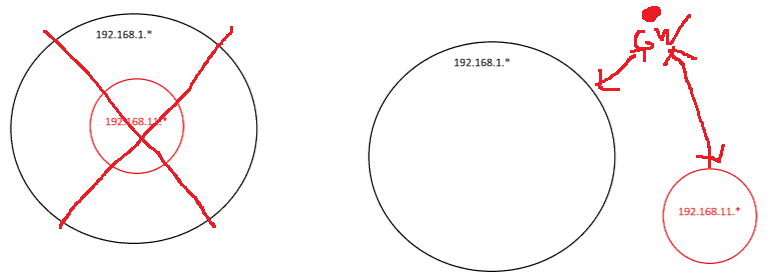
I currently have PFsense acting as my main DHCP + DNS server (among many other things). I want to setup an Active Directory Server, WITHOUT removing the DHCP + DNS functionality from PFsense. I’ve been trying for HOURS trying to get this to work:
Or another way of looking at is is that the subnet 192.168.11.* is running WITHIN the main subnet of 192.168.1.*.
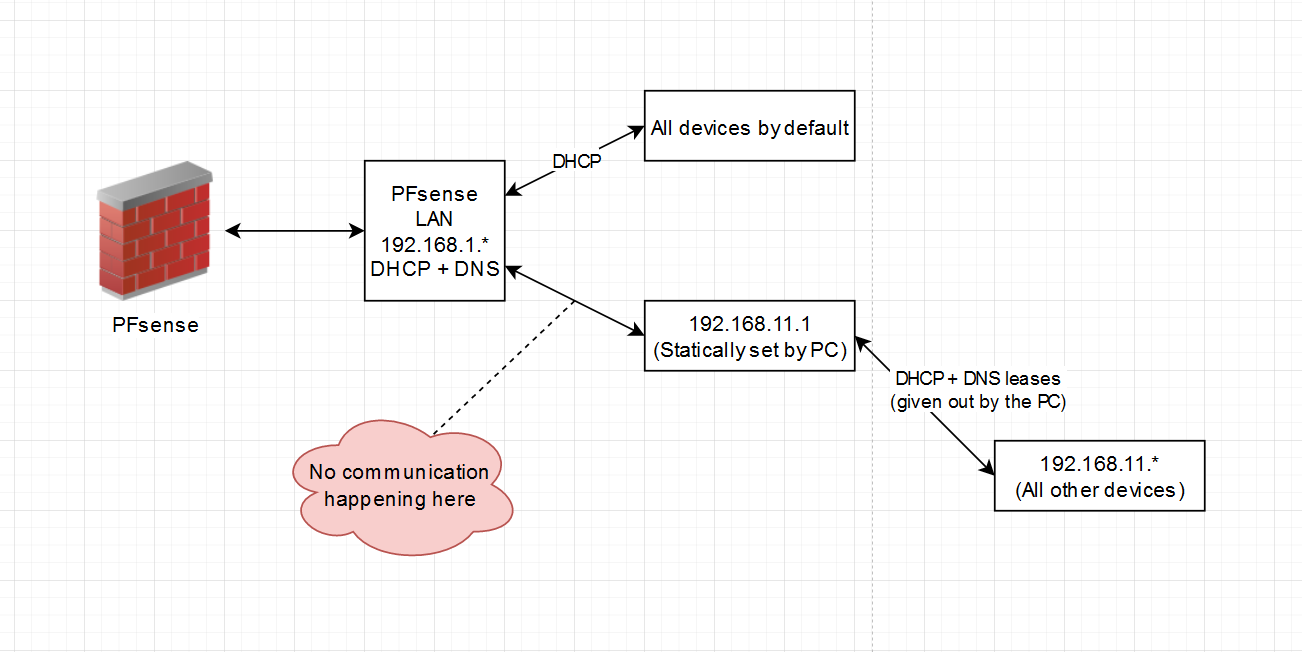
I’d essentially like ALL devices to get handed an internal ip address of 192.168.1.* by default, but within PFsense “push” certain computers to communicate with the 192.168.11.1 AD server.
I can’t figure out how to do this. I tried to do it with VLAN’s but it doesn’t work because you can’t “push” certain clients to a specific VLAN. I’m now thinking I may have to do some weird NAT stuff, but honestly, no idea.
I know that I can also manually set the IP of the computers that I want to be domain-joined (therefore setting their IP to 192.168.11.* ) so that it can communicate with the AD server (located at 192.168.11.1) but I want to avoid doing this. Further, I still get the problem that the two subnets (192.168.1.* and 192.168.11.*) CANNOT communicate with each other.
Set up a bridge on the AD machine, so comms between both subnets should work. I take it the AD hands out IP addresses to those who need to connect to said AD and those are on a physically separate network, correct? If not, NAT is your only solution.
Can you clarify on this? Set it up how? Is that within Windows Server 2022 (the AD server) or what? Do I need to mess with the Windows Server 2022 firewall settings?
I take it the AD hands out IP addresses to those who need to connect to said AD
Correct; I ONLY want the AD to hand out IP addresses to those who need it (ie. the PC’s which I want AD joined).
No idea, I don’t use that. But it should be in the network settings somewhere, if (and that’s a big IF!) M$ follows logic rules However, it does require 2 physical ports (NIC’s) to work.
Hmm, if I run the AD server on an entirely different NIC (say I have DHCP + DNS disabled on the other NIC and instead have the AD server handling these), would I be able to push clients from the “default” NIC to communicate with the AD NIC?
Are you not using a router between the two subnets? You have to do Mac-vlan tagging in your switch to get to the other subnet. That is also assuming you have some sort of L3 device doing the routing functions between subnets. That’s what they are designed to do. Otherwise you won’t be able to communicate between them. You could do some static routing between them but that might get pretty wild and crazy real fast.
what is your cider notation at the pfSense? /24?
if it’s a /24 then 192.168.11.* is def NOT in the same network thus, no communications is ever going to happen.
You would need at least a /20 at the pfSense
A “bump” after a mere 15 hrs is not exactly enticing responses
Please remember L1T forum members are all volunteers and no matter how urgent you believe your case is, they have no obligation to fix your issue instantly, or at least in the shortest time possible. If this case is for work, pay a professional to fix it, otherwise, be patient.
Follow those previous instructions for setting up your initial pfSense that is fielding your WAN connection from your ISP. That configuration will allow you to run one pfSense instance that handles the entire IP range you desire. All of your network routing will go through that one pfSense.
You can, alternatively, run multiple instances of pfSense and divy up the IP range across them.
You have a useable IP range of 192.168.0.1 - 192.168.15.254.
That’s a LOT.
So you can divy up that massive IP range into sub-networks, each being handled by its own pfSense as follows:
Subnetting is just about making the most efficient use of your available range. Adjust your subnet mask accordingly to achieve what is best for your deployment. You may only need one pfSense to handle the entire range if it’s just a home network. A business, however, would need more granularity and control over what bits of traffic are going where.
I don’t think you can use subnetting to achieve what you’re trying to do. You need to either have two VLANs, one for things you want to get DHCP from pfsense and the other for things and get DHCP from the domain controller, or you need to have one or the other handle DHCP. Either way you only want one DHCP server on any given network.
I would suggest if you want to keep the DHCP and DNS functionality on pfsense then use pfsense as the DHCP server, set the domain controller as the DNS server that’s given out by DHCP and then use the pfsense DNS server as the upstream server of the domain controller.
As has already been pointed out, you are trying to combine the two networks of 192.168.1.0/24 and 192.168.11.0/24. This is not possible to do.
There are two ways to resolve this depending on the number of hosts you want to put on there. If the number of hosts on each network is small, simply split one of the networks into two:
192.168.1.0/25 has hosts 192.168.1.<1..126> with broadcast .127 192.168.1.128/25 has hosts 192.168.1.<129..254> with broadcast .255
OR, you could simply combine the two networks into one bigger one, by setting netmask /20 instead. Both will then be part of the network 192.168.0.0 - 192.168.15.255.
Incidentally IPv6 has a fixed network, subnet and host part. Here is what a full IPv6 address looks like: abcd:1234:5678:0bed:0000:0000:0000:000a
The abcd:1234:5678 part is the network part. This is assigned to you by your ISP and the range is from 0000:0000:0000 to ffff:ffff:ffff.
The 0bed part is your subnet part. This can be any number between 0000 and ffff.
The 0000:0000:0000:000a part is the host part. As before, range goes between 0and f for each digit.
Now, you can do two shortcuts that may or may not help you. You may truncate any leading zeroes, and if there are many zeroes you can use :: (only once!) to denote that this can be filled with zeroes. Thus, the above example change to abcd:1234:5678:bed::a.
Setup that pfsense LAN interface with TWO IP addresses: 192.168.1.1/24 and 192.168.11.2/24 and everything should just work. You may need firewall rules to allow/deny traffic between the two as well.
Or you could do it any of a dozen other ways… Adding static routes, changing subnet masks on host (if I did my quick math right 255.255.245.0 should allow access to both 1 and 11), VLAN tagging, using multiple LAN interfaces, IPv6, multiple IPs on each host’s eth interface, etc., etc., etc.
Or you could just drop the .11.x network. You didn’t explain at all why you created it and why you think you need it. Why not put your AD on a 192.168.1.x/24 address?
In your diagram, the 192.168.11.1 would need to function as a Router, which while possible on Windows Server, is not something it is good at and not recommended. If you want the two networks to be separate, just define them both at the PFsense level and create whatever rules you want to allow 192.168.1.0/24 to exchange traffic with 192.168.11.0/24. You can then point PFsense’s DNS resolver to 192.168.11.1 for your AD’s domain name and point AD’s DNS to 192.168.1.1 (as a conditional forwarding policy) for whatever domain name you use on that network.
Another thing you might consider is just accepting Windows DNS. If you want the AD experience, that includes DNS. Even if Windows DNS might work very differently from BIND, it is still a real DNS server with a lot more functionality than the PFsense resolver. You don’t have to use Windows as the DHCP server if you don’t want to, but doing so can help DDNS work better for non-Microsoft devices.

 However, it does require 2 physical ports (NIC’s) to work.