RTX 5090: 1/2 game performance on VFIO compared to native — low GPU utilization, other titles seem to run fine?

I’ve just set up a new Zen 5 system (Ryzen 9 9950X3D) for use as a hybrid homelab server/virtualized gaming/AI/productivity build.

I’m currently running a fresh new copy of Unraid 7.2 to experiment with Linux virtualization and determine the viability of replacing and consolidating my current aging server (which is also running Unraid) and my missing Win11 workstation with a single machine.

I’ve updated the firmware on the motherboard, ensured that all modern PCIe features such as 4G decoding are enabled, and on Unraid (i.e. Linux kernel parameters) configured logical threads 0-7 and 16-23 as Isolated so that the hypervisor’s host OS will not touch the 3D vCache equipped cores (on CCD 0). The first 8 cores (both logical SMT threads of each) are then pinned on my Windows 11 VM. The topology is correct: every two adjacent vcpu numbers are mapped to the two threads running on the same physical core on the host, and it’s advertised to the VM as an 8-core, 2-threads CPU in passthrough mode.

I’m passing through a GeForce RTX 5090 Founders Edition card (connected at 16x), an M.2 NVMe SSD (Samsung 960 Pro) and my USB4 controller. Installed latest Windows 11 Pro (25H2), enabled MSI interrupts on NVIDIA High Definition Audio, disabled Memory Integrity within Core Isolation (extremely high CPU usage and low performance otherwise).

Now, at 4K RT Ultra preset in Cyberpunk 2077 benchmark with framegen and whatnot at 2160p resolution, I get an average FPS of 191 FPS when running natively, 176 FPS when virtualized. The GPU gets a high utilization, and frankly I can live with an overhead that looks like this, though not ideal.

What unfortunately doesn’t seem to fare similarly is The Witcher 3 Wild Hunt. I’m running the next-gen version with every setting maxed out (“RT Ultra” profile, plus HairWorks) at 2160p, and no frame gen. When booting from my SSD natively, I am getting around 130ish FPS in some areas (Skellige), and the GPU utilization hovers around 97-100%. Under the same conditions, when virtualized I get 40-60% utilization and consequently about ~1/2 the performance wrt Win11 baremetal (around the 50-60 FPS in those same areas). The difference remains stark when enabling frame gen, which becomes necessary in order to play in some areas (e.g. Novigrad, where with DLSS framegen I get framerates of about 50-60 FPS natively, <20 FPS virtualized).

No other game that I’ve tested exhibits this phenomenon. I’ve also compared e.g. Furmark results and they seem more or less in line with what you would expect from this card.

Any advice on how to proceed?
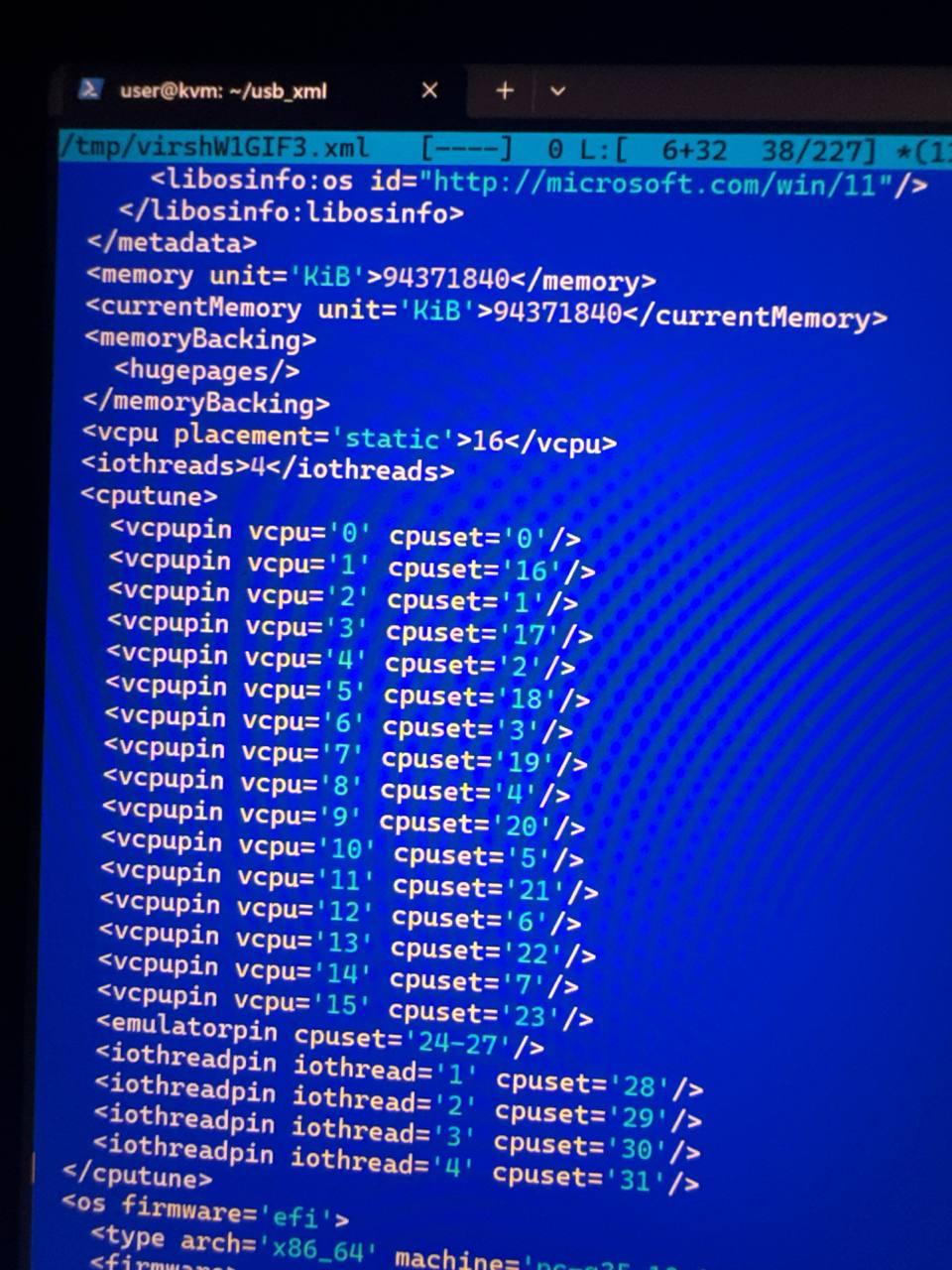
Hi. That’s easy. There are two reasons for this exact behavior.

  1. Inter-CCD communication is relatively slow.
  2. The guest doesn’t realize that the underlying cores aren’t actually equivalent in terms of cache size and frequency boost.

Easiest way to get the most of your performance back is to pin vcpus to the first CCD. The other cores might be used for Quemu service threads if you will.

This will give you approximately 75-80% of expected performance.

Another option is to describe the topology (1 socket, two dies, 8 cores per die and 2 threads per core) and hope that it will be enough. But it most likely would perform much worse in gaming. Not unless you’ll use process lasso or another affinity tool in the guest.

P.S. Your CP2077 overhead is actually much higher than you expect. Try to set low settings and 1024x768. You’ll see that the CPU bottleneck is hilarious. It could perform three or even four times worse than same scenario on the bare metal.

P.P.S. Some additional performance could be squeezed out by isolating the pinned cores from through the host kernel boot arguments and disabling all scheduler activities for them.

Tried that along with a proper pinning.

It doesn’t worth the effort at all. The performance difference between this config and the default settings is negligible.

So just do what AMD does with their “3D Vcache optimizer”. Namely, the first option. Bind all vCPUs to the first CCD and use the second one for I/O tasks which aren’t CPU bottlenecked. That will give you 2/3 of theoretically achievable improvement. Then isolcpus and scheduling options might add some on the top. That is all.

Unfortunately that’s already what I’m doing, in that I bound only the threads of the first 8 CPUs (cpuset 0-7 and 16-23, the two ranges basically interleaved in the XML cputune section so that threads on the same CPU are next to each other), again with 8 core 2 threads. So the VM only uses the first CCD.

I’ve also added nohz_full and rcu_nocbs along with isolcpus for the same threads, but no meaningful improvement appeared.

I’ve played with the Cyberpunk settings a bit and it seems like performance hit can be even far worse than previously measured, and my GPU fails to reach even a 50% load when enabling path tracing. The only applications where I’m seeing similar performance between native and virtual now, are Minecraft with shaders and FurMark v2 4K, both of which are OpenGL apps (Minecraft with Sodium, Iris and Complementary Shaders being a very single-threaded performance-bound app still, so it’s interesting that it runs similarly native and virtualized).

I will try with Proxmox for the hell of it (and document results), and also experiment with different timer parameters in the XML, but it’s not looking too good.

Has anyone had positive experiences with AAA titles thru VFIO on Blackwell, particularly 5090 GPUs? Feel like I might have made a stupid purchase. Oh well… if I get to the bottom of this, I’ll document my findings.

Thanks

Double-check on „msinfo“ that VBS is fully disabled. This caused similar issues for me in the past (some games using the GPU fully some bot). Core isolation is not the only thing that should be disabled if I remember correctly.

2 Likes

Proxmox is a bad idea in your case, you’ll just waste your time. Just yesterday I had ran away from this very phenomenon over there. Installed a plain and simple Ubuntu, configured everything manually via virsh and got a little miracle. And a miracle it actually is, because I wasted two weeks on trying the solution before finally giving up.

P.S. Speaking about improvements, considering a little fact that I’m running on 6.18 kernel now it is quite possible that I am not doing a honest comparison here.

Just done testing that nuance. Installed the old proxmox kernel (5.15.53-1-pve) on my Ubuntu 25.10 host. And surprisingly I don’t see any performance difference. No performance differences at all. I don’t know why Proxmox is only able to give 45-55 FPS compared to 240-250 on the Ubuntu 25.10 host while running under the very much identical kernel. Whatever the cause, the kernel has nothing to do with it.

WOW, you’re crazy dude! After disabling VBS fully (which took a ton of trial and error, bcdedit /set {0cb3b571-2f2e-4343-a879-d86a476d7215} loadoptions DISABLE-LSA-ISO was the missing puzzle piece), performance is now 93%+ compared to native on The Witcher 3. It’s now very enjoyable within a ~90-110 FPS range (based on in-game area, with everything maxed out and framegen enabled).

While not optimal, this is a staggering improvement, and I can probably squeeze out a little more. Next I will have to experiment with NUMA and also pin the emulator and IO threads of QEMU.

I also switched to the Q35+ vchipset (for some reason i440fx is still the default on Unraid, they might have not gotten the memo). Attached below is my current XML for reference.

If anyone has any more advice, I’d be glad to hear it, otherwise for now that’s all. Thanks again to everyone!

<?xml version='1.0' encoding='UTF-8'?>
<domain type='kvm'>
  <name>Windows 11</name>
  <uuid>f985025e-89c9-2b34-71d8-ebbfb44a2c65</uuid>
  <metadata>
    <vmtemplate xmlns="http://unraid" name="Windows 11" iconold="windows11.png" icon="windows11.png" os="windowstpm" webui="" storage="default"/>
  </metadata>
  <memory unit='KiB'>33554432</memory>
  <currentMemory unit='KiB'>33554432</currentMemory>
  <memoryBacking>
    <nosharepages/>
  </memoryBacking>
  <vcpu placement='static'>16</vcpu>
  <cputune>
    <vcpupin vcpu='0' cpuset='0'/>
    <vcpupin vcpu='1' cpuset='16'/>
    <vcpupin vcpu='2' cpuset='1'/>
    <vcpupin vcpu='3' cpuset='17'/>
    <vcpupin vcpu='4' cpuset='2'/>
    <vcpupin vcpu='5' cpuset='18'/>
    <vcpupin vcpu='6' cpuset='3'/>
    <vcpupin vcpu='7' cpuset='19'/>
    <vcpupin vcpu='8' cpuset='4'/>
    <vcpupin vcpu='9' cpuset='20'/>
    <vcpupin vcpu='10' cpuset='5'/>
    <vcpupin vcpu='11' cpuset='21'/>
    <vcpupin vcpu='12' cpuset='6'/>
    <vcpupin vcpu='13' cpuset='22'/>
    <vcpupin vcpu='14' cpuset='7'/>
    <vcpupin vcpu='15' cpuset='23'/>
  </cputune>
  <os>
    <type arch='x86_64' machine='pc-q35-9.2'>hvm</type>
    <loader readonly='yes' type='pflash' format='raw'>/usr/share/qemu/ovmf-x64/OVMF_CODE-pure-efi-tpm.fd</loader>
    <nvram format='raw'>/etc/libvirt/qemu/nvram/f985025e-89c9-2b34-71d8-ebbfb44a2c65_VARS-pure-efi-tpm.fd</nvram>
  </os>
  <features>
    <acpi/>
    <apic/>
  </features>
  <cpu mode='host-passthrough' check='none' migratable='off'>
    <topology sockets='1' dies='1' clusters='1' cores='8' threads='2'/>
    <cache mode='passthrough'/>
    <feature policy='require' name='topoext'/>
    <feature policy='disable' name='hypervisor'/>
  </cpu>
  <clock offset='localtime'>
    <timer name='hpet' present='no'/>
    <timer name='hypervclock' present='yes'/>
  </clock>
  <on_poweroff>destroy</on_poweroff>
  <on_reboot>restart</on_reboot>
  <on_crash>restart</on_crash>
  <devices>
    <emulator>/usr/local/sbin/qemu</emulator>
    <disk type='file' device='cdrom'>
      <driver name='qemu' type='raw'/>
      <source file='/mnt/cache/isos/virtio-win-0.1.285-1.iso'/>
      <target dev='hdb' bus='sata'/>
      <readonly/>
      <address type='drive' controller='0' bus='0' target='0' unit='1'/>
    </disk>
    <controller type='usb' index='0' model='ich9-ehci1'>
      <address type='pci' domain='0x0000' bus='0x00' slot='0x07' function='0x7'/>
    </controller>
    <controller type='usb' index='0' model='ich9-uhci1'>
      <master startport='0'/>
      <address type='pci' domain='0x0000' bus='0x00' slot='0x07' function='0x0' multifunction='on'/>
    </controller>
    <controller type='usb' index='0' model='ich9-uhci2'>
      <master startport='2'/>
      <address type='pci' domain='0x0000' bus='0x00' slot='0x07' function='0x1'/>
    </controller>
    <controller type='usb' index='0' model='ich9-uhci3'>
      <master startport='4'/>
      <address type='pci' domain='0x0000' bus='0x00' slot='0x07' function='0x2'/>
    </controller>
    <controller type='sata' index='0'>
      <address type='pci' domain='0x0000' bus='0x00' slot='0x1f' function='0x2'/>
    </controller>
    <controller type='pci' index='0' model='pcie-root'/>
    <controller type='pci' index='1' model='pcie-root-port'>
      <model name='pcie-root-port'/>
      <target chassis='1' port='0x8'/>
      <address type='pci' domain='0x0000' bus='0x00' slot='0x01' function='0x0' multifunction='on'/>
    </controller>
    <controller type='pci' index='2' model='pcie-root-port'>
      <model name='pcie-root-port'/>
      <target chassis='2' port='0x9'/>
      <address type='pci' domain='0x0000' bus='0x00' slot='0x01' function='0x1'/>
    </controller>
    <controller type='pci' index='3' model='pcie-root-port'>
      <model name='pcie-root-port'/>
      <target chassis='3' port='0xa'/>
      <address type='pci' domain='0x0000' bus='0x00' slot='0x01' function='0x2'/>
    </controller>
    <controller type='pci' index='4' model='pcie-root-port'>
      <model name='pcie-root-port'/>
      <target chassis='4' port='0xb'/>
      <address type='pci' domain='0x0000' bus='0x00' slot='0x01' function='0x3'/>
    </controller>
    <controller type='pci' index='5' model='pcie-root-port'>
      <model name='pcie-root-port'/>
      <target chassis='5' port='0xc'/>
      <address type='pci' domain='0x0000' bus='0x00' slot='0x01' function='0x4'/>
    </controller>
    <controller type='pci' index='6' model='pcie-root-port'>
      <model name='pcie-root-port'/>
      <target chassis='6' port='0xd'/>
      <address type='pci' domain='0x0000' bus='0x00' slot='0x01' function='0x5'/>
    </controller>
    <controller type='pci' index='7' model='pcie-root-port'>
      <model name='pcie-root-port'/>
      <target chassis='7' port='0xe'/>
      <address type='pci' domain='0x0000' bus='0x00' slot='0x01' function='0x6'/>
    </controller>
    <controller type='virtio-serial' index='0'>
      <address type='pci' domain='0x0000' bus='0x02' slot='0x00' function='0x0'/>
    </controller>
    <interface type='bridge'>
      <mac address='52:54:00:cb:44:61'/>
      <source bridge='br0'/>
      <model type='virtio'/>
      <address type='pci' domain='0x0000' bus='0x01' slot='0x00' function='0x0'/>
    </interface>
    <serial type='pty'>
      <target type='isa-serial' port='0'>
        <model name='isa-serial'/>
      </target>
    </serial>
    <console type='pty'>
      <target type='serial' port='0'/>
    </console>
    <channel type='unix'>
      <target type='virtio' name='org.qemu.guest_agent.0'/>
      <address type='virtio-serial' controller='0' bus='0' port='1'/>
    </channel>
    <input type='mouse' bus='ps2'/>
    <input type='keyboard' bus='ps2'/>
    <tpm model='tpm-tis'>
      <backend type='emulator' version='2.0' persistent_state='yes'/>
    </tpm>
    <audio id='1' type='none'/>
    <hostdev mode='subsystem' type='pci' managed='yes'>
      <driver name='vfio'/>
      <source>
        <address domain='0x0000' bus='0x01' slot='0x00' function='0x0'/>
      </source>
      <address type='pci' domain='0x0000' bus='0x03' slot='0x00' function='0x0'/>
    </hostdev>
    <hostdev mode='subsystem' type='pci' managed='yes'>
      <driver name='vfio'/>
      <source>
        <address domain='0x0000' bus='0x01' slot='0x00' function='0x1'/>
      </source>
      <address type='pci' domain='0x0000' bus='0x04' slot='0x00' function='0x0'/>
    </hostdev>
    <hostdev mode='subsystem' type='pci' managed='yes'>
      <driver name='vfio'/>
      <source>
        <address domain='0x0000' bus='0x02' slot='0x00' function='0x0'/>
      </source>
      <boot order='1'/>
      <address type='pci' domain='0x0000' bus='0x05' slot='0x00' function='0x0'/>
    </hostdev>
    <hostdev mode='subsystem' type='pci' managed='yes'>
      <driver name='vfio'/>
      <source>
        <address domain='0x0000' bus='0x77' slot='0x00' function='0x0'/>
      </source>
      <address type='pci' domain='0x0000' bus='0x06' slot='0x00' function='0x0'/>
    </hostdev>
    <watchdog model='itco' action='reset'/>
    <memballoon model='none'/>
  </devices>
</domain>
1 Like

That’s weird. I have VBS and nested virtualization enabled and didn’t see any problems with that. O_o