*Follow-up to: [Niche: ROMED4ID-2T PCIe ports usecase](Niche' ROMED4ID-2T PCIE Ports usecase)*
*Previous revision of these notes ended with open questions. This revision reports a working result.*
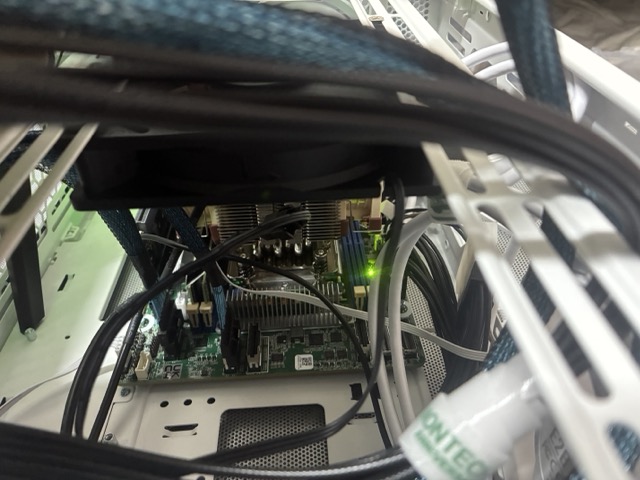
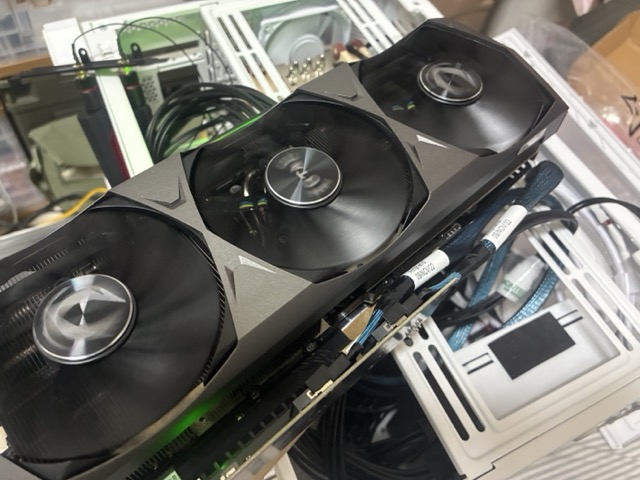

**
—**
## 1. Result
**Two merged SlimSAS 8i ports train a full PCIe 4.0 x16 link on this board, using an ordinary passive adapter.** An RTX 3090 on `SLIM5`+`SLIM6`, set to `x16` in BIOS and fed by two SlimSAS cables into a plain SlimSAS-to-PCIe-slot adapter — no retimer, no redriver, no active silicon of any kind — negotiates 16GT/s at x16 with equalization complete.
**No ASRock RDV riser or retimer card is required.** The x8 ceiling reported in the original thread is neither a platform limitation nor evidence that active components are needed.
```
# Root port (SLIM6/SLIM5 pair, BIOS Link Width = x16)
80:03.1 LnkCap: Port #0, Speed 16GT/s, Width x16, ASPM L1
     LnkSta:  Speed 16GT/s, Width x16

     LnkSta2: EqualizationComplete+ EqualizationPhase1+

     SltSta:  PresDet+
# Endpoint
83:00.0 NVIDIA GA102 [GeForce RTX 3090] [10de:2204]
     LnkCap:  Speed 16GT/s, Width x16

     LnkSta:  Speed 16GT/s, Width x16
```
No bandwidth warning is logged, and `dmesg` carries no AER or link-training errors. The link stays at x16 after `vfio-pci` binds the card and a guest takes it.
### Test system
| | |
|—|—|
| Board | ASRock Rack ROMED4ID-2T |
| BIOS | P3.30, 2022-09-05 |
| CPU | EPYC 7F52 (16C/32T, Rome) |
| RAM | 2× 64 GB DDR4-2666 RDIMM |
| OS | Proxmox VE 9.2.5, kernel 7.0.14-8-pve |
| GPU | ZOTAC RTX 3090 (`19da:1613`) |
| Adapter | Passive SlimSAS 8i ×2 → PCIe x16 slot, no active components; requires its own power feed |
| BIOS setting | `SLIM6/SLIM5 Link Width = x16` |
This settles the question the original thread turned on. The inference that ASRock’s
RDV-suffixed risers must contain retimers, and that a generic adapter therefore cannot
work, does not hold — a passive adapter reaches full width on this board. It is the
earlier x8 result that now needs explaining, not this one. See §7.
—
## 2. What the merge looks like from the OS
Setting a pair to `x16` collapses four x4 root ports into one x16 root port. Before, with `SLIM6/SLIM5` at the `x4x4/x4x4` default:
```
80:03.1 PCI bridge LnkCap Width x4
80:03.2 PCI bridge LnkCap Width x4
80:03.3 PCI bridge LnkCap Width x4
80:03.4 PCI bridge LnkCap Width x4
```
After setting the pair to `x16`, `80:03.2` through `80:03.4` cease to exist:
```
80:03.0 Host bridge (AMD Starship/Matisse PCIe Dummy Host Bridge)
80:03.1 PCI bridge LnkCap Width x16
```
The other two pairs, left at their defaults, keep their four x4 ports each. This is a clean way to confirm the BIOS setting took effect before ever plugging a card in.
—
## 3. Port grouping, confirmed empirically
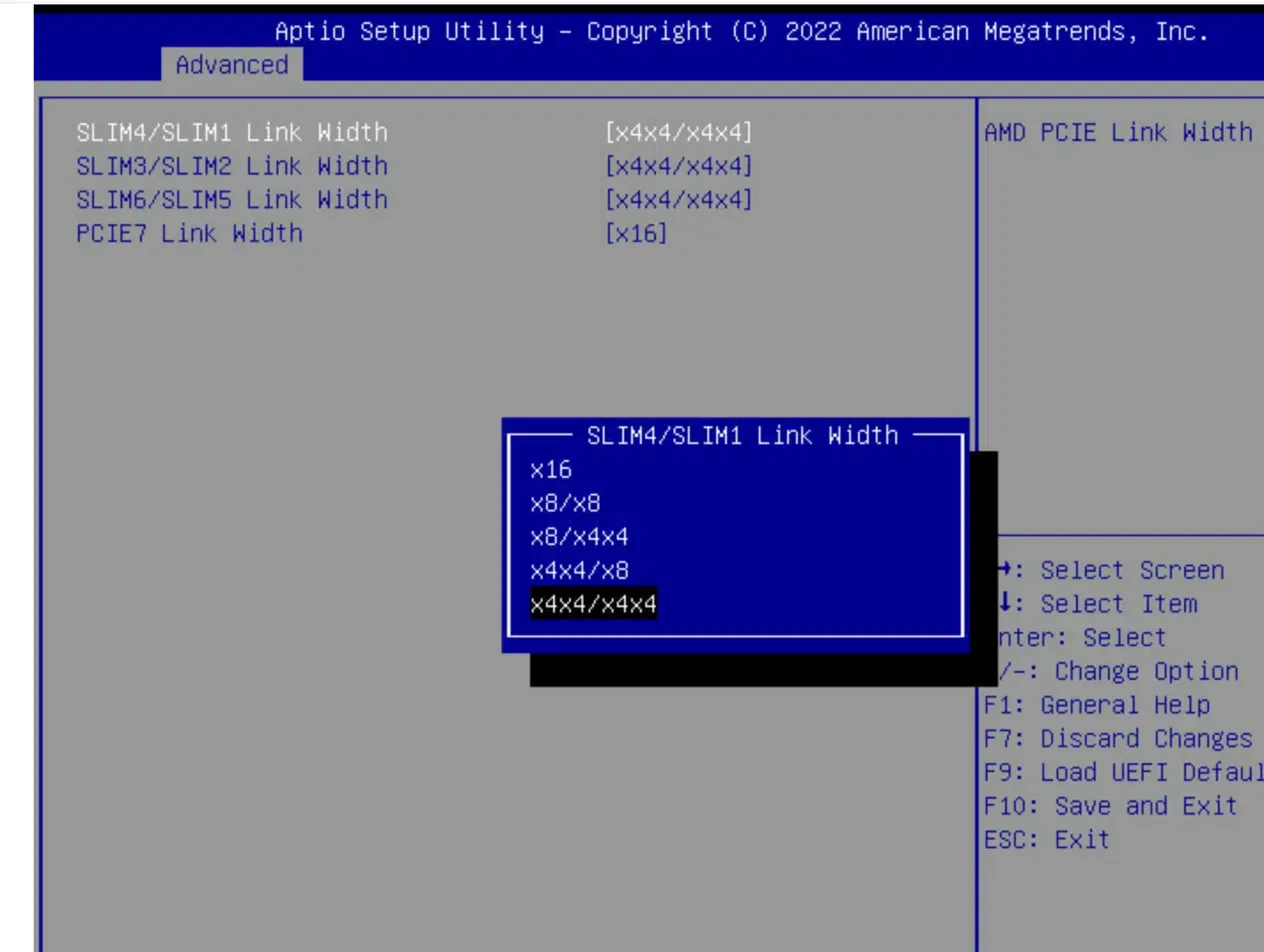
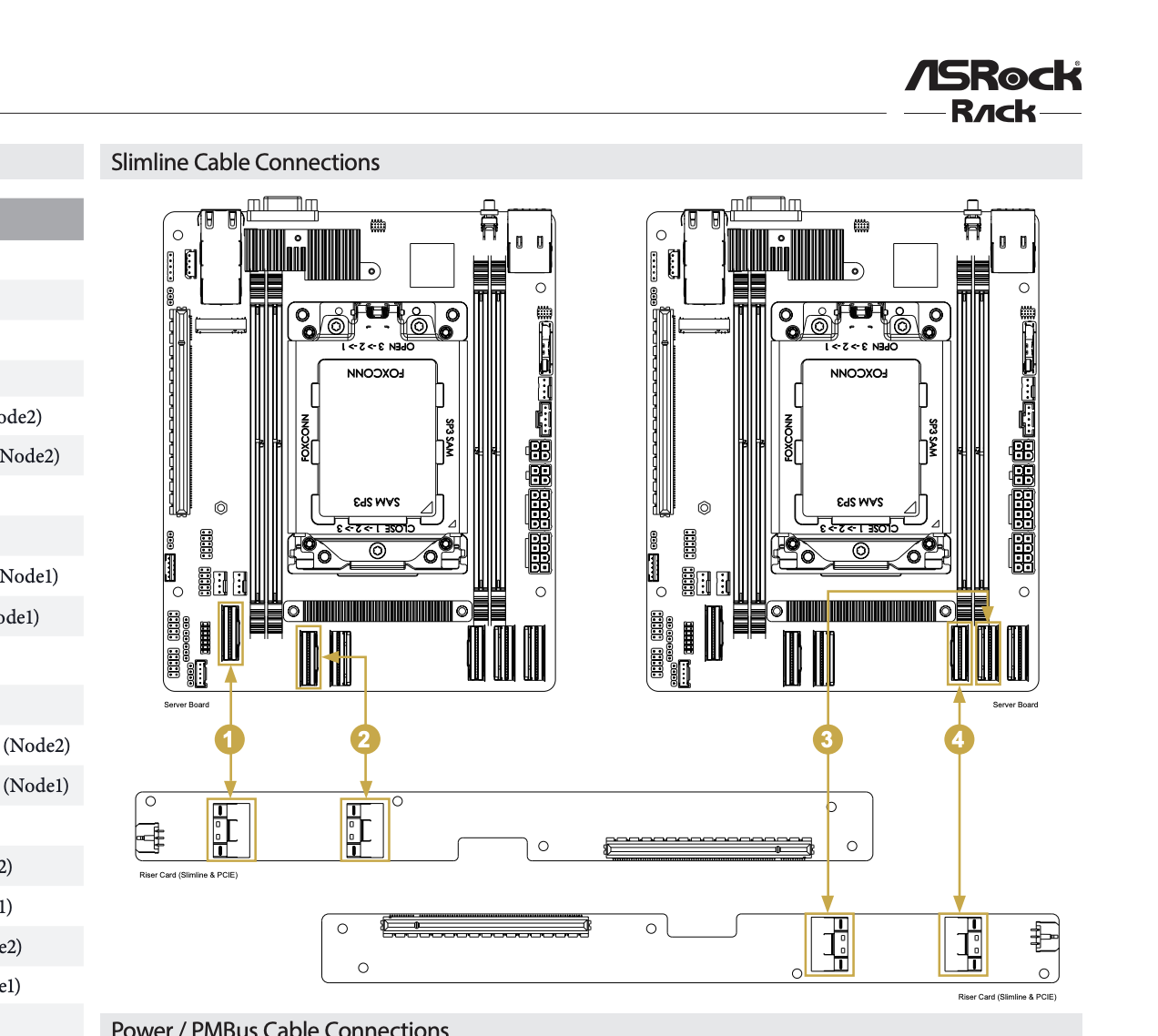
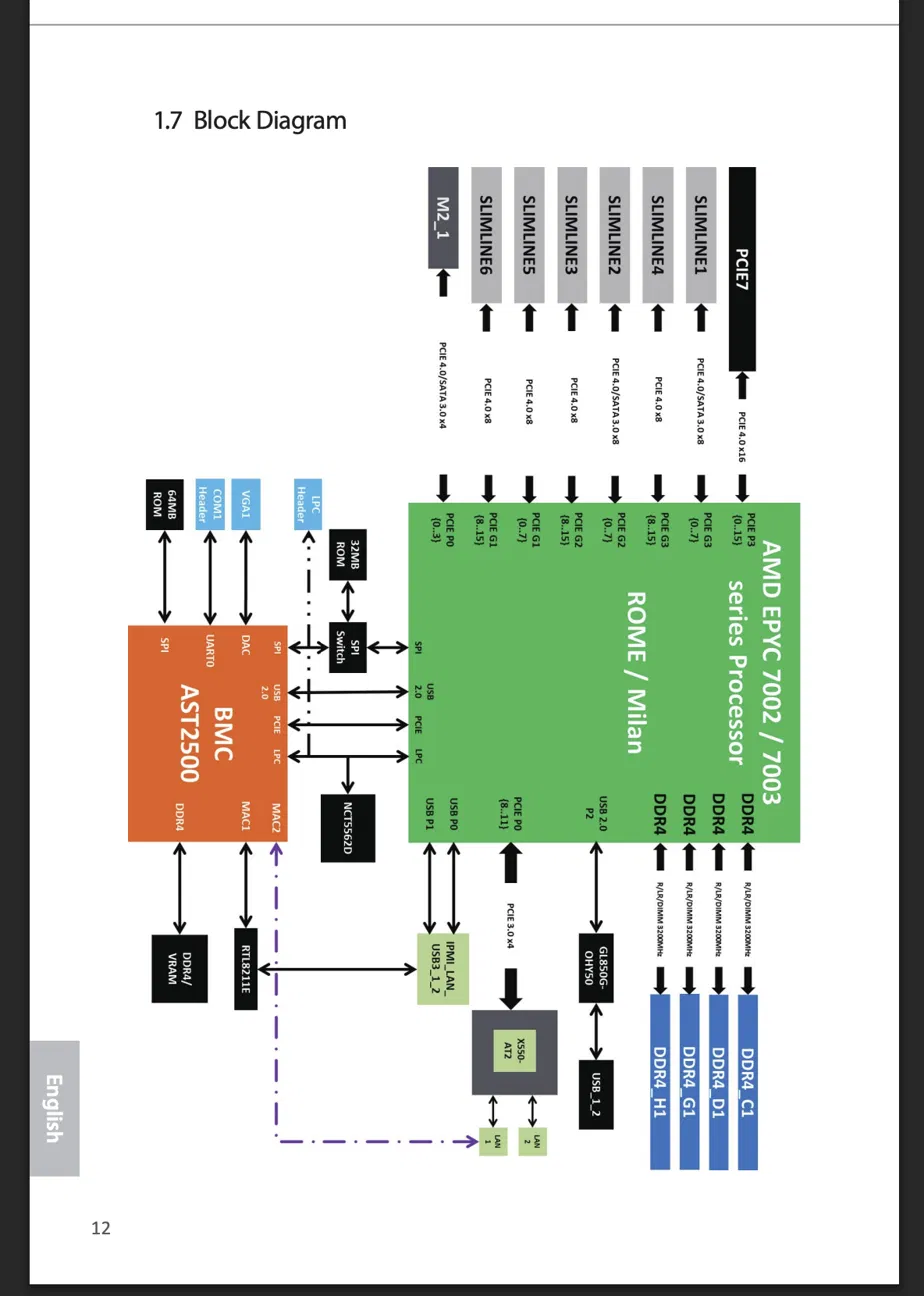
The block diagram’s pairing — `1+4`, `2+3`, `5+6`, not sequential — is independently confirmed by walking PCI topology on a running system. Each pair sits on its own root complex:
| Connectors | Root complex | Root ports | Block-diagram controller |
|—|—|—|—|
| `SLIM2` + `SLIM3` | `0000:00` | `00:03.1`–`00:03.4` | PCIE G2 |
| `SLIM1` + `SLIM4` | `0000:40` | `40:01.1`–`40:01.4` | PCIE G3 |
| `SLIM5` + `SLIM6` | `0000:80` | `80:03.1`–`80:03.4` | PCIE G1 |
| `PCIE7` | `0000:40` | `40:03.x` | PCIE P0 (separate controller) |
| `M2_1` | `0000:c0` | `c0:03.1` | PCIE P3 |
| on-board X550 | `0000:c0` | `c0:03.3` | — |
Derived from `dmidecode -t slot` bus addresses cross-referenced against which root port lit up as devices were moved between connectors. Two useful consequences:
- **`PCIE7` shares root complex `0000:40` with `SLIM1`/`SLIM4`** but is a separate controller, matching the diagram.
- **Nothing hangs off root complex `0000:c0` except `M2_1` and the on-board NIC.** For multi-GPU work this matters: peer-to-peer traffic between cards on different root complexes crosses Infinity Fabric, so a tensor-parallel group is best kept within one pair.
### PCIE7 bifurcates further than documented
The earlier notes recorded `PCIE7 Link Width [x16]` as the only option. On this BIOS it splits further — observed while running a x1 Wi-Fi card in it:
```
40:03.1 LnkCap Width x4 ← card here
40:03.2 LnkCap Width x4
40:03.3 LnkCap Width x8
```
So `PCIE7` offers at least `x4x4x8`. Worth checking on other boards before assuming the slot is all-or-nothing.
—
## 4. How to verify a link without guessing
Most of the time lost in this investigation went to misreading an empty port. Two artifacts to know:
**An empty root port lies about both speed and width.**
```
80:03.1 LnkCap: Speed 2.5GT/s, Width x16 ← looks like a Gen1 cap
LnkSta: Speed 2.5GT/s, Width x16 (overdriven)
```
`Width x16 (overdriven)` is what `lspci` prints when no link exists, and the `2.5GT/s` in `LnkCap` is not a real Gen1 restriction. The same port reported `Speed 16GT/s, Width x16` in both registers the moment a GPU was fitted. Do not chase a BIOS link-speed setting on the strength of that reading.
**`Port #247` in `LnkCap` means “nothing attached.”** It becomes a real port number once a device links.
The three registers that actually tell you where you are:
| Reading | Meaning |
|—|—|
| `SltSta: PresDet-` | Nothing electrically present — cable unseated, or adapter unpowered |
| `PresDet+`, `LnkSta … (overdriven)`, `EqualizationPhase1-` | Card present, link never trained — far end electrically silent |
| `PresDet+`, `EqualizationComplete+`, real width | Working |
```bash
for d in 00:03.1 00:03.2 00:03.3 00:03.4 40:01.1 40:01.2 40:01.3 40:01.4 \
80:03.1 80:03.2 80:03.3 80:03.4; do
o=$(lspci -vv -s $d 2>/dev/null)
printf “%-8s %-9s %s\n” “$d” \
"$(echo "$o" | grep 'SltSta:' | grep -o 'PresDet\[+-\]')" \\
“$(echo “$o” | grep -o ‘LnkSta:.*’)”
done
```
### Retrain does not renegotiate width
Worth knowing before concluding a card is bad. Setting Retrain Link (`LNKCTL` bit 5) only drives the LTSSM to **Recovery**, which does not re-run lane detection — a link stuck at x1 stays at x1:
```bash
cur=$(setpci -s 0000:00:03.3 CAP_EXP+10.w)
setpci -s 0000:00:03.3 CAP_EXP+10.w=(printf "%04x" ((0x$cur | 0x20)))
```
Toggling Link Disable (bit 4) forces a full return to **Detect**, where lanes are detected:
```bash
echo 1 > /sys/bus/pci/devices/0000:03:00.0/remove
cur=$(setpci -s 0000:00:03.3 CAP_EXP+10.w)
setpci -s 0000:00:03.3 CAP_EXP+10.w=(printf "%04x" ((0x$cur | 0x10))) # disable
sleep 2
setpci -s 0000:00:03.3 CAP_EXP+10.w=(printf "%04x" ((0x$cur & ~0x10))) # enable
sleep 3
echo 1 > /sys/bus/pci/rescan
```
If width is still short after that, the missing lanes are not being detected at all — an open circuit rather than marginal signalling. Clean `CESta` counters (`RxErr-`, `BadTLP-`, `BadDLLP-`) alongside a narrow link point the same way: dead lanes, not noisy ones.
—
## 5. Failure modes hit along the way
Every one of these presented as “the merge doesn’t work” before being pinned down.
**The adapter needs its own power.** A SlimSAS-to-PCIe-slot adapter has to source the slot’s 12 V and 3.3 V itself; the cables carry signal only. Unpowered, the whole chain reads `PresDet-` and looks identical to a cable that isn’t plugged in. This alone cost several boot cycles.
**Not every card works in the cable chain.** A Realtek RTL8922AE Wi-Fi card in the same adapter never trained — presence detect flapped at roughly 1 Hz, with `pciehp` logging `Card present` / `No link` in a continuous loop, and the raw `SLTSTA` PresDet bit toggling between samples. The same adapter, cables and connector ran the RTX 3090 at full x16. Moved into `PCIE7`, the Wi-Fi card worked normally. Match the card to the position rather than assuming a slot that works for one works for all.
**A ~1 Hz `Card present` / `No link` loop is mechanical.** Read the raw bit rather than trusting the driver log, which retries on its own cadence:
```bash
raw=(setpci -s 0000:80:03.1 CAP_EXP+1a.w); echo (( (0x$raw >> 6) & 1 ))
```
**Adding or moving any device reshuffles UEFI boot order.** This stranded the host at “no bootable device” twice, needing IPMI console access to re-select the boot drive. Budget for it after every hardware change.
**IOMMU groups renumber, breaking hypervisor passthrough configs.** Proxmox pins `path=`, `id=` and `iommugroup=` in `/etc/pve/mapping/pci.cfg`. Over this investigation the GPU’s group moved 57 → 59 → 54 → 32 as devices came and went, and moving the GPU put a different card at its old address:
```
PCI device mapping invalid (hardware probably changed):
‘id’ does not match for ‘gpu-rtx3090’ (10ec:8922 != 10de:2204)
```
Re-derive both values from the card’s *current* address after any change. A trap worth naming: the Wi-Fi card landed in group 57 — the number the stale mapping still held — so checking against the old address appeared to match.
**One x4 lane group in a cable/adapter/carrier chain had dead lanes.** Separately from the GPU work, two NVMe drives behind a two-cable adapter and an M.2 carrier gave one drive at x4 and the other stuck at x1 (`8GT/s`, speed negotiated fine, width short, error counters clean). Swapping the drives left the x1 on the position, clearing both drives; moving the whole assembly to a different connector on a different root complex carried the x1 with it, clearing the board. The fault is in the cable, the adapter, or the carrier’s first slot. Relevant here as a caution: with two cables feeding one slot, a single bad lane group degrades width without any error being logged.
—
## 6. Practical notes for multi-GPU builds on this board
**Seven GPU positions exist**: `PCIE7` at x16 plus six SlimSAS at x8, or fewer at wider widths if pairs are merged. Lanes are not the constraint — 16 + 48 + 4 (M.2) + 4 (X550) is 72 of the 7F52’s 128.
**MMIO is not a constraint either.** With Above 4G Decoding enabled each root complex exposes roughly 8 TiB of 64-bit MMIO, so large and resizable BARs have room. Note this BIOS has **no Re-Size BAR option at all** — `Advanced → PCI Subsystem Settings` offers only `Above 4G Decoding` and `SR-IOV Support`. Forcing a resize from the OS before guest start is the workaround.
**Legacy I/O port space is already exhausted.** The 64 KB x86 range is fixed, each bridge wants a 4 KB granule, and `0x1000`–`0xd000` are allocated with no expansion cards fitted — several root ports log `can’t assign; no space` at every boot. GPUs do claim an I/O BAR (the 3090 takes 128 bytes), but a failed assignment costs only legacy VGA; compute and passthrough are unaffected.
**ACS is enabled, so peer-to-peer is redirected.** Every root port reports `ReqRedir+ CmpltRedir+ UpstreamFwd+`, meaning GPU-to-GPU traffic routes up to the root complex and through the IOMMU rather than directly. That is what gives clean per-device IOMMU groups — the 3090’s two functions sit alone in group 32, no ACS override needed — but it is also why tensor parallelism over PCIe will be communication-bound here. The trade is direct: ACS on for passthrough isolation, ACS off for real P2P. With no NVLink bridging possible across cable-mounted cards, pipeline parallelism is the better fit; if TP is required, keep the group within one SlimSAS pair.
**NUMA is not a factor.** The BIOS is at NPS1, so the whole socket presents as one NUMA node and every PCI device reports `numa_node: -1`. No CPU or memory affinity work is needed — though PCIe traffic between root complexes still crosses the fabric.
—
## 7. Still open
1. **Why did the earlier c-payne test stop at x8?** A passive adapter works here, so the
difference lies somewhere else: cable length or pair matching, cable revision, BIOS
version, board revision, or cable ordering across the two connectors. Anyone who hit
the x8 ceiling is now looking for a specific variable rather than a missing chip.
2. **Cable length and skew.** The most likely remaining candidate. Two cables feeding
one x16 link have to stay within the lane-to-lane skew budget, and that is the one
thing a passive adapter cannot fix. Reported lengths from both working and failing
setups would settle it quickly.
3. **Does the same merge train at x16 on the other two pairs?** Only `SLIM5`+`SLIM6` has
been tested at x16 on this system. The block diagram says the three pairs are
equivalent, but that is untested here.
4. **Are the ASRock RDV risers actually retimer cards?** Still unconfirmed, and now
less interesting — whatever they contain, they are not a prerequisite.
—
## 8. References
- Original thread: Niche' ROMED4ID-2T PCIE Ports usecase
- ROMED4ID-2T full manual (block diagram, BIOS options): https://download.asrock.com/Manual/ROMED4ID-2T.pdf
- ROMED4ID-2T QIG: https://download.asrock.com/Manual/QIG/ROMED4ID-2T.pdf
- 1U2N2G-ROME/2T QIG (cable list, wiring): https://download.asrock.com/Manual/QIG/1U2N2G-ROME2T.pdf
- 1U4G-ROME product page: https://www.asrockrack.com/general/productdetail.tw.asp?Model=1U4G-ROME#Manual
- 1U4G-ROME QIG: https://download.asrock.com/Manual/QIG/1U4G-ROME.pdf