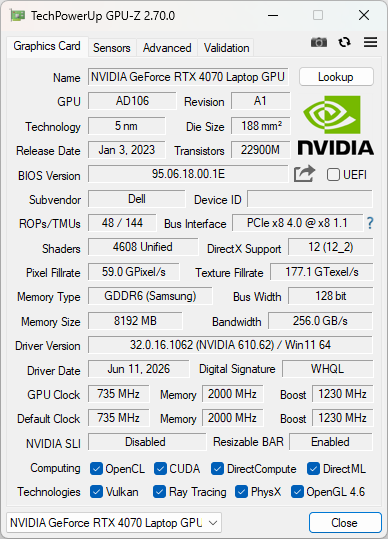
I’ve been having issues trying to “use” Resizable BAR on my Dell XPS 15 9530 (2023) with my eGPU setup. I am using a Mantiz Saturn Pro V2 (MZ-03) with an RTX 5070.
My laptop has an Intel Iris Xe Graphics connected to the display, and an RTX 4070 Laptop as a dGPU in an Optimus setup. I’ve gone and checked through the BIOS/UEFI and found out that I do have access to Resizable BAR and that it IS enabled through the following:
# Through PowerShell, look for PcieResizableBar with the current value of "Enabled"
Get-CimInstance -Namespace root\dcim\sysman\biosattributes -ClassName EnumerationAttribute | Select-Object AttributeName, CurrentValue, PossibleValue

# Through Dell Command Configure prompt. Note that not all iterations of this utility will be able to access this property, depends on your device.
cctk --PcieResizableBar
However, when the eGPU boots up, I have no access to Resizable BAR with the RTX 5070, and the RTX 4070 reports “Cannot read PCI Config Space” through GPU-Z, which seems to be a library reporting error.
Will keep this page to document how to fix Resizable BAR in my system altogether.
Current status: Not solved yet. Need to try a full DDU cleanup, reinstalling the drivers and trying to see how the behavior changes.
So somewhat of a success here - if I go full DDU and reinstall the drivers without rebooting, I get both the RTX 4070 Laptop and RTX 5070 to work WITH Resizable BAR (ReBAR, going to use that moving forward) - Removing the Device ID from the screenshots just in case (I have no idea and I’m tired )
That’s a strange one. If the BIOS is already showing ReBAR as enabled, I’d expect the RTX 5070 to pick it up. Interested to see if the DDU cleanup changes anything.
Interestingly enough, restarting the computer neuters ReBAR for both devices again, and disabling the whole DMA Chain (PreBootDMA, KernelDMA and any other DMA protections) in the BIOS/UEFI doesn’t do anything.
Conversely, Removing and Scanning for hardware doesn’t bring ReBAR online, but it improves the performance somehow? (i.e. I no longer need to disable my 4070 to stop stuttering glitches). Behaves the same as if I had ReBAR enabled, but GPU-Z still states it isn’t. Which is interesting, but I gotta figure out if there’s a way to force adding the PCI devices again in such a way that would enable ReBAR, maybe?
I’ve managed to get ReBAR working at least on ONE video card, the 4070. If I run this script (vibe coded for now) I manage to get the dGPU to recognize ReBAR at the end of it. I’m testing this in a very haphazard manner, and very unscientifically. I wish I could understand at length the details on how my laptop brings up the whole stack of PCIe devices online, but I think I’m smart enough to not let an AI gaslight me into believing something.
#Run as Administrator in PowerShell

$dGPU = "dGPU_Device_ID"
$hostRouter = "USB4_Router"

pnputil /remove-device $dGPU
pnputil /remove-device $hostRouter /subtree /force

Start-Sleep -Seconds 8

pnputil /scan-devices

Start-Sleep -Seconds 12

# Confirm everything came back
Get-PnpDevice | Where-Object {$_.FriendlyName -match "USB4|Thunderbolt|RTX|NVIDIA"}
Actually - I don’t think the way Dell has implemented ReBAR makes any sense, or my configuration in it of itself. Through trial and error, I discovered that if I turn on the laptop with the dGPU disabled, plug in my laptop, and re-enable it; all the stutter issues I had are gone. I am going framework next time.
Just a thought that maybe fits into your situation:
With modern USB4 controllers the USB4 connection manager is supposed to be in the OS. And the OS can decide how it wants to handle PCIe address space as well.
If the BIOS has boot Support for USB4, then it will have another USB4 connection manager and its own way of allocating PCIe address space enough to boot NVMe behind USB4 (and thus at least one PCIe switch).
So it may be (because I have seen this on my old framework before) that the PCIe address space gets allocated differently by BIOS then when the OS does it.
And I believe the USB4 spec wants the OS to “take over” what the BIOS already setup instead of killing everything and interrupting the user experience.
So it maybe this has sth. to do with it. Because the address space needs to be allocated top down on every switch level. Maybe the amount of space available changes. Because from Windows I only saw even splits of address space for every potential downstream PCIe port (i.e. root port gets 64 GiB. A USB4 hub with 3 downstream ports and no local PCie gets 64/3 for every port reserved and so on). And then there may not be enough room for mapping the entire VRAM / use Max size ReBAR depending on how much you had to start with or how you distributed the address space to other unused ports.
Task manger in Resources by connection view can visualize this acceptably well.
Yeah the culprit has always been the Memory assignment (i.e. Device Manager / Resources by Connection). And for the love of my life I can only get both cards to work with ReBAR on a clean install once. But for now I’m putting this topic to rest, I can work around the ReBAR issues at least for now.
 )
)