The PC
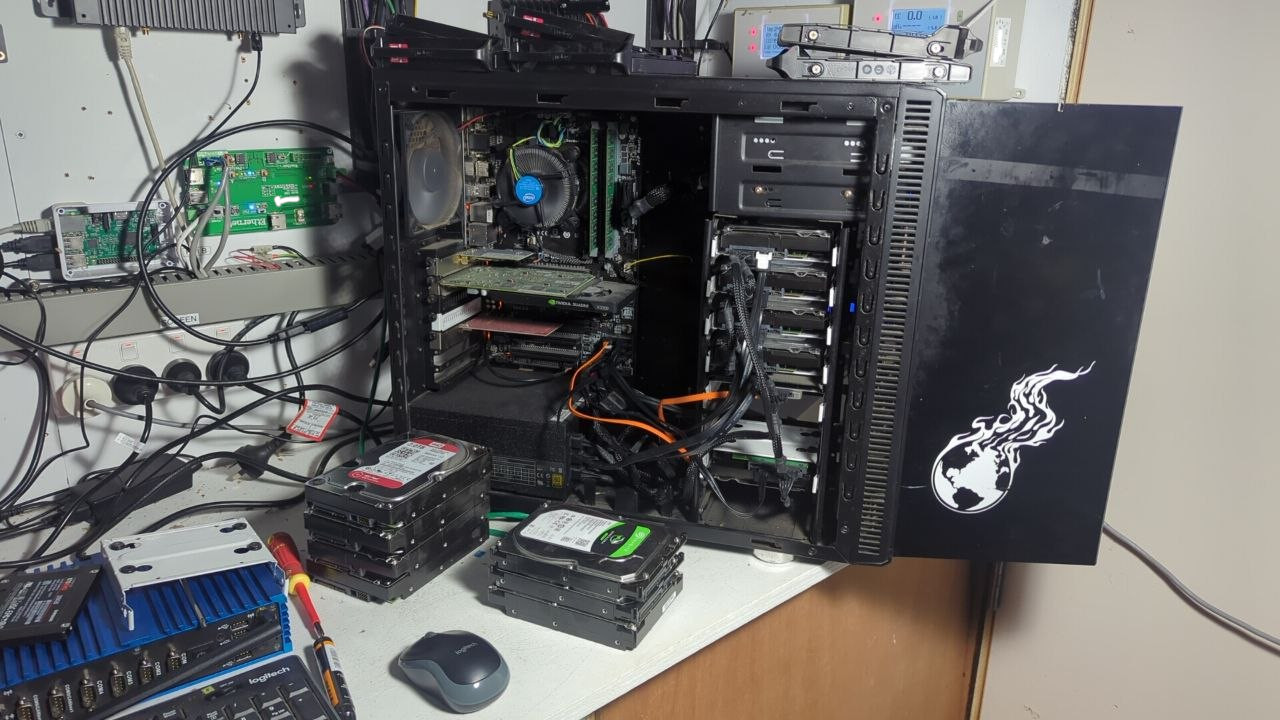
I got a PC that was being used for nothing, a z97 with 16GB of DDR3.
The motherboard has 6 SATA ports which is annoying but with a spare x16 PCIe I grabbed a 6 port SATA card with the ASM1166 chip that seems to have good support on LInux.
The case, a Fractal R3 with a beforetimes logo, has 8 drive slots (but I am missing 1x drive tray). I will need to do some mods to the case to accomodate the other 4 (they’re going on the side). Its got good cooling, 2 fans in the front, 2 in the top and 1 at the back. I did try to find an ICY dock or something but theres only 2x 5.25” bays.
Goal
The purpose of this NAS is long term storage of important files so its focus is on reliability
- I won’t be storing much media on there, only special media like DragonBall Z, Viper, George Carlin and Bill Hicks standup.
- it won’t be on all the time - I’m paying 50c/kwh atm !
- I’ll just use it as like a vault or offline wallet, turning it on just to get files off or put files on
I have been using claude to help me with research and pulling the problematic things out of the SMART data. You can see all the workings and raw files at GitHub - penguinpowernz/nas: Research for how to build my NAS · GitHub if you care, it’s a bit of a mess atm.
OS Stack
- LVM (I love it)
- Restic (snapshots)
- mdadm (KISS)
- Debian 13
- Ansible (dunno if i really need this)
Drives and options
I found 3 from my old Synology NAS and 4 from another old Synology NAS. All in total I had 7x 2TB… I also have like 9x 1TBs but who cares about those. So I found 5x 2TB drives on the local market for cheap condition unknown (nor did I research the drives).
So I have 12x 2TB drives to work with.
Have been mulling a few options. I don’t want RAID10 cos you can’t grow or shrink your mirrors. And I don’t want RAID6 because rebuild thrashes the disks.
Option 1
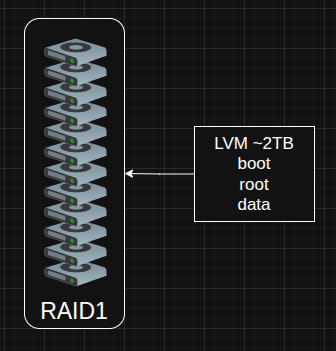
- all in one mirror
- 2TB space
- boot root data all on the same disk
- max redundancy
Option 2
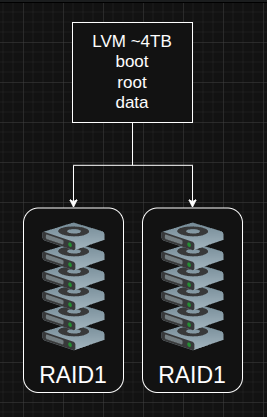
- poor mans RAID10 using LVM
- 4TB space
- boot root data all on the same disk
- I dont like real RAID10 because you can’t grow or shrink your mirror at will
Option 3
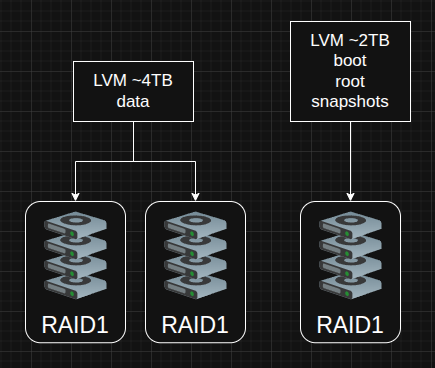
- poor mans RAID10 using LVM
- separate RAID1 for boot root
- one partition for restic snapshots of really really important data
- 4TB space plus 2TB of snapshot space
The drives
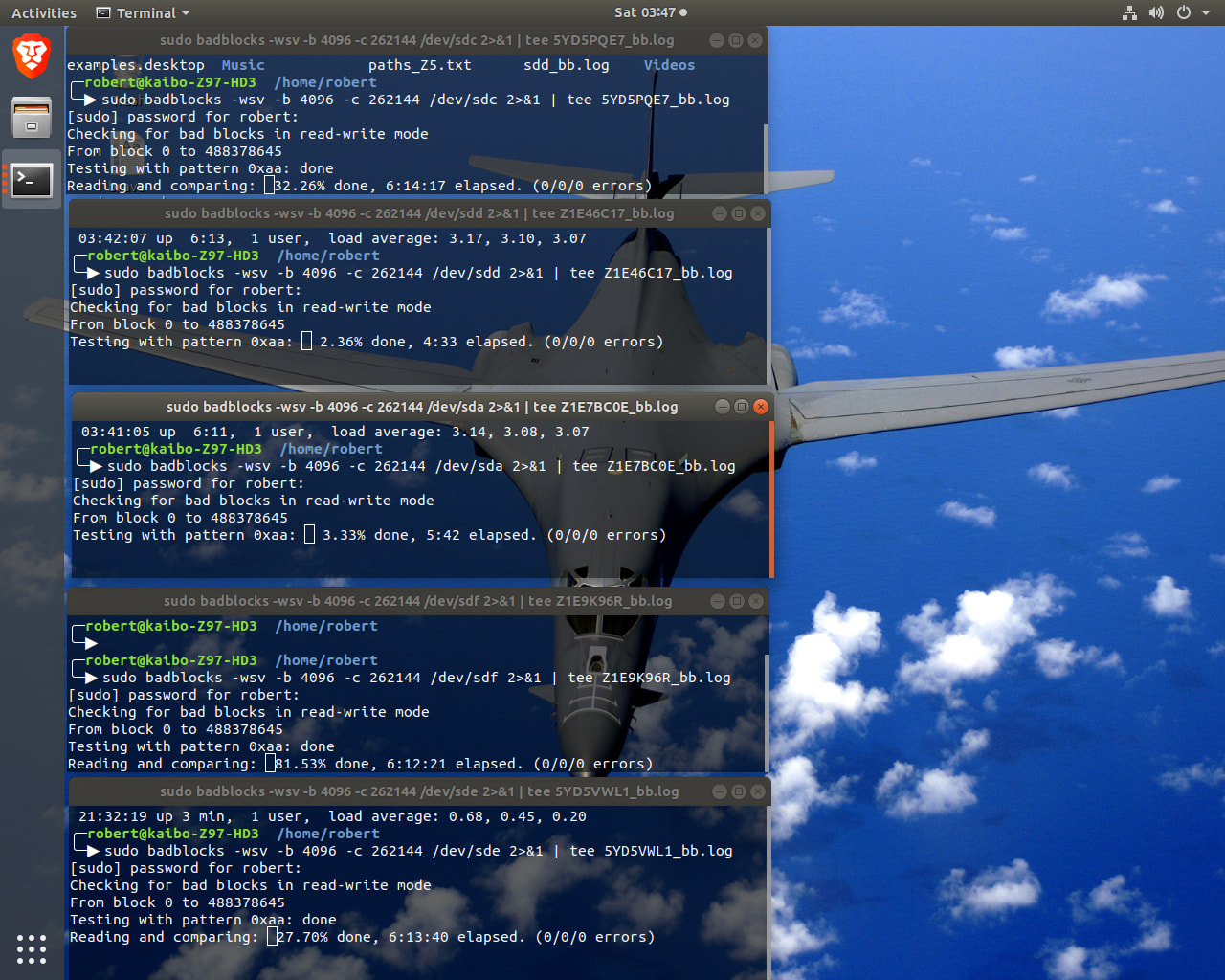
The drives are a bit crappy. I have been doing the smart and badblock tests on them. Some are years old. SH = SMART health, SE = SMART extended self test, BB = badblocks test and SC = SMART conveyance test.
| Size | Model | Serial | SH | SE | BB | SC | Hours | Status |
|---|---|---|---|---|---|---|---|---|
| 2TB | Seagate NAS ST2000VN000-1H3164 | W1H31BLJ |  |
|
0 | — | ~6.4y | |
| 2TB | WD Red WD20EFRX-68EUZN0 | WD-WCC4M1RYFSH9 | |
|
16 | — | ~6.4y |  |
| 2TB | WD Red WD20EFRX-68EUZN0 | WD-WCC4M7YANCD5 | |
|
0 | — | ~6.4y | |
| 2TB | Seagate NAS ST2000VN000-1HJ164 | W520VJFQ | |
|
0 | — | ~6.4y | |
| 2TB | Seagate Barracuda ST2000DM008-2FR102 | WFL3ZBBC | |
|
— | |
~0.3y |  |
| 2TB | Seagate IronWolf ST2000VN004-2E4164 | Z52BBV0P | |
|
— | |
~0.06y | |
| 2TB | Seagate Barracuda ST2000DM008-2FR102 | ZFL0TF34 | |
|
— | |
~4.2y | |
| 2TB | Seagate Barracuda Green ST2000DL003-9VT166 | 5YD5PQE7 | |
|
|
— | ~0.7y | |
| 2TB | Seagate Barracuda Green ST2000DL003-9VT166 | 5YD5VWL1 | |
|
|
— | ~5.7y | |
| 2TB | Seagate Barracuda ST2000DM001-1CH164 | Z1E9K96R | |
|
|
— | ~0.6y | |
| 2TB | Seagate Barracuda 7200.14 ST2000DM001-1CH164 | Z1E46C17 | |
|
|
— | ~1.5y | |
| 2TB | Seagate Barracuda 7200.14 ST2000DM001-1CH164 | Z1E7BC0E | |
|
|
|
~3y | |
These are the commands I’ve been running to do the tests:
- SMART extended self-test and conveyance test from gnome-disks
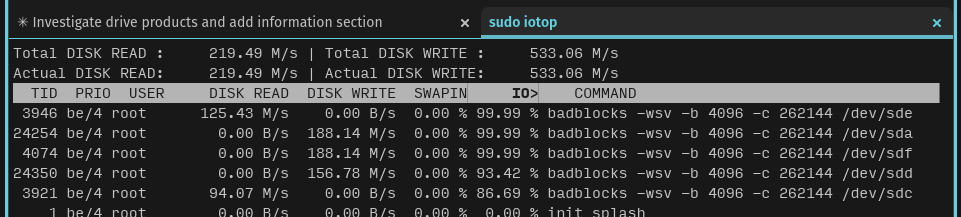
sudo badblocks -wsv -b 4096 -c 262144 /dev/sdX 2>&1 | tee sdX_bb.log- THIS IS DESTRUCTIVE which is why I haven’t run it on the three middle ones yet.
The AI said to run 2 at a time, but here I am running 5… load is averaging 5.0/8 cores = 62% system load.
The Problems
So I got a few problematic disks. I’ll try use them anyway see how they get on. Still waiting for the latest bad blocks to finish anyhow.
WD-WCC4M1RYFSH9 — WD Red WD20EFRX-68EUZN0
- 16 bad blocks
- Start/Stop count: 76,660 — very high; indicates this drive was in a system that powered it on and off constantly (e.g. a desktop or spin-down-heavy NAS)
Not sure how bad this is, does bad blocks fixing it means it’s OK now?
Z1E9K96R — Seagate Barracuda 7200.14 ST2000DM001-1CH164
This guy got cooked:
- Lifetime max temperature of 82°C means the drive experienced extreme overheating at some point
- Thermal damage to heads and platters is a real risk at these temperatures.
- Seagate’s max recommended operating temp for this model is 60°C
- Runtime_Bad_Block: 1 — one runtime bad block logged; may be a consequence of the thermal event.
5YD5VWL1 — Seagate Barracuda Green ST2000DL003-9VT166
This drive model is well known to have issues due to its aggressive power saving, and the way it does it causes RAID controllers like mdadm to think it died and kick it out of the array.
- data recovery shops report it burns PCBs a lot
- Seek_Error_Rate normalized: 069, worst: 060 (threshold 030) — degraded but above threshold. The large raw value (60,269,278,047) is unusually high even by Seagate encoding standards
- Start_Stop_Count: 31,268 / Load_Cycle_Count: 31,269 — very high and nearly equal, indicating this drive was parked and unparked (or power-cycled) an extraordinary number of times
- lots of uncorrectable probably badblocks will find something.
It may be possible to disable or mitigate this crap:
hdparm -B 254 /dev/sdX
hdparm -B 255 /dev/sdX

# Increase to 180s to give non-TLER drives more time before md gives up
echo 180 | sudo tee /sys/block/sdX/device/timeout
5YD5PQE7 — Seagate Barracuda Green ST2000DL003-9VT166
Another green one like above so same issues. This one almost got cooked at 45°C. It’s got errors that may be related to bad SATA cable.
How to lay out the drives
The question then is how to layout the drives and I don’t like anything the AI offered on this. Its easy for option 1. For option 2 and 3, just make sure 2 bad drives are put in each of the mirrors.
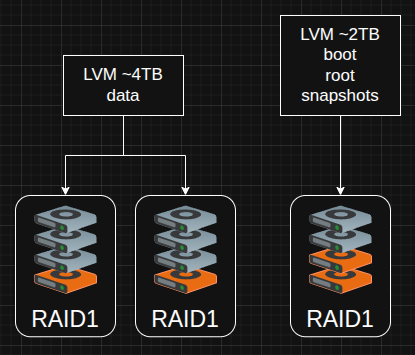
But then there is also very similar pairs that will wan’t to be in different arrays, like:
- Z1E9K96R + Z1E46C17 + Z1E7BC0E
- 5YD5PQE7 + 5YD5VWL1
So this approach is probably OK:
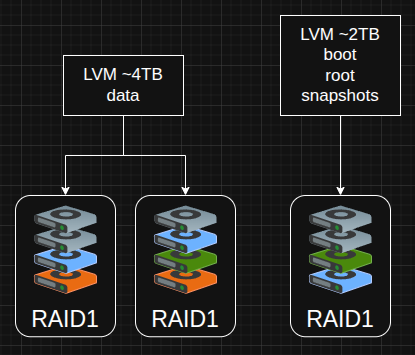
Spreads the pairs out, and root mirror gets 2 bad drives to give the RAID10 more breathing room.
Some things to note when I’m configuring it all
Don’t do power saving stuff
Make sure I’m killing any power saving stuff on the drives, so they never spin down and confuse mdadm:
# other drives
sudo hdparm -B 254 /dev/sdX    # max performance, no spin-down; use on all non-NAS drives
sudo hdparm -B 255 /dev/sdX    # disable APM entirely (not all drives support this)

# WD drives (require power off for change to activate)
sudo idle3ctl -s 130 /dev/sdX
sudo idle3ctl -d /dev/sdX
Should be possible to make this persist across reboots with a udev rule or hdparm config. I’d like the latter better but is important what the drives support.
Staggered starting
Make sure I’m stagger starting the drives so I don’t kill the PSU with the amp pull as the drives start up using suspend on startup:
sudo hdparm -s1 --yes-i-know-what-i-am-doing /dev/sdX

# did it work?
sudo hdparm -I /dev/sdX | grep -i "power-up"

# check this after booting to see if it is suspended
sudo hdparm -C /dev/sdX

# once booted start everyone up
for i in a b c d; do
  sudo hdparm -S0 /dev/sdX

  # if its really misbehaving rescan SCSI host controller
  sudo blockdev --rereadpt /dev/sdX
done
Booting
The BIOS obviously can’t get into the RAID or the LVM. So I need an ESP partition on all of the drives in the root mirror. I haven’t noted that in any of my diagrams but prob just need 500M or 1G.
As an aside
It’s been quite interesting to discover the drives history. The AI is able to decode it to tell a story about the disk. Once I got the AI to research about the drives I realized I had bought some duds. It was able to tie what it found in the research to the problematic SMART data.
Next steps
Hopefully this helps someone realize all the dimensions to testing trash disks.
A few questions I guess:
- How long will I get away with those bad disks for?
- Which option makes the most sense?
- Is there another option I haven’t list that could meet the goals?
- Does badblocks “fix” the disk or would I expect more sectors to crap out?
- Can I put a swap partition on RAID?
- Do you like BONEs?
Thanks