Ram throwing errors, not sure where to start

So brothers computer started to blue screen, because of the error he went to do a mem test and was getting 10k errors before we just shut it down.

Trial and error, we should be at stock spec settings, and one stick is not throwing errors, because he effectively refuses to listen to check, I have no idea if that socket is the good one and all the ram is good and the sockets are bad, or if all the ram is bad and its the sockets or cpu.

before he spends money on a new computer or parts, im going to force him to figure out what the problem is.

my questiestion is, is there something between ram and cpu that could have died/on its way out that is causing the errors, and what are the odds that 3 sticks go bad over the cpu going bad? a 400$ cpu replacement is a hell of a lot less painful than hum buying new cpu motherboard and ram, while also buying as little ram as he can during a what was it 400-600% increase in costs

What are the specs?

And if at JEDEC speeds the RAM is still throwing errors, is he by chance using four DIMM sticks?
Four DIMM sticks are not really well supported on most motherboards, try with two DIMMs instead.

If using XMP/EXPO, match the max supported memory speed of the CPU for max compatibility (DDR5-5600 for latest Intel and AMD, DDR5-5200 for previous gen and DDR4-3200 for older).

Also update UEFI/BIOS firmware to latest stable version available (unless the CPU is a Intel 13th/14th gen, then get a RMA before corrupting the UEFI too!), as those usually come bundled with broader compatibility for RAM. Pay close attention to the model type/variant and revision. As motherboard manufacturers release multiple revisions of the same model motherboard, and those are not the same.

is there something between ram and cpu that could have died

Possibly. If the motherboard was wrongly placed on stand offs (meaning stand offs protruding from the case, where no motherboard holes exist) in the case; it could have shorted out something in the motherboard and/or bend the motherboard slightly, resulting in signal lines/traces inside the motherboard going haywire.

what are the odds that 3 sticks go bad over the cpu going bad?

CPUs don’t often go bad out of nowhere; unless they were running at elevated voltages for a long time. e.g. by a overclock (e.g. AMD PBO), faulty motherboard firmware (ASRock, ASUS) or manufacturing defects like Intel 13th and Intel 14th gen.

If the processor is going bad and applications are randomly crashing out of nowhere or BSOD/random reboots happen, and it is not memory related; then that might be occurring because of degradation. In that scenario, drop the max boost clock of the processor using a negative boost clock override in the UEFI by around ~500Mhz and it should be stable again.

(Specifically for Intel 13th and Intel 14th gen: there’s no fix, get a RMA and if possible with your money back. Then buy a AMD AM5 processor)

Then request a RMA from the processor manufacturer, also never enable PBO nor any other CPU performance “enhancements” in your life ever again (and/or never buy Intel/ASRock/ASUS, whoever at fault, again).

a 400$ cpu replacement

No need to blow that kind of cash on a new CPU, unless you’re doing fancy stuff like running physics simulation software. 7500F goes for ~$120 and the 7500X3D goes for ~$230

2 Likes

Is this really a problem in normal use where max power is only required for seconds or minutes? The way I understand PBO, is that it allows me more clock speed when required. And at that time, it will increase voltage, heat up etc.

But in normal life, my CPU idles (most cores are sleeping) at low clock speed. How would PBO being enabled matter for 99.9% of the time?

I understand if I convert videos 24/7 and run at max PBO speed this an issue. but most people don’t do that.

Is this really a problem

@Lurker PBO is a overclocking feature. Performance Boost Overdrive. Overdrive. Meaning, beyond sane limits. Which is what it does, it instructs the motherboard to ignore safety and shoot ridiculous amounts of voltage (1,35V to 1,7V) and amperage (insane PPT, EDC, TDC values, >170W) into the motherboard.

Is it a problem? Well, depends how long you like to keep your processor for. If you’d like the PC to still be operable in a decade with daily usage, I’d highly suggest not enabling PBO.

PBO is mostly a marketing gimmick for AMD, where they instruct techtubers to use it so they can maintain the performance crown. The problem is; now regular gamers think they should enable it because it’ll give them some extra FPS.

Which yes, maybe, but a 2-4% imperceptible gain is not worth long term degradation of the chip imho.

The way I understand PBO, is that it allows me more clock speed when required. And at that time, it will increase voltage, heat up etc.

By default, AMD Ryzen (and Intel with PL1 and PL2) already boost the processor up to their max boost clocks with a slight load.

That’s called Performance Boost 2 (PB2), which has sane nominal voltage ranges (0,6V - 1,35V) and sane-ish PTTL (95 degrees), sane-ish PPT, TDC and EDC (~120W) safety limits and is enabled by default.

PB2 != PBO

With PBO enabled those limits are in Overdrive.

But in normal life, my CPU idles (most cores are sleeping) at low clock speed.

PB2 and PBO when running a game; restoring all your tabs at once, both will ramp up the processor to its max potential when required.

Overdrive raises the defaults, it raises the whole voltage and amperage graph/curve across all clock speeds.

How would PBO being enabled matter for 99.9% of the time?

Well, do nitrous injection kits for a Honda Civic make the engine last longer? If it’s only driven to the supermarket twice a week?

It depends. Probably not.
2 Likes

Thanks for explaining.

I have a AMD 7900 12-core. The way I understood it, PBO basically makes it clock similar to the 7900X. But since the “X” versions clock higher, are those specifically selected to withstand the higher voltage and heat?

And yes, I have good cooler and in actual work (converting videos) temps don’t go above 90°C. More like 85°C. Only in artificial benchmarks it goes to a straight 95°C.

99.99% of time I don’t convert videos or similar.

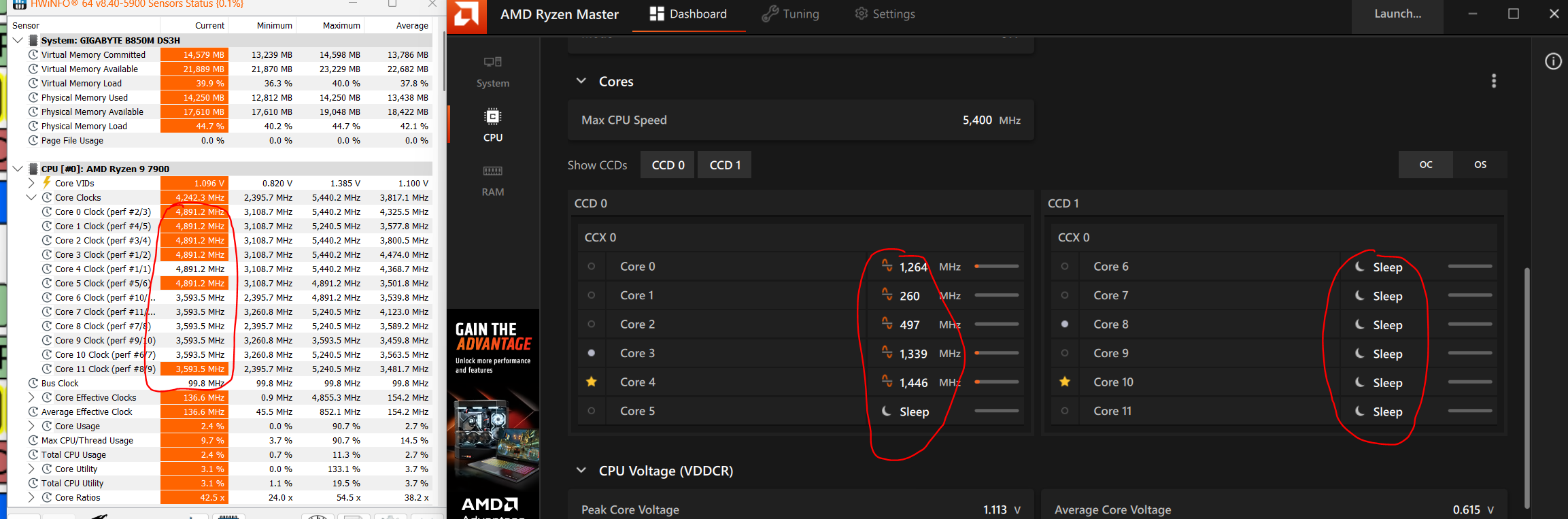
And it seems, HWinfo just makes up frequency numbers. Or is Ryzen Master wrong? That is a huge difference. I know W11 taskmamanger shows wrong data.

The way I understood it, PBO basically makes it clock similar to the 7900X.

@Lurker This is not what PBO does. PBO has no internal spec sheets of X models mappings, it does not scale amperage and voltages linearly to X equivalent models. PBO disregards default sane limits, and puts things into Overdrive.

And yes, I have good cooler and in actual work (converting videos) temps don’t go above 90°C. More like 85°C. Only in artificial benchmarks it goes to a straight 95°C.

Those are ridiculous temps to begin with. 95C is not a sane limit imho. The AM4 platform default PTTL was saner at 75C. Both Intel and AMD have just been pushing the PTTLs, to remain in top place on benchmark charts. Regular consumers should not opt-in to reach the physical limits of the silicon, especially not on a machine that’s their “daily driver”.

PBO will by default try its hardest to reach PTTL, which is why you see those insane temperatures.

PB2 instead will hit PPT limit before it reaches PTTL limit.

Consider enabling Eco Mode in Ryzen Master or UEFI AMD CBS, as it will drastically decrease temperatures and strain on the motherboard VRMs for zero perceivable difference in FPS or “speed”.

HWinfo just makes up frequency numbers. Or is Ryzen Master wrong?

Both are right. The figures that HWiNFO and Task Manager are showing are the effective clocks, and the figures that Ryzen Master is showing are the real clocks.

https://www.hwinfo.com/forum/threads/effective-clock-vs-instant-discrete-clock.5958/

1 Like

bad few days for sleep and other crap going on, figured I would update

this is stock spec settings on the ram, not what the ram can do, I think jdec been a long time since I had to know what was what.

3 sticks in known good socket are still bad, he more or less figured out what the best 2 sticks are (no error and least error on a mem test) and is using that, so far no bsod issues and games are more stable. he is going to try to ride this out to zen 6, he is currently on I think zen 3

for cpu, he was never going to get anything less than an 8 core, and he was going to go x3d with it, worst case, his ram is completely screwed, he is going to go to a 9000 cpu and ride that till zen 6 because he is not going to buy new ddr4 ram ( I found 100$ 2 stick 16gb per stick he could get so he is ballpark what he was and saw it as a non starter), he does enough stuff to justify I think he went 12 core maybe 16 core, just gives him headroom to have an intensive background process on top of a game and not feel it.

so rams screwed it wasn’t the motherboard or the cpu, could still be either of those that did the damage in the first place, I have no idea, he never really overclocked, by the time he got this system everything runs fast enough its hard to justify, but he also never undervolted either.