Background
This is a continuation of this Proxmox Setup series/recommendation.
Be sure to check out bare metal on OpenMetal.io as part of this series.
https://openmetal.io/promos/l1t-proxmox-on-bare-metal/
The video that goes with this thread is here:

This is a continuation of the Proxmox clustering / HA best-practices series—this time focused on how one does HA with a database layer. The key idea is slightly counter-intuitive: your high-availability database should not depend on your hypervisor cluster’s HA features to be “available.” That separation is the best practice, because the cluster HA functions entirely differently than application-level HA.
The first landmine for newcomers is trying to solve HA problems with the cluster-level HA. Instead, MariaDB (and mysql) have Galera. However this presents a cluster not a single, stable IP/hostname for clients. Each node has its own address, and the cluster won’t magically “share” an IP address or provide facilities to pick the best cluster member that’s up. Time and time again I see new administrators expect this functionality to be in the database, when really it is best served being explicitly architected in an additional layer that provides a single endpoint and health-based routing.
In this guide I’ll show three practical ways to do that: a basic solution if you already run pfSense (using HAProxy), a stand-alone HAProxy approach you can run as a container, and the “best” option for many setups: ProxySQL, which adds database-aware checks and heartbeat-style monitoring so clients always land on a node that’s actually ready.
MariaDB Clustering setup
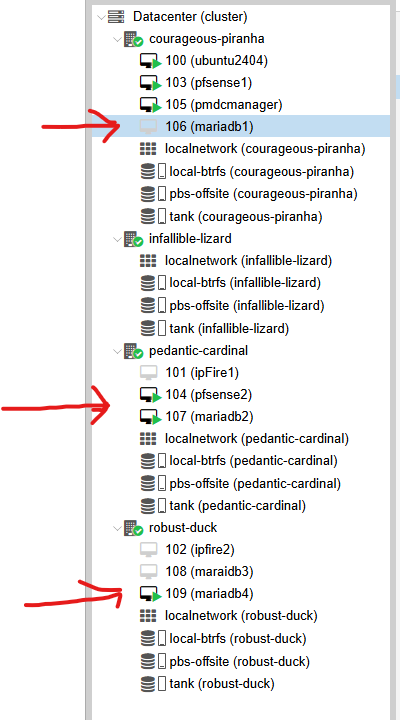
In our open-metal cluster I have 3 hosts configured according to the Quickstart Guide that MariaDB offers.
Our cluster configuration in our OpenMetal.io cluster here is:
node1: 192.168.100.100
node2: 192.168.100.11
node3: 192.168.100.12
… the particulars of configuring this MariaDB cluster are not covered in the video, but feel free to make a post if you’re stuck (please only reply to the thread here with stuff relevant to the video or the HA aspects you may have questions or insights about).
You need a minimum of 3 nodes. More is fine. This is also full replication – in a DR scenario steps can be taken to force one node to come up even if there is no quorum. (Because of full replication, it should have clicked in the back of your mind that you don’t even need to setup ZFS-based replication as we showed in the video, even as a hedge.)
Verify the cluster is fully operational:
mysql -uroot -p -e "
SHOW VARIABLES LIKE 'wsrep_on';
SHOW STATUS LIKE 'wsrep_connected';
SHOW STATUS LIKE 'wsrep_ready';
SHOW STATUS LIKE 'wsrep_cluster_status';
SHOW STATUS LIKE 'wsrep_local_state_comment';
"
Node1 should show Primary / Ready=ON / Synced
Our OpenMetal.io Dedicated Servers Proxmox Cluster Tutorial
In the tutorial linked above, we setup pfSense for routing, and in a HA configuration. pfSense syncs configuration and shares a single IP address – in our case 192.168.100.254 – and we can leverage pfsense here to forward database connections bound for port 3306 (MariaDB) to any of our 3 available hosts.
Check out the video for configuring HA Proxy on pfsense.
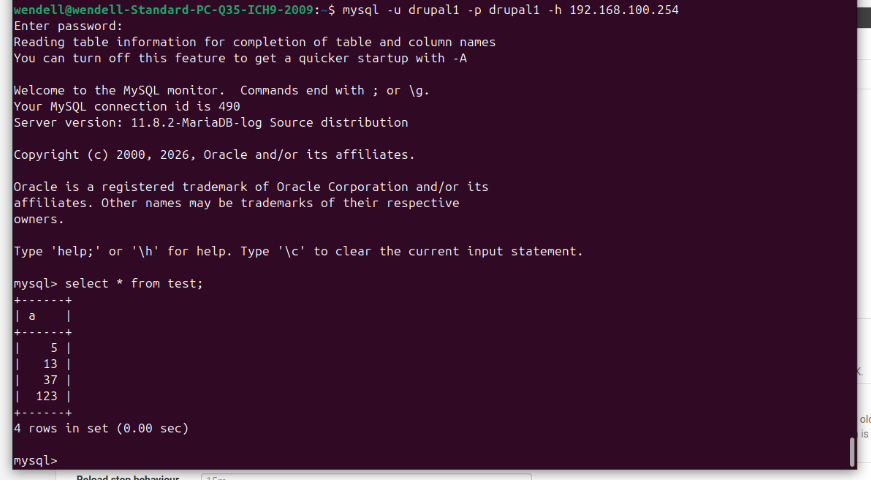
In this pic we are connecting from our ubuntu workstation to 192.168.100.254 – our pfsense router – which is the instance of HAProxy running on 3306, and from there HAProxy forwards to the least-number-of-connections database cluster member that is up.
And remember 192.168.100.254 is itself an HA IP address. There is one wrinkle. HA pfsense can transfer tcp states in the master state tables – connections stay open through the firewall – but HAproxy connections are outside this mechanism. When pfsense failover occurs active connections through haproxy will need to be re-established.
For a web server application, this is a non-issue, but it might not be ideal in other scenarios.
Option 1 - HA Proxy via pfsense
This is covered in the video. Here’s a rough diagram:
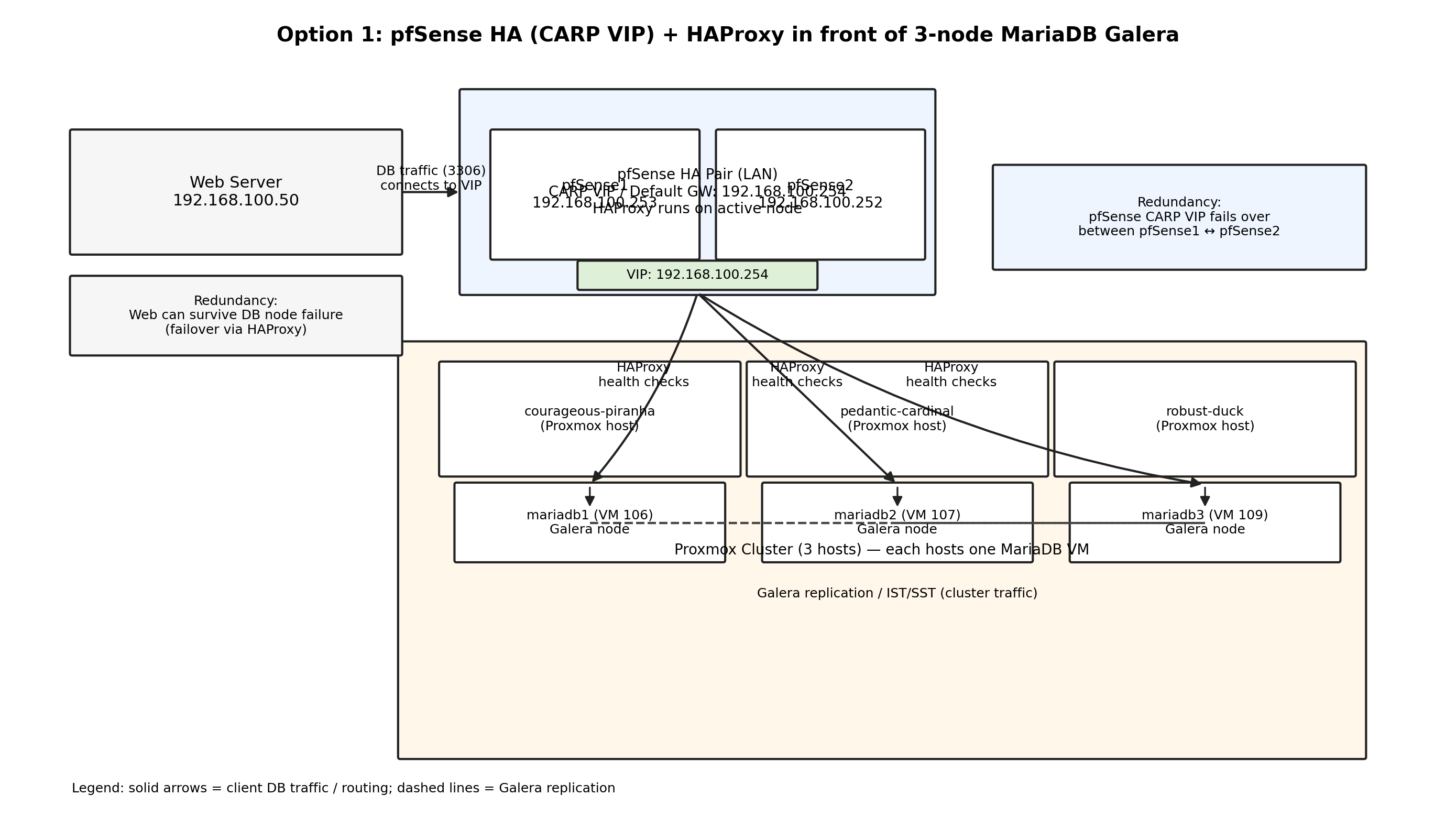
This is an option that works, but then one can go down the rabbit hole of SQL server health checks – is the DB server UP but technically not part of the cluster because of some event – etc etc. So then you can layer on health checks that HA Proxy can use (the systemd go/nogo script I mentioned. The scope creeps a bit here imho.
Option 2 – HA Proxy via docker
In the case where you have multiple web servers, this approach might be a better fit.
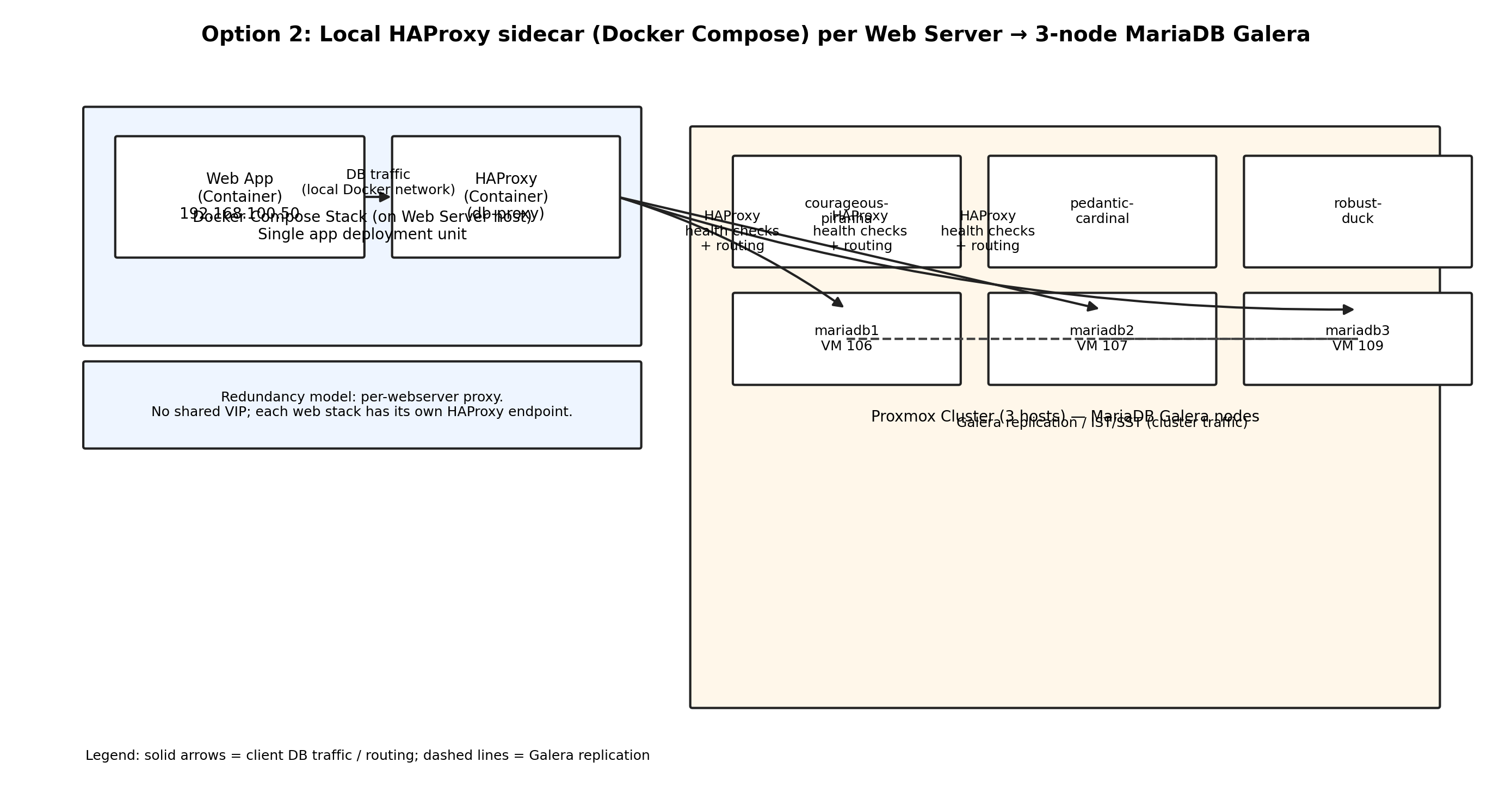
In our example, the docker-compose solution has a web server component and a local haproxy component. the web server connects to the haproxy instance on the same docker host and if one has multiple docker hosts with multiple web servers.. this scales just fine.
docker-compose.yml
services:
  drupal:
    image: webdevops/apache-php:8.3
    container_name: drupal
    environment:
     # this assumes /app/web for web root
     # and /app/vendor for vendor, and /app/files for sites/default/files
      WEB_DOCUMENT_ROOT: /app/web

      # You said you'll wire settings.php to env vars.
      DB_USER: ${DB_USER}
      DB_PASS: ${DB_PASS}
      DB_HOST: haproxy-db

    volumes:
      - ./sites:/app/sites/default/files
      - ./vendor:/app/vendor
      - ./web:/app/web

    depends_on:
      - haproxy-db

    networks:
      - appnet

    # Optional: expose web if you're not behind another reverse proxy
    # ports:
    #   - "8080:80"

  haproxy-db:
    image: haproxy:2.9
    container_name: haproxy-db
    environment:
      DB_HOST1: ${DB_HOST1}
      DB_HOST2: ${DB_HOST2}
      DB_HOST3: ${DB_HOST3}
    volumes:
      - ./haproxy/haproxy.cfg.tmpl:/usr/local/etc/haproxy/haproxy.cfg.tmpl:ro
    command: >
      sh -lc "
        apk add --no-cache gettext >/dev/null 2>&1 || true;
        envsubst < /usr/local/etc/haproxy/haproxy.cfg.tmpl > /usr/local/etc/haproxy/haproxy.cfg;
        haproxy -W -db -f /usr/local/etc/haproxy/haproxy.cfg
      "
    networks:
      - appnet

    # Do NOT publish this externally unless you intend to.
    # If you need access from outside docker, uncomment:
    # ports:
    #   - "3306:3306"

networks:
  appnet:
    driver: bridge
haproxy/haproxy.cfg.tmpl
global
  log stdout format raw local0
  maxconn 2048

defaults
  log global
  mode tcp
  option tcplog
  timeout connect 1s
  timeout client  60s
  timeout server  60s

frontend mysql_in
  bind *:3306
  default_backend galera_nodes

backend galera_nodes
  mode tcp
  balance roundrobin

  # Basic TCP health checks (is it listening / reachable)
  option tcp-check
  tcp-check connect

  # If you want a MySQL-aware check, see the next section.
  server db1 ${DB_HOST1}:3306 check inter 2s fall 2 rise 2
  server db2 ${DB_HOST2}:3306 check inter 2s fall 2 rise 2
  server db3 ${DB_HOST3}:3306 check inter 2s fall 2 rise 2
Slightly better: HAProxy mysql-check (still not fully Galera-aware)
If you can create a dedicated user on each Galera node (e.g. haproxy_check) you can have HAProxy do a MySQL-level check. Add this in the backend:
backend galera_nodes
  mode tcp
  balance roundrobin

  option mysql-check user haproxy_check
  server db1 ${DB_HOST1}:3306 check inter 2s fall 2 rise 2
  server db2 ${DB_HOST2}:3306 check inter 2s fall 2 rise 2
  server db3 ${DB_HOST3}:3306 check inter 2s fall 2 rise 2
The Rabbit Hole of Galera
This is the clean “I only want Synced/Primary nodes” solution without ProxySQL.
How it works:
- Each DB node exposes a tiny TCP service that you have to DIY (lets say port
9200) that returnsupordown - The DIY script checks wsrep status locally (fast, reliable)
- HAProxy uses that agent result to include/exclude the node
Then on each DB node you run something like:
- xinetd/systemd socket that runs a script that returns
uponly when:wsrep_local_state = 4wsrep_cluster_status = Primary- (optionally)
wsrep_ready = ON
… this is the UNIX way.
SQLProxy
The approach with docker here is also pretty easy using SQLProxy instead of HAProxy.
SQLProxy bakes in a lot of the health checks I talked about DIYing myself, and is perhaps a more modenr solution. ProxySQL is Galera-aware, which is awesome. It also keeps writes on the current writer, which is a nice feature.
services:
  web:
    image: webdevops/apache-php:8.3
    container_name: drupal-web
    restart: unless-stopped
    environment:
      WEB_DOCUMENT_ROOT: /app/web
      # Drupal will use these; you said you'll wire settings.php
      DB_USER: ${DB_USER}
      DB_PASS: ${DB_PASS}
      DB_HOST: proxysql
      DB_PORT: "6033"
    volumes:
      - ./sites:/app/sites/default/files
      - ./vendor:/app/vendor
      - ./web:/app/web
    depends_on:
      - proxysql
    networks:
      - appnet

  proxysql:
    image: proxysql/proxysql:2.6
    container_name: proxysql
    restart: unless-stopped
    ports:
      # Optional: expose for debugging from LAN; you can remove these if not needed.
      - "6033:6033"  # MySQL client port (web connects here)
      - "6032:6032"  # Admin port (for config / diagnostics)
    environment:
      # Use admin credentials for initial configuration
      PROXYSQL_ADMIN_USER: ${PROXYSQL_ADMIN_USER}
      PROXYSQL_ADMIN_PASS: ${PROXYSQL_ADMIN_PASS}
    volumes:
      - proxysql-data:/var/lib/proxysql
      - ./proxysql/proxysql.cnf:/etc/proxysql.cnf:ro
      - ./proxysql/bootstrap.sql:/bootstrap.sql:ro
    networks:
      - appnet
    # ProxySQL starts, then we apply bootstrap SQL once (idempotent-ish) via admin interface.
    command: >
      sh -lc '
        proxysql -f -c /etc/proxysql.cnf &
        echo "Waiting for ProxySQL admin...";
        for i in $(seq 1 60); do
          mysql -h 127.0.0.1 -P6032 -u"${PROXYSQL_ADMIN_USER}" -p"${PROXYSQL_ADMIN_PASS}" -e "SELECT 1" >/dev/null 2>&1 && break
          sleep 1
        done
        echo "Applying bootstrap SQL...";
        mysql -h 127.0.0.1 -P6032 -u"${PROXYSQL_ADMIN_USER}" -p"${PROXYSQL_ADMIN_PASS}" < /bootstrap.sql || true
        wait
      '

networks:
  appnet:

volumes:
  proxysql-data:
Note: This is just an example!
Here is an example .env based on our OpenMetal.io demo environment
# App/DB credentials (what Drupal uses)
DB_USER=drupal
DB_PASS=change_me

# Galera node IPs (LAN)
DB_HOST1=192.168.100.100
DB_HOST2=192.168.100.11
DB_HOST3=192.168.100.12

# ProxySQL admin (local only; not your DB creds)
PROXYSQL_ADMIN_USER=admin
PROXYSQL_ADMIN_PASS=adminpass

# ProxySQL monitor user (exists on MariaDB nodes; ProxySQL uses it for health)
PROXYSQL_MONITOR_USER=proxysql_mon
PROXYSQL_MONITOR_PASS=monpass

# Optional: a separate “app user” as seen by ProxySQL (can be same as DB_USER)
PROXYSQL_APP_USER=drupal
PROXYSQL_APP_PASS=change_me
I have also opened up a can of helping you configure ProxySQL, sorry. Here is an example config:
datadir="/var/lib/proxysql"

admin_variables=
{
  admin_credentials="${PROXYSQL_ADMIN_USER}:${PROXYSQL_ADMIN_PASS}"
  mysql_ifaces="0.0.0.0:6032"
}

mysql_variables=
{
  # Web connects here
  interfaces="0.0.0.0:6033"

  # Monitoring creds (must exist on all MariaDB nodes)
  monitor_username="${PROXYSQL_MONITOR_USER}"
  monitor_password="${PROXYSQL_MONITOR_PASS}"

  # Helpful timeouts (tune to taste)
  connect_timeout_server=3000
  ping_timeout_server=1000
  ping_interval_server_msec=2000

  # Keep connections warm for PHP/Drupal style workloads
  default_query_delay=0
  default_query_timeout=60000
  wait_timeout=28800
  max_connections=2048
}

# You can enable this if you want more logging during setup:
# mysql_server_variables=
# {
# }

# Important: start with empty tables; bootstrap.sql populates and loads to runtime.
./proxysql/bootstrap.sql
This sets up:
- mysql_servers: your 3 Galera nodes
- mysql_users: the app user (what Drupal logs in as)
- mysql_galera_hostgroups: tells ProxySQL how to classify writer vs readers based on wsrep state
- applies config to runtime and persists to disk
-- ./proxysql/bootstrap.sql
-- =========
-- 1) Define Galera hostgroups
-- =========
DELETE FROM mysql_galera_hostgroups;

INSERT INTO mysql_galera_hostgroups
(writer_hostgroup, backup_writer_hostgroup, reader_hostgroup, offline_hostgroup, active, max_writers, writer_is_also_reader, max_transactions_behind)
VALUES
(10,              30,                  20,             40,              1,      1,          1,                   100);

-- =========
-- 2) Add the Galera nodes
-- =========
DELETE FROM mysql_servers;

INSERT INTO mysql_servers(hostgroup_id, hostname, port, max_connections, weight, comment)
VALUES
(10, '${DB_HOST1}', 3306, 512, 100, 'galera node1 (writer candidate)'),
(10, '${DB_HOST2}', 3306, 512, 100, 'galera node2 (writer candidate)'),
(10, '${DB_HOST3}', 3306, 512, 100, 'galera node3 (writer candidate)');

-- =========
-- 3) Add the application user that Drupal will use
--    (ProxySQL auth layer; it passes through to backend with same creds)
-- =========
DELETE FROM mysql_users WHERE username='${PROXYSQL_APP_USER}';

INSERT INTO mysql_users(username, password, default_hostgroup, transaction_persistent, active)
VALUES ('${PROXYSQL_APP_USER}', '${PROXYSQL_APP_PASS}', 10, 1, 1);

-- =========
-- 4) Load into runtime and persist
-- =========
LOAD MYSQL VARIABLES TO RUNTIME;
LOAD MYSQL SERVERS TO RUNTIME;
LOAD MYSQL USERS TO RUNTIME;
LOAD MYSQL GALERA HOSTGROUPS TO RUNTIME;

SAVE MYSQL VARIABLES TO DISK;
SAVE MYSQL SERVERS TO DISK;
SAVE MYSQL USERS TO DISK;
SAVE MYSQL GALERA HOSTGROUPS TO DISK;
MariaDB/Galera: create the monitor user (run on each DB node)
ProxySQL needs a low-privilege user it can use to run health checks (and Galera status checks).
On each MariaDB node (or once, if replicated and you’re sure user creation replicates in your setup):
here’s how you do that:
CREATE USER IF NOT EXISTS 'proxysql_mon'@'%' IDENTIFIED BY 'monpass';
GRANT USAGE ON *.* TO 'proxysql_mon'@'%';
GRANT PROCESS, REPLICATION CLIENT ON *.* TO 'proxysql_mon'@'%';
FLUSH PRIVILEGES;
(If you lock this down later, restrict @'%' to your ProxySQL container/host IPs.)
How Drupal points at this
In settings.php you’ll use:
- host:
proxysql - port:
6033 - user/pass:
DB_USER/DB_PASS
That gives you:
- one stable endpoint per web stack
- automatic avoidance of non-synced / down nodes
- proper “writer” behavior for Galera, without your app doing random-host roulette…
Quick verification commands
From the ProxySQL container:
# Admin stats
mysql -h 127.0.0.1 -P6032 -uadmin -padminpass -e "SELECT * FROM runtime_mysql_servers;"
mysql -h 127.0.0.1 -P6032 -uadmin -padminpass -e "SELECT * FROM runtime_mysql_galera_hostgroups;"
mysql -h 127.0.0.1 -P6032 -uadmin -padminpass -e "SELECT * FROM stats_mysql_connection_pool;"
From the web container (to test connectivity through ProxySQL):
mysql -h proxysql -P6033 -u drupal -p -e "SELECT 1;"
I find it useful to also whip up a .php healthcheck that can be hit from external services that will check status on these components… I seem to have strayed somewhat from the original brief… 
Have fun, happy janitoring…