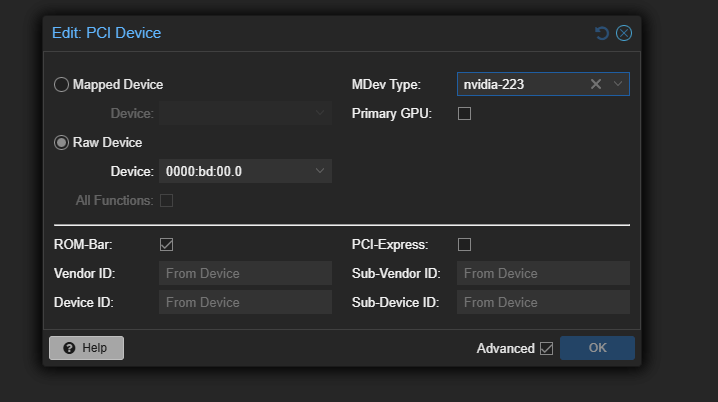
I am having an issue configuring a Proxmox host to use vGPU functions (Tesla T4).
I’ll try to include what I have done so far, but the bottom line is that the VM doesn’t start.
nano /etc/pve/qemu-server/102.conf
agent: 1
args: -device vfio-pci,sysfsdev=/sys/bus/mdev/devices/fe2a1b14-8020-4379-8612-fd1f14751868,display=off
bios: ovmf
boot: order=scsi0;ide0;net0
cores: 4
cpu: x86-64-v2-AES
efidisk0: nfs:102/vm-102-disk-0.qcow2,efitype=4m,ms-cert=2023w,pre-enrolled-keys=1,size=528K
hostpci0: 0000:bd:00.0,mdev=nvidia-223
machine: pc-q35-10.1
memory: 16384
meta: creation-qemu=10.1.2,ctime=1767977348
name: dcsadminew
net0: virtio=BC:24:11:97:F2:E2,bridge=vmbr0,firewall=1
numa: 0
ostype: win11
scsi0: nfs:102/vm-102-disk-1.qcow2,iothread=1,size=250G
scsihw: virtio-scsi-single
smbios1: uuid=3bacf6c0-4245-496d-9d28-c61db01affc6
sockets: 1
tpmstate0: nfs:102/vm-102-disk-2.qcow2,size=4M,version=v2.0
vmgenid: 927e43b5-5c76-4946-a350-ef0022d09ece
root@pve3:~# qm start 102
swtpm_setup: Not overwriting existing state file.
kvm: -device vfio-pci,sysfsdev=/sys/bus/mdev/devices/00000000-0000-0000-0000-000000000102,id=hostpci0,bus=pci.0,addr=0x10: vfio 00000000-0000-0000-0000-000000000102: error getting device from group 249: Input/output error
Verify all devices in group 249 are bound to vfio- or pci-stub and not already in use
stopping swtpm instance (pid 8681) due to QEMU startup error
waited 10 seconds for mediated device driver finishing clean up
actively clean up mediated device with UUID 00000000-0000-0000-0000-000000000102
start failed: QEMU exited with code 1
root@pve3:~# journalctl -xe | tail -n 60
Feb 23 08:49:20 pve3 kernel: bnxt_en 0000:17:00.0 nic0: entered promiscuous mode
Feb 23 08:49:20 pve3 kernel: bnxt_en 0000:99:00.0 nic4: entered promiscuous mode
Feb 23 08:49:20 pve3 kernel: vmbr0: port 2(fwpr102p0) entered blocking state
Feb 23 08:49:20 pve3 kernel: vmbr0: port 2(fwpr102p0) entered forwarding state
Feb 23 08:49:21 pve3 kernel: fwbr102i0: port 1(fwln102i0) entered blocking state
Feb 23 08:49:21 pve3 kernel: fwbr102i0: port 1(fwln102i0) entered disabled state
Feb 23 08:49:21 pve3 kernel: fwln102i0: entered allmulticast mode
Feb 23 08:49:21 pve3 kernel: fwln102i0: entered promiscuous mode
Feb 23 08:49:21 pve3 kernel: fwbr102i0: port 1(fwln102i0) entered blocking state
Feb 23 08:49:21 pve3 kernel: fwbr102i0: port 1(fwln102i0) entered forwarding state
Feb 23 08:49:21 pve3 kernel: fwbr102i0: port 2(tap102i0) entered blocking state
Feb 23 08:49:21 pve3 kernel: fwbr102i0: port 2(tap102i0) entered disabled state
Feb 23 08:49:21 pve3 kernel: tap102i0: entered allmulticast mode
Feb 23 08:49:21 pve3 kernel: fwbr102i0: port 2(tap102i0) entered blocking state
Feb 23 08:49:21 pve3 kernel: fwbr102i0: port 2(tap102i0) entered forwarding state
Feb 23 08:49:21 pve3 nvidia-vgpu-mgr[8892]: notice: vmiop_env_log: vmiop-env: guest_max_gpfn:0x0
Feb 23 08:49:21 pve3 nvidia-vgpu-mgr[8892]: notice: vmiop_env_log: (0x0): Received start call from nvidia-vgpu-vfio module: mdev uuid 00000000-0000-0000-0000-000000000102 GPU PCI id 00:bd:00.0 config params vgpu_type_id=223
Feb 23 08:49:21 pve3 nvidia-vgpu-mgr[8892]: notice: vmiop_env_log: (0x0): pluginconfig: vgpu_type_id=223
Feb 23 08:49:21 pve3 nvidia-vgpu-mgr[8892]: notice: vmiop_env_log: Successfully updated env symbols!
Feb 23 08:49:21 pve3 nvidia-vgpu-mgr[8892]: error: vmiop_log: (0x0): vGPU is supported only on VGX capable boards
Feb 23 08:49:21 pve3 nvidia-vgpu-mgr[8892]: error: vmiop_log: (0x0): Failed to initialize plugin internal data for inst 0 with error 1 (vGPU validation of the GPU failed)
Feb 23 08:49:21 pve3 nvidia-vgpu-mgr[8892]: error: vmiop_log: (0x0): Initialization: plugin internal data init failed error 1
Feb 23 08:49:21 pve3 nvidia-vgpu-mgr[8892]: error: vmiop_log: display_init failed for inst: 0
Feb 23 08:49:21 pve3 nvidia-vgpu-mgr[8892]: error: vmiop_env_log: (0x0): vmiope_process_configuration: plugin registration error
Feb 23 08:49:21 pve3 nvidia-vgpu-mgr[8892]: error: vmiop_env_log: (0x0): vmiope_process_configuration failed with 0x1f
Feb 23 08:49:21 pve3 kernel: [nvidia-vgpu-vfio] 00000000-0000-0000-0000-000000000102: start failed. status: 0x1
Feb 23 08:49:21 pve3 kernel: tap102i0: left allmulticast mode
Feb 23 08:49:21 pve3 kernel: fwbr102i0: port 2(tap102i0) entered disabled state
Feb 23 08:49:21 pve3 kernel: fwbr102i0: port 1(fwln102i0) entered disabled state
Feb 23 08:49:21 pve3 kernel: vmbr0: port 2(fwpr102p0) entered disabled state
Feb 23 08:49:21 pve3 kernel: fwln102i0 (unregistering): left allmulticast mode
Feb 23 08:49:21 pve3 kernel: fwln102i0 (unregistering): left promiscuous mode
Feb 23 08:49:21 pve3 kernel: fwbr102i0: port 1(fwln102i0) entered disabled state
Feb 23 08:49:21 pve3 kernel: fwpr102p0 (unregistering): left allmulticast mode
Feb 23 08:49:21 pve3 kernel: fwpr102p0 (unregistering): left promiscuous mode
Feb 23 08:49:21 pve3 kernel: vmbr0: port 2(fwpr102p0) entered disabled state
Feb 23 08:49:21 pve3 kernel: bond0: left promiscuous mode
Feb 23 08:49:21 pve3 kernel: bnxt_en 0000:17:00.0 nic0: left promiscuous mode
Feb 23 08:49:21 pve3 kernel: bnxt_en 0000:99:00.0 nic4: left promiscuous mode
Feb 23 08:49:21 pve3 systemd[1]: run-qemu\x2dserver-qsd\x2d102\x2dtpmstate0.fuse.mount: Deactivated successfully.
░░ Subject: Unit succeeded
░░ Defined-By: systemd
░░ Support: Debian -- User Support
░░
░░ The unit run-qemu\x2dserver-qsd\x2d102\x2dtpmstate0.fuse.mount has successfully entered the ‘dead’ state.
Feb 23 08:49:21 pve3 systemd[1]: 102.scope: Deactivated successfully.
░░ Subject: Unit succeeded
░░ Defined-By: systemd
░░ Support: Debian -- User Support
░░
░░ The unit 102.scope has successfully entered the ‘dead’ state.
Feb 23 08:49:21 pve3 systemd[1]: 102.scope: Consumed 1.883s CPU time, 130.5M memory peak.
░░ Subject: Resources consumed by unit runtime
░░ Defined-By: systemd
░░ Support: Debian -- User Support
░░
░░ The unit 102.scope completed and consumed the indicated resources.
Feb 23 08:49:31 pve3 kernel: nvidia-vgpu-vfio 00000000-0000-0000-0000-000000000102: Removing from iommu group 249
Feb 23 08:49:31 pve3 qm[8652]: start failed: QEMU exited with code 1
Feb 23 08:49:31 pve3 qm[8651]: root@pam end task UPID:pve3:000021CC:00030BB7:699C68EF:qmstart:102:root@pam: start failed: QEMU exited with code 1
root@pve3:~# ^C
root@pve3:~# ^C
root@pve3:~# nvidia-smi
Mon Feb 23 08:54:29 2026
±----------------------------------------------------------------------------------------+
| NVIDIA-SMI 580.126.08 Driver Version: 580.126.08 CUDA Version: N/A |
±----------------------------------------±-----------------------±---------------------+
| GPU Name Persistence-M | Bus-Id Disp.A | Volatile Uncorr. ECC |
| Fan Temp Perf Pwr:Usage/Cap | Memory-Usage | GPU-Util Compute M. |
| | | MIG M. |
|=========================================+========================+======================|
| 0 Tesla T4 On | 00000000:BD:00.0 Off | 0 |
| N/A 43C P8 15W / 70W | 13MiB / 15360MiB | 0% Default |
| | | N/A |
±----------------------------------------±-----------------------±---------------------+
±----------------------------------------------------------------------------------------+
| Processes: |
| GPU GI CI PID Type Process name GPU Memory |
| ID ID Usage |
|=========================================================================================|
| No running processes found |
±----------------------------------------------------------------------------------------+
from some reading I saw that even though the driver I installed “NVIDIA-Linux-x86_64-580.126.08-vgpu-kvm.run” specifically mentions vgpu, that function wasn’t necessarily included which seems like a really weird thing for nvidia to do.
but when I run nvidia-smi vgpu -q all I get is…
No supported devices in vGPU mode
I’m puzzled by this because ls /sys/class/mdev_bus/0000:bd:00.0/mdev_supported_types/ reports
nvidia-222 nvidia-223 nvidia-224 nvidia-225 nvidia-226 nvidia-227 nvidia-228 nvidia-229 nvidia-230 nvidia-231 nvidia-232 nvidia-233 nvidia-234 nvidia-252