I believe it’s just a hotfix release for the newly released laptops with Panther Lake Arc Pro graphics (they have models marked as “Arc Pro” along with “Intel vPro”). There should be no firmware update. Maybe in 2026Q3.
Sorry, totally didn’t see this before! I haven’t tested performance, I ended up changing around what I was going to do with the card and switched back to direct passthrough of the whole card.
I’ve upgraded to the 7.0 kernel release for Proxmox 9.1 and it appears to have fixed the crashing. I have a VF passed to a Ubuntu 26.04 LTS VM doing heaven benchmark over RDP (at over 140fps at 1080p), another VF passed to a Windows 11 25H2 VM doing GPU accelerated video decoding, and a Plex LXC using the root card I gave 2GB of RAM using vramfs. So the two VF’s have 7GB VRAM each. Tested with both the old driver / firmware supporting up to 12 VF’s and the latest R2 release.
No crashing so far even switching to different movies / tv show transcoding while having the two VM’s doing what I mentioned above. Only difference from before is the upgrade to the 7.0 kernel. So thank you for suggesting that it could be the deciding factor, it was.
3 Likes
Could we use qxl as a virtual display with sunshine?
GUNNIR has just released a new BIOS for their single-slot B50, offering SR-IOV support and 4 VFs.
5 Likes
Hi everyone,
Hoping to get a little bit of assistance with this one. I have a newly installed Proxmox 9.1 instance, with a B50 installed. I have manually kept the driver version of the B50 at 32.0.101.6979 so as to not artificially cap it at 2 VFs.
I’m able to set the quantity of VFs by manually echo’ing the sriov_numfs, as well as getting them to persist through reboots by editing /etc/sysfs.conf to set sriov_numfs.
Contrary to any of the guides or discussion though, Proxmox is assigning the xe driver instead of the vfio_pci for all nominated VFs. I’m able to unbind the xe driver, but any attempts to force the vfio_pci driver to attach fail.
root@pve:\~# cat /sys/bus/pci/devices/0000:45:00.1/driver_override

vfio-pci

root@pve:\~# echo vfio-pci > /sys/bus/pci/devices/0000:45:00.1/driver_override

echo 0000:45:00.1 > /sys/bus/pci/drivers/vfio-pci/bind

\-bash: echo: write error: Invalid argument
root@pve:\~# dmesg | grep -iE "vfio|45:00.1|iomm|group|sriov|xe" | tail -n 80

\[348274.902117\] vfio-pci 0000:45:00.3: probe with driver vfio-pci failed with error -22

\[348274.902289\] vfio-pci 0000:45:00.4: vgaarb: VGA decodes changed: olddecodes=io+mem,decodes=io+mem:owns=none

\[348274.902311\] vfio-pci 0000:45:00.4: probe with driver vfio-pci failed with error -22

\[348274.902472\] vfio-pci 0000:45:00.5: vgaarb: VGA decodes changed: olddecodes=io+mem,decodes=io+mem:owns=none

\[348274.902494\] vfio-pci 0000:45:00.5: probe with driver vfio-pci failed with error -22

\[348274.902653\] vfio-pci 0000:45:00.6: vgaarb: VGA decodes changed: olddecodes=io+mem,decodes=io+mem:owns=none

\[348274.902673\] vfio-pci 0000:45:00.6: probe with driver vfio-pci failed with error -22

\[348274.902850\] vfio-pci 0000:45:00.7: vgaarb: VGA decodes changed: olddecodes=io+mem,decodes=io+mem:owns=none

\[348274.902874\] vfio-pci 0000:45:00.7: probe with driver vfio-pci failed with error -22

\[348274.903050\] vfio-pci 0000:45:01.0: vgaarb: VGA decodes changed: olddecodes=io+mem,decodes=io+mem:owns=none

\[348274.903070\] vfio-pci 0000:45:01.0: probe with driver vfio-pci failed with error -22

\[348274.903302\] vfio-pci 0000:45:01.1: vgaarb: VGA decodes changed: olddecodes=io+mem,decodes=io+mem:owns=none

\[348274.903325\] vfio-pci 0000:45:01.1: probe with driver vfio-pci failed with error -22

\[348274.903472\] vfio-pci 0000:45:01.2: vgaarb: VGA decodes changed: olddecodes=io+mem,decodes=io+mem:owns=none

\[348274.903493\] vfio-pci 0000:45:01.2: probe with driver vfio-pci failed with error -22

\[348274.903631\] vfio-pci 0000:45:01.3: vgaarb: VGA decodes changed: olddecodes=io+mem,decodes=io+mem:owns=none

\[348274.903651\] vfio-pci 0000:45:01.3: probe with driver vfio-pci failed with error -22

\[348274.903823\] vfio-pci 0000:45:01.4: vgaarb: VGA decodes changed: olddecodes=io+mem,decodes=io+mem:owns=none

\[348274.903842\] vfio-pci 0000:45:01.4: probe with driver vfio-pci failed with error -22

\[348354.233938\] vfio-pci 0000:45:00.1: vgaarb: VGA decodes changed: olddecodes=io+mem,decodes=io+mem:owns=none

\[348354.233969\] vfio-pci 0000:45:00.1: probe with driver vfio-pci failed with error -22

\[348449.962188\] vfio-pci 0000:45:00.1: vgaarb: VGA decodes changed: olddecodes=io+mem,decodes=io+mem:owns=none

\[348449.962224\] vfio-pci 0000:45:00.1: probe with driver vfio-pci failed with error -22

\[348449.962269\] vfio-pci 0000:45:00.2: vgaarb: VGA decodes changed: olddecodes=io+mem,decodes=io+mem:owns=none

\[348449.962286\] vfio-pci 0000:45:00.2: probe with driver vfio-pci failed with error -22

\[348449.962327\] vfio-pci 0000:45:00.3: vgaarb: VGA decodes changed: olddecodes=io+mem,decodes=io+mem:owns=none

\[348449.962343\] vfio-pci 0000:45:00.3: probe with driver vfio-pci failed with error -22

\[348449.962383\] vfio-pci 0000:45:00.4: vgaarb: VGA decodes changed: olddecodes=io+mem,decodes=io+mem:owns=none

\[348449.962399\] vfio-pci 0000:45:00.4: probe with driver vfio-pci failed with error -22

\[348449.962439\] vfio-pci 0000:45:00.5: vgaarb: VGA decodes changed: olddecodes=io+mem,decodes=io+mem:owns=none

\[348449.962455\] vfio-pci 0000:45:00.5: probe with driver vfio-pci failed with error -22

\[348449.962495\] vfio-pci 0000:45:00.6: vgaarb: VGA decodes changed: olddecodes=io+mem,decodes=io+mem:owns=none

\[348449.962523\] vfio-pci 0000:45:00.6: probe with driver vfio-pci failed with error -22

\[348449.962564\] vfio-pci 0000:45:00.7: vgaarb: VGA decodes changed: olddecodes=io+mem,decodes=io+mem:owns=none

\[348449.962581\] vfio-pci 0000:45:00.7: probe with driver vfio-pci failed with error -22

\[348449.962622\] vfio-pci 0000:45:01.0: vgaarb: VGA decodes changed: olddecodes=io+mem,decodes=io+mem:owns=none

\[348449.962638\] vfio-pci 0000:45:01.0: probe with driver vfio-pci failed with error -22

\[348449.962676\] vfio-pci 0000:45:01.1: vgaarb: VGA decodes changed: olddecodes=io+mem,decodes=io+mem:owns=none

\[348449.962692\] vfio-pci 0000:45:01.1: probe with driver vfio-pci failed with error -22

\[348449.962746\] vfio-pci 0000:45:01.2: vgaarb: VGA decodes changed: olddecodes=io+mem,decodes=io+mem:owns=none

\[348449.962762\] vfio-pci 0000:45:01.2: probe with driver vfio-pci failed with error -22

\[348449.962806\] vfio-pci 0000:45:01.3: vgaarb: VGA decodes changed: olddecodes=io+mem,decodes=io+mem:owns=none

\[348449.962822\] vfio-pci 0000:45:01.3: probe with driver vfio-pci failed with error -22

\[348449.962860\] vfio-pci 0000:45:01.4: vgaarb: VGA decodes changed: olddecodes=io+mem,decodes=io+mem:owns=none

\[348449.962876\] vfio-pci 0000:45:01.4: probe with driver vfio-pci failed with error -22

\[348449.962996\] vfio-pci 0000:45:00.1: vgaarb: VGA decodes changed: olddecodes=io+mem,decodes=io+mem:owns=none

\[348449.963015\] vfio-pci 0000:45:00.1: probe with driver vfio-pci failed with error -22

\[352161.740491\] xe 0000:45:00.0: vgaarb: VGA decodes changed: olddecodes=none,decodes=none:owns=io

\[352161.740727\] xe 0000:45:00.0: vgaarb: VGA decodes changed: olddecodes=none,decodes=none:owns=io

\[352161.740946\] xe 0000:45:00.0: vgaarb: VGA decodes changed: olddecodes=none,decodes=none:owns=io

\[352161.741155\] xe 0000:45:00.0: vgaarb: VGA decodes changed: olddecodes=none,decodes=none:owns=io

\[352161.741362\] xe 0000:45:00.0: vgaarb: VGA decodes changed: olddecodes=none,decodes=none:owns=io

\[352161.741507\] xe 0000:45:00.0: vgaarb: VGA decodes changed: olddecodes=none,decodes=none:owns=io

\[352161.741643\] xe 0000:45:00.0: vgaarb: VGA decodes changed: olddecodes=none,decodes=none:owns=io

\[352161.741813\] xe 0000:45:00.0: vgaarb: VGA decodes changed: olddecodes=none,decodes=none:owns=io

\[352161.741966\] xe 0000:45:00.0: vgaarb: VGA decodes changed: olddecodes=none,decodes=none:owns=io

\[352161.742086\] xe 0000:45:00.0: vgaarb: VGA decodes changed: olddecodes=none,decodes=none:owns=io

\[352161.742207\] xe 0000:45:00.0: vgaarb: VGA decodes changed: olddecodes=none,decodes=none:owns=io

\[352161.742341\] xe 0000:45:00.0: vgaarb: VGA decodes changed: olddecodes=none,decodes=none:owns=io

\[352163.509522\] xe 0000:45:00.0: \[drm\] PF: Disabled 12 VFs

\[352165.746798\] xe 0000:45:00.0: \[drm\] PF: Tile0: GT0: VF1..VF4 provisioned with 536870912 (512 MiB) GGTT

\[352165.749030\] xe 0000:45:00.0: \[drm\] PF: Tile0: GT0: VF1..VF4 provisioned with 4227858432 (3.94 GiB) LMEM

\[352165.749228\] xe 0000:45:00.0: \[drm\] PF: Tile0: GT0: VF1..VF4 provisioned with 8192 GuC context IDs

\[352165.749454\] xe 0000:45:00.0: \[drm\] PF: Tile0: GT0: VF1..VF4 provisioned with 32 GuC doorbell IDs

\[352165.750448\] xe 0000:45:00.0: \[drm\] PF: Tile0: GT1: VF1..VF4 provisioned with 8192 GuC context IDs

\[352165.751661\] xe 0000:45:00.0: \[drm\] PF: Tile0: GT1: VF1..VF4 provisioned with 32 GuC doorbell IDs

\[352165.854934\] pci 0000:45:00.1: \[8086:e212\] type 00 class 0x030000 PCIe Endpoint

\[352165.855155\] pci 0000:45:00.1: vgaarb: no bridge control possible

\[352165.855159\] pci 0000:45:00.1: vgaarb: VGA device added: decodes=io+mem,owns=none,locks=none

\[352165.855166\] xe 0000:45:00.0: vgaarb: VGA decodes changed: olddecodes=none,decodes=none:owns=io

\[352165.855528\] xe 0000:45:00.0: vgaarb: VGA decodes changed: olddecodes=none,decodes=none:owns=io

\[352165.855830\] xe 0000:45:00.0: vgaarb: VGA decodes changed: olddecodes=none,decodes=none:owns=io

\[352165.856144\] xe 0000:45:00.0: vgaarb: VGA decodes changed: olddecodes=none,decodes=none:owns=io

\[352165.856482\] xe 0000:45:00.0: \[drm\] PF: Enabled 4 of 12 VFs

\[426692.677698\] vfio-pci 0000:45:00.1: vgaarb: VGA decodes changed: olddecodes=io+mem,decodes=io+mem:owns=none

\[426692.677734\] vfio-pci 0000:45:00.1: probe with driver vfio-pci failed with error -22

\[429103.660388\] vfio-pci 0000:45:00.1: vgaarb: VGA decodes changed: olddecodes=io+mem,decodes=io+mem:owns=none

\[429103.660436\] vfio-pci 0000:45:00.1: probe with driver vfio-pci failed with error -22

\[429198.997195\] vfio-pci 0000:45:00.1: vgaarb: VGA decodes changed: olddecodes=io+mem,decodes=io+mem:owns=none

\[429198.997245\] vfio-pci 0000:45:00.1: probe with driver vfio-pci failed with error -22
root@pve:\~# lspci -nnk | grep -A4 -E "Battlemage|Intel Graphics|Arc Pro B50"

45:00.0 VGA compatible controller \[0300\]: Intel Corporation Battlemage G21 \[Intel Graphics\] \[8086:e212\]

    Subsystem: Intel Corporation Device \[8086:1114\]

    Kernel driver in use: xe

    Kernel modules: xe

45:00.1 VGA compatible controller \[0300\]: Intel Corporation Battlemage G21 \[Intel Graphics\] \[8086:e212\]

    Subsystem: Intel Corporation Device \[8086:1114\]

    Kernel modules: xe

45:00.2 VGA compatible controller \[0300\]: Intel Corporation Battlemage G21 \[Intel Graphics\] \[8086:e212\]

    Subsystem: Intel Corporation Device \[8086:1114\]

    Kernel modules: xe

45:00.3 VGA compatible controller \[0300\]: Intel Corporation Battlemage G21 \[Intel Graphics\] \[8086:e212\]

    Subsystem: Intel Corporation Device \[8086:1114\]

    Kernel modules: xe

45:00.4 VGA compatible controller \[0300\]: Intel Corporation Battlemage G21 \[Intel Graphics\] \[8086:e212\]

    Subsystem: Intel Corporation Device \[8086:1114\]

    Kernel modules: xe

46:00.0 Audio device \[0403\]: Intel Corporation Device \[8086:e2f7\]

    Subsystem: Intel Corporation Device \[8086:1114\]
root@pve:\~# lspci -s 45:00.1 -vvv

45:00.1 VGA compatible controller: Intel Corporation Battlemage G21 \[Intel Graphics\] (prog-if 00 \[VGA controller\])

    Subsystem: Intel Corporation Device 1114

    Control: I/O- Mem- BusMaster- SpecCycle- MemWINV- VGASnoop- ParErr- Stepping- SERR- FastB2B- DisINTx-

    Status: Cap+ 66MHz- UDF- FastB2B- ParErr- DEVSEL=fast >TAbort- <TAbort- <MAbort- >SERR- <PERR- INTx-

    Region 0: Memory at 27e00000000 (64-bit, prefetchable) \[disabled\] \[size=16M\]

    Region 2: Memory at 27800000000 (64-bit, prefetchable) \[virtual\] \[size=4G\]

    Capabilities: \[70\] Express (v2) Endpoint, IntMsgNum 0

        DevCap: MaxPayload 128 bytes, PhantFunc 0, Latency L0s unlimited, L1 unlimited

            ExtTag- AttnBtn- AttnInd- PwrInd- RBE+ FLReset+ SlotPowerLimit 0W TEE-IO-

        DevCtl: CorrErr- NonFatalErr- FatalErr- UnsupReq-

            RlxdOrd- ExtTag- PhantFunc- AuxPwr- NoSnoop- FLReset-

            MaxPayload 128 bytes, MaxReadReq 128 bytes

        DevSta: CorrErr- NonFatalErr- FatalErr- UnsupReq- AuxPwr- TransPend-

        LnkCap: Port #0, Speed 2.5GT/s, Width x1, ASPM L0s L1, Exit Latency L0s <64ns, L1 <1us

            ClockPM- Surprise- LLActRep- BwNot- ASPMOptComp+

        LnkCtl: ASPM Disabled; RCB 64 bytes, LnkDisable- CommClk-

            ExtSynch- ClockPM- AutWidDis- BWInt- AutBWInt-

        LnkSta: Speed unknown (downgraded), Width x0 (downgraded)

            TrErr- Train- SlotClk- DLActive- BWMgmt- ABWMgmt-

        DevCap2: Completion Timeout: Range B, TimeoutDis+ NROPrPrP- LTR+

             10BitTagComp+ 10BitTagReq+ OBFF Not Supported, ExtFmt+ EETLPPrefix-

             EmergencyPowerReduction Not Supported, EmergencyPowerReductionInit-

             FRS- TPHComp- ExtTPHComp-

             AtomicOpsCap: 32bit- 64bit- 128bitCAS-

        DevCtl2: Completion Timeout: 50us to 50ms, TimeoutDis-

             AtomicOpsCtl: ReqEn-

             IDOReq- IDOCompl- LTR- EmergencyPowerReductionReq-

             10BitTagReq- OBFF Disabled, EETLPPrefixBlk-

        LnkSta2: Current De-emphasis Level: -6dB, EqualizationComplete- EqualizationPhase1-

             EqualizationPhase2- EqualizationPhase3- LinkEqualizationRequest-

             Retimer- 2Retimers- CrosslinkRes: unsupported

    Capabilities: \[ac\] MSI: Enable- Count=1/1 Maskable+ 64bit+

        Address: 0000000000000000  Data: 0000

        Masking: 00000000  Pending: 00000000

    Capabilities: \[100 v1\] Alternative Routing-ID Interpretation (ARI)

        ARICap: MFVC- ACS-, Next Function: 2

        ARICtl: MFVC- ACS-, Function Group: 0

    Capabilities: \[200 v1\] Address Translation Service (ATS)

        ATSCap: Invalidate Queue Depth: 00

        ATSCtl: Enable-, Smallest Translation Unit: 00

>     Kernel modules: xe
Am I missing something easy with this?
The VF will show as xe driver loaded until you power-on a VM with the VF attached to it, then they will show as vfio-pci, assuming everything else is configured / functioning correctly.
This allows the VF to be utilized by the host / LXC’s via the xe driver until it is first used by a VM.
1 Like
Under kernel 7.0, it appears that the amount of VRAM allocated to each VF can be modified individually.
Currently, firmware 6979 allows up to 12 VFs to be enabled.
root@epyc:~# find /sys -name vram_quota
/sys/kernel/debug/dri/0000:23:00.0/sriov/vf12/tile0/vram_quota
/sys/kernel/debug/dri/0000:23:00.0/sriov/vf11/tile0/vram_quota
/sys/kernel/debug/dri/0000:23:00.0/sriov/vf10/tile0/vram_quota
/sys/kernel/debug/dri/0000:23:00.0/sriov/vf9/tile0/vram_quota
/sys/kernel/debug/dri/0000:23:00.0/sriov/vf8/tile0/vram_quota
/sys/kernel/debug/dri/0000:23:00.0/sriov/vf7/tile0/vram_quota
/sys/kernel/debug/dri/0000:23:00.0/sriov/vf6/tile0/vram_quota
/sys/kernel/debug/dri/0000:23:00.0/sriov/vf5/tile0/vram_quota
/sys/kernel/debug/dri/0000:23:00.0/sriov/vf4/tile0/vram_quota
/sys/kernel/debug/dri/0000:23:00.0/sriov/vf3/tile0/vram_quota
/sys/kernel/debug/dri/0000:23:00.0/sriov/vf2/tile0/vram_quota
/sys/kernel/debug/dri/0000:23:00.0/sriov/vf1/tile0/vram_quota
By default, when a VF is created, the available VRAM is evenly distributed.
I enabled 3 VFs, each allocated 4.5GB of VRAM. The remaining 2.5GB is reserved for PF.
root@epyc:~# cat /sys/kernel/debug/dri/0000:23:00.0/sriov/vf1/tile0/vram_quota
4584374272
root@epyc:~# cat /sys/kernel/debug/dri/0000:23:00.0/sriov/vf2/tile0/vram_quota
4584374272
root@epyc:~# cat /sys/kernel/debug/dri/0000:23:00.0/sriov/vf3/tile0/vram_quota
4584374272
Change the VF3’s VRAM size to 2GB.
root@epyc:~# echo 2147483648 > /sys/kernel/debug/dri/0000:23:00.0/sriov/vf3/tile0/vram_quota
root@epyc:~# cat /sys/kernel/debug/dri/0000:23:00.0/sriov/vf3/tile0/vram_quota
2147483648
After starting the VMs, you can see that the VRAM of one VM has changed to 2GB, while the others remain unchanged at 4.5GB.
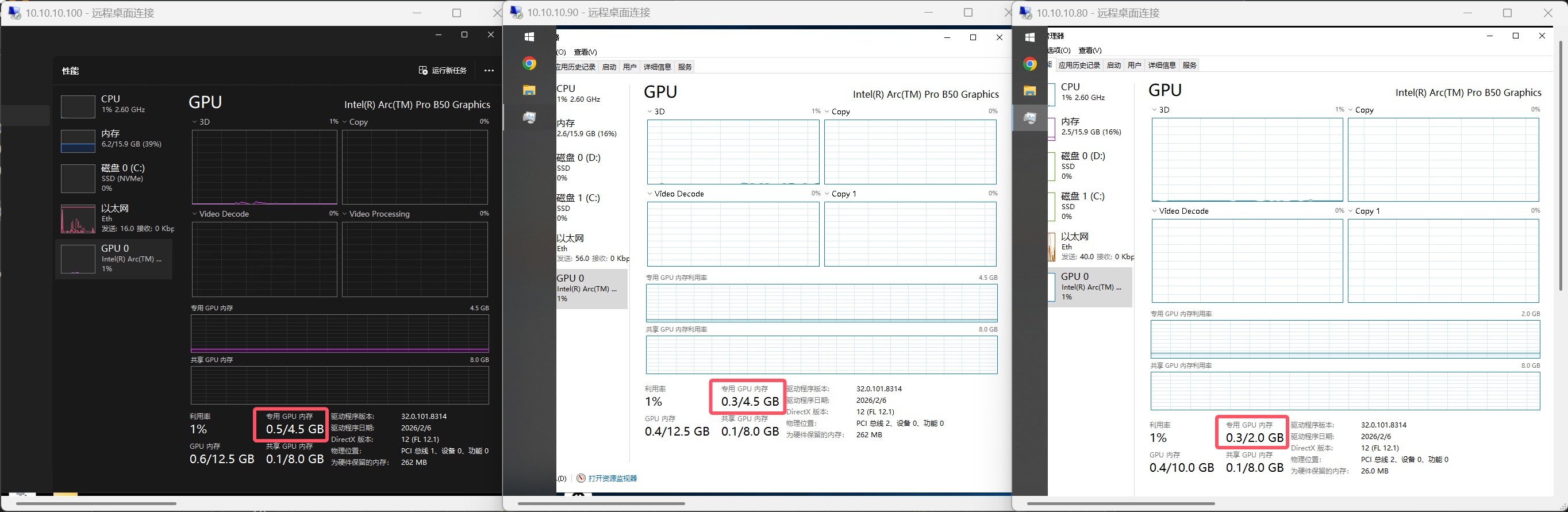
I ran a few simple tests, and it seems to be working fine.
I’ll let it run for a few days and see if there are any problems.
6 Likes
can you change the host - meaning .0 vf - vram? because i just yesterday made a whole project to alloc x amount of vram with vulkan as a workaround
Using the feature I mentioned above, you can specify the VRAM size for each VF.
The remaining VRAM will then be used by the PF, which is the host.
I currently have one 2GB VF and two 4GB VFs enabled, with about 6GB of VRAM remaining for the host.

my issue is that i want the host to also use the gpu for display out and acceleration. which is what i am doing now with this GitHub - nicman23/b50-sriov-alloc: Allocates b50 VRAM to host before sr-iov vf creation · GitHub
In principle, to reserve VRAM for the PF, you have to occupy that memory first and then release it after the VF is created.
I previously used vramfs to mount VRAM as a directory, while the project you sent seems to use Vulkan—the underlying logic is basically the same.
Personally, I think just creating the VF and then downsizing its VRAM achieves the same goal and is much more flexible.
is the downsized ram available to the host? if so then yea
Of course, the downsized VRAM can be used by the host.
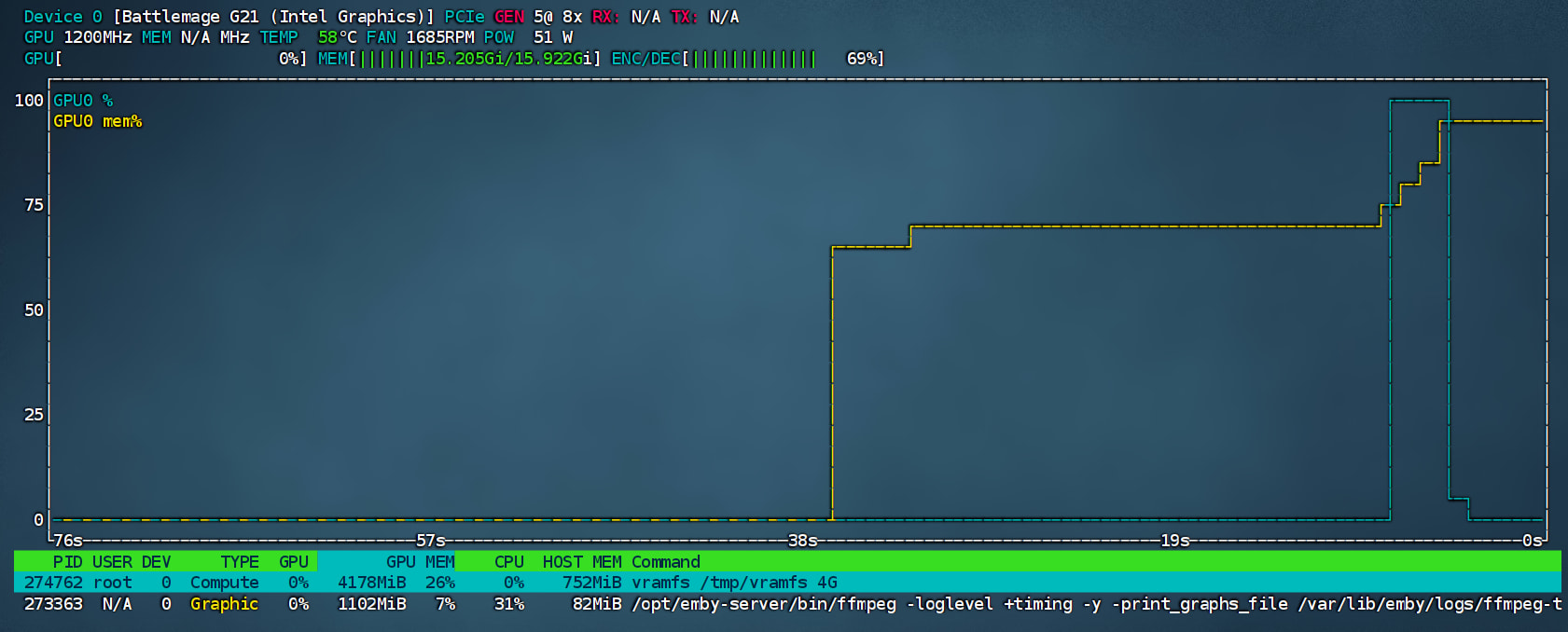
However, this requires the kernel to support modifying vram_quota.
If the kernel does not support it, you can only use the old method.
sorry but what tui is that? it is quite nice
nvtop
2 Likes
Very nice! Thanks for posting this will play around with the resizing. I really don’t need a full 7GB of VRAM allocated to my Ubuntu VM (after allocating 2GB to host) so being able to push the Windows VM up to say 10GB to give more flexibility for AI tasks etc would be very useful.
EDIT: Need to play around with this further but it appears there is a maximum size for each VF being the total VRAM of the GPU divided by the # of VF’s. So 8GB of VRAM is the highest I can go with 2 VF’s even if I set the other one to a much lower quota.
It still lets you set a higher quota than the max, and interestingly enough the quota is still the deciding factor of how much VRAM is left over for the host.. So I had 1x 8GB VF, 1x 4GB VF, and only 2GB VRAM for the host.. The remaining 2GB of VRAM just ends up in the void lol.
This is likely a firmware limitation; VF can only map a limited LMEM address space.
Even with more VRAM allocated, the guest cannot see it.
root@epyc:~# echo 2 > /sys/bus/pci/devices/0000:23:00.0/sriov_numvfs
root@epyc:~# lspci -vvv -s 23:00.1
23:00.1 VGA compatible controller: Intel Corporation Battlemage G21 [Intel Graphics]
        Region 2: Memory at 6f800000000 (64-bit, prefetchable) [virtual] [size=8G]
root@epyc:~# echo 3 > /sys/bus/pci/devices/0000:23:00.0/sriov_numvfs
root@epyc:~# lspci -vvv -s 23:00.1
23:00.1 VGA compatible controller: Intel Corporation Battlemage G21 [Intel Graphics]
        Region 2: Memory at 6f800000000 (64-bit, prefetchable) [virtual] [size=8G]
root@epyc:~# echo 4 > /sys/bus/pci/devices/0000:23:00.0/sriov_numvfs
root@epyc:~# lspci -vvv -s 23:00.1
23:00.1 VGA compatible controller: Intel Corporation Battlemage G21 [Intel Graphics]
        Region 2: Memory at 6f800000000 (64-bit, prefetchable) [virtual] [size=4G]
For now, it’s better to run tasks with high VRAM requirements on the host.
Will definitely consider that, for now I gave the max 8GB to Windows, 5.5 to Ubuntu, and 2.5GB to the host / Plex LXC which gives me at least 3-4 transcodes. Better than 7/7 and 2GB to Plex.
What did you use before, VirtIO?