Please help me choose between the MSI X870E Carbon and the Gigabyte X870E Aorus Master

EDIT: I have purchased a Gigabyte X870E Aorus Pro. I saw one for a decentish price and I didn’t want to wait and risk the AI bubble making yet another component shoot up in price.


I’m looking for a an X870E motherboard for use with a Ryzen 9 9900x. I’ve pretty much narrowed it down to the Gigabyte Aorus Pro, as it fulfils all of my must have requirements. It’s also around £300, which is ~£110 cheaper than the Aorus Master, and ~£140 cheaper that the Carbon. When it comes time to splash the cash though, I might feel the added expense of the Master or the Carbon is worth it. So I would like some help choosing between the Master and the Carbon… just in case I see a deal or something.

Originally I had wanted to get an ASRock X870E Taichi Lite, because it is basically nearly perfect in my eyes. Not least because of ASRock being Linux friendly… it’s just that ASRock’s current issues with 9000 series CPUs made me think again. I haven’t totally ruled it out though.

The two main contenders are-

https://www.msi.com/Motherboard/MPG-X870E-CARBON-WIFI

https://www.gigabyte.com/Motherboard/X870E-AORUS-MASTER

They both meet all my hard requirements. It’s just the more subjective elements that I’m hoping some of you can help me with. I’m also open to suggestions when it comes to alternate mobos but I’m not really inclined toward ASRock unfortunately.

Here’s a list of my must haves. They are non-negotiable requirements.

  1. ATX or EATX form factor.
  2. Two PCIe slots and the second slot must either be x8 or x16 in length, and at least x4 in terms of lanes, although x8 would be much better (see nice to have number 7.).
  3. 4x SATA ports. I need a total of 9x SATA ports at a minimum (preferably 12x), so I’ll be using a LSI 2308 in the second PCIe slot.
  4. 4x DIMM slots.
  5. 4x m.2 slots and when all the slots are in use, it must not disable one of the PCIe slots. It can slow the slot down though.
  6. Good non-Windows based fan control possibilities (see 11.).

Nice to haves.

  1. More than 2x PCIe slots. I have a few PCIe cards that I would like to be able to connect to my system when I need to use them, without having to remove my GPU or HBA. These other cards are for the most part, x1 or x4 physically.
  2. A post code display. If a board doesn’t have one, I’m not sure how big of a deal to make of it? As long as there’s a 3rd PCIe slot, I could get a PCIe post code card. [EDIT: apparently this isn’t a thing anymore on modern mobos]
  3. More than 4x SATA ports.
  4. A second Ethernet port. Speaking of which, I’d be happy with anything from 2.5GbE and faster on the Ethernet ports.

Now for the more subjective things that I’m interested in knowing more about.

  1. BIOS fan control or preferably support from the CoolerControl software. If any of you own either of the boards and you use or have tried CoolerControl, I’d be especially interested to hear your thoughts.
  2. How does MSI vs. Gigabyte stack up in terms of BIOSes?

Things I don’t give a flying f* through a rolling donut about.**

  • RGB… well, that’s not quite true. I do care whether I can turn it off or not.

I guess one of the implicit must haves is USB4, otherwise non-X870E would have been considered?

1 Like

If there was a motherboard that was a match for the Carbon or the Master but it didn’t have USB4, then that’s not really too much of an issue… USB4 would be a future proofing feature. Which is to say I don’t see myself using it extensively in the near future.

You have highlighted a flaw in my deliberation process though. I didn’t seriously consider chipsets other than X870E and X870. I did compare various X870 boards to X870E boards but no X870 boards made my final shortlist. Since I narrowed it down though, my requirements did change a little. So I will have a second look tomorrow but I think that the eight fewer PCIe lanes on the non-E X870 boards will make it unlikely that I’ll find anything compelling.

As for non-870 chipests… I looked at the list of X670E mobos on PCPP and when I saw that they were mostly out of stock, or only marginally cheaper than the models that replaced them; I didn’t look much further. I also looked at a few of the other chipsets, way back when I first started planning the earlier version of this build, which was around X870E’s release. But the research into non-X*70 chipsets went as far as reading an article on what extras X870E brought to the table. So again, I wouldn’t rule out a different chipset but I’d be surprised if there’s anything that will compete with the Carbon, Master, or Pro.

MSI X670E ACE for 1 LAN port, X670E GodLike for 2 LAN ports. All PCIE slots use CPU lanes.

However, both require a slimmer GPU than the two you have listed, in order to not cover the 2nd PCIE slot.

1 Like

Asus X870 ProArt is also a good contender.

Also, what do you feel about these?

With 9+ sata devices it is time to start consolidating. As a general rule of thumb, If you run < 4TB disks, look into 8 TB SSDs. If you run higher capacity drives, you should really consider a NAS.

2 Likes

Of the few UK based websites that I’ve check, the ones that have stock all have the ACE for significantly more than the X870E Carbon. I can’t even find new stock for the Godlike.

I do appreciate the suggestions though.

Did you mean X870E? I can find sparse references to an X870 ProArt but I think they’re also typos… I can’t find the product page or and sales listings.

In regards to the X870E ProArt. It’s £499 in the UK. Which makes it £50 more than the Carbon, and £90 more than the Master. It’s physical PCIe slot layout also means that the GPU I will have (which is a 2.9 slot model) will have very little clearance to what ever is in the second PCIe slot. It’s not a total deal breaker and I am gonna do my due diligence and give the ProArt a proper, detailed look. I just think that the price and slot layout alone (and the lack of a POST display) makes it the weaker candidate of the group.

Thank you for the suggestion though.

Beyond knowing they exist, I’ve never really had need to think about them. I do really want 4x m.2 slots if possible. So I’d be remiss to sacrifice a slot to SATA when I can just use my PCIe HBA if I get the right board.

I can’t really consolidate my SATA devices, due to my use case scenario. The fact that my SATA disks are discreet units is part of my use case. It’s not a bug, it’s a feature you might say.

As for NVMe… I need 2x m.2 ports for my boot device, which will be a mirrored ZFS pool. I want another, discreet NVMe disk for a different OS. When GTA VI is released for the PC, if it won’t run on Linux or performance is significantly better on Windows… then I’m gonna have to hold my nose and install that shitty OS for the first time in over 5 years. The fourth slot is for pure storage. So it’s not entirely essential but why sacrifice an m.2 slot to SATA when the right motherboard will have a free PCIe slot, right?

As for SATA devices…

Device Ports Required Usage
Icy Dock MB326SP-B 6x Mass storage and messing around with physical OS installs
Icy Dock MB971SP-B 2x quickly moving storage between my workstation and my strictly offline only VHS capture system. Also it looks like and old casette player out of a car… need I say more?
Asus BW-16D1HT 1x Optical disc preservation

So that’s 9x down from the 4x SATA on the mobo and the 8x SATA on my HBA. With the remaining 3x SATA connections, I have a few options.

Device Ports Required Usage
Icy Dock MB830SP-B 3x An easy way of connecting my 2x 20TB ZFS mirror to my main PC, for backing up the essential data on my NAS
Mother(board)'s Backside 2x My new case has 2x 3.5" / 2.5" SATA mounts behind the motherboard. I doubt I’ll ever use them but I don’t want to never be able to use them
Pioneer BDR-212DBK 1x Without going off on a massive tangent about the looming death of the optical drive industry… having the ability to connect my best optical drive without tearing apart part of my system / cable management is a plus for me. It also means that I don’t have to risk wear or damage to my Sony’s SATA connections

Non of the three devices above need to always be connected but the thing is, no matter how ruthless I am with my SATA devices, there’s no way 4x SATA connections will be enough. I’m gonna have to have an HBA of some kind, so I may as well use the one I’ve got and get 12x SATA connections (even if I don’t use them all). It’d save me spending any more money for no real gain, or having to choose a motherboard that has more significant downsides in other areas.

Yes. My bad, did not look up the chipset proper.

Fair enough. Asus boards does have really good ECC support, if that matters to you, but the price tag makes it a bit hard to swallow.

As for SATA, I do hear what you are saying, but there are other ways that may or may not be better. Like USB based stuff. Here is what I would do, but all of these are suggestions and if you believe this is not the way, then by all means keep using what you have. Just wanted to point to a few alternatives that may or may not make sense for you. :slight_smile:

You know your use case better than anyone though, this is more to be thought of as inspiration than anything else.

1 Like

I didn’t know that Asus boards supported ECC.

ECC is a bit of a moot point though as I’ve already bought my RAM. I managed to snag a kit back when the prices were merely disgusting, rather than sickeningly obscene. It would have been nice to have ECC but when it comes to my desktop, I’m not as bothered about having ECC as I am with my server.

I appreciate your input, believe me. Especially as I don’t really have any friends who are into this sort of thing. So it’s invaluable to have someone talk to about it and someone who can challenge my thought processes and decisions.

I’m actually kind of planning a DIY version of something like this but that’s a whole different kettle of fish that’s not related to my planned build per se. I don’t want to say too much more as I will be posting my idea to the forum, once it’s a little more fleshed out.

I’m a bit wary of docking stations because of the lack of active cooling. My Icy Docks either have their own fans, are cooled by my case fans, or I don’t use them for long enough for heat to be an issue.

I mentioned that I had 2x 22TB disks that I’ll be using to backup data from my server. The disks will be using ZFS, which means I’ll have to scrub them at some point. Which is a process that could take tens of hours.

I have actually considered them as an option in the past but then I ended up with my original Icy Docks.

The transfer speed of the data connection doesn’t really make a difference. The limiting factor is how fast the drive is itself and how fast in can read a disc. Which (if memory serves) is something that was historically limited by the economics of making a faster drive just not making sense in the market. That never really changed. So USB 3.2 is really not necessary.

I do actually hope to get an slimline external Verbatim drive at some point but I’ll be getting the 43888 model specifically, in the hopes I get lucky and it has Pioneer internals.

It has provided plenty of food for thought, thank you!

Also, to be really honest… I know that some of my use case doesn’t really make a lot of sense. A big part of why I want to keep my MB971SP-B is because I think it’s cool. Every time I eject a drive from it, it gives me a little jolt of happiness. And when I said “Also it looks like and old cassette player out of a car… need I say more?” I was only half joking.

1 Like

Unfortunately, SATA is a dying interface, this is a fact. Kinda like finding a motherboard with support for IDE in 2015, it is increasingly difficult to find a motherboard with enough SATA ports in 2025.

The good news? We have the m.2 adapters now, and you could theoretically slap in one of these if you really need to expand your m.2 slots, although since most consumer boards only have three PCIe slots in 2025, not sure it’s better:

Unfortunately, PCIe lanes are at a premium in consumer cards. I found one card that has four PCIe lanes and four m.2 slots, but that card will disable the PCIe slots, so yeah… 3 PCIe slots is the maximum on AM5. This is partly because most PCIe stuff has moved over to USB though, used to be you required a soundcard (those are USB now) or extra SATA ports (storage is m.2 / u.2 now) or whatever, these days only a GPU and possibly network card is required on the PCIe front and m.2 can cover most weird internal connectors better than PCIe cards can.

It wouldn’t surprise me if we’ll soon see mobos with two PCIe slots and eight m.2 slots (for ATX, mATX could get away with perhaps half that) with all legacy motherboard ports on one single m.2 adapter (that being AC97/HDA, USB 2.0 and SATA ports at the moment). You could get away with x16 to the m.2 and x16 to the PCIe slots, with bifurb trickery to distribute the lanes, and given that AM5 currently has 28 5.0 lanes from the CPU (with four dedicated to the chipset)… 32 lanes should be doable with AM5 today (albeit x8 being 4.0 instead of 5.0).

However… This is for the future of PCs to decide on. Maybe it is too cumbersome, or maybe it will make things a lot simpler to design. We’ll see where that goes eventually.

Some do, some don’t, more do than used to. ASRock’s been full line for ECC UDIMM for a while, Gigabyte’s started support on its high end, and MSI was staying at zero last I checked.

But it’s hard to articulate much of an EC4 value proposition given rwCRC and ODEC2 in DDR5 UDIMMs. So far the most I’ve seen anybody around here say is it gave some peace of mind. ¯\_(ツ)_/¯

I’m not really sure that the Gigabyte board works as you expect, the block diagram and additional instructions are unclear as it doesn’t really go into what happens when you populate all M.2 slots with the “main” PCI 16x slot.

Since you don’t mention OS I’d highly advice you to avoid LSI/Broadcom adapters (especially legacy ones as the one you mentioned) if you intend to use this box as a desktop running Windows and/or expect sleep/hibernate to work. In fact, I would strongly advice against using it on any storage related box as it will cause issues.

If you need more SATA ports and plan to use this as a desktop, a standard AHCI controller will do you much better in ~99.8% in all cases such as the ASMedia ASM1166 (you may need to flash the controller before using it in a AM5 system). To be honest, unless you have already have the controller and cabling I’d say stick with a AHCI controller instead. It will be slighly slower if you max it out but otherwise you don’t notice a difference except it running a lot cooler and no weird quirks due to the built in firmware.

may god have mercy on us. 9 sata on a single m.2? the 5’s seem to have trouble with mechanical strain.

Sorry fot he slow reply but evidentally, I forgot to click the Reply button to post this.


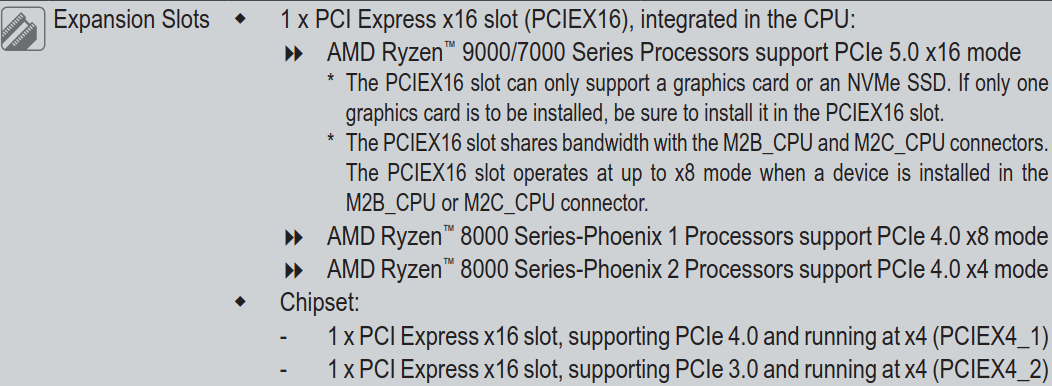
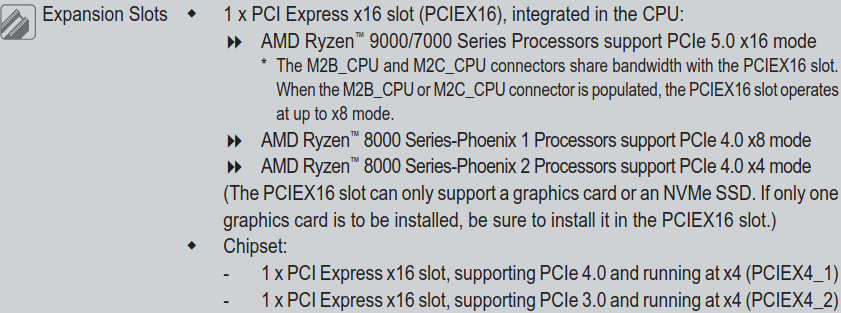
When the two m.2 slots coming of the CPU are used, the first PCIe slot runs in x8 mode.

Here’s the relevant section from the manual for the MASTER.

Here’s the relevant section from the manual for the PRO.

In some of my replies, I did allude to the fact that I will be using Linux (and that I haven’t used Windows in over 5 years) but you’re right in so far as I haven’t explicitly stated what OS I’ll be using.

It’ll be Debian as my day to day OS (on ZFS mirrored NVMe m.2’s). On a separate disk, I plan to install either a gaming focused distro such as Bazzite, or Windows. Depending on how well GTA IV performs on Linux (if at all) when it is released. If I use Windows for GTA VI, I will take steps so that it can’t touch any disk(s) apart from the one it’s installed on.

I hadn’t considered the potential for issues with sleep / hibernation. I don’t really use either feature much… maybe once every 10 to 14 days, if that. It’s probably more like once a month. So if my HBA does end up causing issues in that regard, I’ll either just do full shutdowns or I might replace the card.

Using what? Windows or my LSI HBA? I’m not sure I understand what you mean.

I already have the HBA (an LSI 9211-8i) but whether I end up actually using it for my new build depends on whether it has any issues with the new build. So I’ll have to wait and see.

All I can say now is that the card, which is flashed to IT mode and used strictly as a HBA rather than a RAID card, is the same model of card that I have previously used on TrueNAS and then Proxmox without any issues. It’s a well known, commonly recommended card in the TrueNAS community and on the ServeTheHome forums, and it is supported in even the most recent Linux kernels. Again though, if it gives me any problems, I’ll replace it.

To be honest though, I’m a little bit surprised by your advice against using a HBA such as the one I have and opting instead for an AHCI card, as your advice goes against the consensus of what I’ve previously read. Although admittedly that was in the context of use in a server. Which is why I’d appreciate it if you could expand on what you’ve said please?

Yes, it says that it “shares bandwith”. It doesn’t mention if you can use all with reduced bandwith or if any gets disabled.

You’re reading comments that are several years old or people not realizing that time passes, the 9211-8i is over 10 years old by now. While it did have its advantages like 4+ years ago the hardware around is evolving and it’s really starting to show its age, you likely also want to take reliability into the equation because things to last forever. It runs hot, SATA HDDs now have much larger capacity so you likely don’t need as many drives and older ones needs to be replaced (at least if you care about your data) as they don’t last forever. 8x slots are “expensive” for what it is, you need non bog standard SATA cabling and it’s EoL.

ZFS support in Linux distros can also wary quite a bit, don’t expect all distros to have the same level of support or even support at all.

It basically really depends on your personal needs.
If you find a board that offers all the features you would need.
Than there is not much reason to spend more really.

For example if you plan to build a system with a single gpu.
And you don´t really have a specific use case for the second x8 pci-e gen5 slot.
Than there is not much of a reason to spend significantly more on such boards,
which have two pci-e gen5 x16 slots than can run x8/x8 mode like the Carbon basically.
Or for example a board that has a 10G nic like the x870E Aorus Master X3D ice.

In most cases you would be very well equipped with just an X870 board.
However with certain X870E boards you will get a little bit more usb connectivity and what not.
So yeah it just depends on the features you need and which you could live without basically.
And of course what your actual budget is for the entire system.
I would not really recommend to spend more on features you don´t really need.
I´d would rather spend that money else where in the build like a better gpu, psu, more ram or storage or what not.

This topic was automatically closed 273 days after the last reply. New replies are no longer allowed.