Hello everyone
I’m dealing with quite complex ping lag spike problem while playing counter strike 2 on my VM with GPU passthrough inside Proxmox
My baseline ping shown in parsec is around 0.5ms and sometimes I get a few large spikes around 200ms or a jitter or around 10 to 80 ms
This makes gameplay really hard in competitive games
Parsec metrics graph showing the lag spikes in green:
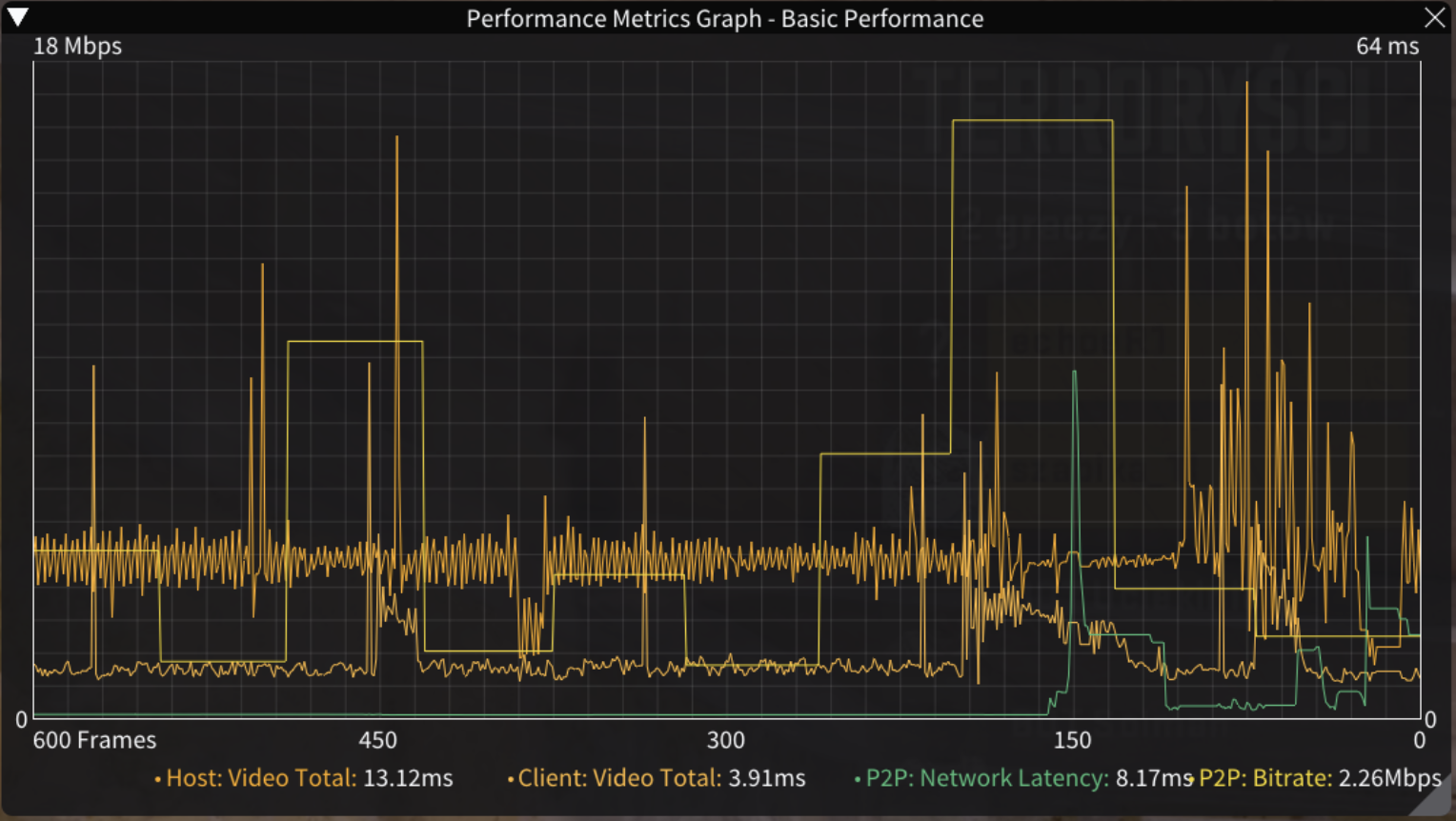
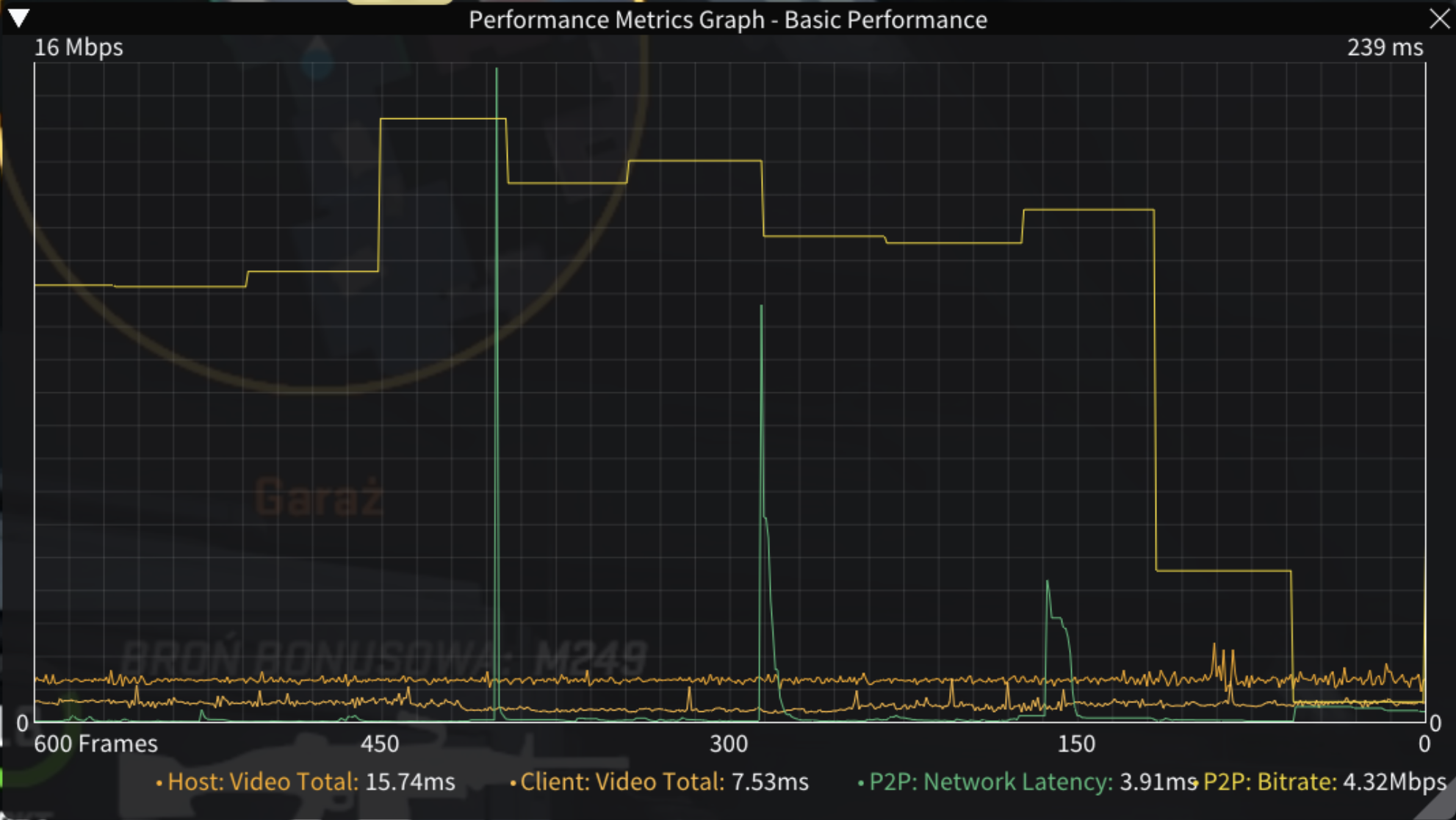
Here are my finding:
- The networking problem is on the VM / Proxmox side
- When the stream lag occurs counter strike complains about high ping so this means entire VM experiences the network problem
- I feel like the lag spike are correlated with CPU usage of the VM (more happens on screen = more lag)
- I ran ping to the VM and my router and they came out clean also no dropped packets on the interfaces
- I’ve ruled out any other networking issues like mac address conficts, mtu, router issues etc
My theory:
- I suspect that virtualised networking gets interrupted when being processed by my CPU causing the lag spikes
What I’ve tried:
- Pinning the VM cores
- Setting IPv4 Checksum Offload to disabled
- Setting TCP Checksum Offload (IPv4 & IPv6) to disabled
- Setting UDP Checksum Offload (IPv4 & IPv6) to disabled
- Setting Large Send Offload V2 (IPv4 & IPv6) to disabled
- Disabling Proxmox firewall
This made the issue less prominent but I’m not sure since it’s very random and it could be placebo
My Proxmox host hardware config:
- Proxmox 9.2.18 with Linux 7.0.14-16-pve kernel
- Ryzen 5800x
- Intel Arc B580 GPU in PCIe passthrough
- 64GB of RAM
- MSI MAG B550m Mortar WiFi motherboard
- Realtek RTL8125B 2.5Gbps NIC in the motherboard above
Here is my gaming VM qm config:
affinity: 4-7,12-15
agent: 1
bios: ovmf
boot: order=virtio0;net0;ide0
cores: 8
cpu: host
efidisk0: MAIN:vm-110-disk-0,efitype=4m,ms-cert=2023k,pre-enrolled-keys=1,size=1M
hostpci0: 0000:2d:00,pcie=1
hostpci1: 0000:2e:00,pcie=1
machine: pc-q35-10.1
memory: 32768
meta: creation-qemu=10.1.2,ctime=1779110193
name: Windows-11
net0: virtio=BC:24:11:87:7F:6F,bridge=vmbr0,queues=8
numa: 0
ostype: win11
parent: WOrking
scsihw: virtio-scsi-single
smbios1: uuid=421ed01b-b364-4603-9745-441b67ca26ee
sockets: 1
tablet: 1
tpmstate0: MAIN:vm-110-disk-1,size=4M,version=v2.0
usb0: host=0b95:1790
vga: none
virtio0: MAIN:vm-110-disk-2,backup=0,cache=writeback,iothread=1,size=400G
vmgenid: 137e181d-fc45-4f57-a0bf-e3d6ab522bbe