I have two smart switches. Cisco SG500x-24 with 4 10G sfp+, and a the other is a cisco 300 series only 12 ports I belive but I have no idea where it walked off to… lol
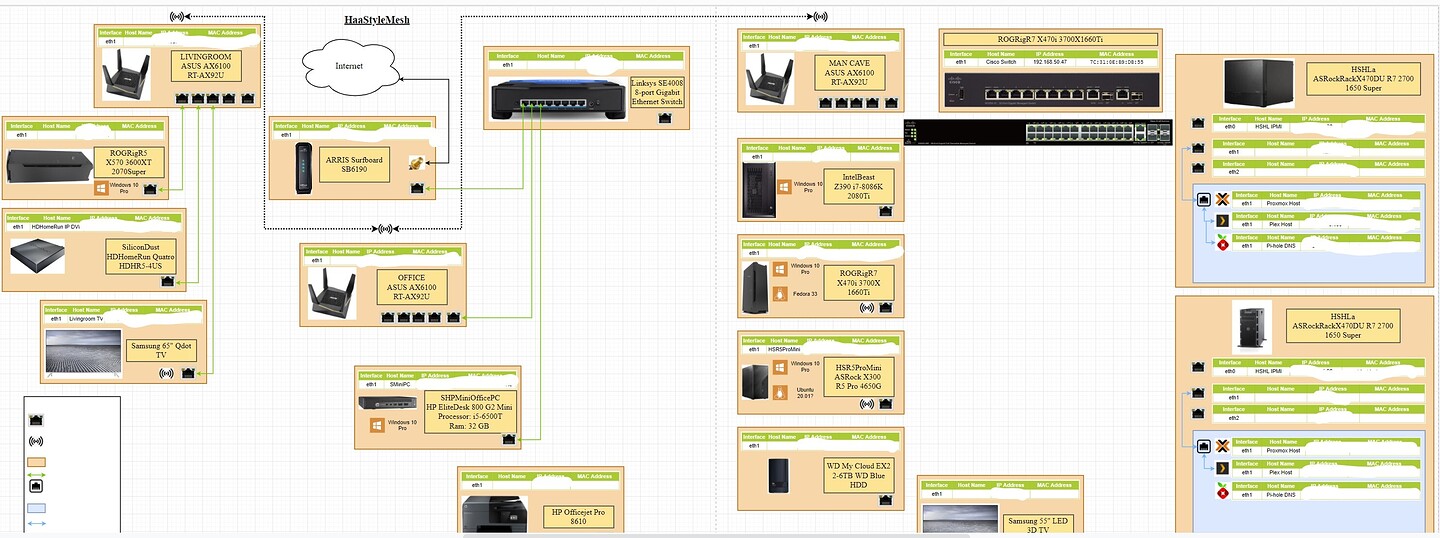
diagram-for reference
https://forum.level1techs.com/uploads/default/original/4X/8/9/3/893e2c7d4faa9f5d43a30c124acb658215451c12.jpeg
Okay so im going to tickle with this idea. Currently your on wireless backhaul and you are using the WiFi 6 radios on all of them for that and dedicating your none wifi 6 radio to wireless broadcast correct?
In theory there should be an “OpenNAT” section of your router firmware that will allow us to have the firewall be the NAT
If you want different subnets. We place the different switches on different ports of the firewall and assign them via the firewall
1 Like

great so it is in NAT mode. this is going to be harder then I thought. Hmm give me a sec
@Novasty can we bounce knowledge for a second.
The double NAT problem is the thing Im trying to avoid for him with these mesh nodes in place
My issue is he will no longer operate in mesh mode if he wants it as a dumb AP and im not familiar with asus firmware. You more so because you had/owned asus devices
1 Like


I see a disable NAT option here in the first screen for WAN
1 Like
That would work well only IF… we can DHCP forward otherwise each mesh router would break up your network into further subnetworks which im trying to avoid we dont want chains of 192.168.1.1s in line lol
But yes we would be disabling their firewall as the firewall you bought would indeed act as the firewall for the network
1 Like
Theres a DHCP option too for the WAN, I can also disable the router from using DHCP in that first screen too
The reason im avoid double NAT if your unfamiliar is that it does fuck certain applications and also makes routing more difficult and overall maintenance more difficult. If it can be avoided that is the first route you take
1 Like
I have heard yes it can be a a issue especially with services like plex etc. I can disable the DHCP server if that helps any and NAT functions it seems…
1 Like
Worst case man we would have to run your routers in dumb AP… firewall disabled and DHCP forwarded upstream… set all the SSIDs the same and it wouldnt be the ideal mesh (it would be like 2005-mesh LOL) but it would work to avoid double and triple NAT
You wouldnt lose bandwidth throughput or capability because the wifi6 is your backhaul in both instances
1 Like
Got ya. Yeah I have three of them…lol I got three for a 2000 sqft home so they had great conectivity -30-35db
have/still*
2 Likes
I did something similar for my buddy and it worked fine. Its just I want to make sure there’s no capability I’m missing
We would likely need to set reserved IPs in the firewall and set your mesh points WAN to something static. So when the forwarding occurs the opnsense or pfsense (whichever you choose). Knows where to send it
1 Like
Any input (as you catch up)
1 Like
Hello @Novasty and thank you for any input you may have in advance.
1 Like

Thanks for the screenshot. Give me a sec to look into it. ASUS docs suck lol We will definitely try to avoid “router” mode as we want the firewall to be the router
1 Like

Okay thats what we are looking for. Will it still connect without an ethernet wire? Thats where I was confused. It could be their wording
1 Like