Hello Everyone,
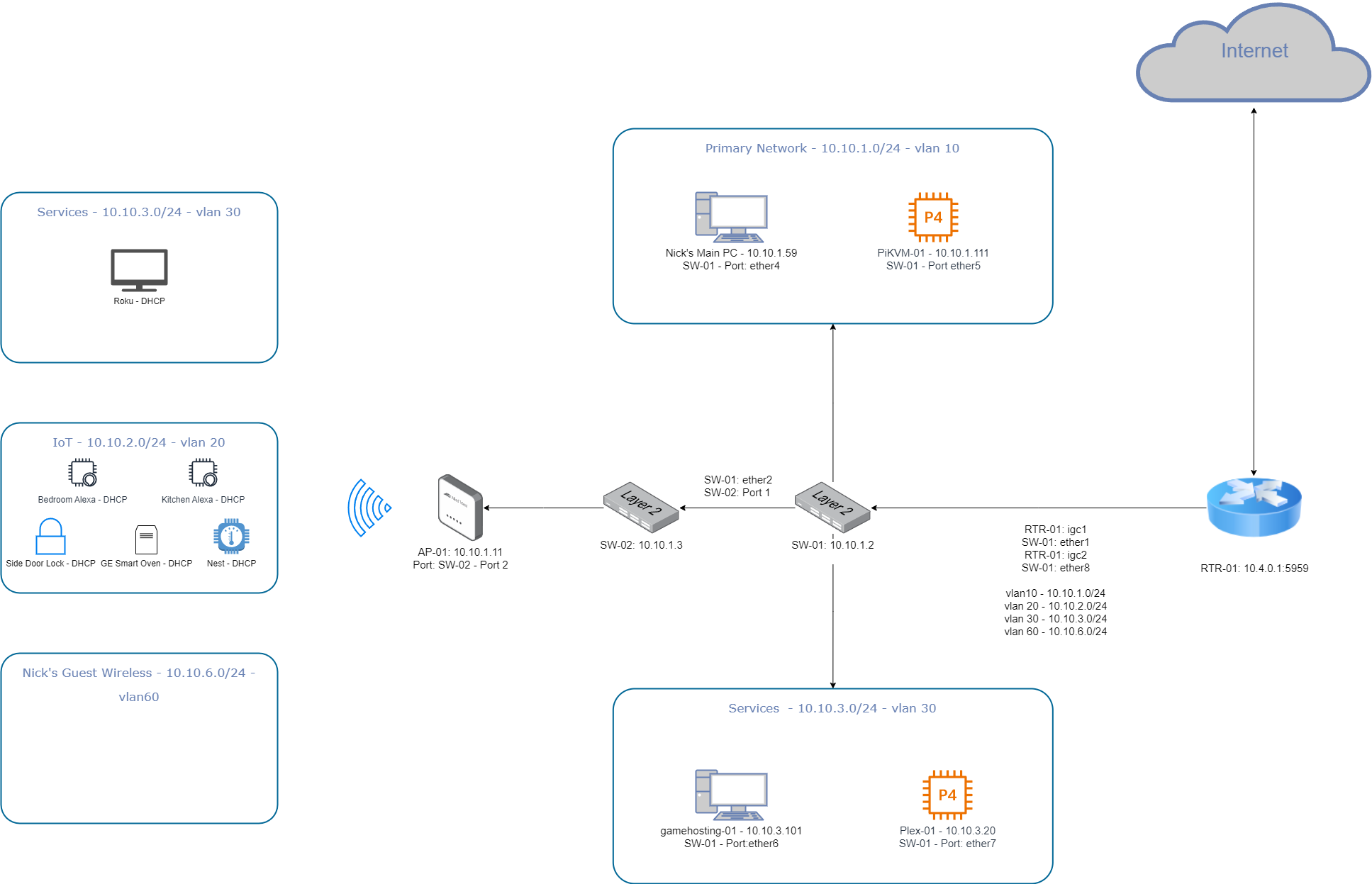
I have spent the last few weeks chasing an issue. It is the worst kind, sporadic, but persistent packet loss between my devices and my PFSense device. I will attach my Network Diagram for more details. In case the diagram is trash, here is an overview. I have all my devices plugged into a managed switch. The managed switch has two connections to the PFSense device. One port is untagged for the LAN connection on the PFSense device. Another connection is to another interface on the PFSense device for tagged traffic.
Checking logs on the PFSense device, I see nothing indicating there is an issue. Throughout the day, I run constant pings from my desktop machine to the PFsense device (one to the interface and another to a virtual interface assigned to another physical interface), another machine on a different vlan, and to my managed switch. It has gotten so bad I am losing packets every 20-30 pings. I am never losing connection to my managed switch. I am doing this same test from two other machines on different vlans, all have the issue at the same time.I am also monitoring performance on the PFSense device. Most of the time I am sitting at 99% idle. From time to time I am using 4%-6% CPU.
My brain tells me this is an issue with my PFSense device, but I am unsure what the issue is or how to figure it out.
Important Information
PFSense Device - CWWK Mini PC Intel N Series 4-core N100
Managed Switch - MikroTik CRS310-8G+2S+IN
PFSense Build Information - 2.7.2-RELEASE(amd64)
built on Wed Dec 6 15:10:00 EST 2023
FreeBSD 14.0-CURRENT
Thank you for your feedback.
Update - I just thought of running a constant ping from an SSH session on my PFsense to my primary PC. I get zero packet loss on the PFSense device when I am having packet loss from my devices
Personally I’d throw in an unmanaged switch to take over the untagged connection to the pfsense and see if the switch has anything to do with the problem. If you get the same packetloss on routes through the unmanaged switch than you know you can focus on pfsense.
1 Like
Are you having issues other than with pings?
Great suggestion, I will try that.
It is weird (to me) that while I am experiencing packet loss from my PC to the PFSense device, I do not experience packet loss from the PFSense device to my PC.
I am hosting a game server. My friend and I have been experiencing disconnects and lag, correlated with the packet loss I am seeing.
Have you checked the firewall log to see if the firewall is dropping some traffic? Seems unlikely but it is possible for stateful firewalls to drop legitimate traffic if the states expire to quickly. You could try changing it from default to conservative in the advanced system/firewall settings.
I’d also suggest making sure that you have disabled all the hardware offloading in the advanced network settings as that seems to cause more problems than its worth and is very fussy about what hardware and configurations it works with.
1 Like
I dont see anything in the logs. I did look at hardware offloading. All but one was already disabled (Hardware checksum offload). I disabled this and will continue to monitor. Thank you for the suggestion!
Well folks, I have been testing for 8 hours without a single dropped packet. I ended up going back to my old managed switch. It is a little Netgear. I moved to MikroTik because I needed more ports and wanted the 2.5gb speeds. I was hoping this wouldn’t be the issue as I recently installed a half rack and ran perfectly measured cables. Everything was neat and tidy. Now I will have to rip it all out.
The MikroTik has no logs indicating issues. It even has a dropped packet counter which is at zero.
This was a hard issue as I was not blaming the switch for the following three reasons.
- I was never losing packets to the switch itself.
- I could send packets from the PFSense device, through the switch, to all my other devices without packet loss.
- I have been using this switch for a few months “without issue”, but as I thought about it, I realized it has only been recently where I have been doing anything demanding enough to even notice packet loss. It was only a few weeks ago I started gaming on a my hosted server. Before that, I was just browsing the web, watching YouTube (Wendel of course), and other simple stuff.
I suspect this switch has been bad since the beginning, but I just noticed now.
Do you think I should try and get a replacement or go through the steps of restoring to factory settings, etc? I already updated the firmware and SWOS software.
Thanks again for all your help. You made me face what I did not want to do, replace my switch.
In case anyone is interested, or finds it useful, I would like to share the final piece of this saga.
I RMA’d the MikroTik Switch. I loaded my config and to my horror, had the exact same issue. After eliminating hardware as the culprit, reviewing the config over and over and finding nothing, seeing no logs indicating a problem, I had one final option. Instead of using SWOS, I switched over to RouterOS. It took me about five hours to figure out what the hell I was doing, but documentation and perseverance got me to where I needed to go. I now have my network configured as I did before, am using the MikroTik switch, and have zero packet loss.
I am glad this is resolved, but also sad I will never know what the actual issue was.
Thanks again for the help!
2 Likes