Pcie GPU with an Aspeed AST2400, aka the lowest power UEFI-compatible GPU

While doing my usual shopping patrols on ebay I found a bunch of sellers that had some interesting cards.

The title of the item was " ST425 PCIe X1 AST2400 2K VGA 1920 X 1200" so this seems to be an Aspeed AST2400 (a server integrated graphics and management chip) in pcie card form. The price was around 30 euros, so very affordable. The same item is also available on aliexpress if you search for ST425 or AST2400. Since this has only a tiny memory chip and a single VGA/S-Sub port, there is no management functionality and is just used as a GPU.

here it is, in all its glory:
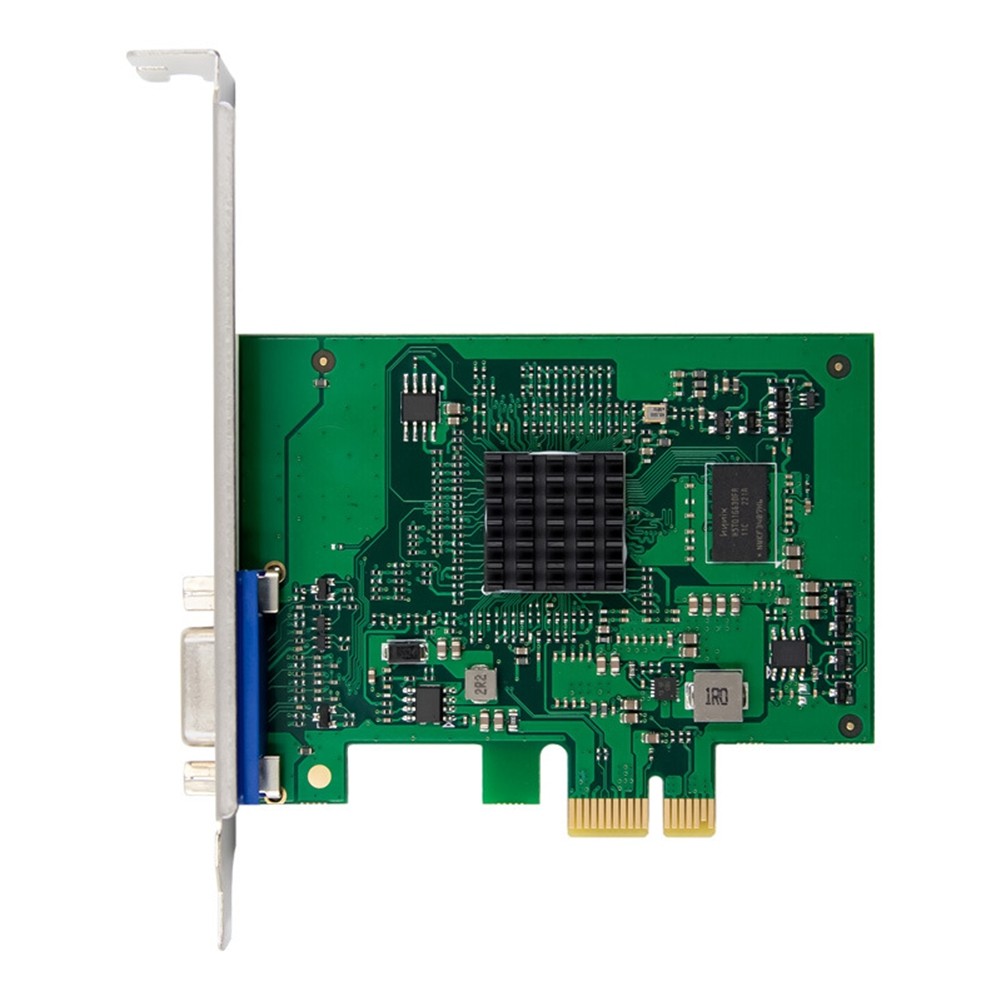
Yes this card is not going to play any games at all, and it has only a VGA or D-Sub video out like a server would.

This is a basic low power GPU (5 watts or less) to place in a home server or NAS so you can use a CPU that does not have integrated graphics and still have a screen output to connect a screen for troubleshooting or even better a ipKVM.

Installing a CPU without integrated graphics on AM4 (and AM5 afaik) is the only way to bifurcate the x16 pcie slot in 4x4x4x4 mode to install 4 nvme ssds, since the APUs can only bifurcate up to 8x4x4 due to hardware limitations.

Since it was cheap I decided to pull the trigger and get one to try out. Since the listing does not mention UEFI support explicitly I had some doubts it would, and I was right.

After I got it, I quickly discovered that it works only with CSM/legacy mode/whatever enabled, or in other words the chinese manufacturer didn’t flash the firmware image that has the UEFI support module. I know that it exists, servers with this chipset had UEFI support and their graphics didn’t stop functioning when disabling CSM.

Thankfully, the Aspeed website provides all the firmware images to do this in the support drivers section, in the Vbios/UEFI tab and a somewhat simple manual explaining what is what in the “graphics document” tab. ASPEED - Drivers Download

The last firmware package that supports the 2400 is the 1.11.03, the newer ones only have images for newer Aspeed chipsets.
Warning: DO NOT USE THE FLASHING TOOLS, in my card they just erased the memory chip and bricked the card
I’m uploading the pdf file and the firmware zip of version 1.11.03 from the aspeed website, as a backup in case they remove them in the future.

Aspeed Graphics User Guide.pdf (668.1 KB)
v11103_vbios.zip (13.5 MB)

In the zip file there is a “VBIOS+UEFI ROM” folder, which contains the binaries you can just flash to the memory chip on this card.

Since this card only has a VGA/D-Sub port, I chose the “uefi_2400_396.rom” file since the others seem to be named for different video output ports, or for different video chipsets (the 2500, the 2600, etc).

I have memory chip hardware flashing tools and a hot air station to desolder the memory chip because OF COURSE you can’t read nor program the memory chip while it’s in the board. The memory chip is the black square one in the top left in the image, it’s marked as Puya P25Q80H.

Before doing anything, as tradition, I desoldered the memory chip and made a dump. So if something goes wrong I can always flash it again.

It’s a pretty huge memory chip for the firmware it contains, a whole 1MB of flash memory for a firmware image that is like 64k (for the bios-only version) or 76k (for the bios + UEFI module version).

Opening the dump in a hex editor, I see these as the first lines


1.08.00 |\. IBM COMPATIBLE

so the factory firmware is 1.08.

Opening the uefi_2400_396.rom image I get a similar structure as this one, but the version number is different, and there is more stuff at the end with UEFI strings and whatnot.

So far so good, it seems this is just a dumb firmware I can flash as-is.

First I try the flashing tools aspeed provides, under FreeDOS, and the tool fails with an error “write failed”.

On reboot the card is dead, so I pull it and desolder the chip again, to find out the chip was empty.
The tool managed to erase it but not to write it, so lesson learned, DO NOT USE THESE TOOLS.

Now I have the backup I did earlier but I wanted to test the uefi_2400_396.rom file, so I wrote that on the chip with the hardware flasher tool and resolder the memory chip on the card.

This works fine and now the card works when I disable CSM alltogether (while before it did not). Great Success!

It also works with a VGA-HDMI converter so I can pipe the output to a pikvm that only accepts HDMI.

It also works fine with my Linux OpenSUSE test disk (with icewm and KDE/wayland).

with lspci -vv I see the following two devices from aspeed in my test rig, a pci-pci bridge and a VGA controller.

06:00.0 PCI bridge: ASPEED Technology, Inc. AST1150 PCI-to-PCI Bridge (rev 03) (prog-if 00 [Normal decode])
	Subsystem: ASPEED Technology, Inc. AST1150 PCI-to-PCI Bridge
	Control: I/O+ Mem+ BusMaster+ SpecCycle- MemWINV- VGASnoop- ParErr- Stepping- SERR- FastB2B- DisINTx-
	Status: Cap+ 66MHz- UDF- FastB2B- ParErr- DEVSEL=fast >TAbort- <TAbort- <MAbort- >SERR- <PERR- INTx-
	Latency: 0, Cache Line Size: 64 bytes
	Bus: primary=06, secondary=07, subordinate=07, sec-latency=32
	I/O behind bridge: f000-ffff [size=4K] [16-bit]
	Memory behind bridge: f5000000-f60fffff [size=17M] [32-bit]
	Prefetchable memory behind bridge: [disabled] [64-bit]
	Secondary status: 66MHz+ FastB2B- ParErr- DEVSEL=medium >TAbort- <TAbort- <MAbort- <SERR- <PERR-
	BridgeCtl: Parity- SERR+ NoISA- VGA+ VGA16+ MAbort- >Reset- FastB2B-
		PriDiscTmr- SecDiscTmr- DiscTmrStat- DiscTmrSERREn-
	Capabilities: [50] MSI: Enable- Count=1/1 Maskable- 64bit+
		Address: 0000000000000000  Data: 0000
	Capabilities: [78] Power Management version 3
		Flags: PMEClk- DSI- D1+ D2+ AuxCurrent=375mA PME(D0+,D1+,D2+,D3hot+,D3cold+)
		Status: D0 NoSoftRst+ PME-Enable- DSel=0 DScale=0 PME-
	Capabilities: [80] Express (v1) PCI-Express to PCI/PCI-X Bridge, IntMsgNum 0
		DevCap:	MaxPayload 128 bytes, PhantFunc 0
			ExtTag+ AttnBtn- AttnInd- PwrInd- RBE- SlotPowerLimit 26W TEE-IO-
		DevCtl:	CorrErr+ NonFatalErr+ FatalErr+ UnsupReq+
			RlxdOrd+ ExtTag+ PhantFunc- AuxPwr- NoSnoop+ BrConfRtry-
			MaxPayload 128 bytes, MaxReadReq 512 bytes
		DevSta:	CorrErr- NonFatalErr- FatalErr- UnsupReq- AuxPwr+ TransPend-
		LnkCap:	Port #0, Speed 2.5GT/s, Width x1, ASPM L0s L1, Exit Latency L0s <2us, L1 <16us
			ClockPM- Surprise- LLActRep- BwNot- ASPMOptComp-
		LnkCtl:	ASPM Disabled; RCB 64 bytes, LnkDisable- CommClk+
			ExtSynch- ClockPM- AutWidDis- BWInt- AutBWInt- FltModeDis-
		LnkSta:	Speed 2.5GT/s, Width x1
			TrErr- Train- SlotClk+ DLActive- BWMgmt- ABWMgmt-
	Capabilities: [a4] Subsystem: ASPEED Technology, Inc. AST1150 PCI-to-PCI Bridge
	Capabilities: [100 v1] Virtual Channel
		Caps:	LPEVC=0 RefClk=100ns PATEntryBits=1
		Arb:	Fixed- WRR32- WRR64- WRR128-
		Ctrl:	ArbSelect=Fixed
		Status:	InProgress-
		VC0:	Caps:	PATOffset=00 MaxTimeSlots=1 RejSnoopTrans-
			Arb:	Fixed- WRR32- WRR64- WRR128- TWRR128- WRR256-
			Ctrl:	Enable+ ID=0 ArbSelect=Fixed TC/VC=01
			Status:	NegoPending- InProgress-
	Capabilities: [800 v1] Advanced Error Reporting
		UESta:	DLP- SDES- TLP- FCP- CmpltTO- CmpltAbrt- UnxCmplt- RxOF- MalfTLP-
			ECRC- UnsupReq- ACSViol- UncorrIntErr- BlockedTLP- AtomicOpBlocked- TLPBlockedErr-
			PoisonTLPBlocked- DMWrReqBlocked- IDECheck- MisIDETLP- PCRC_CHECK- TLPXlatBlocked-
		UEMsk:	DLP- SDES- TLP- FCP- CmpltTO- CmpltAbrt- UnxCmplt- RxOF- MalfTLP-
			ECRC- UnsupReq- ACSViol- UncorrIntErr- BlockedTLP- AtomicOpBlocked- TLPBlockedErr-
			PoisonTLPBlocked- DMWrReqBlocked- IDECheck- MisIDETLP- PCRC_CHECK- TLPXlatBlocked-
		UESvrt:	DLP+ SDES+ TLP- FCP+ CmpltTO- CmpltAbrt- UnxCmplt- RxOF+ MalfTLP+
			ECRC- UnsupReq- ACSViol- UncorrIntErr- BlockedTLP- AtomicOpBlocked- TLPBlockedErr-
			PoisonTLPBlocked- DMWrReqBlocked- IDECheck- MisIDETLP- PCRC_CHECK- TLPXlatBlocked-
		CESta:	RxErr- BadTLP- BadDLLP- Rollover- Timeout- AdvNonFatalErr- CorrIntErr- HeaderOF-
		CEMsk:	RxErr- BadTLP- BadDLLP- Rollover- Timeout- AdvNonFatalErr+ CorrIntErr- HeaderOF-
		AERCap:	First Error Pointer: 00, ECRCGenCap- ECRCGenEn- ECRCChkCap- ECRCChkEn-
			MultHdrRecCap- MultHdrRecEn- TLPPfxPres- HdrLogCap-
		HeaderLog: 00000000 00000000 00000000 00000000

07:00.0 VGA compatible controller: ASPEED Technology, Inc. ASPEED Graphics Family (rev 30) (prog-if 00 [VGA controller])
	Subsystem: ASPEED Technology, Inc. ASPEED Graphics Family
	Control: I/O+ Mem+ BusMaster- SpecCycle- MemWINV- VGASnoop- ParErr- Stepping- SERR- FastB2B- DisINTx-
	Status: Cap+ 66MHz- UDF- FastB2B- ParErr- DEVSEL=medium >TAbort- <TAbort- <MAbort- >SERR- <PERR- INTx-
	Interrupt: pin A routed to IRQ 24
	Region 0: Memory at f5000000 (32-bit, non-prefetchable) [size=16M]
	Region 1: Memory at f6020000 (32-bit, non-prefetchable) [size=128K]
	Region 2: I/O ports at f000 [size=128]
	Expansion ROM at 000c0000 [disabled] [size=128K]
	Capabilities: [40] Power Management version 3
		Flags: PMEClk- DSI- D1+ D2+ AuxCurrent=375mA PME(D0+,D1+,D2+,D3hot+,D3cold+)
		Status: D0 NoSoftRst- PME-Enable- DSel=0 DScale=0 PME-
	Capabilities: [50] MSI: Enable- Count=1/4 Maskable- 64bit+
		Address: 0000000000000000  Data: 0000
	Kernel driver in use: ast
	Kernel modules: ast

I’m sharing my discovery and journey in the hopes it helps others.

If you are fine with leaving CSM/Legacy mode active you can just use it as-is, but if you need to use it in a system with CSM disabled (I remember I had to keep it disabled for pcie passthrough in the past, I don’t know if it’s still the case) or an even more modern system that has no CSM at all, you will need to flash the firmware manually on the chip as I did, or find a chinese seller that has flashed the right firmware from the start.

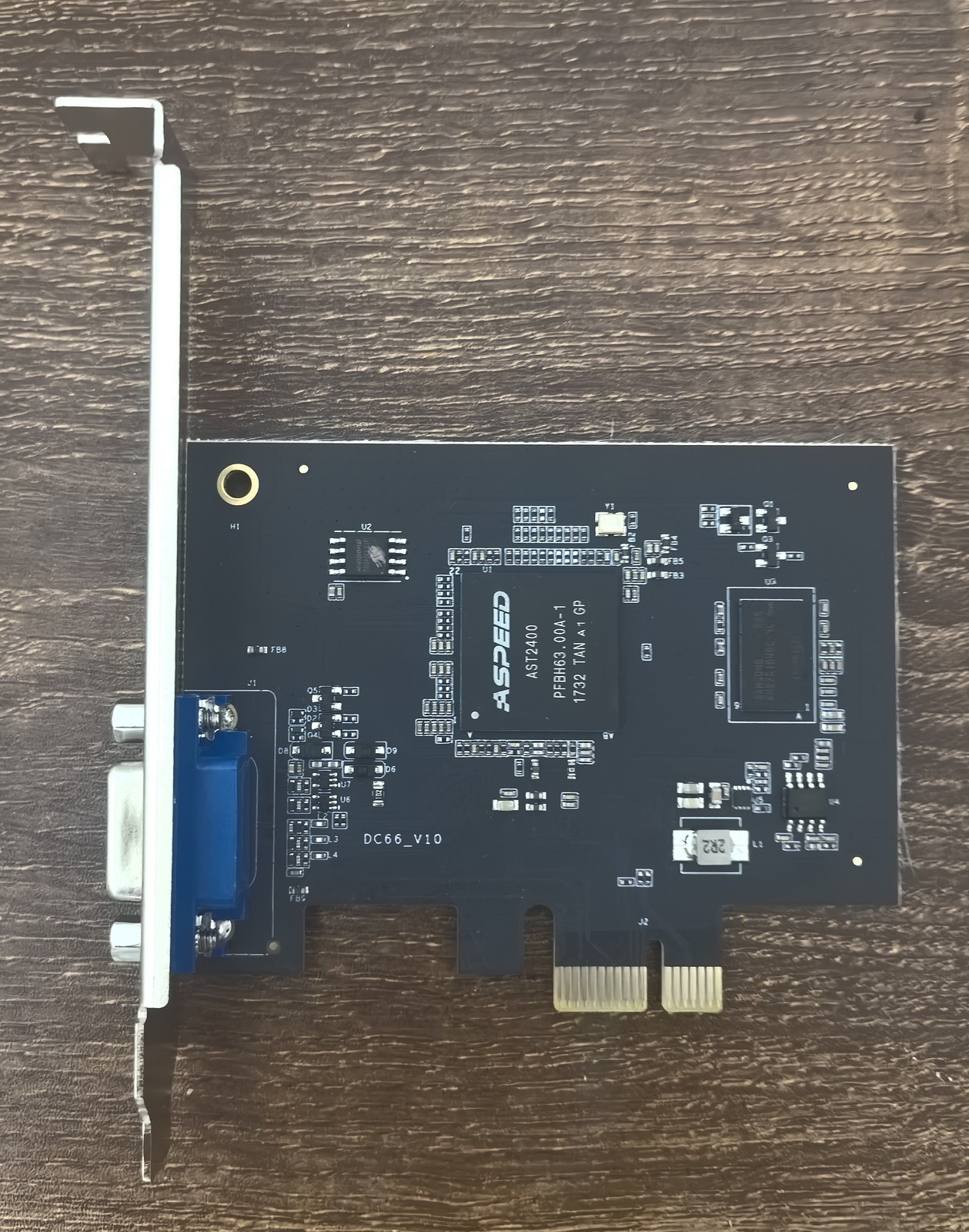
There is a single chinese seller on ebay that sells a different card also using the AST2400, and claims “Support UEFI mode, 1-13 generation main board can be displayed.” so it seems to support UEFI out of the box. It’s also around 60 euros so twice as expensive. I have not bought nor tested this card, I’m just providing this as information.
The title of the item on ebay is “Suitable for ASPEED AST2400 PCIE X1 low-power 2U graphics card X79/X99 with VGA”

2 Likes

That AST2400 card appears to be surprisingly underpopulated of surface components, here is a different one so you can see the difference: Captcha - WEDOS Global Protection

IIRC ASpeed also provided GPU-only versions under different part numbers. I think AST2510 is the GPU only version of the AST2500, not sure if AST2400 has any equivalent: https://www.asrockrack.com/general/productdetail.asp?Model=TOMMY#Specifications
Same PCB but based on the AST2500 and fully populated: https://www.vgamuseum.info/media/k2/items/cache/4a5dadae8236179289a29d4a9cb30754_XL.jpg

Because as I said this card is just a GPU and has no management function. Asrock’s Paul cards are full BMC with management, and also unobtainable in my experience

A BMC’s GPU component is an actual GPU that is initialized and seen by the host, and its framebuffer is shared with the ARM cores of the management part so it can natively “capture the screen”, but in my experience the GPU/VGA port will still work perfectly fine even if the BMC’s firmware is hosed.

I suspect the designers got hold of a ton of old stock of these chipsets for very cheap, and are just using them in “dumb mode”.

A bit like the crossflashing sas RAID cards to HBAs also done by chinese sellers (and homelabbers), that disables a lot of functionality of a better chipset.
It makes sense because there is such a large stock of old decommissioned raid cards that crossflashing them in dumb mode is much cheaper than buying a native HBA.

You’re incorrect because you missed my point. Check the 3 cards I linked again. You have, in this order:
1 - An unbranded AST2400 with only VGA output. It has no Ethernet port and no apparent headers, so it is very likely to be VGA only like your card cause it can’t do BMC functions. Actually, the position of most components on this card are identical to your card, just that it has a lot of whitesilk in it describing components. Your card actually looks like a heavily simplified version of this one because it has many less components.
2 - AsRock TOMMY. This one is essencially an AsRock PAUL PCB with only VGA, cause all the headers for BMC and the Ethernet Port are not present, so it should be VGA only, similar to 1. It actually uses the AST2510 that is the VGA only version of the AST2500.
3 - AsRock PAUL, the full fledged AST2500 BMC card.

You’re incorrect because you think my card (the green one) and the first one you posted have very different components. They have only minor component differences. Mine is also lacking the silkscreen, some unpopulated headers and the space for an unpopulated through hole cap. But it’s 99% the same card, probably a clone, assuming the one you posted was done by a real OEM or something.

The black one in the second picture on the other hand seems to be a lot simplified, that’s true. Hopefully it was done by someone that knows what is actually needed, and not just a scam card that does not work.

As for the Tommy card, it’s clearly the same board of Paul (the full BMC) that is reused for a pin-compatible VGA only chipset, so it’s likely not optimized for least possible components. Most of the cost savings are in the bigger parts that are not populated and the VGA chipset itself anyway.

Using a power meter on the power cord (i.e. total system power) I get 27-28 watts with the card in, and it does not change if I attach or remove the monitor (the system is configured to use external GPU so it is showing console on the AST2400 card).

Without the card installed, I get 26 watts, so this card is using around 1-1.5 watts

Checking with powertop with the card and without the card I see in IdleStats that most of the time is spent in C3 (between 85 and 90% depending on the moment), which is the lowest power state the AMD system I have can go. I have no intel systems to test it in, so that is left to someone else that wants to try.

Testing aspm capability, this python tool fails GitHub - Bootlessjam/ASPM-Tool

but this shell script works (after you configure the pcie root port and whatnot as said in the readme) GitHub - Eivs/enable-aspm

and it enables the L0 and L1 for the pcie bridge, while the GPU itself does not seem to have an ASPM at all.

LnkCtl: ASPM L0s L1 Enabled; RCB 64 bytes, LnkDisable- CommClk+

either way, power consumption does not change with aspm enabled


04:00.0 PCI bridge: ASPEED Technology, Inc. AST1150 PCI-to-PCI Bridge (rev 03) (prog-if 00 [Normal decode])
        Subsystem: ASPEED Technology, Inc. AST1150 PCI-to-PCI Bridge
        Control: I/O+ Mem+ BusMaster+ SpecCycle- MemWINV- VGASnoop- ParErr- Stepping- SERR- FastB2B- DisINTx-
        Status: Cap+ 66MHz- UDF- FastB2B- ParErr- DEVSEL=fast >TAbort- <TAbort- <MAbort- >SERR- <PERR- INTx-
        Latency: 0, Cache Line Size: 64 bytes
        IOMMU group: 1
        Bus: primary=04, secondary=05, subordinate=05, sec-latency=32
        I/O behind bridge: f000-ffff [size=4K] [16-bit]
        Memory behind bridge: fb000000-fc0fffff [size=17M] [32-bit]
        Prefetchable memory behind bridge: [disabled] [64-bit]
        Secondary status: 66MHz+ FastB2B- ParErr- DEVSEL=medium >TAbort- <TAbort- <MAbort- <SERR- <PERR-
        BridgeCtl: Parity- SERR+ NoISA- VGA+ VGA16+ MAbort- >Reset- FastB2B-
                PriDiscTmr- SecDiscTmr- DiscTmrStat- DiscTmrSERREn-
        Capabilities: [50] MSI: Enable- Count=1/1 Maskable- 64bit+
                Address: 0000000000000000  Data: 0000
        Capabilities: [78] Power Management version 3
                Flags: PMEClk- DSI- D1+ D2+ AuxCurrent=375mA PME(D0+,D1+,D2+,D3hot+,D3cold+)
                Status: D0 NoSoftRst+ PME-Enable- DSel=0 DScale=0 PME-
        Capabilities: [80] Express (v1) PCI-Express to PCI/PCI-X Bridge, IntMsgNum 0
                DevCap: MaxPayload 128 bytes, PhantFunc 0
                        ExtTag+ AttnBtn- AttnInd- PwrInd- RBE- SlotPowerLimit 26W TEE-IO-
                DevCtl: CorrErr+ NonFatalErr+ FatalErr+ UnsupReq+
                        RlxdOrd+ ExtTag+ PhantFunc- AuxPwr- NoSnoop+ BrConfRtry-
                        MaxPayload 128 bytes, MaxReadReq 512 bytes
                DevSta: CorrErr- NonFatalErr- FatalErr- UnsupReq- AuxPwr+ TransPend-
                LnkCap: Port #0, Speed 2.5GT/s, Width x1, ASPM L0s L1, Exit Latency L0s <2us, L1 <16us
                        ClockPM- Surprise- LLActRep- BwNot- ASPMOptComp-
                LnkCtl: ASPM L0s L1 Enabled; RCB 64 bytes, LnkDisable- CommClk+
                        ExtSynch- ClockPM- AutWidDis- BWInt- AutBWInt-
                LnkSta: Speed 2.5GT/s, Width x1
                        TrErr- Train- SlotClk+ DLActive- BWMgmt- ABWMgmt-
        Capabilities: [a4] Subsystem: ASPEED Technology, Inc. AST1150 PCI-to-PCI Bridge
        Capabilities: [100 v1] Virtual Channel
                Caps:   LPEVC=0 RefClk=100ns PATEntryBits=1
                Arb:    Fixed- WRR32- WRR64- WRR128-
                Ctrl:   ArbSelect=Fixed
                Status: InProgress-
                VC0:    Caps:   PATOffset=00 MaxTimeSlots=1 RejSnoopTrans-
                        Arb:    Fixed- WRR32- WRR64- WRR128- TWRR128- WRR256-
                        Ctrl:   Enable+ ID=0 ArbSelect=Fixed TC/VC=01
                        Status: NegoPending- InProgress-
        Capabilities: [800 v1] Advanced Error Reporting
                UESta:  DLP- SDES- TLP- FCP- CmpltTO- CmpltAbrt- UnxCmplt- RxOF- MalfTLP-
                        ECRC- UnsupReq- ACSViol- UncorrIntErr- BlockedTLP- AtomicOpBlocked- TLPBlockedErr-
                        PoisonTLPBlocked- DMWrReqBlocked- IDECheck- MisIDETLP- PCRC_CHECK- TLPXlatBlocked-
                UEMsk:  DLP- SDES- TLP- FCP- CmpltTO- CmpltAbrt- UnxCmplt- RxOF- MalfTLP-
                        ECRC- UnsupReq- ACSViol- UncorrIntErr- BlockedTLP- AtomicOpBlocked- TLPBlockedErr-
                        PoisonTLPBlocked- DMWrReqBlocked- IDECheck- MisIDETLP- PCRC_CHECK- TLPXlatBlocked-
                UESvrt: DLP+ SDES+ TLP- FCP+ CmpltTO- CmpltAbrt- UnxCmplt- RxOF+ MalfTLP+
                        ECRC- UnsupReq- ACSViol- UncorrIntErr- BlockedTLP- AtomicOpBlocked- TLPBlockedErr-
                        PoisonTLPBlocked- DMWrReqBlocked- IDECheck- MisIDETLP- PCRC_CHECK- TLPXlatBlocked-
                CESta:  RxErr- BadTLP- BadDLLP- Rollover- Timeout- AdvNonFatalErr- CorrIntErr- HeaderOF-
                CEMsk:  RxErr- BadTLP- BadDLLP- Rollover- Timeout- AdvNonFatalErr+ CorrIntErr- HeaderOF-
                AERCap: First Error Pointer: 00, ECRCGenCap- ECRCGenEn- ECRCChkCap- ECRCChkEn-
                        MultHdrRecCap- MultHdrRecEn- TLPPfxPres- HdrLogCap-
                HeaderLog: 00000000 00000000 00000000 00000000
05:00.0 VGA compatible controller: ASPEED Technology, Inc. ASPEED Graphics Family (rev 30) (prog-if 00 [VGA controller])
        Subsystem: ASPEED Technology, Inc. ASPEED Graphics Family
        Control: I/O+ Mem+ BusMaster- SpecCycle- MemWINV- VGASnoop- ParErr- Stepping- SERR- FastB2B- DisINTx-
        Status: Cap+ 66MHz- UDF- FastB2B- ParErr- DEVSEL=medium >TAbort- <TAbort- <MAbort- >SERR- <PERR- INTx-
        Interrupt: pin A routed to IRQ 32
        IOMMU group: 1
        Region 0: Memory at fb000000 (32-bit, non-prefetchable) [size=16M]
        Region 1: Memory at fc020000 (32-bit, non-prefetchable) [size=128K]
        Region 2: I/O ports at f000 [size=128]
        Expansion ROM at 000c0000 [disabled] [size=128K]
        Capabilities: [40] Power Management version 3
                Flags: PMEClk- DSI- D1+ D2+ AuxCurrent=375mA PME(D0+,D1+,D2+,D3hot+,D3cold+)
                Status: D0 NoSoftRst- PME-Enable- DSel=0 DScale=0 PME-
        Capabilities: [50] MSI: Enable- Count=1/4 Maskable- 64bit+
                Address: 0000000000000000  Data: 0000
        Kernel driver in use: ast
        Kernel modules: ast
1 Like

So I ran across this as I was looking into forcing Resizable BAR on my x99 machine I’m using for homelab stuff. Its got the X99-WS/IPMI which is running the ASMB8 iKVM that is based on the AST2400.

Noticed that it kinda stopped working when disabling CSM and found this too: “X99-WS/IPMI: FRU & VGA Priority” via servethehome

Based on your findings (and knowlege of firmware/roms), the gpu does support UEFI, and I wonder if its possible to slurp this firmware into the BMC.

tl;dr I think it may be possible, but it may be complex. Either bios mod, or use bootloader to load the driver before booting the OS, or install a card with another aspeed 2400 that has the firmware with UEFI support.

The Aspeed 2400 has two “parts”, a BMC and a GPU for the host system.
The BMC is not relevant here, that’s the ARM system that provides remote management. The GPU is initialized and run by the host system, as it’s a gpu for the host system. The BMC can see the GPU framebuffer (so it can “see the screen”) and that’s it. It does not initialize or control the GPU. So the BMC or its firmware don’t matter for the issue you have.

Since this is a motherboard with integrated graphics, the firmware that runs the gpu is probably a module in the motherboard firmware (also called “UEFI driver”). The package from Aspeed website also has the module for integration in board firmware. It’s in the UEFI folder, then x64 subfolder.
Since your board has a VGA port like my card, I assume the right file should be uefi_2400_396.efi.
As stated in the Aspeed documentation pdf:
“The .efi format gop driver (under \UEFI) should be merged into UEFI system BIOS by customer.”

So the more permanent “fix” here is bios modding to add this module to the motherboard’s bios. Hoping the Bios isn’t signed so it actually lets you do that and still boot at all.
This is a bit above my abilities (I understand the theory but I have no experience doing it) so I can’t really help more than giving you this answer. You probably should ask someone experienced with bios modding.

Here a thread where some people discuss it

here a guide to do that (please make sure to read and understand the warnings, this is bios modding so it’s entirely possible you will brick the motherboard and need an external chip flashing tool to reflash the bios from a backup)

Another (less invasive) avenue is to drop the efi file on the EFi partition (where the OS bootloader is) or in a USB drive formatted with FAT32 and then either use a bootloader or a EFI boot entry to load it on boot.
This would get called after the board is started up so you would not be able to use this to see the UEFI setup screens, but the OS would see the GPU

Funnily enough, most people use this method to load cheats for games.

I have not tested any of the following, so you try this at your own risk.

https://www.unknowncheats.me/forum/apex-legends/437899-autoloading-uefi-driver-efi-aimbot-glow-hack.html

in this post they are loading a driver called memory.efi, you can probably replace that with the efi file for the aspeed .
It also has a video

    Open the EFI shell. Skip 2, 3 steps if you are using the EFI shell from the box.
    Put the files from "put on usb" onto a usb drive.
    Restart PC open Boot Manager, Select UEFI USB.
    Copy the driver memory.efi to the system EFI partition.
    shell:

    cp FS0:\memory.efi FS1:\EFI\Boot

        A driver must be placed on the system EFI partition in any directory you like. In my case, I used the /EFI/Boot folder.
        Where FS1: is your boot partition and FS0: is your flash drive or just where you copy from.

    Add a boot record for the memory.efi .
    shell:

    bcfg driver add 0 FS5:\EFI\Boot\memory.efi "Apex Driver"

        Where FS1: is your boot partition and "Apex Driver" is any name.

    Lets check the presence of a boot record after adding.
    shell:

    bcfg driver dump

        If the record has been successfully added, you will see :
        Option: 00. Variable: Driver0000 in the output

Bonus information:

A last thing that may work is to plug in one of these pcie cards with Aspeed 2400 and bios+uefi firmware in its little firmware chip. A driver is a driver, avter it is loaded it should detect both the card and the integrated gpu.
At least in the past I’ve seen this work with SAS cards and network cards, once one loads its uefi driver, all the other cards also appear in the UEFI setup screen even if they had no UEFI support of their own, or if it was disabled.

1 Like

That is a lot of good information, thanks.

Looking in the supplied firmwares, the kvm is supplied separately than the motherboard bios.

Extracts to ASMB8-iKVM/AST2400 with X99WS161.ima, and I wonder if its in there (since it mentions the AST2400).

Ultimately I just want CSM disabled (and potentually mod in rebar support as it is failing to start in truenas with my arc 310) and still be able to get video via the ipmi, such as changing bios settings.

This is all new to me so trying to wrap my head around the various tools involved.

that’s the firmware for what I call BMC above. Names are not standardized so the same device can have many names.

The BMC or ipmi or iKVM is the device that shows an interface over the network and lets you remote control the PC. This has its own CPU and ethernet port, running its own firmware, but it has nothing to do with the GPU that runs the VGA port.

The GPU for the host has its own firmware (and needs drivers in the host to be used, like all gpus).

For the AST2400, both things are physically in the same chip but they are two separate devices with two separate firmwares.

I’m confident the issue is with the GPU firmware, which is most likely added as a module inside the UEFI/BIOS firmware as with any other integrated graphics or storage chipset soldered on the board.

From what I see, bios modding is possible on that board

Also, the motherboard supports “asus bios flashback” also called “USB BFB” by the moderator in the forums linked, which is an independent system that allows to flash the UEFI firmware to debrick or install a modded bios without the need for using a hardware flasher.