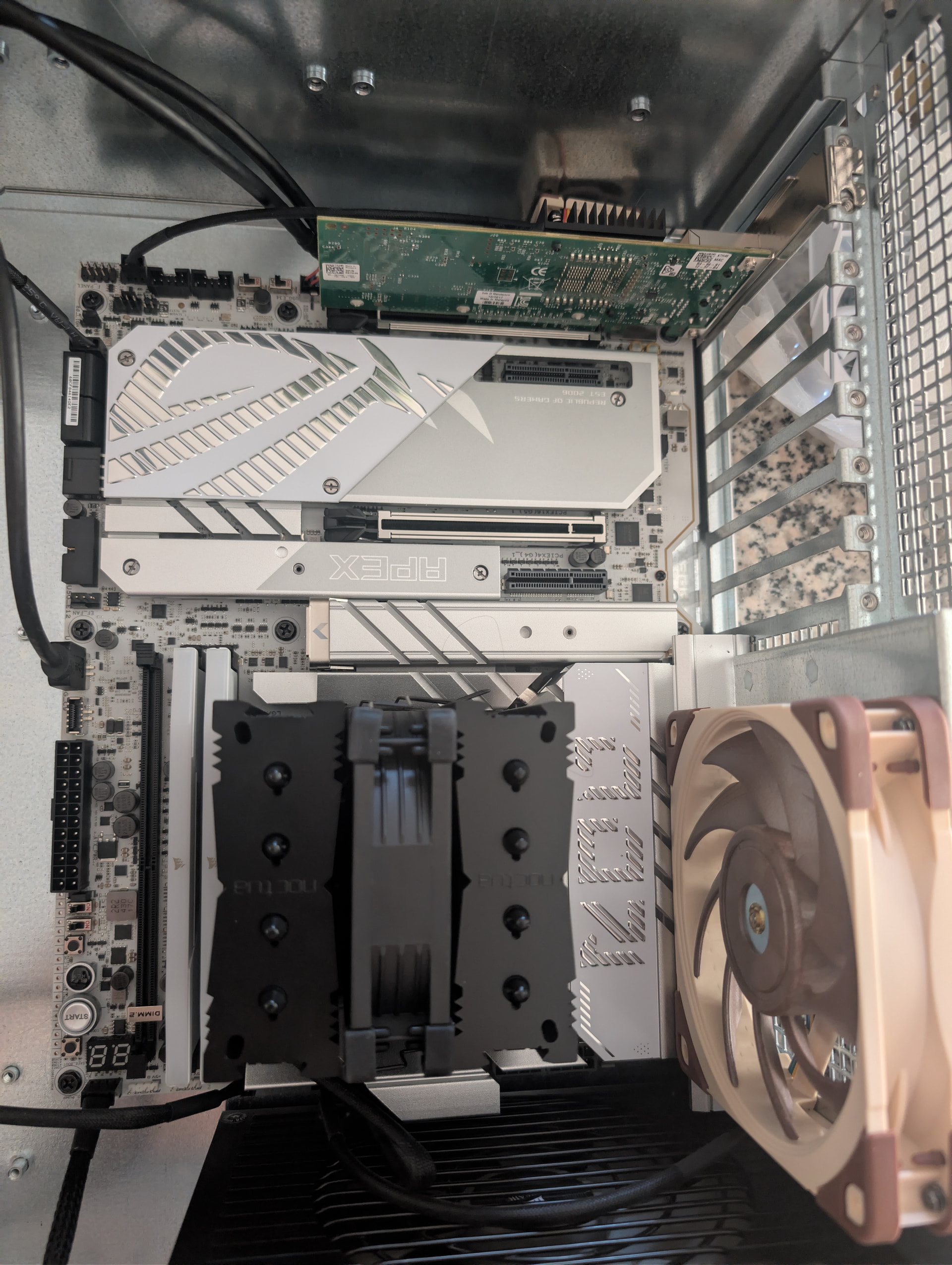
Hello! I am upgrading my SSD NAS and realized my motherboard selection didn’t have enough SATA ports to accommodate all my drives. I’ve seen mixed reviews about PCIe to SATA expansion cards, as it seems the general recommendation is to grab a card that does SAS to SATA.
My only issue is the limited space I have on my motherboard due to the GPU taking up a lot of space. Assuming I’m not surpassing the theoretical bandwidth limit, any recommendations as to what I should do?
If your drives are sata I would recommend the LSI 9305 series HBA. The ones sold on ebay for 50 bucks are often flashed to “IT mode” meaning they are a dumb host bus adapter, just more sata ports on your motherboard. You dont have to configure any complex pass through bs or tri-mode drivers… I run 4 of the LSI 9305-16i in my bulk storage box, each one has 16 sata channels via 4 minisas-hd (square connector) cables to a icydock 16 disk enclosure. Dead simple setup, ZFS rock and roll.
Depends from what performance you expect. There are reliable Sata cards with ASM 1166 with 6 ports and allegedly relialble (never used myself) realtek sata controller cards with 9 native sata ports, but they are on a pcie 3.0 x2 connection so they will bottleneck like mad on more than a couple SSDs. There are also a ton of absolute trash clowncar abomination cards with some 4-port asmedia controller and Sata port expanders, which should be avoided.
sas cards are usually pcie x8 slots, unless you can remove some of the junk bolted on the board and hope there is nothing under it so you can fit the cards, you will also need a short flexible riser and mount them with the “low profile” bracket.
Worth considering to “shaft” the 10gbit card and put that on a riser on the smaller slots instead. 10gbit is 1.25GB (per port) and that’s like a pcie 3.0 x4 to cover a couple ports (3.9GB/s), not a big deal at all. It’s wasting a pcie 5.0 slot.
Also worth looking up wtf is the boards’s wiring to those slots, because you might be out of pcie lanes (spoiler alert).
**Support Intel® Core™ Ultra Processors(Series 2) ***
2 x PCIe 5.0 x16 slots (supports x16 or x8/x8 or x8/x4/x4 modes)**
**Intel® Z890 Chipset**
2 x PCIe 4.0 x4 slots
* Please check the PCIe bifurcation table on the support site (https://www.asus.com/support/FAQ/1037507/).
** M.2_3 & M.2_4 share bandwidth with PCIEX16(G5)_2. When M.2_3 is enabled, PCIEX16(G5)_1 will run x8 & PCIEX16(G5)_2 will run x4. When M.2_3 & M.2_4 are enabled, PCIEX16(G5)_1 will run x8 & PCIEX16(G5)_2 will disabled.
- To ensure compatibility of the device installed, please refer to https://www.asus.com/support/download-center/ for the list of supported peripherals.
for context, and looking at the manual at page 15 there is a table that explains this better. The PCIEX16(G5)_1 is the main x16 pcie slot and PCIEX16(G5)_2 is the x16 one at the bottom where your 10gbit card is in. The two M.2_3 & M.2_4 slots steal 4 lanes each from the secondary x16 slot.
So if I understood this correctly, you have a m2 in the first m2 slot that is dedicated to CPU, and that’s fine.
Another m.2 in the “M.2_3” slot so your secondary x16 slot is running in x4 mode. And of course the primary x16 is running in x8 mode.
So in actual practice you have only the two pcie 4.0 x4 slots wired to chipset available to add stuff. The chipset is wired to CPU using DMI and on this gen it should be roughly equivalent to a pcie 4.0 x8.
So all your Sata ssds are on the chipset’s sata controller, that’s 5 drives so 2.75 GB/s of bandwith, so it’s a little less than x2 pcie 4.0 lanes worth of bandwith “gone”.
So in theory you should still have enough bandwith to fully utilize at least 1 of the two pcie 4.0 x4 slots.
Do note that the LSI 9305 mentioned above is a pcie 3.0 card so you are looking at 3.9GB/s of max bandwith you can get out of it on your setup since you only have (effectively) x4 slots available. For mechanical drives is irrelevant, but for SSDs it will bottleneck at more than 6 ssds connected to that card. Which is still probably not that big of an issue
I am going to give a little bump to “The Art of Server” on ebay (also has a YouTube channel). He has a nice selection of cards flashed to IT mode and fully tested along with needed cables.
I originally tried to get a cheap card and do the flashing myself, but it did not end well. He answered my questions and hooked me up with exactly what I needed.
I would stay away from consumer SATA PCI cards. Firmware/chipset bugs, SATA connectors that work themselves out. Not fun when a drive falls out of the array for the second time in a week.
Thanks so much for doing the math, this is something I still don’t fully understand but broken down like this makes a lot of sense. I really appreciate it!
Assuming the GPU was taken into account, do you think I should just not have the GPU in this system? I was planning on a simple Odysseus environment to experiment in. Considering I’m at the theoretical limit of PCIe lanes by just adding one more SSD, I almost feel like I have my back against a wall in terms of room for growth.
One thing I will add here, I have two nearly identical systems. One with four clown car cards in 1x slots, and one with a single LSI 9305-24i. The system with the clown cards, idles at about 60 watts. The system with the LSI idles at 230. Same HDD, memory etc. so, something to keep in mind. LSI is for the big boy dedicated storage appliance. But maybe Marvell is okay, if you’re not chasing the highest possible performance.
An update, I ended up installing my two M.2’s into the first two slots as to not consume bandwidth from the x8 slots. The DIMM.2 slot is also independent and runs at x4 gen 4 speeds so that’s handy for future expansion.
I’m looking for a riser cable for the dual 10gb nic so I can move it to the empty bay beneath the motherboard in my chassis and leave the bottom x8 slot for whatever card I end up getting to support all the other SSD’s. I think it’s an acceptable tradeoff and I shouldn’t loose too much performance on the GPU.
IMO there’s no reason to buy ancient used SAS cards unless you specifically want to install SAS drives. There’s a whole thread on ASM1166 cards here. And what’s nifty is you can get them in M.2 format as well as PCIe cards.
yes, but if I’m not mistaken the 9305-24i is a clowncar setup similar to the Startech card he linked above, with three 9300-8i chips and a PLX pcie switch, so you triple the power consumption of a 9300-8i (12w x3) while also adding another 10-ish watts for the plx switch. Same story for the 16i version (two chips and a plx switch). Or there were different versions? I’m sure there is at least one version that was a clowncar and I noped out immediately from these high port count 93xx cards.
If he gets a 9400-16i card it’s all a single chip in the 12-15w range, but it’s still pcie 3.0, so the x8 slot is a must.
Another candidate for 16-port card is an Adaptec ASR-71605, with similar specs and power consumption (it’s SAS 6gbit instead of SAS 12gbit but that does not matter for Sata drives that are 6gbit anyway), but massively cheaper if you get it used on ebay especially from china. I see them going for 25 euros vs 100+ euros for the 9400-16i.
These cards can be switched to HBA mode from their bios settings (it’s true HBA mode, equivalent to IT mode for LSI/Broadcomm. Not the fake “disk-sized volume” bs some LSI raid cards can do in what they call JBOD mode)
See here for a comparison and power consumption numbers (at the bottom of the post)
Doing some math again, a pcie 3.0 x8 slot is 8GB/s (theoretical) and Sata 6.0 maxes out at 600MB/s (or 0.6GB/s) so we are looking at connecting up to 13 sata ssds to the sas card before it hits a bottleneck (in theory, in practice it’s probably more like 12 ssds).
If you want more, you need to look at Broadcomm 9500, which is pcie 4.0 x8, so the numbers above double, and you can connect 26 sata ssds. Also adaptech has newer cards on pcie 4.0 x8 but I never needed either so you’ll have to look that up on your own.
Yes the first two M.2 are wired to CPU so they are independent (the second M.2 is pcie 4.0 for some reason, probably not that big of a deal though).
DIMM.2 slots are connected to chipset so they will share the upstream bandwith with Sata controller, and with the other two x4 slots on the motherboard. As said above, the chipset is connected to CPU with DMI at whatever version, and in this case it is an equivalent of pcie 4.0 x8.
Since the Sata ports are using an equivalent to pcie 4.0 x2, you still have a pcie 4.0 x6 worth of bandwith from chipset for something else. Possibly using one for the x540 network card you mentioned in the other thread, which is pcie 3.0 x4 so it’s like pcie 4.0 x2.
That leaves enough bandwith for the other pcie 4.0 x4 slot, or for one DIMM.2 slot, without bottlenecking.
Again from the specsheet of the mobo:
<strong>Total supports 6 x M.2 slots and 4 x SATA 6Gb/s ports*
Support Intel® Core™ Ultra Processors(Series 2) *</strong>
M.2_1 slot (Key M), type 2242/2260/2280/22110 (supports PCIe 5.0 x4 mode)
M.2_2 slot (Key M), type 2242/2260/2280 (supports PCIe 4.0 x4 mode)
M.2_3 slot (Key M), type 2242/2260/2280 (supports PCIe 5.0 x4 modes)**
M.2_4 slot (Key M), type 2242/2260/2280 (supports PCIe 5.0 x4 modes)**
**Intel® Z890 Chipset**
DIMM.2_1 slot (Key M) via ROG DIMM.2, type 2230/2242/2260/2280/22110 (supports PCIe 4.0 x4 mode)
DIMM.2_2 slot (Key M) via ROG DIMM.2, type 2230/2242/2260/2280/22110 (supports PCIe 4.0 x4 mode)
4 x SATA 6Gb/s ports
I saw your other thread where you find out your current 10gbit card is pcie 2.0 so it cannot run both ports at max speed on a x4 slot, and got recommended a x540 that is natively pcie 3.0 x4, so I assume this is superseded?
That’s actually a good reason to get a SAS card, especially in these hard times. You can still get decent deals with SAS drives because most people can’t use them.
The issue here is that his NAS is using SSDs and it seems he cares about the performance. Since an ASM1166 only has a pcie 3.0 x2 upstream interface, it’s bottleneck city for more than a couple SSDs. Those cards are 100% fine and imho recommended if you are doing a more normal spinning rust setup where each drive is never going to hit more than 250MB/s even in optimal conditions (and in real usage less than that).
I just picked up a Dell X550-T2 as well as a Supermicro AOC-S3008L-L8E 12Gbps SAS-3 HBA P16. Really looking forward to this config as it will leave me plenty of room for growth.
Gonna throw the X540-T2 into the gaming rig and call it a day lol
You are mistaken. The 9305-24i is a single SAS3324 chip and uses maybe 20 watts by itself. The issue is that all of these cards don’t support ASPM and turn it off for the rest of the system, and if you have a lot of devices, this will be a significant additional power suck.
100gig mellanox nics are shockingly cheap right now on ebay, and I would not consider the network to be the bottleneck with sata attached storage. The weakest link when using SSD’s is actually the pcie lanes to the older HBAs that assumed slow network/disk so ran 8 lanes of gen3.