Trying to find some enterprise m.2 PCIe 5.0 but it seems like that doesn’t exist or very rare?
Trying to build a 3 node Proxmox with CEPH cluster on a 100gb backbone switch and looking to use one of those 4 drive IcyDocks MB204MP-B per server. MoBo will be the Asus WRX90E
Use Case: 15vms with workloads of database’s a FreePBX and 3 different windows servers acting as terminal servers.
On the fence here what the best way to go is for storage. So far to stay PCIe 5.0 Best option I have found was the 4TB T705s but using them in the enterprise will this bite me in the ass? Or stay PCIe 4.0 as there is more options for enterprise drives?? Thoughts? Suggestion’s?
Don’t grill me too hard. I’m new here . lol Thanks everyone in advance .
I think the “Enterprise” is currently transitioning from u.2/3 to E1 and E3 EDSFF form factors. There are plenty of (expensive) Gen5 options in these form factors.
Mobos have m.2 slots, but mostly for boot drives (replacing USB/SATA fobs).
The actual enterprise solution would be to use the slimSAS ports and/or an HBA card in the pcie slots.
That being said, I wouldn’t expect too much performance difference between pcie 4 and 5 for your use case? You would rely more on random access and probably high parallelism? An enterprise class pcie 4 drive will perform better and especially more consistent than a consumer pcie 5 one like the T705.
M.2 is a consumer form factor, and not even really a very good one. It was fine as a step away from SATA and good for a generation or two, but with pcie 5.0 we have really moved past its usefulness and need a better solution that can handle a more sustained and higher maximum heat load. Enterprise has already had that, hopefully consumer land adopts it as well.
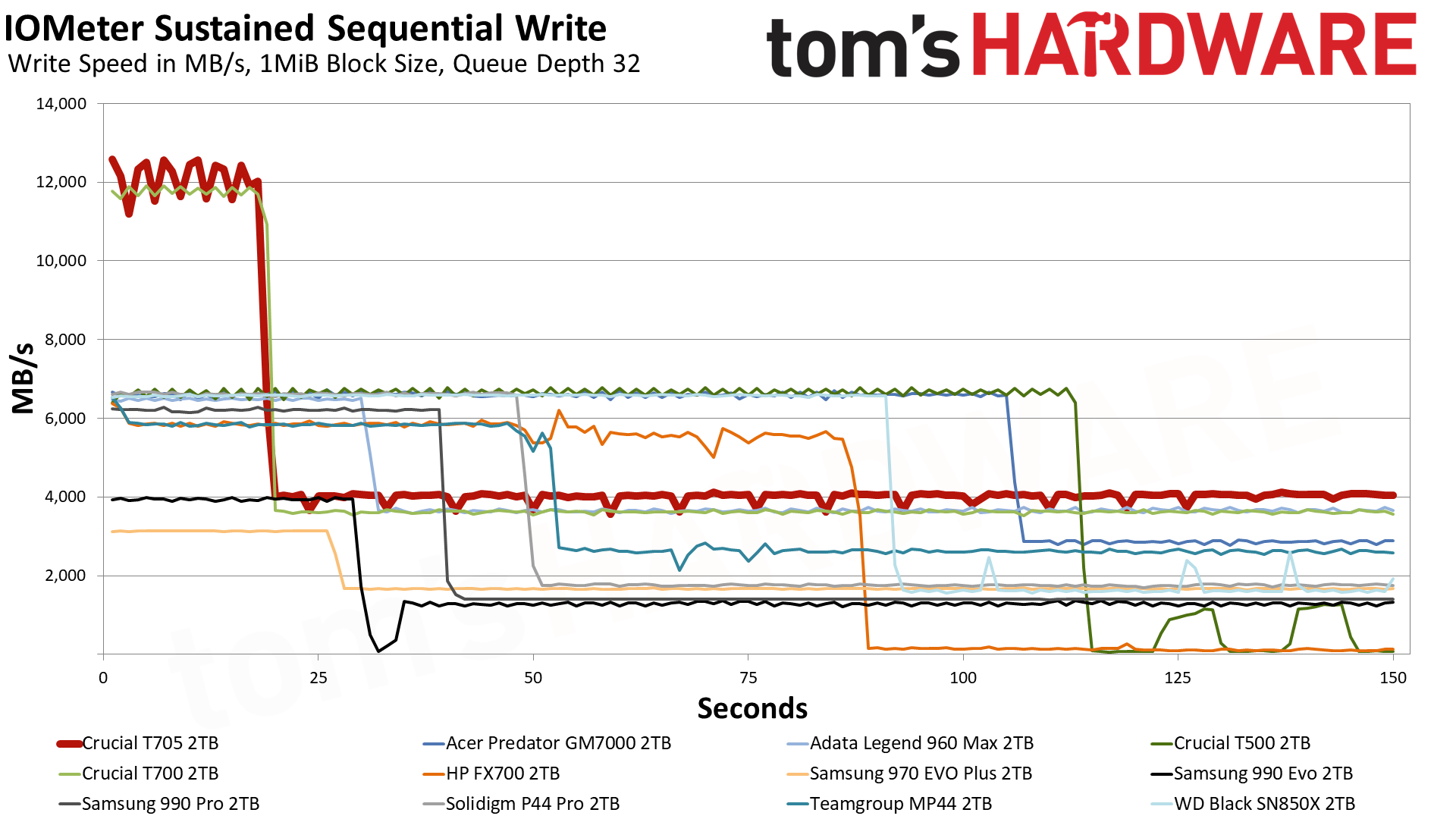
The 2TB T705 writes at a blistering 12.1 GB/s for over 18 seconds in pSLC mode. Crucial specifies a cache that’s approximately 11% of user space, which at 220GB matches our findings quite closely. After the cache is exhausted, the drive writes to TLC at around 4 GB/s. This is exceptionally fast and appears to be about the limit for this flash, at least with this controller.
“Consistent” means the SSDs don’t use tricks like a pSLC cache. You’re going to get the true speed of the underlying media 100% of the time. And none of the enterprise PCIe 5.0 SSDs of any form factor I’ve seen have broken the limits of PCIe 4.0 in write speeds.
If you really insist on using the PCIe 5.0 M.2 slot fully as PCIe 5.0 × 4, you can surely Frankenstein it yourself.
With the remaining six MCIO 8i connectors, attach up to twelve SSDs of your choice and combine them with RAID. The aggregate should saturate the PCIe 5.0 × 4 interface even if the SSDs are all PCIe 3.0.
I’m inclined to see that more as a truth in marketing issue. If drives were sold like processors they’d be speced for pSLC cache size and cache folding rate would be a headline performance number the way DDR MT/s is. But they’re not, including TLC 5.0 drives like Micron 9550 and Kioxia CD8P.
I’ve looked some but haven’t had luck turning up relevant data on enterprise sustained write performance, whether in house testing like Tom’s does on consumer drives or more formally like SNIA SSS PTS WSAT (Chapter 10). Micron’s examples include drops of 40-50% (Figures 12-14) but details are elided.
Given access to drives to evaluate, a testable hypothesis here might be consistent means more like 2x reductions rather than the 3-7x common with consumer drives.
As someone who spends a lot of time on NGFF thermals even with PCIe 4.0 drives I broadly agree. Enterprisey approaches don’t fit in laptops and tablets and rackmount LFM is rarely acceptable in desktop, though. Most accessible mitigation I’m seeing’s NGFF with IHSes on the controllers (e.g. SM2508) and NAND (no examples yet).
I came across your post while doing research on how to connect U.2 drives to MCIO ports.
Do you know if MCIO carries power in addition to data and if so, whether MCIO from motherboards will supply power? I’ve seen some MCIO to U.2 cables with a sata power cable and some without.