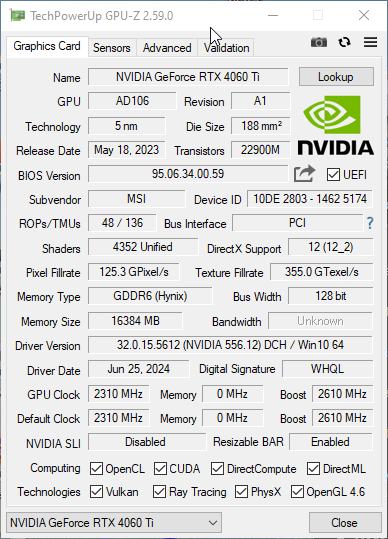
I have recently buitl a threadripper pc - asrock trx50 plus 7060 threadripper, I had read that the q35 chipset in qemu was better for pci-e and I did some major surgery on my win10 gaming vm (libvirt, kvm and qemu on a linux host). Everything seems ok, device manager in win10 shows no problems, but when I run gpu-z in the vm it will show that the passed through gpu is pcie gen4 using 8 lanes, but then, after a few seconds it then shows instead just ‘pci-express’. Imgur: The magic of the Internet
Since I had to bite the bullet ad associate my win10 install with a ms account in order to reactivate when I changed from i440 to q35, I’m wondering if I need to do a reinstall of the win10 from scratch?
The gpu seems to behave ok, but since it is installed on pci_e slot 3 on the m/b which is supposed to be 16 lanes gen5 i’m bothered by the report of using 8 lanes (even though that report isnonly for a few seconds) the gpu card of course is only gen4 since it is an rtx406ti (16gb). I want to have the best possible performance of the passed through gpu in the win10 vm.
The 4060 ti only supports 8 lanes of gen 4 so I think you’re good. Put the GPU under load and GPU-Z should jump back to showing that it’s running at full spec.
"The 4060 ti only supports 8 lanes of gen 4 so I think you’re good. "
Ah, that might be ok then, time for a little stress testing! Thanks.
diziet
edit: hmm, this may be a gpu-z thing, running the gpu-z stress test, and the furmark demo and playing a few minutes of skyrimse all at the sane time, and gpu-z say this:
the previous incarnation of this win10 vm using the virtual i440fx chipset never showed any thing like like though.
Well it seems ok but I currently only have a 60hz monitor, though furmark does report fps higher than that! The number of bios options in this threadripper board is quite staggering and it doesn’t help that I’ve never heard of many of them. I’ve only altered ones I know so I can’t help wondering if there isn’t some setting that also needs to be altered for proper virtualisation - for instance I had a blue screen when I did a ‘scan for new hardware’ in device manager, and this was after having done a clean install using the q35 virtual chipset.
Just grab Time Spy or any of the other commonly used free benchmarks. If your score is similar to what others with a 4060ti 16gb are getting then I wouldn’t worry about anything GPU-Z says about PCI.
Actually I think there is definitely something wrong. I can reliably hard reset the host just by launching witcher3 in the win10vm or doing a ‘scan for hardware changes’ in the vm device manager.
But I’m at a loss as how to trouble shoot this.
I used i440fx for a long time and it worked just fine. Today I decided to switch to Q35 because according to internet “it’s more efficient and advanced” and now my 3rd display doesn’t work XD
it’s 100% reproducible - when I switch chipset to i440fx all 3 displays work, when I switch to Q35, my 3090 is unable to detect one of displays no-matter-what. The funniest part is that it actually displays bootloader on that “not detected” display. It only stops being detected as soon as nvidia driver takes over.
So I guess I’ll pass on Q35.
Inb4 I benchmarked machine on Q35 vs i440fx with Unigine Superposition and got score within 50 points (something like 11600 vs 11650) so it’s absolutely within error margin thus I couldn’t care less)