I am looking into redoing my Plex server, and I just need to order a motherboard.
Currently, I have a 6700k with an HBA that makes my computer take 45-60 minutes to boot up. I also have it in a Nanoxia Deep Silence Case with a ton of HDD bays, but when I bought my house and moved in, I seemed to have lost all of my extra drive caddies, as well as the front and rear panels. I have been dealing with it for a while, but I need more HDD space, so I am going to take this time to upgrade and reuse my 6700k in a homelab project in the future.
I have a 5800XT, and I am going to order a new board, but after watching a ton of L1 videos and seeing Wendell discuss PCI-E lanes has me wanting to make sure I am not going to run into any issues over the next 1-3 years, since I plan on going with a 24-bay server case and more server-oriented gear when we manage to sell and buy a new house. That, however, is a different issue for future me to solve.
My current plan is to move to a Fractal 7 XL case, run Ubuntu LTS, and use a 3060Ti to transcode and a RES2SV240 SAS/SATA to give me all the SATA connections I need. I do not want to be bottlenecked and end up not being able to use my Plex server if I fill up the drive bays and/or I have a handful of users trying to access media at the same time. I believe the HBA is fine; my concern is the lanes, and if I am good with an MSI MPG X570 Gaming Pro Carbon WiFi, since I am trying to stay under or around $200 for a board.
Am I good with this? Am I seriously over- or under-thinking this? Will the HBA resolve my long boot times? Thank you all in advance, and please let me know if I need to clear anything up.
Something isn’t right if it takes this long. I’d look into the power supply having an issue spinning up all the drives at once or the HBA’s oprom. Both of these specific problems would likely follow the HBA card onto a new build.
Just to be clear the RES2SV240 isn’t an HBA and won’t interface with the PCIe lanes on the motherboard, it only interfaces with SAS lanes provided by another card.
I have a new power supply, so if that is the issue, I hope it is resolved with the new one!
I guess I misunderstood that . Do you have any recommendations? All I can find are cards like the 9211-8i and the 9207-8i, but those seem to only support up to 8 drives each, and I was ideally hoping to get a card that could do 16 and only use one PCI-E slot.
EDIT: I guess the 9211-8i and the 9207-8i can both use the RES2SV240 since those cards provide SAS lanes. At that point, if I plugged it into another PCI-E slot, It would only be to get power?
I recently got some 9306-24i and have been running them past year or so and have been satisfied; they do require some airflow but don’t run nearly as hot as the 9300-16i series.
There are also 9305-16i that are just as good but they tend to be more sought after and cross the hundred dollar threshold unlike the 9306 which is less well known.
There was a fairly large drop in power consumption between the 9300 to the 9305/9306 series so the latter is much more desirable since it’s easier to cool.
Yes you could do this, you wouldn’t even need to plug the RES2SV240 into the PCIe slot, I’m pretty sure you can just power it through the 4 pin molex connector on top.
SAS expanders do introduce another possible failure point though.
The issue I see is that right now you plan on a GPU+internal HBA and maybe add an expander as well. But you plan on using a server chassis as a drive shelf down the line, which presumably will connect over an external HBA. You will not have enough slots on the board to run both HBAs so will have to give one up.
Or you can try and use an “8i8e” HBA that would let you have 8 internal SAS and 8 external SAS connections. That way you can use an expander in the server and an expander in the drive shelf still. This is the only non Raid controller type I could find on ebay, not sure how good it is:
Yep, I mount mine on an expansion slot in the chassis way down past where the motherboard ends and plug a molex 4 pin into it. I use electrical tape to cover up the pcie slot pins just to be extra safe they dont touch anything.
The number one thing I’d look for is a motherboard that can split the CPU-connected X16 slot via bifurcation. There are boards that’ll split X16 into two X8 slots, and a few that give you one x8 slot and two additional M.2 slots. I’ve got an X570 Aorus Master and a B550 Aorus Master which provide both options. There are also boards that’ll give an X4 PCIe slot with a CPU connection. A PCIe X16 slot is not terribly useful for a home server, but a pair of X8 slots is great for high performance network cards, NVMe drive adapters, HBAs, GPUs, etc…
Does your Plex server do more than just running Plex? Because the 5800XT seems like overkill for that job, more-so with a GPU handling transcoding. I’d almost think to keep using the 6700 with the GPU for Plex, and the 5800XT for home lab.
24 disks seems crazy to me, especially in terms of power. My file/media data is on four 26TB drives, though I bought them just before AI ruined storage. Beats the heck out of the same capacity in 8 TB drives.
I am currently using 8 10TB drives, a 12TB Drive, and 2 4TB drives in just a standard configuration, and I am tapped out. My dad has over 20k movies we are planning on digitizing and putting on the Plex server, and I also want to set it up so that I can lose 4 drives before I lose data. I know it’s not a backup, I am just looking at it from a redundancy/safety layer.
I will be running some Plex-related apps like Sonarr and Radarr, but I plan on dedicating this machine to Plex specifically.
I planned on using the 6700k for an immich server and a cloud server for my family and myself to be able to back up our data, and since that would be easier than streaming multiple streams out from Plex, I figured I could upgrade the Plex server to the 5800XT to give me more headroom. Idk what I would use it for otherwise, atm, and I am also trying to figure out what to do with an extra 14900KF that I have lying around. Idk if I should sell it or use it in a homelab setting for something else.
I will be redoing the system and using something like a SuperMicro or 45 drives case that will store all of the computer components inside of it, so everything will connect internally. That is why I was looking at the RES2SV240 so that I could get 24 drive connections to a single card.
With that said, that is a different beast, and I am not knowledgeable enough to know if there are other things that I just don’t know that would prevent my plan from working. I figured I could get a 24-bay case, transfer my parts over, and have the RES2SV240 ready to connect to 24 drives when I get it all set up.
I am ok with an extra point of failure if it gets me to my goal of 18 drives now and 24 drives later. The molex bit is really useful information and would be how I would power it. Seems the best and easiest way. Thank you for that!
This might be a better solution for me. I can get the airflow figured out. Is this a card that has to be put into IT mode? I think I had to do something like that with my current HBA.
Depending on how you are encoding these, just some bar napkin math at an average of 60gb per movie you are looking at 1.2 petabytes of storage. For 24TB drives that’s 50 drives just for storage with no redundancy taken into account.
I’ve got 31 spinning drives crammed into a medium sized pedestal case and it runs at about 300w.
Keep in mind those Supermicro cases can be outfitted with different flavors of backplanes for their drives. Backplanes that have expanders build into them are pretty common in the 24/36/45 drive chassis, so you’re HBA wouldn’t necessarily need 24+ ports.
That’s an interesting question, because the 9300 series was the last series of HBA from LSI/Avago/Broadcom that would pass through disks “completely” transparently to the operating system. After the 9300 series they went to tri-mode adapters that gained the ability to interface with NVMe, but added an abstraction layer to the drives.
To answer your question, yes as far as I’m aware they were only ever available in IT mode since they never added the raid logic to these half-step generation cards.
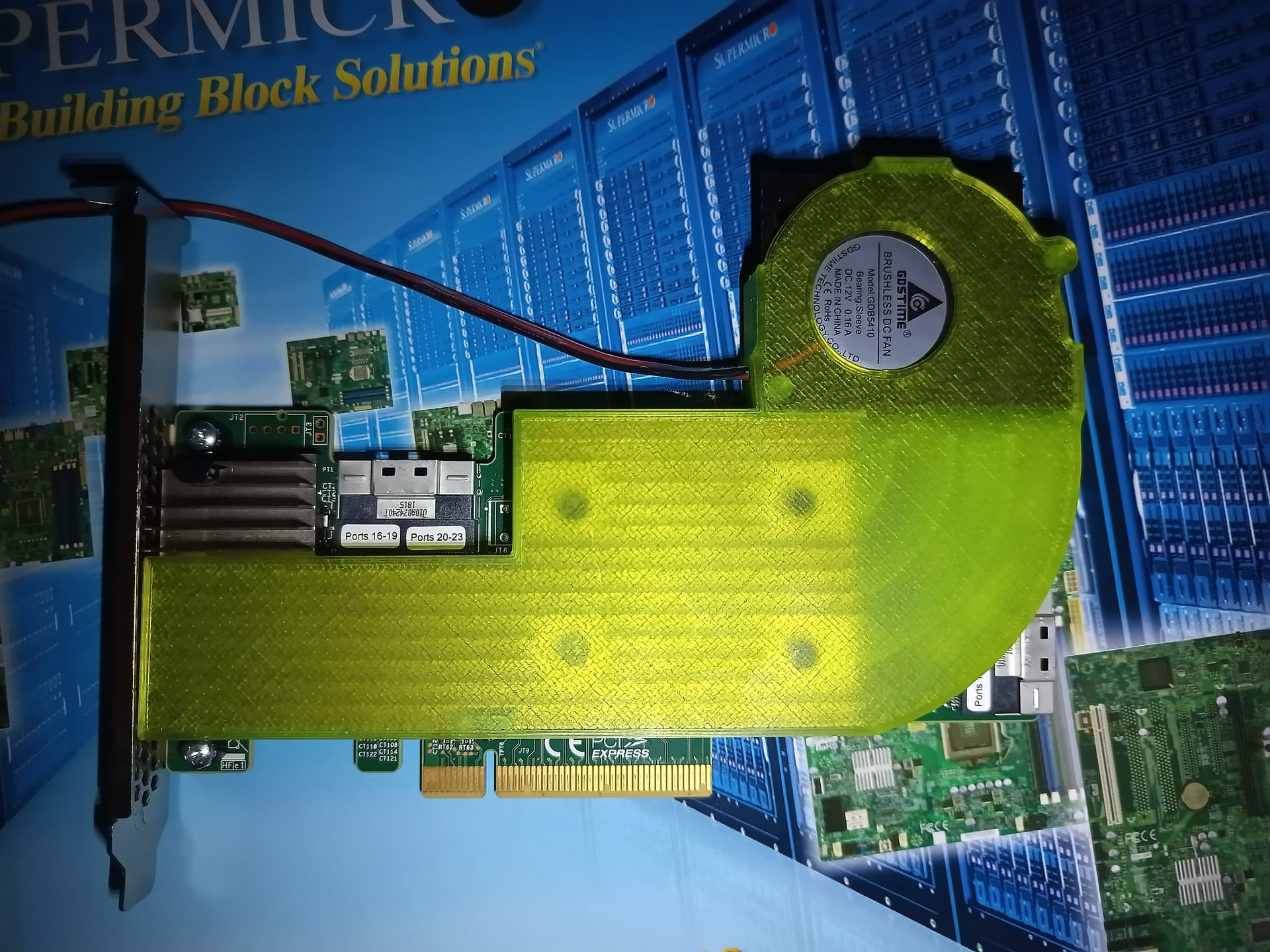
I ended up printing a little single slot shroud for mine:
They would not be 60GB. A lot of them are VHS or DVDs and depending on the source, we are getting them in under 5GB each for a lot of them. Blu-Rays are where I think they are going to really take off in storage size.
My PSU that I am currently using is 650w, but it is also 10 years old. I am starting to think that could be part of the large boot time.
I am aware of this, but a lot of the cheaper cases that fit ATX boards all have the backplanes removed, so I figured it would be best to safeguard myself, especially since I need one for 18 drives now. I personally think it is better to have something and not need all of it than to not have it and need it. Which is why I looked for something that can support 24 bays. I know I plan on running 24 drives in the future.
But I am also trying to listen and take advice from those who are more knowledgeable than me, which is why I am here. Don’t take my last comment as me implying otherwise; I just don’t know enough to actually know what I actually need all the time, and since I learn best by doing and asking questions, figuring this all out beforehand has been difficult for me to understand at times.
Let me ask you this. @electric_anteater stated earlier that I need to look for a board that supports 16x into 8x/8x bifurcation. Is it necessary to run more than 8 drives off an HBA, and if so, why doesn’t the standard x16 slot work in its default configuration? When I hear someone wants to split a 16x into 8x/8x, I think that it is so that they can run 2 PCI-E cards, but I now feel like I am incorrect about that.
So reading this, it seems like I want to use the PCIE1 slot for dual x8, assuming I need it, and then I can use PCIE3 for a GPU since I will get the x16 connection for that. I can then use the bottom m.2_3 for storage needs for the OS and Plex metadata. It is Gen4x4 (64 Gb/s) and should be fast enough for what I need.
If it was the cause you’d probably be able to hear it; the drives would try to spin up and then some fail, and then retry again. You might be able to setup a staggered hdd spinup on the HBA itself.
Nothing wrong with that, my main media server has a card that has 32 ports because I was really wanted to avoid expanders for the build.
for a point of reference, I’m running 12 drives off of that 9306-24i HBA, but it is only connected via a PCIe x1 slot, so it is fine to run the HBAs on fewer PCIe lanes if you don’t mind the drop in aggregate bandwidth to the drives.
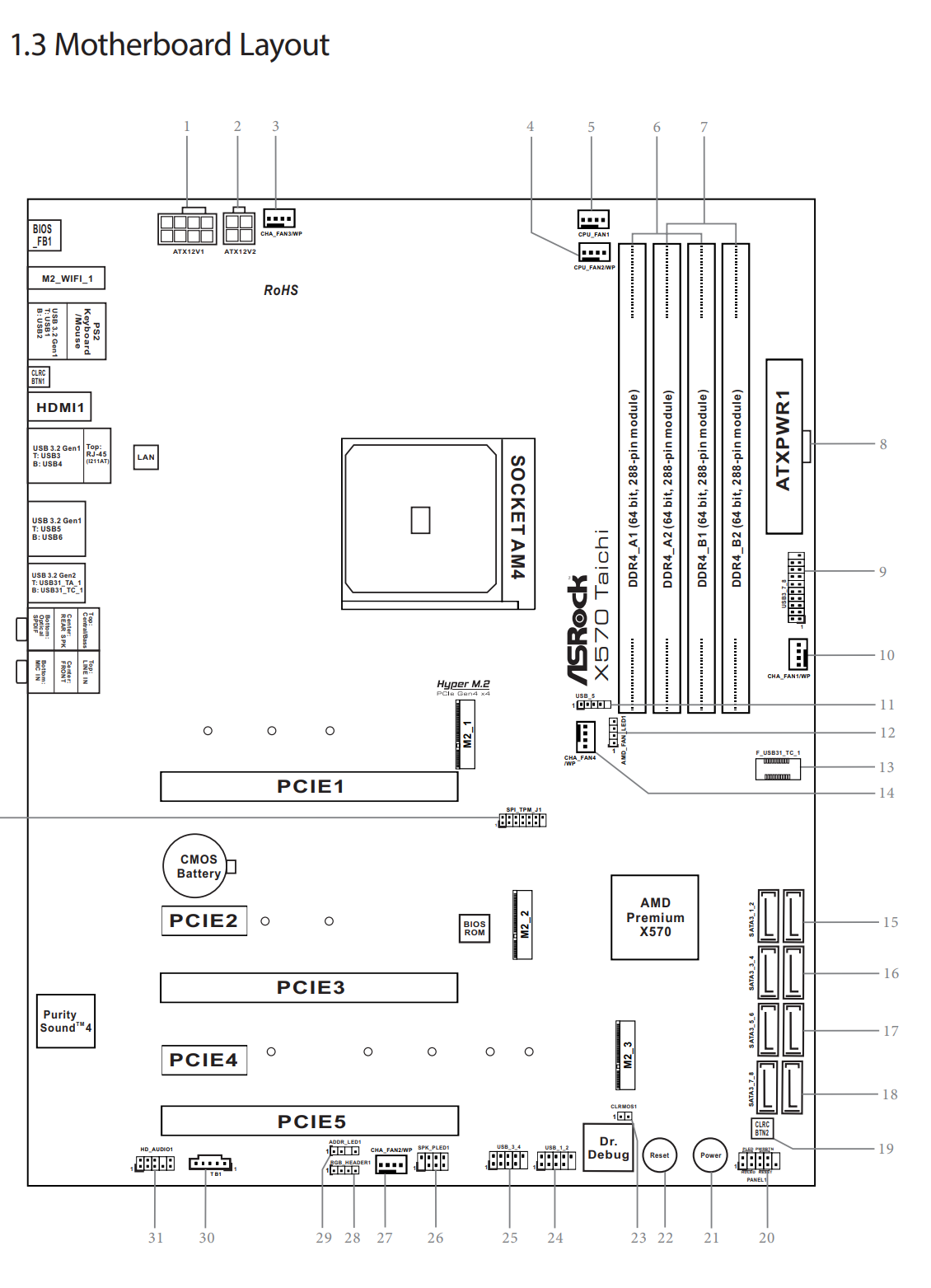
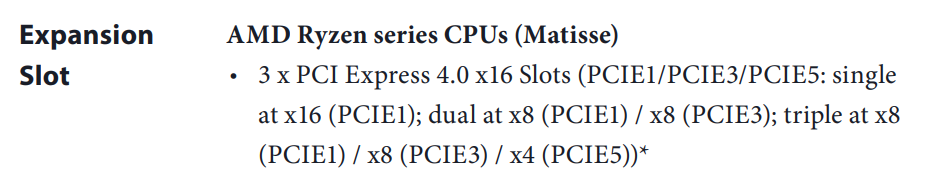
I’m afraid I’m going to be bad at explaining this, but I’ll try: PCIE1 will run at x16 until a card is plugged into PCIE3, after this both PCIE1 and PCIE3 will only run at x8 each. M.2_2/3 and PCIE2/4/5 will remain at “full” bandwidth since they are connected to the chipset, and M.2_1 will also remain at full speed since it doesn’t get shared either.
If it were me and I only at a GPU, HBA and a NVMe drive, I’d put the GPU in PCIE1 so it could get the full x16 connection, put the HBA in PCIE5 since it isn’t particularly sensitive to latency and chipset provides enough bandwidth, and then put the OS m.2 NVMe drive into M.2_1 since it would have the lowest latency connection directly to the CPU.
If my GPU natively only had a PCIe x8 connection to it by architecture (like an RX7600) I might rethink the arrangement though.
I think you did a fine job and helped me understand what is going on. I think I am going to order the i24 card you shared earlier. Is the 3D print available online?
I’m not quite sure what you mean there. If you use both PCIE1 and PCIE3, they each run at x8, which would work nicely with a GPU and an HBA. PCIE3 will never run at x16, as it only has 8 lanes wired to it.
Yes, PCIE5 and m2_3 are wired to the same lanes in an either/or configuration. So you can use m2_1 and m2_3, and both are connected to the CPU lanes.
You don’t ’need’ an x8x8-capable board, but it sure helps a lot. Consumer platforms just don’t have that many PCIe lanes to go around, so it’s worth getting the most out of the lanes you have. Nothing that you’re putting in this server requires 16 lanes. Those LSI HBAs are usually PCIe 3.0 x8. The 9306-24i is PCIE 3.0 x8, so is a 9300-8i. If you plug an x8 card into an x16 slot, half the lanes won’t get used.
With the 9306-24i and the 8 onboard SATA ports, you can run 32 drives without needing a SAS expander or a second HBA. Or use a smaller SAS card. The Intel SAS expander can use 4 or 8 SAS lanes to connect to the HBA, and then connect to 20 or 16 drives. So the 8i with the expander can support 16 drives, plus 8 drives to the onboard SATA. That’s 24 drives right there.
And a GPU being used for transcoding doesn’t need 16 lanes either. Heck, it’ll work just fine for gaming at PCIe 4.0 x8. Honestly you might not need the GPU at all. You’re ripping and encoding these DVDs yourself, so you can encode into whatever container or codec that works best for your Plex clients. Then you won’t have to transcode at all.
One other thought: You don’t have to do everything in a single server. You can have multiple file servers feeding the single Plex server. Plex won’t care, you just add multiple network shares into each Plex library. Maybe the builds end up simpler if you use two chassis each with 12 drives. Maybe that 6700K does file server duty as well as the other applications. The 5800XT does file server duty and Plex server duty.
If all you are using the GPU for is transcoding, it can go in any slot. And, I do mean any. You can take a pair of tin snips and shave the PCIe slot on the card down to a single x1 link and it will work perfectly fine. Though that is overkill for most people, I have cards that are modified in this way.
You wanna look for an “SLI Ready” Board to punt your 16 4.0/3.0 lanes into 2 X8 slots, the Asus prime 470 is a decent choice. But that’s it man. AM4 is tough to do much on because of the PCIE bandwidth issues.
Of course that’s All the more Reason why you should instead: HAVE TWO SERVERS. I also recommend a decent Celeron or other lower power configurable system for home storage and to then mount your new home storage pool on your services storage and start to practice a healthy separation. That will be a better learning experience and more stable in the long run. Single server systems can result in losing your media library or internet everytime an update breaks a docker container. Uptime is important too
 . Do you have any recommendations? All I can find are cards like the 9211-8i and the 9207-8i, but those seem to only support up to 8 drives each, and I was ideally hoping to get a card that could do 16 and only use one PCI-E slot.