Optimal local AI on 12 GB VRAM?

So I have a 12 GB NVIDIA GPU and I’ve been wondering what models I could run on it, and for what purposes.

I didn’t build this system with AI in mind, but with all these open models coming out, I’ve been wondering about what I could experiment with out of curiosity.

My initial sense is that most models seem to be way too large to be usable on 12 GB VRAM, but there are smaller models available too. However, those are often meant for running on really low-spec hardware, so not quite the idea I have in mind of maximizing use of the 12 GB GPU.

Not sure where I should start, what I should expect, etc. If anyone has experience doing anything useful/interesting in local AI on modest hardware like this, I’d love to get some advice on where to start.

1 Like

I found qwen2.5-coder:14b to be quite usable on an RX 6750 (12GB). Probably there’s a newer one now.

12-14b seems to be about the largest that can fit in 12GB. Some smaller 7-9b models can still be useful. YMMV, depending on use case.

I did find that gpt-oss-20b was also usable on that card, just much slower as it doesn’t fit entirely into vram so you have to a wait a little for the response. I wouldn’t go much bigger unless you want to wait multiple minutes for a response. I did try gpt-oss-120b and it takes about 7 minutes to finish a query.

That was when I was using ollama, have now switched to llama.cpp, which should be faster.

This post mentions a couple 9b models that run under 10GB.

See also whichllm which will recommend models based on your hardware

1 Like

I have a quick heuristic when I hear about a new model. It isn’t perfect, but it saves me time from downloading a model that is too big for my gpu.

  1. For every 1gb vram ~ 1B parameters when selecting a model size for a given family (gemma 14B, 32B 100B).
    • in your case, the biggest you can probably fit is a 12 Billion Parameter model. You might be able to get away with a a3b_14B (a=active parameters effectively 3B parameter models)
  2. check the download size to get the highest quantization level q_3,q_5, q_8, that fits in my vram range.
    • in your case, I’d look for a model that is under 12gb in size. If it is bigger, I double check with LMStudio’s compatibility filter
    • generally a bigger model at a lower quantization will have better quality than a small model with a high quantization (gemma 3 12b q8 < gemma 3 27b
  3. I download the model and try it out in my workflows (classifying text, writing stories etc). If it takes a long time (>10 minutes) to run a single hi message, I go back and drop down a quantization level.
    • normally I have a jupyter notebook or Python script that lets me change the model name and I compare the outputs to see how the models at a given example.
    • If you are using time, make sure to include model load time with a request before your actual test, as model loading might throw off the duration for the first generation.

This what I remember off the top of my head if you want to read more I have a link to the llama.cpp wiki. Might be old, but kinda gives you a direction to search on

I try to get the biggest that will fit in memory because I want a more ‘smarter’ more capable model. If I need longer contexts (longer chats or bigger documents), I get a smaller model.

I’ve run gemma 2 9b q_8 it on a macbook with ~16gb of usable memory. Honestly I go in with low expectations to avoid getting disappointed

I also moved away from ollama.

He links this
[Quote=Georgi Gerganov]
Since none of the maintainers here seem to care enough to explain the actual reason for ollama to not support the HF GGUF models, while the root cause is pretty obvious, I will help explain it:

Before the model was released, the ollama devs decided to fork the ggml inference engine in order to implement gpt-oss support (#11672). In the process, they did not coordinate the changes with the upstream maintainers of ggml. As a result, the ollama implementation is not only incompatible with the vast majority of gpt-oss GGUFs that everyone else uses, but is also significantly slower and unoptimized. On the bright side, they were able to announce day-1 support for gpt-oss and get featured in the major announcements on the release day.

Now after the model has been released, the blogs and marketing posts have circled the internet and the dust has settled, it’s time for ollama to throw out their ggml fork and copy the upstream implementation (#11823). For a few days, you will struggle and wonder why none of the GGUFs work, wasting your time to figure out what is going on, without any help or even with some wrong information. But none of this matters, because soon the upstream version of ggml will be merged and ollama will once again be fast and compatible.

Hope this helps
[/quote]

I use it when I can’t use lmstudio. I tried llama.cpp, but I was too lazy to remember the proper cli arguments to start llama server to allow for dynamic model loads

Though I am interested in looking into lemonade

Ever since Wendell mentioned it in his Minisforum strix halo nas review

2 Likes

In my Notebook I have an RTX 4080, 12GB VRAM and for example Qwen 3.5 35b a3b Q4_K-M runs pretty well (19.3 tok/sec). GPT OSS 20b runs excellent too (38.8 tok/sec).

1 Like

For those to fit, you have to use CPU offloading. I was excited too with my laptop and DDR5 and getting 17-20 t/s on the same qwen3.5 35b A3B Q4.l with my 16gb VRAM.

However, I can tell you that once you hook it up to even a simple chatbot, it will drop like a rock as your chat goes on / gets longer. KV cache growth kills the speed.

If you try in VSCode, it will seem ok until the 1st RAG call - and it will drop to 12 t/s.

Most likely qwen 3.5 9B q4, I would check one with MTP since it would be faster. Just wondering if you mean only LLMs?

After using my 55W 16gb VRAM GPU in the laptop for ~4-5 months, I can tell you that while it is quite easy to get smaller parameter models running (2B, 4B, even decent 8B), you have to focus on larger Q5-Q8 quants as the quality really takes a hit - especially with toolcalls. As a matter of fact, with only 12GB, I’d say to not plan on any agentic multi-turn toolcalls.

The good news is you can use a frontier model on the cheap to make a plan, and then use local smaller models to execute each step. I’ve never done this, but I hear it’s a common thing now.

When picking a local model for 12/16GB, you have two choices:

  • Small parameter (4B, 9B, etc) as Q8_0 for high performance prompt processing and token generation, but nowhere as smart - aka, creative - as larger models.
  • Larger models (27B, 30B, 35B, etc) at a significantly compressed Q4_0 or even lower to get it to fit in 12GB (e.g. Q2_0). The compression creates a whole slew of hallucinations to watch out for, but is wild to chat with. LOL. Basically, low compression makes these larger models “too talkative” IMO, overthinking simple problems.

I’m on the side of running high quality (Q8) smaller models. It’s far more consistent - just limit your work for small snippets and it’s fantastic.


With that said here’s my experience.

You want a re-trained models based off of Unsloth’s UD variants. These have heavier weights on coding.

Qwen3 3.5 9B @ UD Q8 model (~9GB + ctx) was excellent - as long as you review all the code (there will be issues here and there, every time, so you gotta check it all).

The Qwen2.5 Coder 7B Q8_0 (9GB) and it’s smaller 3B Q8_0 was great to use because their very fast speed more than makes up for the amount of errors. The cycle starts with codegen, then your review, you tell it to fix, and it cranks out a fix very fast. Think small refactorings and code stubbing, not entire stack full app creation.

I’ve actually written most of my codegen code with this model to date, mainly because lately I’ve been switching lots of newer models.

Skipping ahead, recently I have been running the Kappa 20B 131k MXFP4 model released here on these forums. It’s based on Google’s GPT OSS 20B. Wendell says it fits entirely into 12GB, but my llamacpp conversions seem just a tad too large for 12GB. The jury is still out for VSCode usage as I’ve had great codegen without too many issues, but then I’ve had a few projects go completely haywire. Most likely my settings like Temp.

For llama.cpp (llama-server), you can convert it to GGUF, or I can post mine if you need a starter model. It converts quite easily locally though.

I’m also now trying out two more models, such as the new Gemma 4 12B UD Q6_0 (the Q4_0 may fit in 12GB, if not Q2 would) and Qwen3.6 27B @ UD Q2_0.

That qwen3.6 27B with Q2 is surprising capable! However, it’s pretty slow. The Qwen 35B A3B UD Q2 fits nicely and is a nice speed boost, however it’s providing more wild codegen output and makes me have to review far more code than 27B Q2 is. However, neither will fit on 12GB even at q2_0.

I am not sure which I’m landing on yet. This is part of the fun, finding which model fits your coding style.

I use llama-swap, which makes it easy to swap out models in realtime. So when I use one for A while.

2 Likes

I found https://lmmarketcap.com/tools/vram-calculator very handy because you can research the model scores and filter on the same site. No affiliation here I just found it handy for exactly this use case.

Thanks a lot, everyone, for all the helpful pointers. I still have a lot to review, but I’ve thought of trying LM Studio, which recommended to start with the Gemma 4 E4B model. I’ve also tested Gemma 4 12B QAT – figured it’s bigger so it should be better, while still fitting into the VRAM.

I haven’t tried them for coding assistance; I thought a simpler use case may be data analysis on a CSV for a dataset I’m familiar with. I’d ask the models for insight into patterns in the data and I’d be able to subjectively evaluate how complete or useful the analysis is.

I found that both models perform pretty well against a small dataset (~500 bytes).
However, both fail completely at at analyzing any substantial data volume, like say ~50 KB. They barely start analyzing the data and give up after analyzing maybe 5%. I guess the context window is too restrictive.

By contrast, throwing that same dataset and prompt at Gemini on the web produces a decent result.

I’ll need to explore if there are other models better suited for local data analysis or if that’s just not feasible with 12 GB VRAM.

Hello! with 12GB Vram you can fit part of a Mixture of experts model such as Qwen 3.6 35b a3b. This model has 35b total parameters but only 3b are active at a time (a3b). You can use the llama.cpp cpu offload flag and a KV cache around 100k with flash attention on and q8_0 or even q4 if you want to further compress.

Gemma 4 Moe like 26b moe may also be good for your usecases. Qwen 3.6 family is the best performing by far. Do not use qwen 2.5 or qwen 3.5 since qwen 3.6 is out and brings substantial improvements.

I have not found use for the 9b parameter models since they just aren’t smart enough to do…. about anything.

Beyond qwen 3.6 35b a3b there are custom tunes of it. Specifically things like Carnice (made for use in hermes), Qwopus (qwen trained on opus), Darwin, or Qwable (trained on Fable) can be nice to tinker with.

Overall: Make sure to use models that are MoE and of the qwen 3.6 family or fintunes of the qwen 3.6 models. Gemma 4 MoE may also be good for chat and analysis stuff.

yuxinlu1/gemma-4-12B-coder-fable5-composer2.5-v1-GGUF
mradermacher/Darwin-35B-A3B-Opus-GGUF:Q4_K_M
unsloth/Qwen3.6-35B-A3B-MTP-GGUF with either UD_IQ4_NL or Q4_K_M quants. Try IQ first as it is better quality but may be slower or not run well on your hardware/software. Q4_K_M will run well on your hardware.

Copy paste this into a smart AI (preferably Chatgpt pro or Claude pro) and ask it for a specific llama.cpp config, or just use LM studio making sure to enable flash attention and Q8 or Q4.

1 Like

Thanks for this advice. So far I have tried Qwen3.6 35B A3B Q4_K_M and Gemma 4 26B A4B Instruct Q8_0 and they do seem to be a lot more capable than Gemma 4 12B QAT but it’s also clear that I’m running into a VRAM limit so the GPU utilization is low and performance is slow.
And the result, while a lot better than the 12B model, is still far from usable compared to Gemini.

But maybe I’m doing something wrong. I’m just using LM Studio with the default RAG-v1 plugin. Not sure if it’s an issue with the RAG plugin or the LLMs but it seems to take a small sample of the data points from my 50 KB CSV and analyses those, instead of the whole thing, unlike Gemini.

I’d install anythingllm and play with RAG. that card is a little small for coding imho.

It should be useful to play with document ingestion and search with the models that will fit (8b-12b quantised to 4 bit.

Either way. Play! Learn what works and what doesn’t!

Having a smaller card will force you to run smaller models which will help you be more efficient with model selection elsewhere too.

edit:

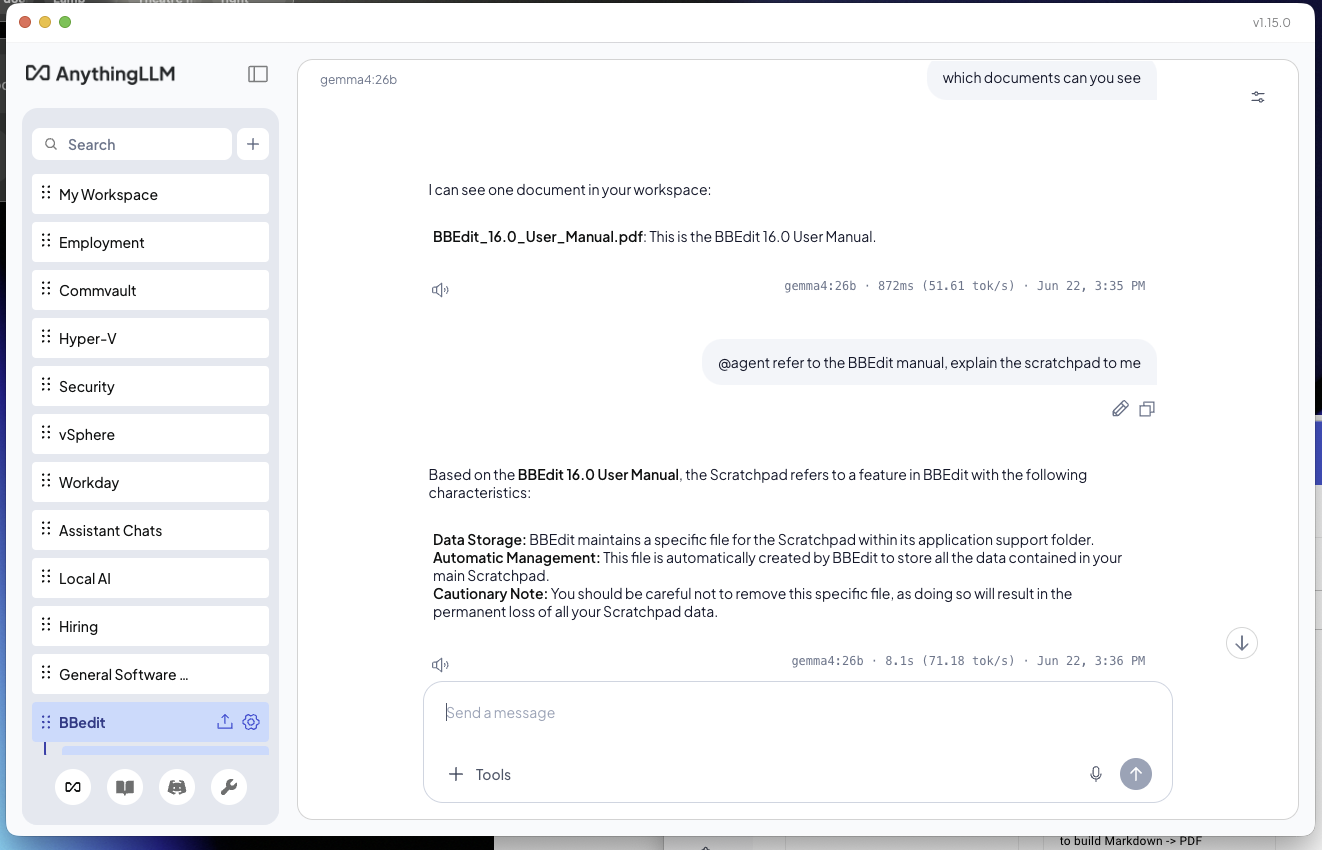
I’ve gone through LMstudio, ollama directly and ended up on AnythingLLM.

You can hook AnythingLLM up to cloud models, Ollama running on your machine, etc. The cool thing? You can save your chats in a similar interface to ChatGPT, split them into projects and use a built in model router either per project or per chat to route to the best model for the use case. You can even switch models after starting the chat.

Its neat. You can say, set up ollama to serve local models for less complex stuff, and auto kick off to the cloud when you need code generation or whatever. You can also export chats to PDF if you want.

Has built in local RAG that is easy to set up too, see below (runs on macOS or Linux IIRC):

1 Like

For LM Studio the default context window is pretty tiny which can cause model confusion even with RAG. I actually used another LLM to optimize my model context windows and sync with my preferred client (opencode).