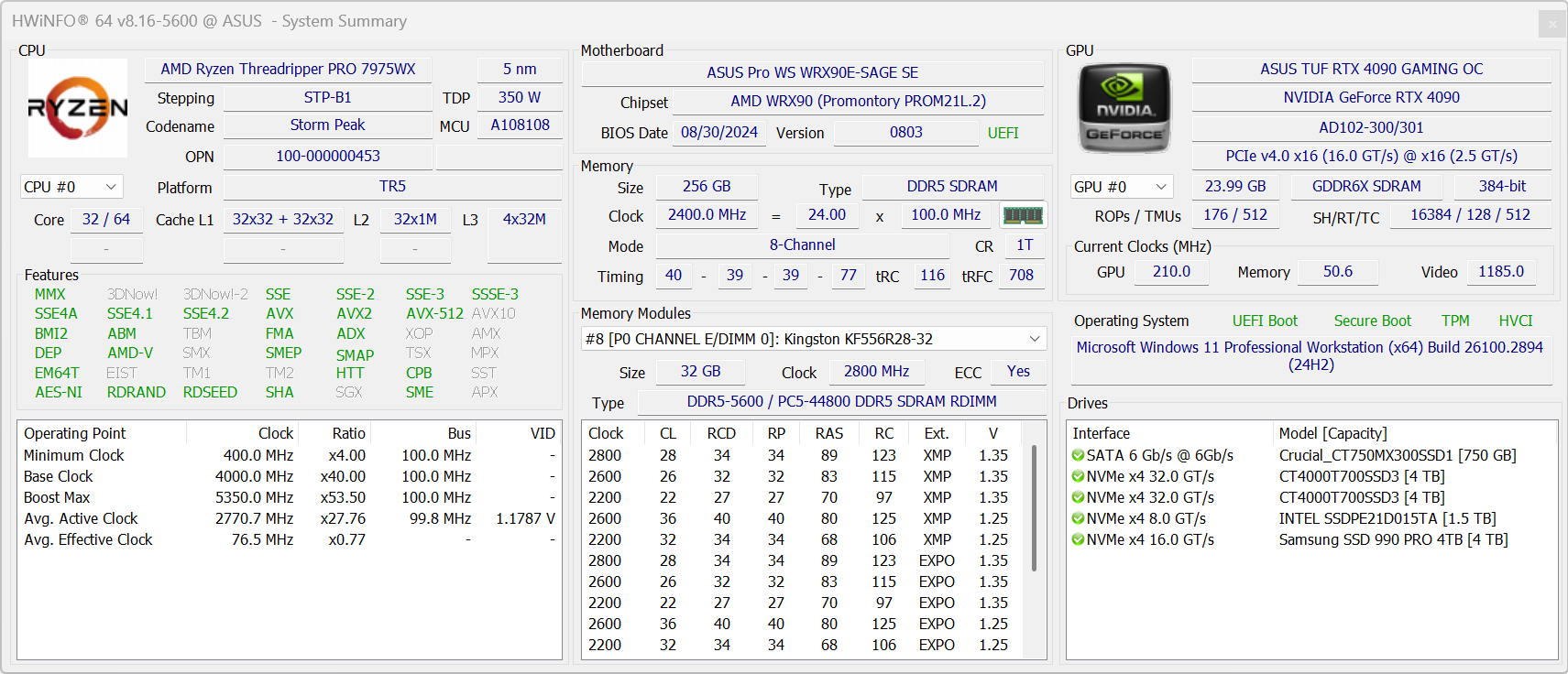
Hi! I have been using ASUS Pro WS WRX80 since 2021 with TR PRO 3975WX. So far it is the most solid motherboard (or system) I have ever used. My new motherboard ASUS Pro WS WRX90E-SAGE is on the way and so is the TR PRO 7975WX. I haven’t bought the RAM yet. I spent a few hours reading the threads in this forum and saw a lot of discussion about the success and failures of using different RAMs. I just want to create this thread so that: 1) I can confidently buy the RAM for my system with minimum issue (I plan to buy 8 sticks so that I can leverage its 8-channel feature); 2) help others to make decisions as well.
If your ASUS Pro WS WRX90E-SAGE is running stable can you please post the RAM details here? Below is just an example:
Brand: Kingston
Model: KF556R36-32 (256)
Speed run stably on: 5600 MHz
(Optional) Benchmark results: 260 GB/s
(Optional) Other system config you would like to share: TR Pro 7975WX, RTX 4090 etc.
Thank you very much in advance!
p.s: I understand there has been threads discussing RAM in early 2024 but it is now October I assume with the update of the motherboard BIOS and accumulated experience from users we should have a more solid list.
Did no one reply? What did you go with and how was your experience? I’m awaiting delivery of a the Aus Pro WS WRX90E-SAGE SE along with the Ryzen™ Threadripper™ PRO 7965WX but haven’t ordered the RAM. Any updates would be appreciated!
So far it has worked fine. The only concern has been that the memory temps (which I can so far only view through the BMC) get pretty toasty, as high as 93c when doing 100% CPU. But I called Nemix back when I first observed it and they said max 24/7 operating temps was 95c, so I’ve tried to just ignore it.
Honestly I think it’s primarily a motherboard issue. The RAM is just buried in there, with no good way to cool it unless you get dedicated mini-fans that will likely block at least PCIe slot 1 on the mobo. Previously I was using a 360" AIO liquid cooler for the CPU and both sets of RAM channels (above and below the CPU) would get super hot and I used those mini fans. I switched to a Noctua air cooler blowing up out of the top of the case and got rid of the mini fans, and now the RAM above the CPU stays fairly cool, max around 70s, but the sticks below (particularly stick C) gets up into the 90s range.
If the RAM is Hynix A-die, stability degrades after 60C and throttling happens a bit later. I wouldn’t let it run over 70C if I wanted to maintain performance.
Experience wise - I haven’t had the chance to do testing on overclocking the RAM or play with the BIOS settings yet. But would love to hear other users’ experience.