I bought a new USB wifi adapter after my old one broke down. The one I bought was recommended as working on Linux but it’s not. I have no wifi at all. Wifi adapter is tl-wn722n
1 Like
Who is the manufacturer?
Tp-link
Can you do lsusb and paste the output here?
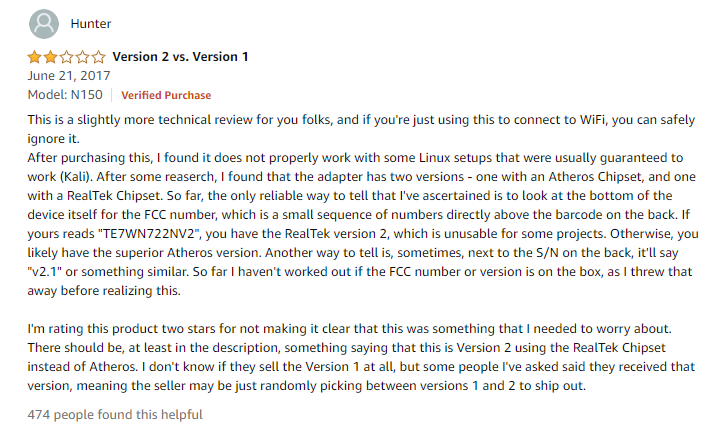
looks like there are different versions of this adapter with different chipsets
1 Like
Bus 002 Device 001: ID 1d6b:0003 Linux Foundation 3.0 root hub
Bus 001 Device 005: ID 1b1c:1b44 Corsair
Bus 001 Device 002: ID 046d:c332 Logitech, Inc.
Bus 001 Device 001: ID 1d6b:0002 Linux Foundation 2.0 root hub
is it getting power or anything? looks like its not even being detected.
Try another usb port and then do lsusb again.
Bus 002 Device 001: ID 1d6b:0003 Linux Foundation 3.0 root hub
Bus 001 Device 010: ID 2357:010c
Bus 001 Device 005: ID 1b1c:1b44 Corsair
Bus 001 Device 002: ID 046d:c332 Logitech, Inc.
Bus 001 Device 001: ID 1d6b:0002 Linux Foundation 2.0 root hub
Looks like you got the RealTek one as described in the amazon review
https://wikidevi.com/wiki/TP-LINK_TL-WN722N_v2
Driver is here
it requires me to compile the driver which i dont know how to. What now?
Compiling is easy, its troubleshooting code that wont compile that can be hard.
If you dont want to compile the drivers you could return the adapter for a different one.
ive lost my waranty.
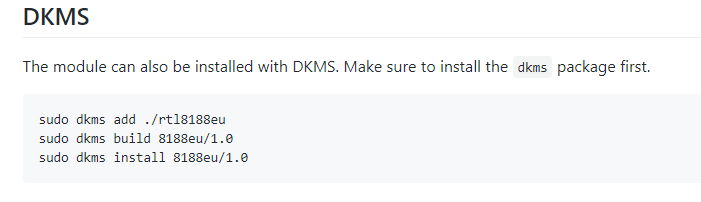
You should already have DKMS.
sudo apt install git
git clone https://github.com/lwfinger/rtl8188eu
cd rt18188eu
follow the instructions from there and see where you get.
Or just install windows to use the adapter.
/s
couldnt help myself
So it somehow fixed itself after i plugged in and unplugged ethernet cable which was connected to my laptop with wifi, do you know what happened?
Well before when you did lsusb it wasnt even showing up so maybe it was just a fluke or bad usb connection.
I came here to post this,
Sold these at the shop I used to work at, customers had trouble running on linux and this always worked.
Seems like it’s fixed now.