No post, Beeps and display, new cpu DOA? [SOLVED]

so i bought a new G3258 and tried it on a motherboard that i bought used.
the asus z87-K

I got no post, no beebs, no display and i made sure everything was connected properly.
after that i bought another motherboard the asus z87 gryphon.
And i got the exact same problem..
i tried all display output ports and also with my gpu connected.
i tried one stick of ram, two sticks of ram, no sticks of ram and still no beeps....

Just wtf is this?
is the cpu DOA? it's brand new.

What's your power supply? Did you use the same one between the boards?

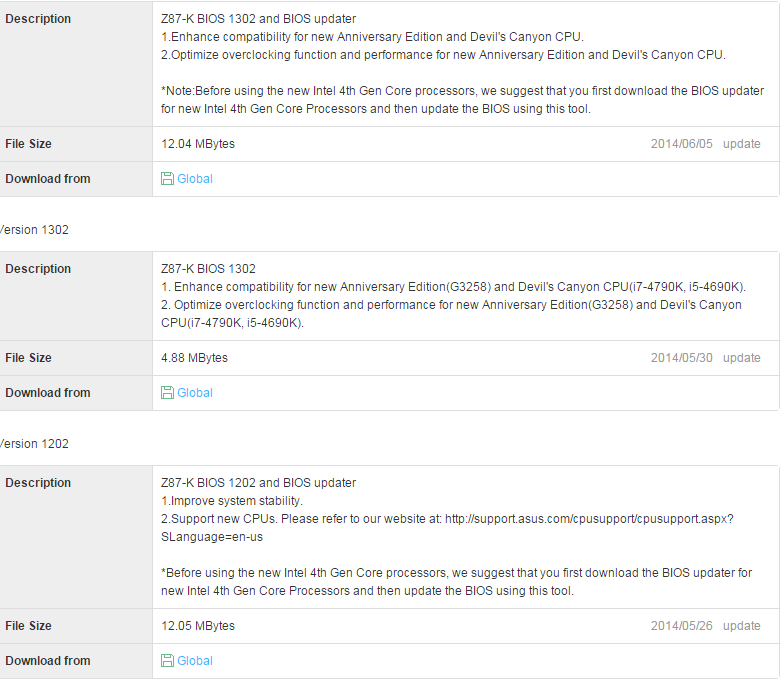
More likely you need a bios update considering that cpu was ment for H/Z97

Asus EZ flash --> https://www.asus.com/uk/support/FAQ/1012815/

bios ---> https://www.asus.com/uk/Motherboards/Z87K/HelpDesk_Download/

2 Likes

it could be a dead speaker..... or power supply issues as well as any common components causing issues.

g650m and i also used it in my old system without problems

the previous owner of the gryphon board used a 4670K
so that should not be the problem.
i will try ez flash on the gryphon motherboard
wait is ez flash even possible without display?

Then maybe just resit the CPU and the RAM, otherwise, something may have happened to the boards.

well i also tried without ram and still no beeps.
and the same issue on two different mobo's?
the speaker does work

A 4670k is not haswell refresh you need a update for refresh cpu's
I beleve both mobos have usb flash you only need power to the mobo

Maybe bring it back to that friend and see if his CPU works on them I suppose.

Otherwise if there's no response at all from the board, they might just be dead

I just tied with another PSU, same stuff.

I forgot to say that the fans do go on and the HDD's also.
just like normal however no post and no beeps.

And it would be strange to have 2 different boards doing the exact same thing.
i'll try the flash option now

I tried Flashback,
reseating cpu,
different psu
2 motherboards.
reseating ram multiple times in diferent orders.
it just won't work no beeps no display.
the gryphon motherboard also spins the fans and such without the cpu installed..

I fixed it ,
human error, sorry guys.
in the manual it said to do flashback on a usb 2.0 port so i did that several times, no result.
i looked a bit better and found that i had a special usb3.0 port.
flashed it and it started :D

everything works now.
except for when i plug in my GPU, the VGA-LED stays solid red and i get no screen.
I use the second pci-e 16x slot because the cooler is just overlapping the first one.

i use the Gryphon mobo

the GPU does work in the last pci-e slot but that's a bit of a anoying place.
I'll have to do some more research on that.
GAwd 1150 is so much different from what i-am used to.
is there a way to lock the thread?

add solved to the title and flag it explaining that its solved in the flag.

1 Like