You should really get an adapter and cable. Every AM5 board comes with at least one CPU-connected M.2 slot that you can use for storage. That helps you avoid siphoning lanes from the GPU or resorting to chipset lanes. Optane’s latency and random I/O advantage is somewhat muted when connected via the chipset lanes.
2 Likes
regarding the boot drive angle, i use 2 as boot drives, one for windows, one for ubuntu, no issues - random io faster on ubuntu
they’re great for software development or anything that requires access to many small files, likewise building.
regarding adapters, ive tried several, just no substitute for pcie mount, m2 adapters dont work for most use cases as the adapter card physically doesn’t fit in the space provided on mb or in m2 pcie adapters (since it’s much bigger physically).
highly recommend not messing around, just get drive, often the come with w pcie gen4 or gen5 pci adapter, just use it, and enjoy.
the use cases where the rand speeds make a big noticeable difference are limited, but you do notice especially when a boot drive, everything is just perceived as instant.
Where did you get this? Seem difficult to find.
microsatacables, not sure if they are in stock anymore. I don’t think I would recommend this adapter however, its too flimsy for the heavier E1.s drives
E1.S support still sucks right now. Put in a vote for Icy Dock to finally build something: Concept Product CP121-8 x EDSFF E1.S NVMe SSD (9.5/15mm) Mobile Rack for External 5.25" Drive Bay | ICY DOCK Community 
I suggested making it accommodate all three E1.S thicknesses from 9.5 mm through 25 mm based on the E1.S spec allowing for the possibility.
was it this one? i bought but can’t get it to work… if you have, would like to pick your brains
Yes, this is the adapter I got. Another thing that soured me on the quality of it was that the included screws were ever so slightly too big to go through the mounting holes in the PCB without basically form tapping the PTHs.
It did however work as advertised, but my motherboard’s lack of bifurcation made me stop using it. I’ve swapped back to the same umccoy adapters that you have.
Appreciate sharing the model though. More options would be nice but I guess it’s pretty a niche ask. Would be nice to see more options as used drives potentially hit the market.
Looking forward to ICY Dock’s e1.s products…
Show your support in the forums! 
They will never make it unless they know there is demand.
They have cables in the works, including ones that split a MCIO 8i host connector into 8 single-lane or 4 dual-lane device connectors for higher density of connections to an HBA.
I just got four of my own P5801Xs. But… it turns out that the EDSFF 1C connector itself has no physical protection against incorrect connection! Is there really no way to determine which way is “up?”
1 Like
Hello everyone, first post. Thank you for this informative thread on a niche and rare product!
I recently got a P5801X exactly as described in the OP with the PCIe adapter card and it works very well. However, I am a little at a loss regarding “real world” sequential (or nearly sequential) performance. Namely, I am copying large files from the P5801X onto itself, which is a mixed read+write sequential workload.
When doing this on Linux (Pop OS 22.04), I am able to sustain around 800 MB/s or so, regardless of the method of copying these files: file manager (Dolphin, Nautilus, Thunar, …) or the command line (cp). In Windows 10, I am able to copy these same files on the same drive at around 2.4 GB/s (it goes down for smaller files or when the Windows antivirus kicks in, of course). Do you see the same performance difference between the OS’s?
Specs:
Motherboard: Asrock X570 Taichi
CPU: AMD Ryzen R9 3950X
Memory: 32 GB 3200 MT/s
Disk: Intel Optane P5801X with Umccoy adapter in GPU Slot 2
Was formatted as NTFS for Windows
Was formatted as ext4 for Linux (Pop OS 22.04)
What I have tried so far, but that did not seem to pan out:
- It was due to being in GPU Slot 2, but there is no performance difference in GPU Slot 1 for this workload.
- It is because the disk was formatted in ext4 but not aligned to 4096 bytes sectors. But after checking with some commands, it seems it is already aligned to 4096 bytes sectors.
- I thought write cache was enabled in Windows, but it is not by default.
- Could I be CPU-limited in Linux but not in Windows? not sure if this can be tested…
Appreciate the insights in advance!
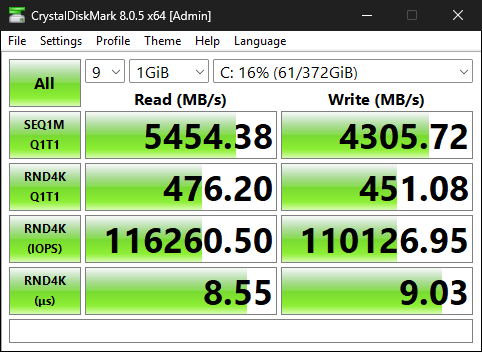
Very clock speed dependent for 4KQ1T1. Turn off Global C-States, IOMMU and ASPM for another bump in 4K. The closer it physically lives to the CPU the better.
This was done on a 9800X3D with an ECLK overclock.
2 Likes
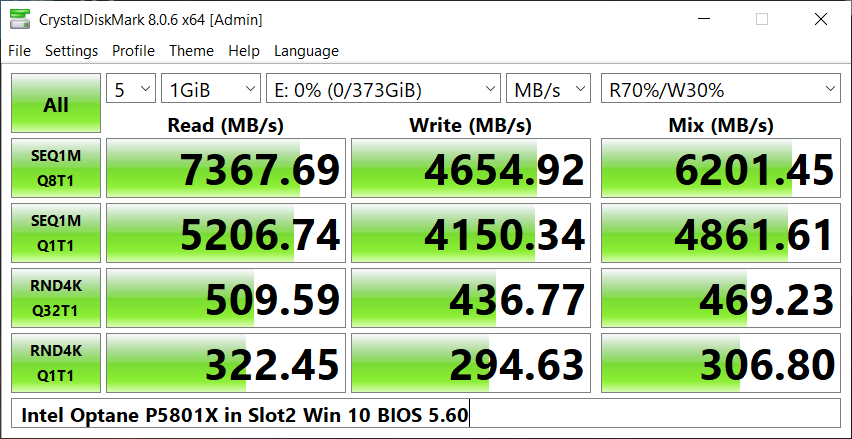
These are my CDM benchmarks. Indeed the 4KQ1T1 of my PC are quite a bit lower, but I am not sure that explains my not-so-fast (nearly) sequential speeds in “real world” file transfers (using a file manager or even cp in the terminal) in Linux.

1 Like
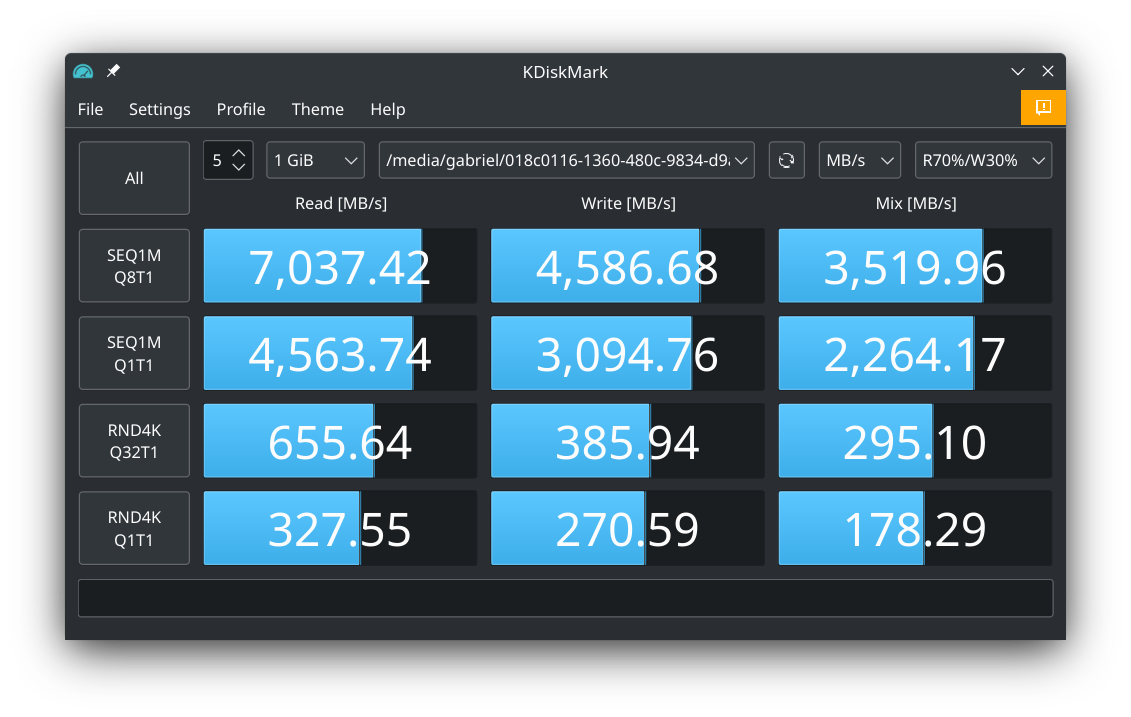
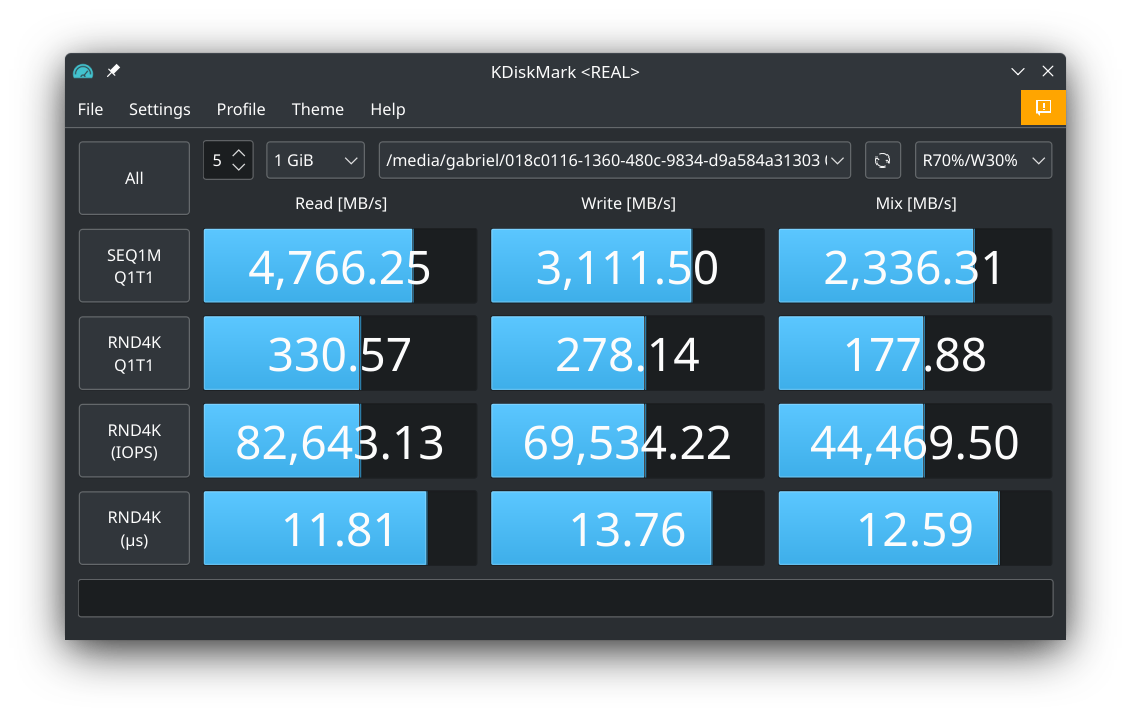
And here is KDiskMark on Pop OS 22.04. It does seem like the mixed R/W workloads fare quite a bit worse than CDM in Windows. What could explain this difference as well as my slow file copy speeds?
2 Likes
And here are the “real world” sequential copy tests.
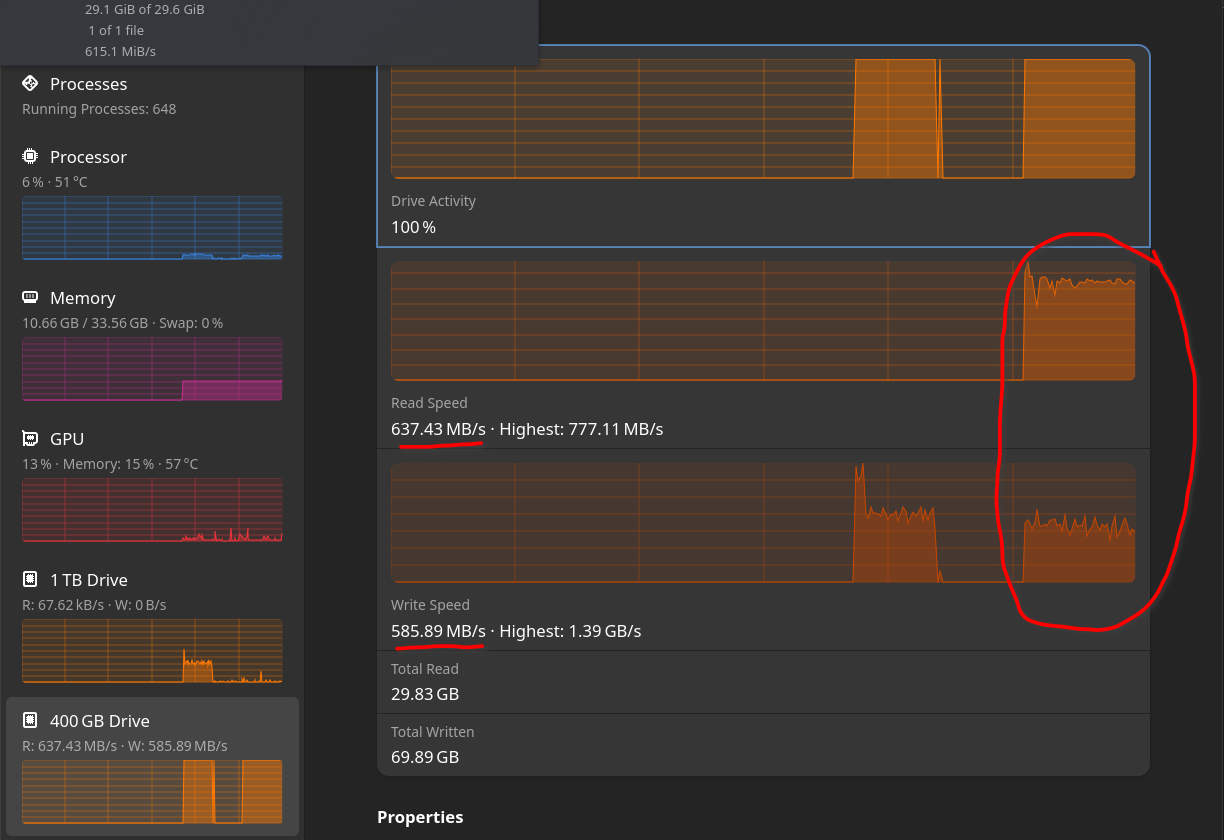
Firstly a copy of a 30GB ZIP file from the P5801X to itself using Dolphin with around 600 MB/s throughput:
Then a copy of the same 30GB ZIP file from the P5801X to itself using cp in the terminal with around 650 MB/s throughput:
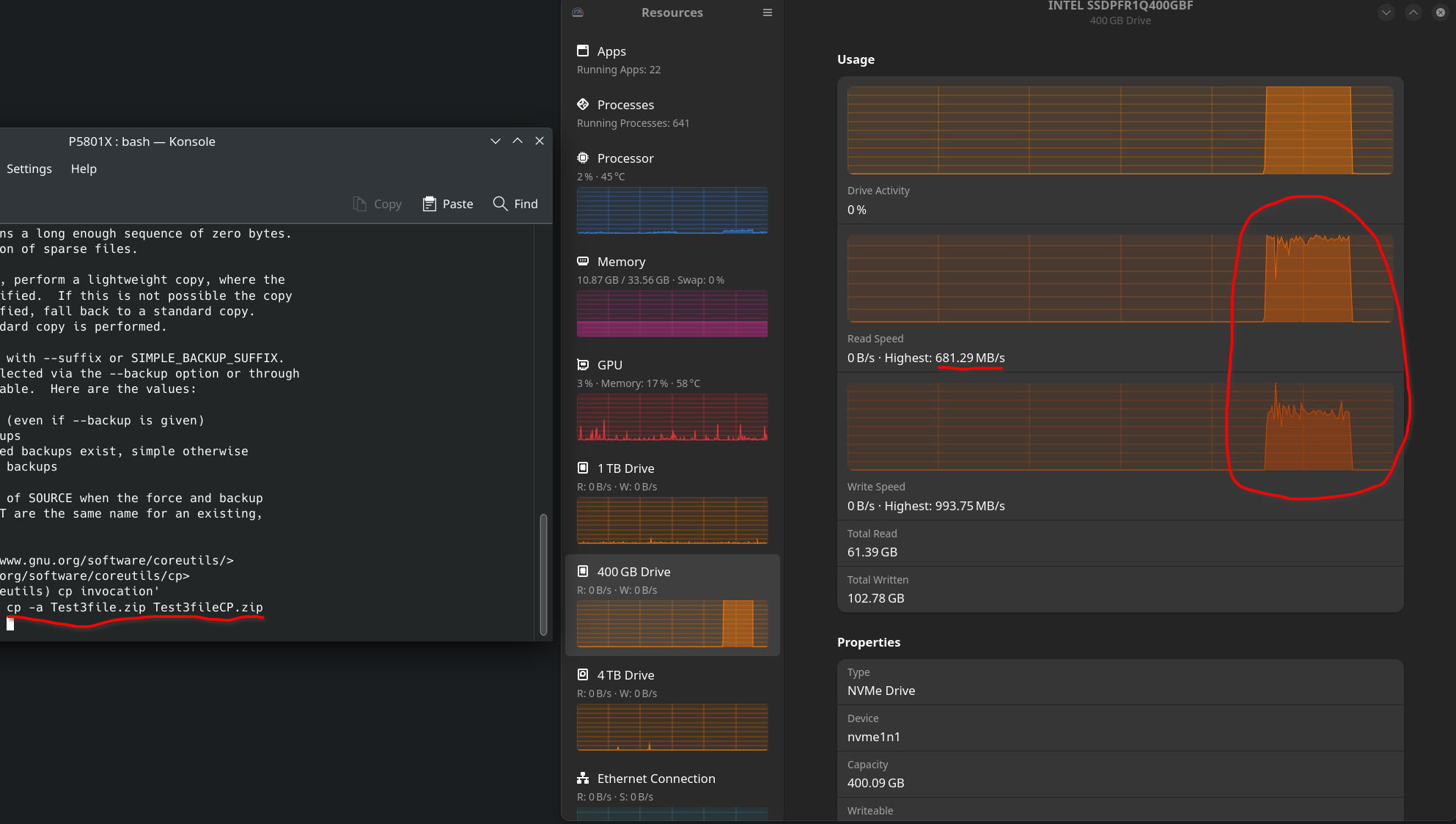
Can anybody else reproduce this? Or is it just my system having this issue?
1 Like
Finally, here is the performance in Windows 10 (formatted in NTFS), with a copy of a 12GB ZIP file from the P5801X to itself using Windows Explorer with around 2.5 GB/s throughput:
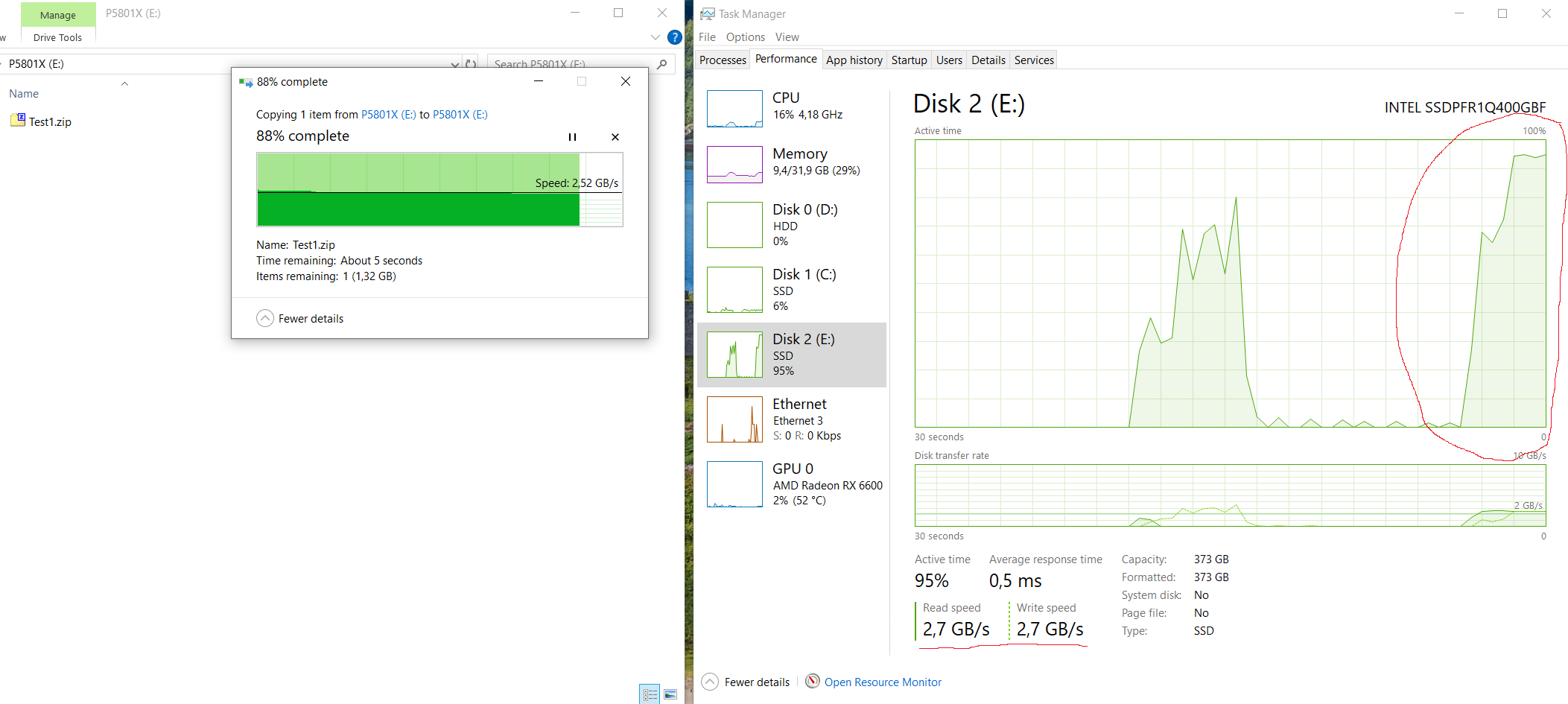
It is quite perplexing to see such a difference between the OSes!
1 Like
Huh… I would think read and write bandwidth are independent, giving 4.8 GB/s copy (from itself to itself).
1 Like
For the life of me I cannot get my drive to show up in Windows or BIOS. I fear that I broke it because one of the adapters I have uses SATA power and the the system won’t turn on if that is connected.
theres several things to consider:
- is it the correct way around? (the u.2 slot is not one way slotted so you have to be really careful which way you insert it into the adapter)
- which version is it?
there is the final one, and an engineering sample (you probably shouldn’t use the engineering sample)
SSDPFR1Q400GBF1< final versionSSDPFR1Q400GBEF< engineering sample
- is it correctly seated? (both in the adapter and the adapter in the motherboard slot)
- what adapter are you using? it might just be a bad adapter, please post a picture, and try buying one of the known working ones