If I were setting up a small office, with say 10 desktops, 5 laptops on wifi, a couple printers maybe a few wired to network and one or two wireless, and one FreeNas system, how would I set it up so that everything can communicate through the workgroup? or what would be the best way?
all laptops and wireless printers are on wifi
some printers into the switch, freenas machine into switch, desktops into a 16 or 24 port switch.
internet → router → switch
or internet ->switch ->router?
or if there is an easier way I do not know about, just general inquiry
Are you asking how you would get all of the devices to talk to each other? You can't really use a Windows Workgroup for that. You need to use something like AD, and then that's dependent on weather or not your completely on Windows. Could you tell me more of what you're trying to do?
I'm not sure what's exactly being asked here. Seems like a lot of networking basics need to be covered before good advice can be given...
But if you're asking how to physically connect, I say: modem>---router>---switch. And the reason I say that is I assume you are going to be using DHCP / NAT on the router to assign internal IP addresses (internal to your LAN, that is). However, DHCP / NAT functionality can INSTEAD be configured on a FreeNAS box if that's what you want to do with minor modification (software settings - wise) on the router. But since I don't know the intent of you having a FreeNAS box, I don't really know which way to advise. The key thing to remember is that only one DHCP server can exist per "network" and you must have NAT (network address translation) set up in order for DHCP to correctly work on your internal LAN (which is all pretty much default on most commercial routers).
Personally, I'd forget the power hungry FreeNAS PC unless the NAS were a much more power efficient "appliance" (like a Drobo or RazPi or something). NAS for file serving is nice but just about any Windows PC can also do the exact same file serving functions for a handful of users (like 2 to 10). So if you have to leave a PC running why make your power bill go up? (As my dad used to sarcastically ask me, "do you have stock in the power company, or what?!")
Basically what I'm trying to do is to have this network where anyone can print to anything and can read from the file server, and I was confused on if the router would need to go before or after the switch..
because I want everything to be able to talk to everything..
for example the wired desktops to be able to print to the wireless printers (and i know the desktops to the wired printers will be easy setup)
and the wireless laptops print to the wired printers, even though it is connected to router, which is connected to switch with the printer.
what is AD? I am super basic in networking
so the router would set all internal IP's, even through into what is connected to the switch? I was confused with this whole thing because I though the switch would be a router's IP and then set its own internal IPs for whats in that and then it would be a mess.
I was looking at building a cheap(ish) or finding an older desktop and installing FreeNAS just for file system to share with all of the networked computers. Is there a better sharing option than that? even though that is not related to this thread completely
Ok...so you're suuppper basic. We can work with that.
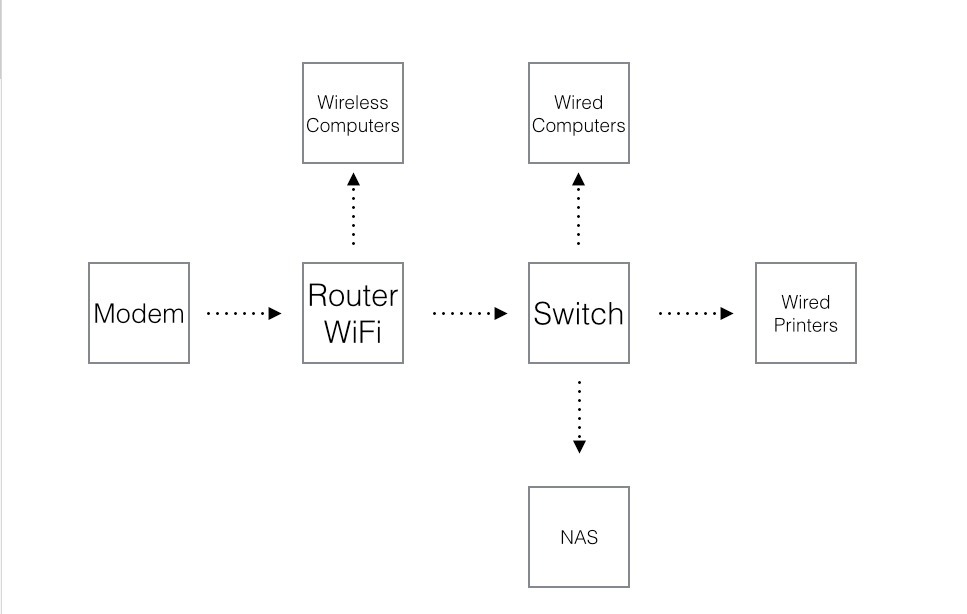
You're correct with the statement that the wired printers and wired computers will talk no problem, the thing with the laptops is your going to need a wireless AP (access point), most standard WiFi routers have this feature. You need to setup the network so it resembles this crudely drawn diagram:
Routers give out the IPs, the switch just acts like a traffic cop. Basic protocols will allow the wireless and wired machines to talk to each other and the printers, I believe that this also applies to Free NAS as well.
As for routers and switches, one thing: DO NOT GO CHEAP!
While it may seem unnecessary, getting the high or prosumer level equipment is worth every cent, it makes things a lot easier to manage, and normally will function for a longer amount of time, without down time.
These are my RECOMMENDATIONS, the area you need to cover with WiFi may be different than what I'm picturing. I tend to always go for the WRT 1900 AC, just don't use the smart WiFi account stuff. If you need something beefier, there's This D-Link beast.
You only need one connection from the router to the switch. If you have spare ports, use them for something mission critical.
Are these wireless printers reliable? I ask becuase i absolutly hate wireless printers, always flaky, I end up just hard wireing them in.
--
You only need 1. You could plug in all 4 and configure it to make it work but theres no need as youll never be able to use more than 1gbit of bandidth from any one device anyway unless your NAS for example has multiple network ports as well, but your NAS will never likely never be able to push gigabits of data either.
-- On the equipment side, what exactly is the budget? @ipat8 suggested some high end stuff which will all likely work quite well but if your budget is small there are a lot of good cheaper brands that will hold up very well too.
@Eden I suggested that equipment based on what is best for ease of use and compatibility. He said he was really new to networking, so I just put together what I recommend for my small business clients.
If he has the money I think they are solid choices, though ive no experiance with the linksys device, ive not used them in a long time. Just thought its worth to get a general idea of what kind of budget there is as it will have a bit impact in what to go for but doesnt necessarily mean worse/poorer quality equipment.
Have you seen the linus video of the unifi AP? If budget wasn't an issue, for say a larger office, what would be the best network implementation? Looking at setting up multiple of those AP's into a switch? and then what would be the router if you did not use one of the AIO set ups like the linksys wrt.
So modem would go to an 8 port UniFi router, which would connect to a 24 port switch, managed by that UniFi router, and the wireless access points would either plug into the switch or into the router (shouldnt matter right?), and then do you need a dedicated running the UniFi software or does the 8 port router handle it and you can just change settings through the software or browser? I know on a standard router AIO you dont run dedicated software, but the way linus showed off the AP's in his video, it seemed like he needed to run the software for the AP's to work, but in my situation I would use the router and he did not have that.