Part III - Netbox backup & restore
Backup
The data you are going to be putting into this application is very sensitive so you better make sure you have good backups.
The below script backups up the Netbox installation directory, database and nginx configuration file to a NAS.
This script assumes the remote share on the NAS is already mounted.
Cretae the script with the following commands
sudo su
cd /root
nano netbox-backup
Now copy in the script text below. save and quit the file.
#!/bin/bash

# Backup netbox, compress and copy
# Backup postgressql, compress and copy
# Copy Nginx netbox configuration file
# Remove files from /tmp
# Remove backups older than 28 days

tar -chzf /tmp/"netbox.$(date +%F).tar.gz" -C / opt/netbox
pg_dump -h localhost -U netbox -Fc netbox > /tmp/"netbox.$(date +%F).dump"
pg_dump -h localhost -U netbox -Fc netbox > /tmp/netbox.restore.dump
rsync /tmp/"netbox.$(date +%F).tar.gz" /mnt/FreeNAS/Backups/netbox-primary/
rsync /tmp/"netbox.$(date +%F).dump" /mnt/FreeNAS/Backups/netbox-primary/
rsync /etc/nginx/sites-available/netbox /mnt/FreeNAS/Backups/netbox-primary
rm /tmp/"netbox.$(date +%F).tar.gz"
rm /tmp/"netbox.$(date +%F).dump"
find /mnt/FreeNAS/Backups/netbox-primary/* -mtime +28 -exec rm {} \;
Make the script executable.
chmod +x netbox-backup
Be sure to create your /root/.pgpass file to allow the script to make the database backup.
The form of .pgpass is as follows
localhost:5432:netbox:netbox:DATABASEPASSWORD
The permissions on .pgpass are 0600 for the root account. The backup will not work if they are anything different.
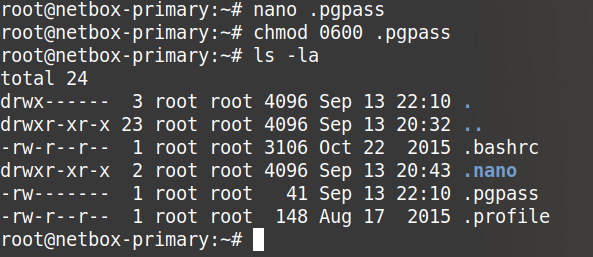
The script is run under the root account via cron at 03:00 and will remove any backups older than 28 days.
Restore
Generally if my production server went bang (and I had no Veeam or Rubrik VM level backups) I would spin up a new VM, run through the Netbox install process until I had a blank working system and then restore the database.
To restore the database backup to the same or a different server the commands are as follows.
sudo -u postgres psql
postgres=# DROP DATABASE netbox;
postgres=# CREATE DATABASE netbox;
postgres=# \q
pg_restore -C -d postgres /mnt/FreeNAS/Backups/netbox-primary/netbox-primary.2018-09-13.dump
Their are different commands you can use to accomplish this task but these seemed to work best for me.
Adjust the date in the path as needed.
##update
You should also be able to restore the database with this command
pg_restore -c /tmp/netbox.restore.dump -U netbox -d netbox -h localhost