Need help with low IO performance in PVE

Hi!

I’m really not sure if this is right category or forum to ask this, but I guess there are much smarter people here than me :slight_smile:

My setup is:
Chinese mini-pc (Intel N100 + 16 GB RAM + 512 SATA SSD)
In the M.2 WIfi slot I’ve placed a Chinese ASM1064 4xSATA adapter

In PVE I’ve got:

  • LXCs (jellyfin, qbittorrent, adguard, zigbee2mqtt, NPM, MQTT, docker)
  • a VM with Truenas (PCIe passthrough that ASM1064)
    • 2x HDD ( WDC_WD60EFRX + WDC_WD80EFZX) connected to the ASM1064) in a ZFS mirror (one dataset)

Now - I know that the drives have mismatched sizes, but I guess the only downside of that is that I losse 2 TB of space from the second disk? If that is true then I don’t really care.

Said dataset is mounted to the PVE using SMB. I had one CT placed on that dataset, and I’ve decided to move it to the internal SSD SATA storage of PVE (local-lvm).

  Logical volume "vm-111-disk-0" created.
  Logical volume pve/vm-111-disk-0 changed.
Creating filesystem with 15728640 4k blocks and 3932160 inodes
Filesystem UUID: 9c4ace98-e20f-4df3-899b-99e09e8ae693
Superblock backups stored on blocks: 
	32768, 98304, 163840, 229376, 294912, 819200, 884736, 1605632, 2654208, 
	4096000, 7962624, 11239424

Number of files: 871,251 (reg: 728,447, dir: 120,376, link: 21,862, dev: 527, special: 39)
Number of created files: 871,249 (reg: 728,447, dir: 120,374, link: 21,862, dev: 527, special: 39)
Number of deleted files: 0
Number of regular files transferred: 725,017
Total file size: 37,672,129,697 bytes
Total transferred file size: 37,164,087,046 bytes
Literal data: 37,164,087,046 bytes
Matched data: 0 bytes
File list size: 29,815,824
File list generation time: 0.154 seconds
File list transfer time: 0.000 seconds
Total bytes sent: 37,229,456,782
Total bytes received: 15,015,107

sent 37,229,456,782 bytes  received 15,015,107 bytes  14,366,237.95 bytes/sec
total size is 37,672,129,697  speedup is 1.01
TASK OK

And well. Is that all right? It took 44 minutes to move a 60GB volume (that actually filled only of 35GB)

The drives were mostly chilling during that time:
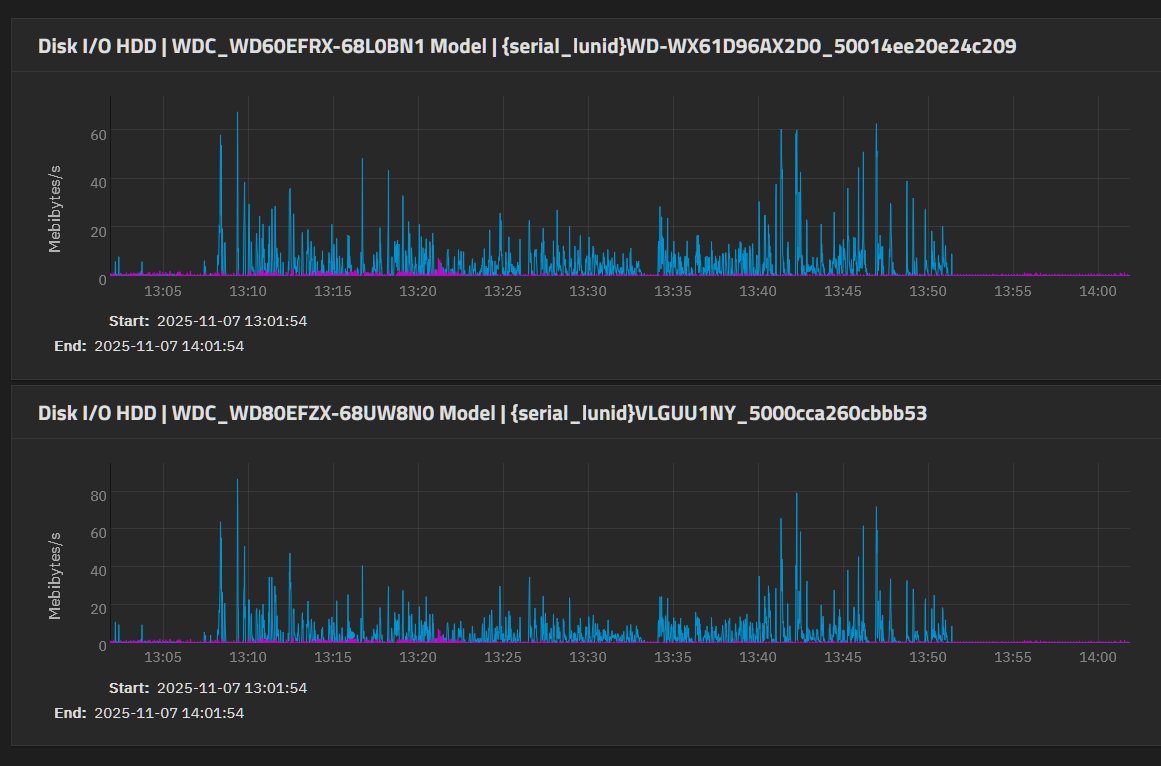
What could cause this? How can I find where is the bottleneck? Any ideas?

If you’d need more info about the PVE setup or sth - just ask, I’m happy to provide whatever is needed

EDIT:
From netdata:
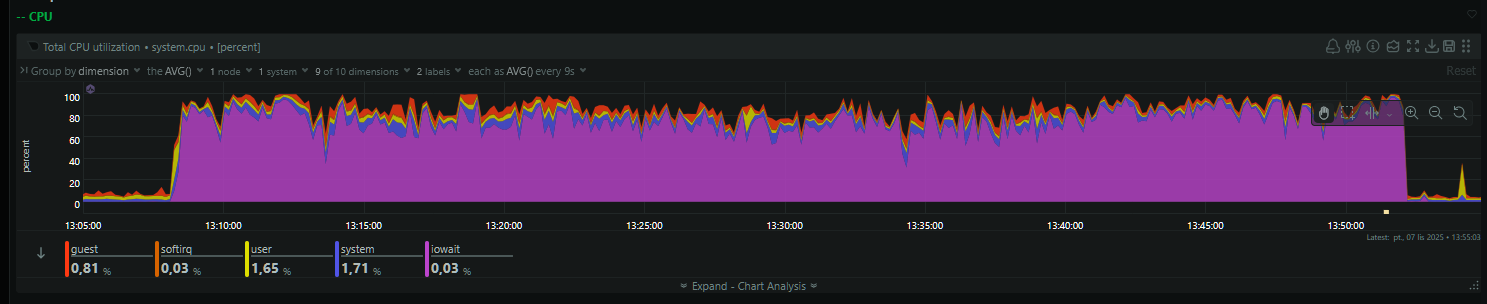


So I’ve guess it could be lack of more RAM?

Iperf3 test (PVE is server, Truenas is client):

root@nas[/home/truenas_admin]# iperf3 -c 192.168.1.6
Connecting to host 192.168.1.6, port 5201
[  5] local 192.168.1.249 port 37170 connected to 192.168.1.6 port 5201
[ ID] Interval           Transfer     Bitrate         Retr  Cwnd
[  5]   0.00-1.00   sec  2.61 GBytes  22.4 Gbits/sec    0   3.58 MBytes
[  5]   1.00-2.00   sec  2.71 GBytes  23.4 Gbits/sec    0   3.95 MBytes
[  5]   2.00-3.00   sec  2.77 GBytes  23.8 Gbits/sec    0   3.95 MBytes
[  5]   3.00-4.00   sec  2.86 GBytes  24.5 Gbits/sec    0   3.95 MBytes
[  5]   4.00-5.00   sec  2.52 GBytes  21.6 Gbits/sec    0   3.95 MBytes
[  5]   5.00-6.00   sec  2.30 GBytes  19.7 Gbits/sec    0   3.95 MBytes
[  5]   6.00-7.00   sec  2.57 GBytes  22.1 Gbits/sec    0   3.95 MBytes
[  5]   7.00-8.00   sec  2.80 GBytes  24.1 Gbits/sec    0   3.95 MBytes
[  5]   8.00-9.00   sec  2.79 GBytes  23.9 Gbits/sec    0   3.95 MBytes
[  5]   9.00-10.00  sec  2.75 GBytes  23.6 Gbits/sec    0   3.95 MBytes
- - - - - - - - - - - - - - - - - - - - - - - - -
[ ID] Interval           Transfer     Bitrate         Retr
[  5]   0.00-10.00  sec  26.7 GBytes  22.9 Gbits/sec    0             sender
[  5]   0.00-10.00  sec  26.7 GBytes  22.9 Gbits/sec                  receiver

iperf Done.
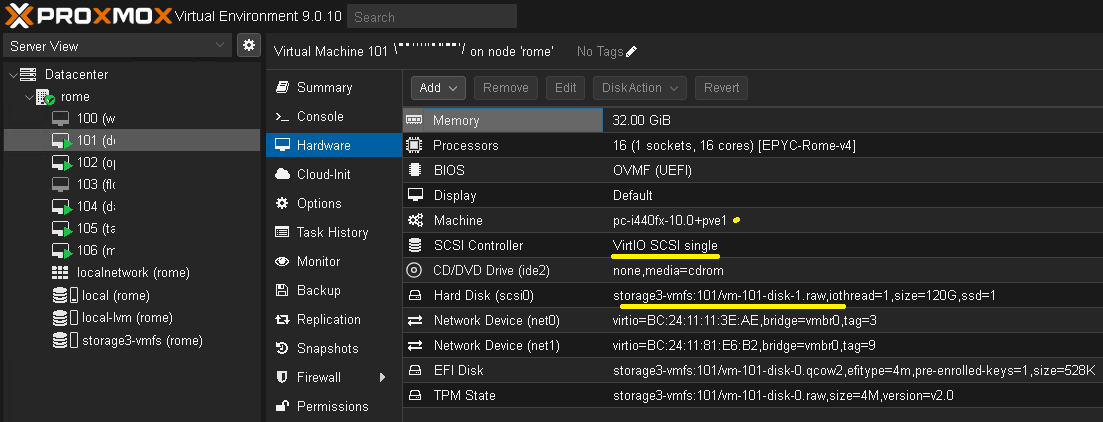
IDK what PVE or CT are, but if I’m understanding right, you attempted to migrate the contents of one LUN (conceptually, a virtual hard drive) to a different LUN. In that source LUN were many small files (~700,000 of them) I understand you were writing to SSD, but it’s unclear where you were copying from (HDD or SSD).

You only got about 10MB/s of copy performance, which is terrible. Even if you were reading from HDDs and only reading small files it should be much, much faster than 10MB/s. Do you have a bunch of ZFS snapshots?

1 Like

PVE - Proxmox Virtual Environment
CT - Container (LXC)
I was copying form Truenas dataset (2xHDD put in ZFS mirror) into SATA SSD.
No, the dataset does not have any snapshots.

With help of Grok after shutting down TrueNAS and pretty much every LXC:

root@FireBat:~# ionice -c1 -n0 nice -n-19 \
fio --name=ssd-isolated \
    --filename=ssd_isolated.tmp \
    --size=4G \
    --time_based \
    --runtime=30 \
    --ramp_time=5 \
    --ioengine=libaio \
    --direct=1 \
    --rw=randrw \
    --bs=1M \
    --rwmixread=70 \
    --iodepth=32 \
    --numjobs=1 \
    --cpus_allowed=0 \
    --group_reporting
ssd-isolated: (g=0): rw=randrw, bs=(R) 1024KiB-1024KiB, (W) 1024KiB-1024KiB, (T) 1024KiB-1024KiB, ioengine=libaio, iodepth=32
fio-3.39
Starting 1 process
ssd-isolated: Laying out IO file (1 file / 4096MiB)
Jobs: 1 (f=1): [m(1)][73.1%][eta 00m:14s]
ssd-isolated: (groupid=0, jobs=1): err= 0: pid=833798: Fri Nov  7 16:01:07 2025
  read: IOPS=60, BW=61.4MiB/s (64.4MB/s)(1985MiB/32343msec)
    slat (usec): min=47, max=616150, avg=10882.53, stdev=36212.02
    clat (msec): min=41, max=3766, avg=305.06, stdev=480.57
     lat (msec): min=42, max=3776, avg=315.96, stdev=493.85
    clat percentiles (msec):
     |  1.00th=[   54],  5.00th=[   56], 10.00th=[   58], 20.00th=[   67],
     | 30.00th=[   73], 40.00th=[   81], 50.00th=[  113], 60.00th=[  247],
     | 70.00th=[  317], 80.00th=[  414], 90.00th=[  609], 95.00th=[  902],
     | 99.00th=[ 2937], 99.50th=[ 3406], 99.90th=[ 3440], 99.95th=[ 3775],
     | 99.99th=[ 3775]
   bw (  KiB/s): min= 2048, max=309248, per=100.00%, avg=72132.34, stdev=80375.46, samples=56
   iops        : min=    2, max=  302, avg=70.39, stdev=78.43, samples=56
  write: IOPS=27, BW=27.6MiB/s (29.0MB/s)(893MiB/32343msec); 0 zone resets
    slat (usec): min=85, max=655404, avg=10544.63, stdev=35131.01
    clat (msec): min=53, max=6200, avg=473.54, stdev=682.38
     lat (msec): min=55, max=6235, avg=484.04, stdev=690.51
    clat percentiles (msec):
     |  1.00th=[   56],  5.00th=[   64], 10.00th=[   72], 20.00th=[   83],
     | 30.00th=[  103], 40.00th=[  142], 50.00th=[  292], 60.00th=[  409],
     | 70.00th=[  502], 80.00th=[  634], 90.00th=[  936], 95.00th=[ 1603],
     | 99.00th=[ 3708], 99.50th=[ 5067], 99.90th=[ 6208], 99.95th=[ 6208],
     | 99.99th=[ 6208]
   bw (  KiB/s): min= 2048, max=147456, per=100.00%, avg=32640.00, stdev=32917.14, samples=55
   iops        : min=    2, max=  144, avg=31.85, stdev=32.12, samples=55
  lat (msec)   : 50=0.25%, 100=43.01%, 250=13.77%, 500=25.16%, 750=8.85%
  lat (msec)   : 1000=4.85%, 2000=2.25%, >=2000=2.95%
  cpu          : usr=0.14%, sys=0.58%, ctx=5573, majf=0, minf=37
  IO depths    : 1=0.0%, 2=0.0%, 4=0.0%, 8=0.0%, 16=0.0%, 32=100.0%, >=64=0.0%
     submit    : 0=0.0%, 4=100.0%, 8=0.0%, 16=0.0%, 32=0.0%, 64=0.0%, >=64=0.0%
     complete  : 0=0.0%, 4=100.0%, 8=0.0%, 16=0.0%, 32=0.1%, 64=0.0%, >=64=0.0%
     issued rwts: total=1968,878,0,0 short=0,0,0,0 dropped=0,0,0,0
     latency   : target=0, window=0, percentile=100.00%, depth=32

Run status group 0 (all jobs):
   READ: bw=61.4MiB/s (64.4MB/s), 61.4MiB/s-61.4MiB/s (64.4MB/s-64.4MB/s), io=1985MiB (2081MB), run=32343-32343msec
  WRITE: bw=27.6MiB/s (29.0MB/s), 27.6MiB/s-27.6MiB/s (29.0MB/s-29.0MB/s), io=893MiB (936MB), run=32343-32343msec

Disk stats (read/write):
    dm-1: ios=2549/1204, sectors=5214232/2345600, merge=0/0, ticks=511708/561723, in_queue=1073431, util=99.75%, aggrios=5130/2358, aggsectors=5215376/2348128, aggrmerge=0/27, aggrticks=1238889/1082516, aggrin_queue=2321765, aggrutil=97.24%
  sda: ios=5130/2358, sectors=5215376/2348128, merge=0/27, ticks=1238889/1082516, in_queue=2321765, util=97.24%

I guess I need to buy a quality SSD, and not this Chinese crap:

root@FireBat:~# smartctl /dev/sda -a
smartctl 7.4 2024-10-15 r5620 [x86_64-linux-6.17.2-1-pve] (local build)
Copyright (C) 2002-23, Bruce Allen, Christian Franke, www.smartmontools.org

=== START OF INFORMATION SECTION ===
Device Model:     N900-512
Serial Number:    AA000000000000000610
Firmware Version: W0825A0
User Capacity:    512,110,190,592 bytes [512 GB]
Sector Size:      512 bytes logical/physical
Rotation Rate:    Solid State Device
Form Factor:      M.2
TRIM Command:     Available
Device is:        Not in smartctl database 7.3/5528
ATA Version is:   ACS-2 T13/2015-D revision 3
SATA Version is:  SATA 3.2, 6.0 Gb/s (current: 6.0 Gb/s)
Local Time is:    Fri Nov  7 16:02:28 2025 CET
SMART support is: Available - device has SMART capability.
SMART support is: Enabled

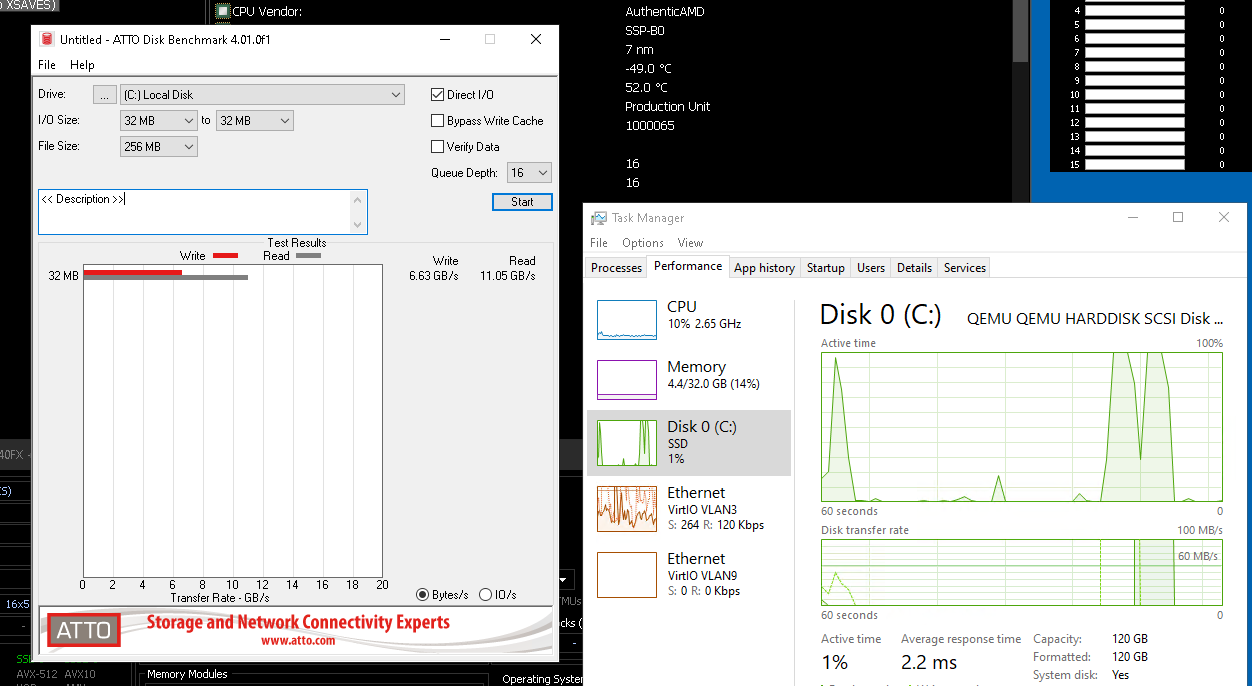
You can get pretty insane performance from inside a windows VM on proxmox 9 to a NFS storage target if you bypass the CPU with RDMA combined with the paravirtualized storage controller.

On windows (and the proxmos box) the CPU utilization is basically flat while IO spikes. I am using SATA SSD’s in a ZFS raid 10 setup for this btw.

1 Like

Janky setups will result in janky results :grin:

Benchmark the PVE.
Benchmark TrueNAS.
Benchmark with iperf3 between PVE and TrueNAS.
Benchmark you share while keeping an eye on single core CPU usage (which SMB is).

1 Like

Hi again! I’ve changed N900-512 to Corsair MP600 R2 (limited to the m.2 slot running at PCIe 3.0 x2).

restoring the same LXC (not exactly the same backup, since few days have passed):


recovering backed-up configuration from 'TrueNAS:backup/vzdump-lxc-111-2025_11_15-02_19_38.tar.zst'
  Logical volume "vm-111-disk-1" created.
  Logical volume pve/vm-111-disk-1 changed.
Creating filesystem with 15728640 4k blocks and 3932160 inodes
Filesystem UUID: 37182038-5dee-403a-8727-79a3c90df003
Superblock backups stored on blocks: 
	32768, 98304, 163840, 229376, 294912, 819200, 884736, 1605632, 2654208, 
	4096000, 7962624, 11239424
  Logical volume "vm-111-disk-0" successfully removed.
restoring 'TrueNAS:backup/vzdump-lxc-111-2025_11_15-02_19_38.tar.zst' now..
extracting archive '/mnt/pve/TrueNAS/dump/vzdump-lxc-111-2025_11_15-02_19_38.tar.zst'
Total bytes read: 32850298880 (31GiB, 79MiB/s)
merging backed-up and given configuration..
TASK OK

It took 7m 50s (previously it took 44 minutes). Total success.

For future reader: don’t use crappy Chinese SATA SSDs.

2 Likes